When it comes to running virtual machines in Kubernetes via KubeVirt, the first question engineers ask is: “What is the overhead?” Let’s dive into the details and break it down by three key areas: compute, storage, and network.
Compute Overhead. Spoiler: There Isn’t Any
To get why there’s almost no CPU overhead, we need to look at how the Linux kernel handles containers.
Basically, there are these things called namespaces that let you run processes with their own network, mount space, PIDs, and so on.
The key here is that every single process in Linux has to live in some namespace. The kernel doesn’t care if it’s the host namespace or an isolated one; it handles them exactly the same way.
As you know, a container is just a process wrapped in isolated kernel namespaces and cgroups (which handle resource limits). Those cgroups are not exclusive to containerization; they are also used in regular systemd. Classic libvirt relies on cgroups to manage resource limits for virtual machines as well.
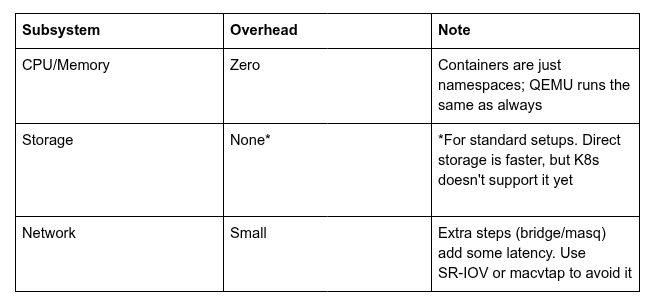
And what is a virtual machine from the system’s point of view? It is simply a QEMU process with extra privileges and access to /dev/kvm. Since a VM is just a process, why not just stick it in a container? That’s the whole idea behind KubeVirt. It makes no difference to the kernel whether QEMU runs in the host namespace or in a separate one managed by Kubernetes. There’s simply no performance hit on the CPU.
A couple of words about libvirt
There is a small overhead because KubeVirt starts up a separate libvirt daemon to handle VM settings. Honestly, it’s negligible.
The architectural choice here is pretty… hmm… unexpected: in most cases, a single libvirt instance runs per host, managing multiple VMs on that host. The problem is, if it freezes, you’ll lose control over everything on that server. KubeVirt takes a different approach by running a dedicated libvirtd daemon for each VM. The trade-off for this isolation is spending some extra resources on the daemon running alongside the VM process. But it’s not much; libvirtd mostly acts as a shim for basic stuff like starting and stopping VMs, making snapshots, hotplugging disks, or initiating live migrations.
Storage: It All Depends On How You Do It
QEMU provides several ways to plug virtual volumes into a VM.
Traditional options include:
- Creating a file (raw or qcow2) on a file system and handing it over to QEMU.
- Using an existing block device and assigning it to QEMU.
In both cases, the kernel acts as an intermediary — the file system or block device must exist on the host system.
Direct connection: QEMU can access storage independently and attach volumes right from the userspace, bypassing the kernel. It supports various drivers, including Ceph, iSCSI, NBD, and others. For instance, Vitastor works this way — QEMU establishes a direct connection.
The KubeVirt philosophy
KubeVirt’s main goal is to be as Kubernetes-native as possible. The team even has that “razor” rule: “If some feature is useful for both VMs and containers, it belongs in Kubernetes, not KubeVirt.” Sometimes, that philosophy slows down the development of VM-specific features.
When it comes to storage, KubeVirt leans heavily on native Kubernetes primitives — most notably, CSI drivers. K8s expects every volume to be either a Filesystem or a BlockDevice — both are supported and don’t add any overhead.
That said, you can’t connect QEMU directly to storage yet because Kubernetes just doesn’t have the right abstractions for it.
In the real world, big enterprise players usually go with shared stuff like NetApp NFS or block devices via iSCSI anyway. Interestingly, KubeVirt does support direct iSCSI.
Bottom line: Compared to standard setups, there’s no overhead. Sure, using QEMU’s direct drivers would be faster, but it’s less flexible. Generic solutions only support standard options, whereas vendor-specific implementations would require custom development and maintenance for each individual provider.
Networking: Here’s Where It Gets Tricky
Every container (or process, if we’re talking Linux kernel) can have its own networking stack and interfaces. To bridge the gap between the container’s network namespace and the host’s, we use veth interfaces — think of it as a virtual “patch cord”, where one end of the cable is in the host and the other is in the container. That’s the baseline for any container setup.
On the outside, a CNI plugin manages the logic: it might throw the interface into a Linux bridge (like Flannel) or hook an eBPF program to it (just like Cilium). For the system, a VM is just another container.
What’s going on under the hood?
95% of the time, the VM gets a TAP interface that looks like any other network interface to the host. The real question is how you’d link that TAP interface to the internal veth one.
Common ways to do it:
Bridge: The kernel spins up a Linux bridge and plugs in both the internal veth end and the VM’s TAP interface.
Masquerade: It uses an iptables rule to bounce traffic between interfaces.
Both methods add a bit of latency — every extra hop in the chain eats up CPU cycles to process the packets.
How to skip the overhead
While it is not a huge hit, you can still get around it using:
- macvtap-cni, which hooks directly into the host’s physical interface.
- SR-IOV — hardware-level virtualization.
Just like with storage, you can set up QEMU to communicate directly with an SDN in userspace and skip the kernel entirely. KubeVirt doesn’t fully support this yet because it’s tied to the CNI spec.
Some CNI drivers (like Kube-OVN) have their own parallel APIs to offload networking from the kernel. Also, KubeVirt features a really powerful plugin interface if you need to build your own custom way to hook up the network.
Final Thoughts
KubeVirt is a good compromise between performance and flexibility. If you need every bit of performance and don’t mind managing complex setups, you can push it further. But if you want something standard, vendor-neutral, and easy to support, KubeVirt does the job perfectly.
P.S. This article is based on a discussion in the professional community. I would like to express my gratitude to the participants for their valuable insights.
Join the community
- Telegram group
- Slack group (Get invite at https://slack.kubernetes.io)
By Andrei Kvapil on January 20, 2026.
Exported from Medium on October 5, 2026.