I have spent many years dreaming about building my own cloud platform. After several attempts within different companies, I finally launched my own project, Cozystack. In this article, I am going to share our experience and our approach to building a modern infrastructure platform around Kubernetes and its API. I’ll dive into the “platform approach” — what platform is, how it works, who it’s for, and how to get one off the ground. Plus, I’ll compare different architectures, explain why we went with K8s, and show you how we put together a production-grade solution based on it.
After reading this series, you will be able to build your own robust and modern solution — whether you adopt my patterns, use them as a reference, or reject them altogether. Regardless, it will be easier than building a platform from scratch; and it is always insightful to look into the inner workings of other projects and understand their underlying logic. Cozystack is always growing and changing, so what I’m describing here is where we stand as of Fall 2025. We’ve already moved away from some of our early architectural choices (we’re actually overhauling the platform’s “engine” right now; I’ll give an update on that once 1.0 is out).
Before we start, I’d like to say a huge thank you to Nick Volynkin. He put a lot of effort into expanding my original presentation into this comprehensive article, effectively becoming a co-author.
What is Cozystack
Cozystack is a comprehensive open-source platform for building bare-metal clouds to quickly deploy managed Kubernetes, database-as-a-service (DBaaS), application-as-a-service (AaaS), and virtual machines based on KubeVirt. With it, you can deploy Kafka, FerretDB, PostgreSQL, Cilium, Grafana, Victoria Metrics, and other services with a single click. It also handles GPU workloads in both virtual machines and K8s clusters. Cozystack is a CNCF Sandbox project, distributed under the Apache 2.0 license.
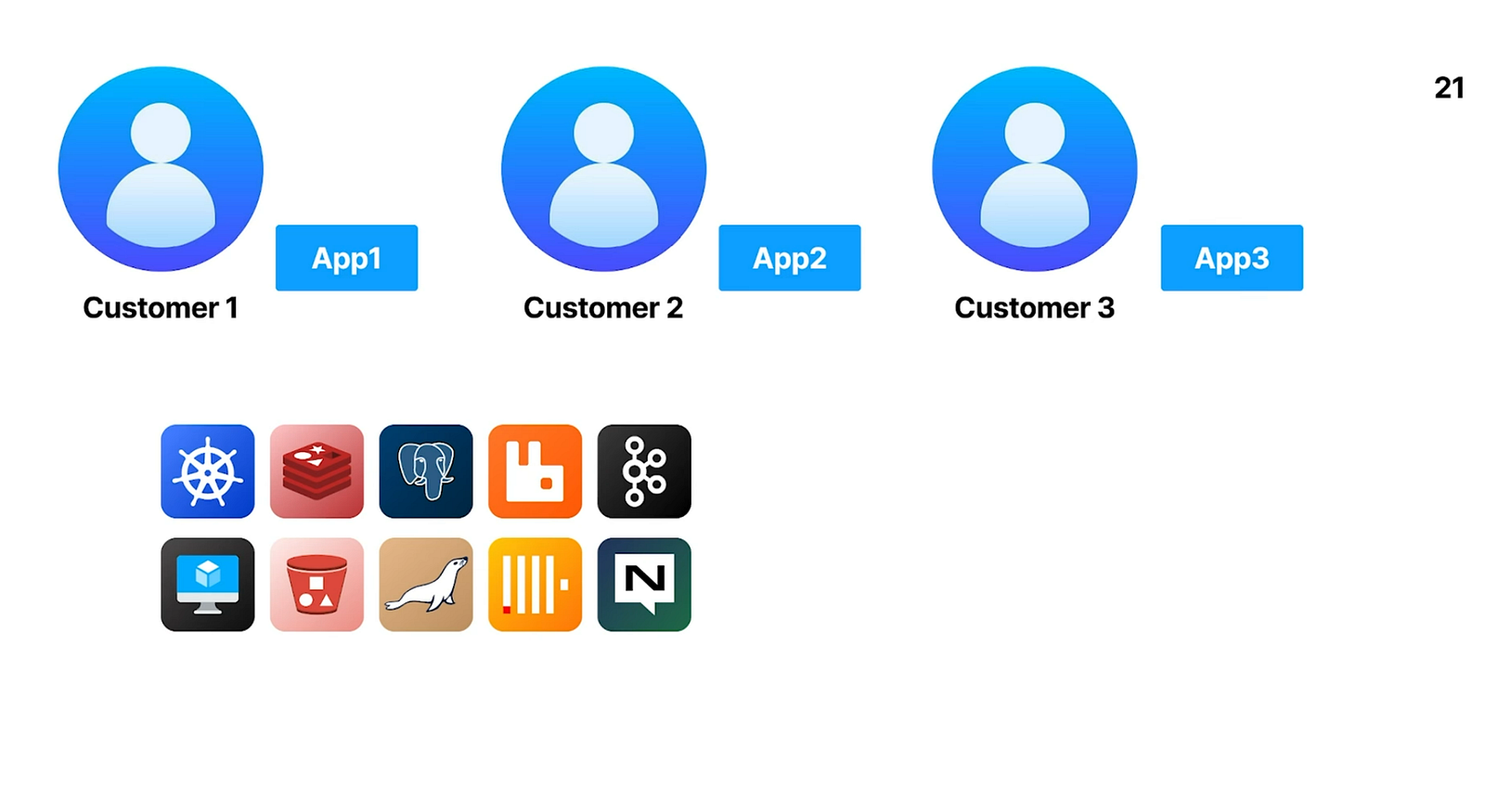
Customers and Managed Applications
Imagine you provide services to multiple clients, each needing to run their own application suites. Those applications rely on a variety of dependencies — databases, queues, caches — which your customers expect to be delivered as managed services. This results in quite a long list of components to support: PostgreSQL, Kafka, Redis, ClickHouse, S3-compatible buckets, and more. On top of that, your customers require managed Kubernetes clusters and Virtual Machines (VMs) to deploy their own applications.
Driven by these needs, you set out to build a comprehensive turnkey solution, delivering a pre-integrated suite of managed services as a boxed platform.
The Technology Stack Challenge
Before you can commence building platform services, you must first establish the underlying infrastructure. There are fundamentals to take care of, such as storage, server provisioning, networking, virtualization, and monitoring. Because these services are stateful, you must implement robust automated provisioning and failover mechanisms. In practice, you start by building the infrastructure stack, then the platform stack, and only then can you address the application stack your customers need.
The result is a complex “tower” of technologies:
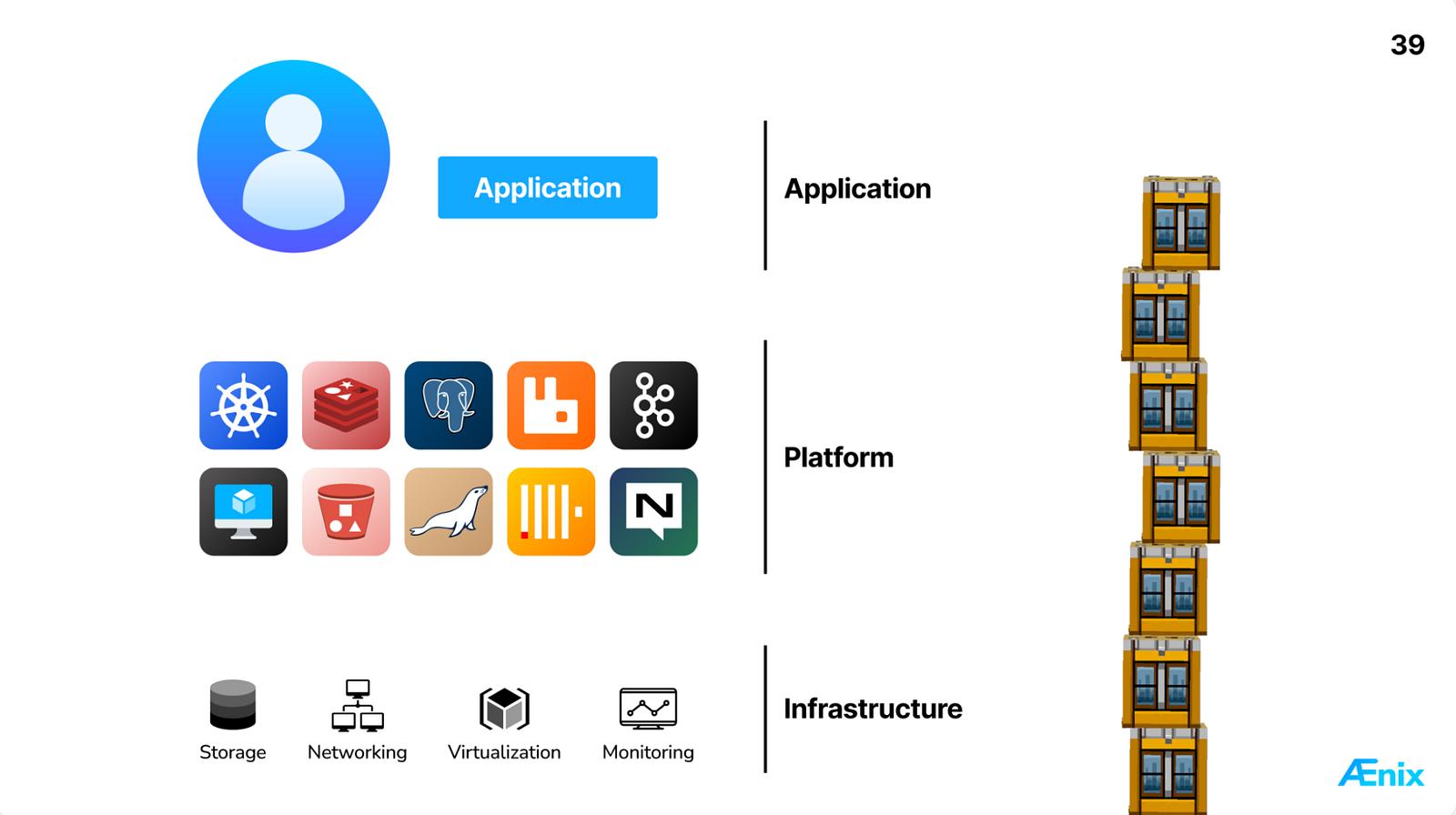
What’s more, building and running your own infrastructure and platform demands deep expertise across a large array of technologies. You are responsible for supporting every component you ship, even as each layer introduces its own bugs, complexity, and unexpected updates. That means you’ll need a significant effort to support your solution; otherwise, this tower will crumble and fall.
How can you avoid this? You can offload specific layers of the stack using the “as-a-service” model. The chart below shows various options for sharing responsibility across the platform stack.
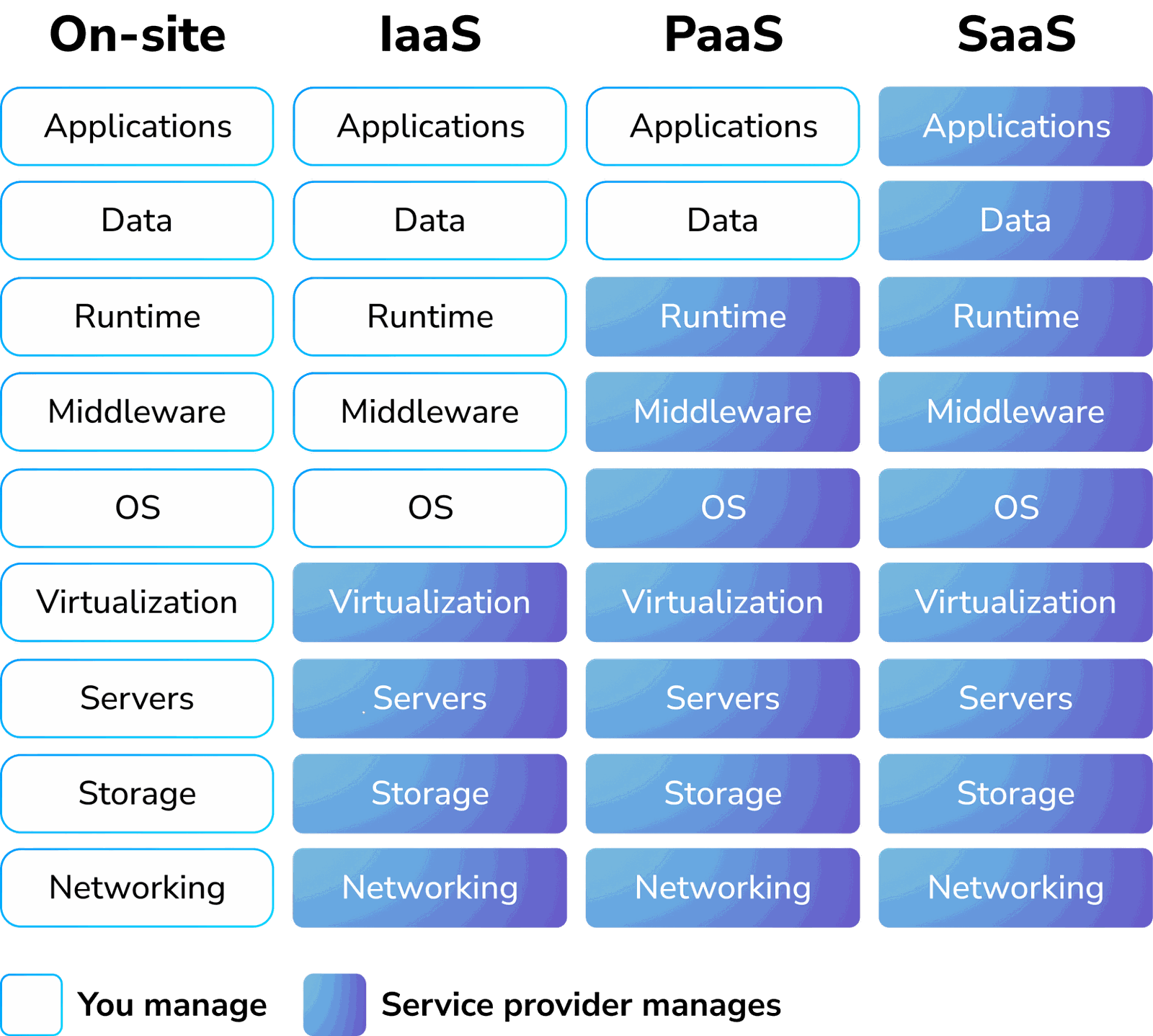
- On-site: The most demanding approach, where you bear responsibility for the entire stack — from infrastructure to services. This is our starting point.
- Infrastructure as a service (IaaS): The provider manages networking, storage, servers, and virtualization. You operate the virtual machines, but still have to handle OS management and infrastructure services.
- Platform as a service (PaaS): Infrastructure management is abstracted away, allowing you to focus exclusively on applications and their data.
- Software as a service (SaaS): No need to manage the applications; you get a finished product (e. g., Google Drive or Slack). This is often the end goal for your customers.
Most customers seek the third option: a platform that allows them to deploy their applications while you, the provider, nail the underlying complexity and support.
Platform Stack Options
Now you have to take care of the infrastructure and platform stack. Let’s explore the available options for building a platform and the trade-offs they entail.
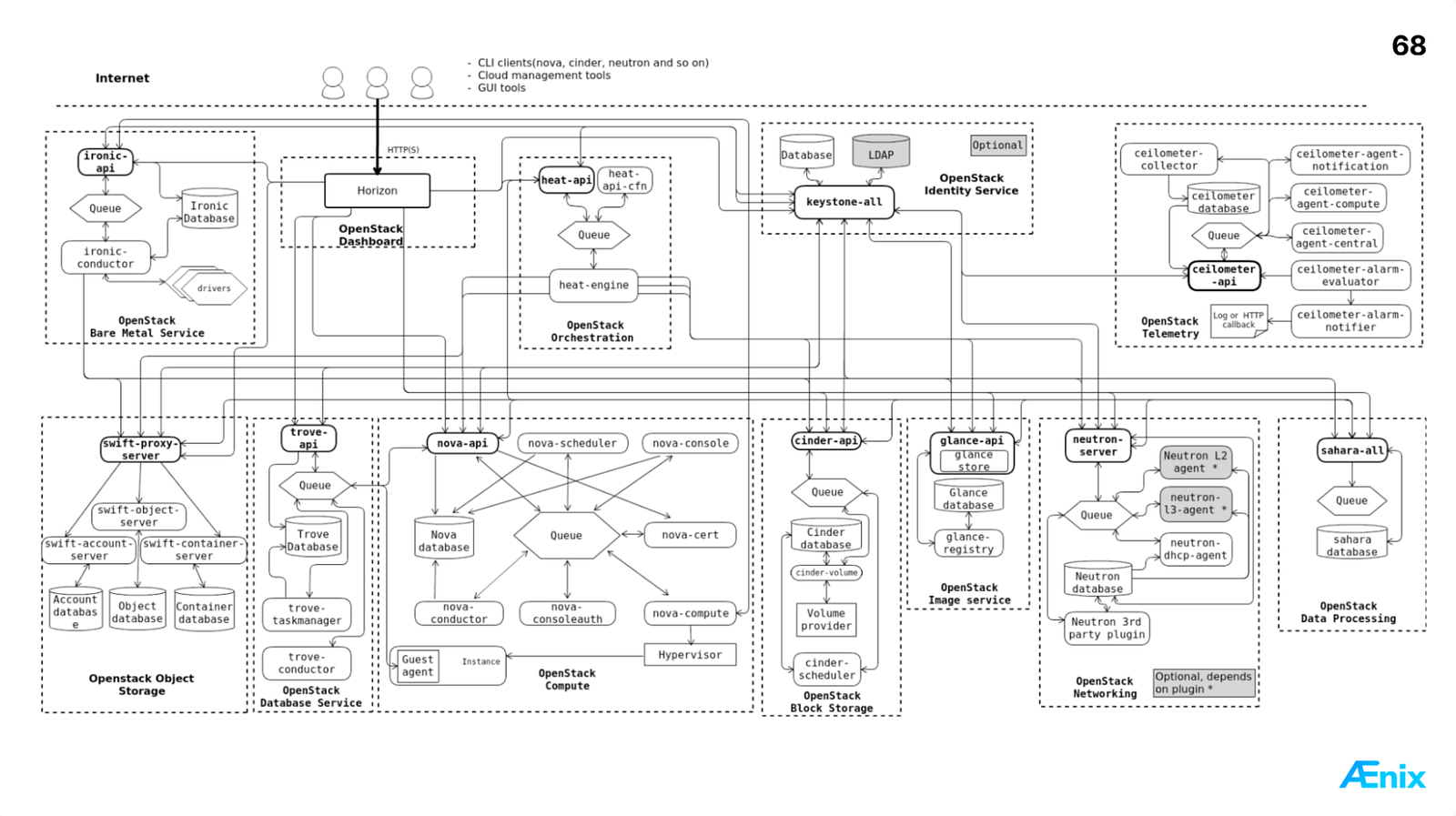
OpenStack is often the first candidate to consider. However, when you try to adopt it, you’ll find that it’s not easy to support at all due to complex architecture and a ton of asynchronous APIs. You’ll need a dedicated development team to maintain OpenStack and all of its components:
Docker is another popular alternative. It offers a vast library of containerized images that are easy to deploy with a simple docker run <image>. While this works for standalone instances, Docker lacks the tools required for high availability and multi-node applications — the very features customers expect from a managed platform.
Cloud Foundry was very popular before the rise of Kubernetes. Today, however, I don’t see many companies using it, which means that there aren’t many engineers who have expertise with it — or those willing to gain such expertise, making it a risky choice due to a shrinking talent pool.
Finally, there’s Kubernetes, which offers a wide variety of features for most platform tasks. Kubernetes has become the de-facto standard for running server workloads. It implements modern patterns like the reconciliation loop. Through projects like KubeVirt, even virtual machines can leverage Kubernetes-style lifecycle management, including live migration on node failures. Furthermore, its clean RESTful API makes it an ideal basis for building custom platform services.
As a cherry on top, Kubernetes features many ready-to-use operators. An operator is a controller running in Kubernetes that manages the lifecycle of an application. Operators perform the imperative work required for each task — deploying, upgrading, replicating, restoring from backup, and more. They do this in the best possible way as they accumulate the experience of developers of each particular software. Users no longer need to deal with low-level operational burden; instead, they interact with a high-level declarative API. Users define the desired state of the application, and the operator works to reconcile the actual state to match it.

Here are some of the operators we use at Cozystack. Each of them is at least level-3 operator:
- https://github.com/kubevirt/kubevirt
- https://github.com/cloudnative-pg/cloudnative-pg
- https://github.com/spotahome/redis-operator
- https://github.com/mariadb-operator/mariadb-operator
- https://github.com/Altinity/clickhouse-operator
- https://github.com/rabbitmq/cluster-operator
Kubernetes can be extended via Custom Resource Definitions (CRDs), enabling operators to manage the complete application lifecycle. In the list above, KubeVirt — the operator for virtual machines — is a prime example of such extensibility in action.
To sum up, Kubernetes stands out as the top choice for a platform stack, and we chose it as the foundation for building Cozystack.
Challenges and Solutions for Managing Kubernetes Operators
The next step is to enable customer self‑service, allowing users to provision infrastructure without the platform’s administrator intervention. To do that, they need some uniform API to work with.
This is where we hit a classic Kubernetes paradox: while K8s has excellent capabilities, it’s also very diverse in technologies. Every vendor builds their operator differently, resulting in a chaotic landscape of inconsistent APIs.
Take a look at the specifications for Kafka, Postgres, MariaDB, and ClickHouse services below. While each operator does its job well, their API schemas share no common structure:
Kafka
apiVersion: kafka.strimzi.io/v1beta2
kind: Kafka
metadata:
  name: kafka-example
spec:
  kafka:
    version: 3.9.0
    replicas: 3
    config:
      offsets.topic.replication.factor: 3
      transaction.state.log.replication.factor: 3
      transaction.state.log.min.isr: 2
      default.replication.factor: 3
      min.insync.replicas: 2
      inter.broker.protocol.version: "3.9"
  zookeeper: { }
  entityOperator: { }
Cloud-Native PostgreSQL
apiVersion: postgresql.cnpg.io/v1
kind: Cluster
metadata:
  name: postgres-example
spec:
  instances: 3
  postgresql:
    parameters:
      max_worker_processes: "60"
    pg_hba:
      - host all all all md5
  primaryUpdateStrategy: unsupervised
  storage:
    size: 1Gi
MariaDB
apiVersion: k8s.mariadb.com/v1alpha1
kind: Database
metadata:
  name: mariadb-example
spec:
  mariaDbRef:
    name: mariadb
  characterSet: utf8
  collate: utf8_general_ci
  cleanupPolicy: Delete
  requeueInterval: 30s
  retryInterval: 5s
ClickHouse
apiVersion: clickhouse.altinity.com/v1
kind: ClickHouseInstallation
metadata:
  name: clickhouse-example
spec:
  configuration:
    clusters:
      - name: "shard1-repl2"
        layout:
          shardsCount: 1
          replicasCount: 2
This leads to a common platform challenge: operator APIs are non‑uniform, lack their own UIs, and are hard to extend. Worse yet, handing users raw operator CRs introduces unnecessary risks and complexity.
Your goal as a platform provider is to let users request managed services via Custom Resources that operators act on. Yet, you need the ability to define which fields they can modify. For example, allowing users to swap base images or alter resource limits could compromise the platform. You definitely don’t want that to happen.
Let’s look at the solutions you can apply to this problem.
- One option is to create a policy using Kyverno or OPA. However, that only partially addresses the issue: while you can restrict changes to specific fields, fine‑grained control gets complex and brittle.
- Alternatively, you could create higher‑level API objects and a dedicated operator to manage them. But you’d need CRDs for every backend resource type, code generation, and reconciliation logic to synchronize states. At that point, the level of effort hits “infinity” — there’s just too much work to do.
- You can also use Helm charts. Unlike operators, charts are easier to create because they package declarative Kubernetes objects, so you don’t need to write code to deploy the application. This allows you to offer users simple charts that share a clean, consistent interface.
However, Helm lacks comprehensive lifecycle management. While it can deploy resources to a Kubernetes cluster, it cannot guarantee self-healing — such as recovering a PostgreSQL replica after a node failure.
As you can see, no single option is a complete solution; we still have to use operators in the backend.
Hybrid Approach to Application Management
Cozystack employs a hybrid approach: Helm serves as the user-facing API, while operators handle the full lifecycle in the backend. Users specify parameters and deploy Helm charts to Kubernetes. The charts then create resources of various kinds (kind:) that operators manage. As the user-facing API, values.yaml exposes only tenant-modifiable parameters.
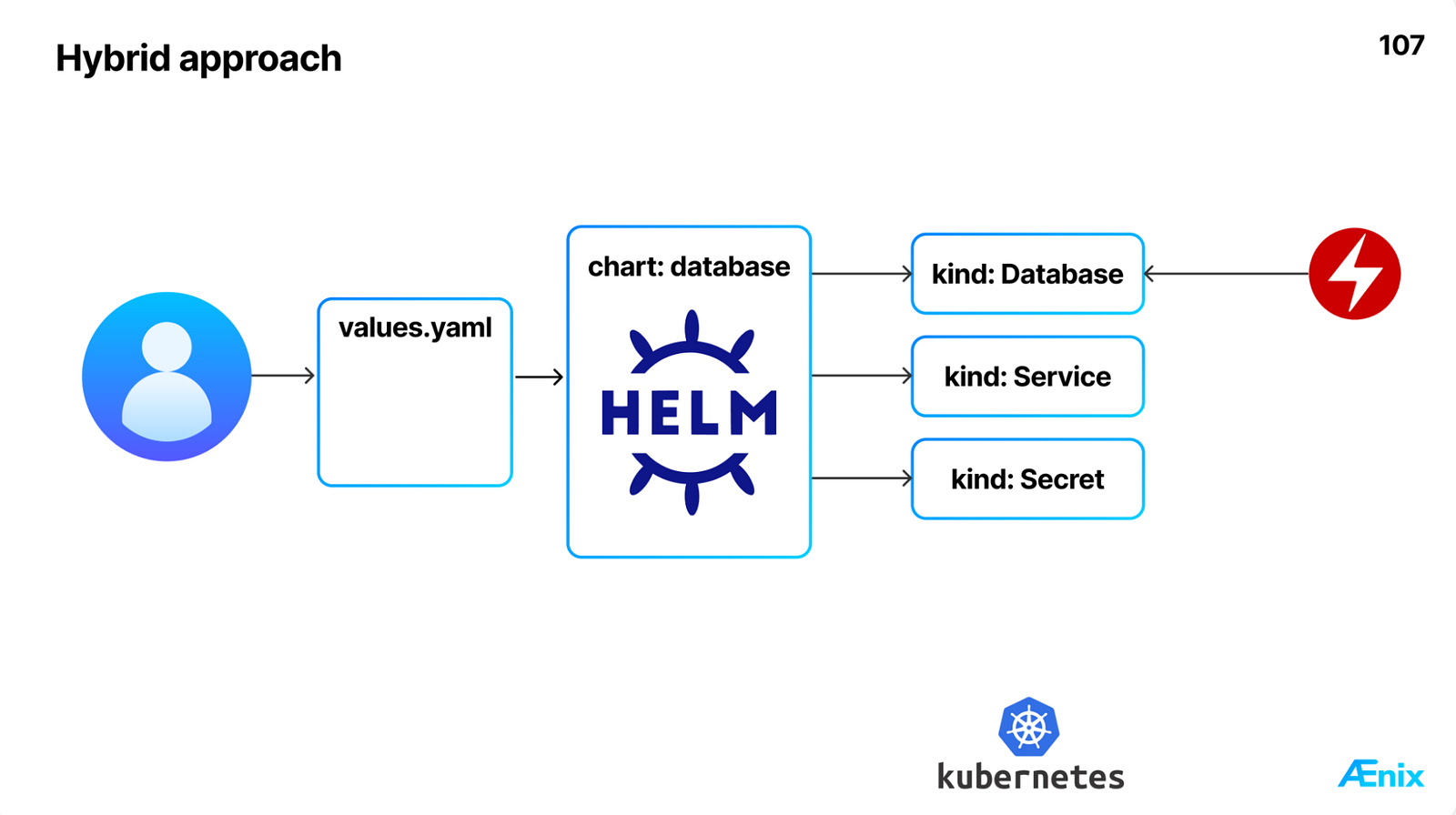
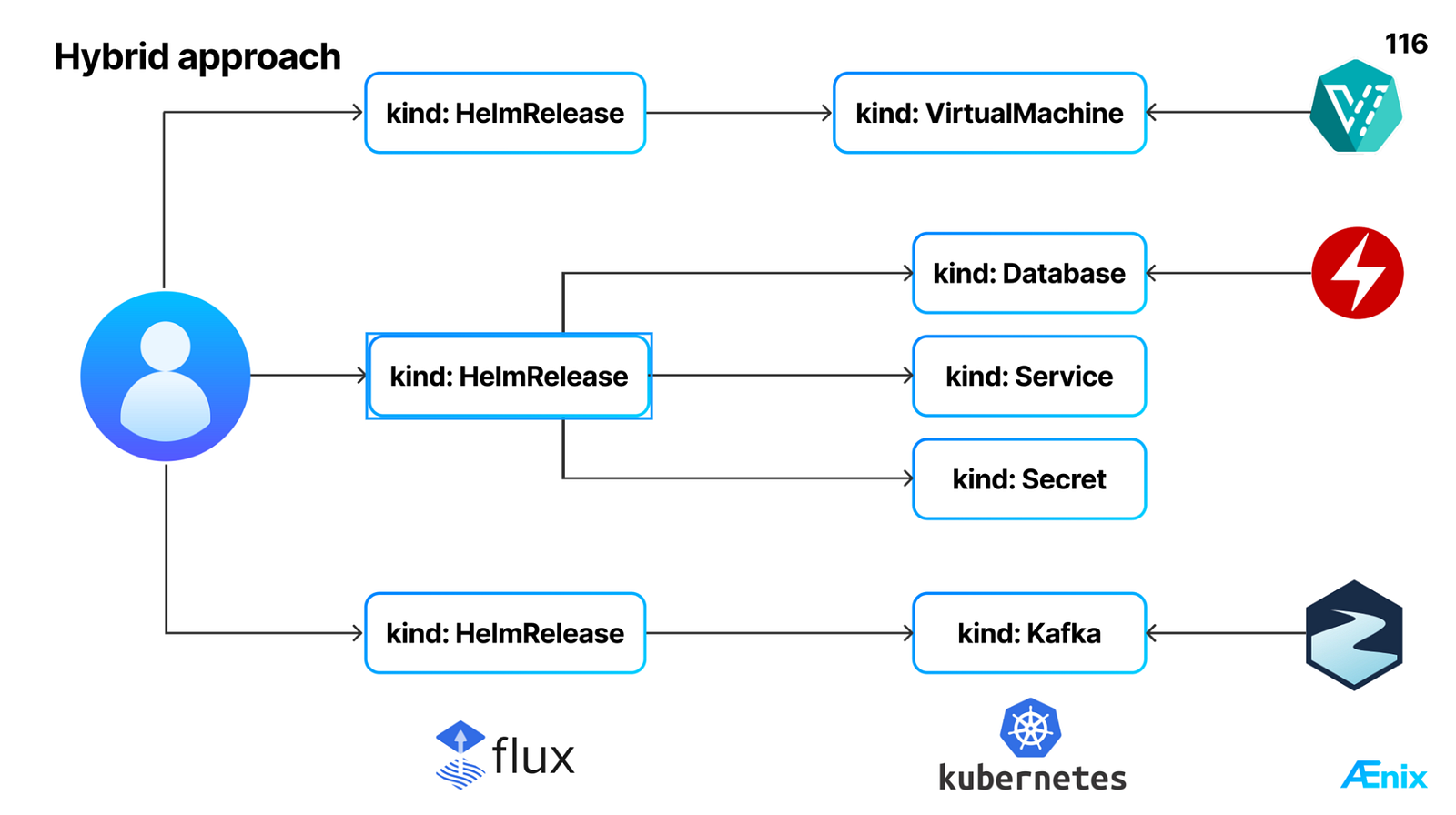
The user-facing part of this flow is handled by Flux CD, a Helm operator for Kubernetes featuring the HelmRelease Custom Resource. Users define their deployments in a HelmRelease, and Flux CD reconciles it to deploy the application.
For example, to deploy a virtual machine, a user creates a resource with kind: HelmRelease. Flux CD then applies the chart, which in turn creates a kind: VirtualMachine managed by the KubeVirt operator.
It’s the same deal with Kafka: you start with a kind: HelmRelease and end up with a kind: Kafka instance managed by the Kafka operator. This creates a unified API and a streamlined process for deploying all sorts of different applications:
Let’s look at two examples below: one for Redis and one for MySQL. As you examine them, you’ll notice a few key things they have in common and where they differ:
- The apiVersion and kind: HelmRelease tell us that these are Flux CD Custom Resources.
- Each one points to a different chart in the spec.chart.spec.chart field.
- Both reference the same source repository in spec.chart.spec.sourceRef, which is the default application repository for Cozystack, served over HTTP.
- Both feature a spec.values block. This block is pulled directly from the values.yaml file of its respective chart.
Redis
apiVersion: helm.toolkit.fluxcd.io/v2
kind: HelmRelease
metadata:
  name: redis-some
spec:
  chart:
    spec:
      chart: redis
      reconcileStrategy: Revision
      sourceRef:
        kind: HelmRepository
        name: cozystack-apps
        namespace: cozy-public
  values:
    authEnabled: true
    external: false
    replicas: 2
    resourcesPreset: nano
    size: 1Gi
    storageClass: ""
MySQL
apiVersion: helm.toolkit.fluxcd.io/v2
kind: HelmRelease
metadata:
  name: mysql-some
spec:
  chart:
    spec:
      chart: mysql
      reconcileStrategy: Revision
      sourceRef:
        kind: HelmRepository
        name: cozystack-apps
        namespace: cozy-public
  values:
    external: false
    replicas: 2
    resourcesPreset: nano
    size: 10Gi
    storageClass: ""
User Interface and API
With our hybrid design in place, we now have a unified API for deploying applications, which originally exposed very different operator APIs. Now that we’ve learned how it works under the hood, let’s see how users interact with it. This unified API is what allows the platform to render all these applications in a dashboard, complete with a name, metadata, and an icon for each Helm chart. Cozystack initially used Kubeapps for this, but we’re moving to a new frontend (more on that in future posts).
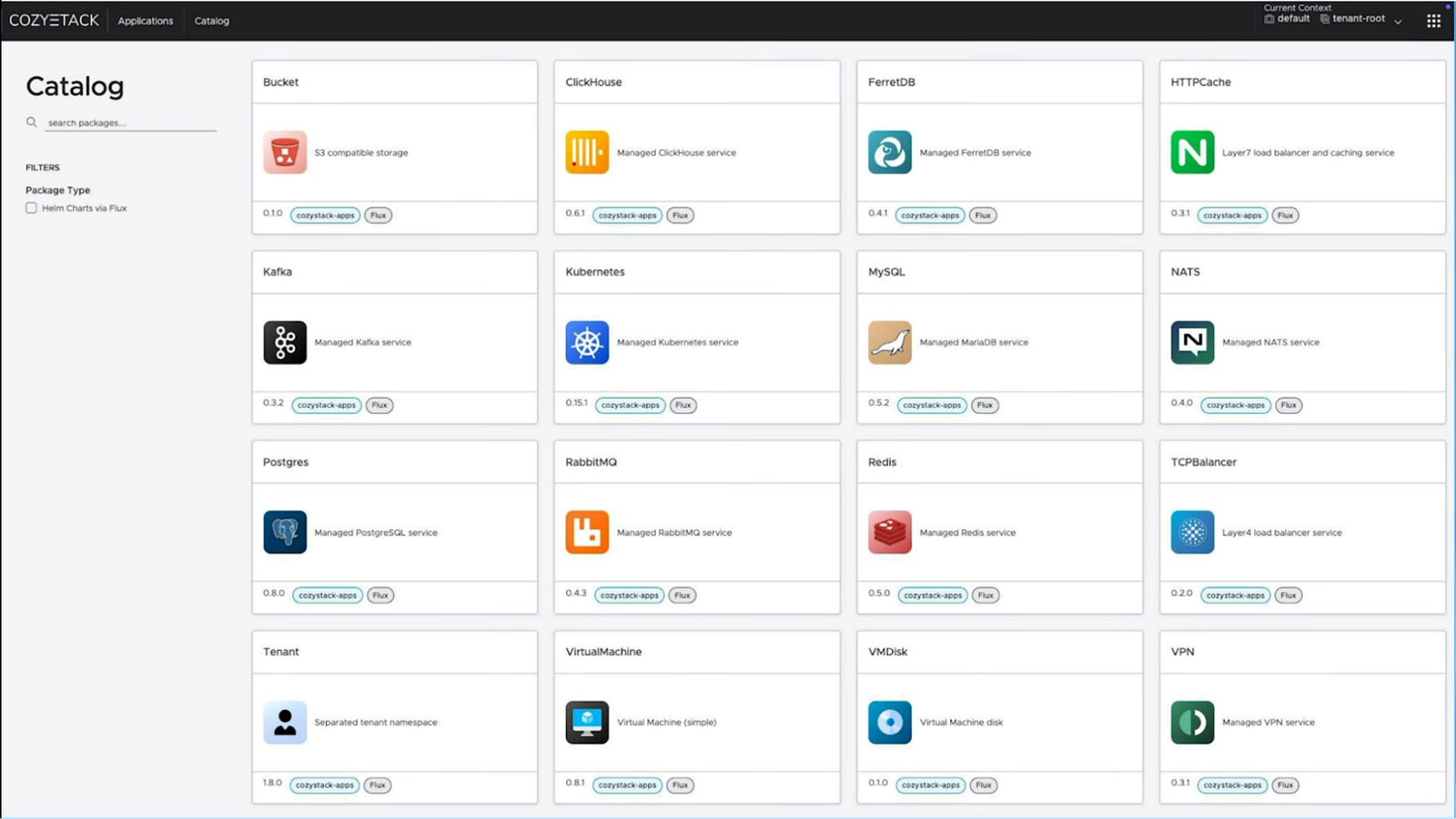
When a user is ready to deploy an application, they create a single YAML file with parameters. Here’s what that looks like:
# virtual machine
running: true
systemDisk:
  image: ubuntu
  storage: 5Gi
  storageClass: replicated
resources:
  cpu: 1
  sockets: 1
  memory: 1024M
# ...
The dashboard can even render these parameters in a visual editor, as they are defined by an OpenAPI schema.
So, let’s quickly recap the key points of the hybrid system we built for Cozystack:
- We use Helm charts to define applications.
- We rely on Kubernetes operators to manage the entire application lifecycle.
- A unified dashboard provides a consistent look and feel for all applications.
This system was a great fit for our typical use case: an internet service provider building a backend for its services. Those providers usually run a website, billing system, as well as a bunch of other applications. The key point here is that the providers are the only users of their own platforms, which makes it a classic single-tenant setup.
Granting Access to End Users
In early versions of Cozystack, access was an administrators-only affair. But as we grew, a key piece of feedback emerged: our customers wanted to grant their end users direct access to the platform. This introduced two new challenges:
- Multi-user role-based access. How could we enable users to deploy applications on the same platform without granting them administrative privileges?
- Clear, user-friendly representation of resources. End users expect to see regular Kubernetes kinds such as
PostgresorRedis, and not some fancy HelmReleases.
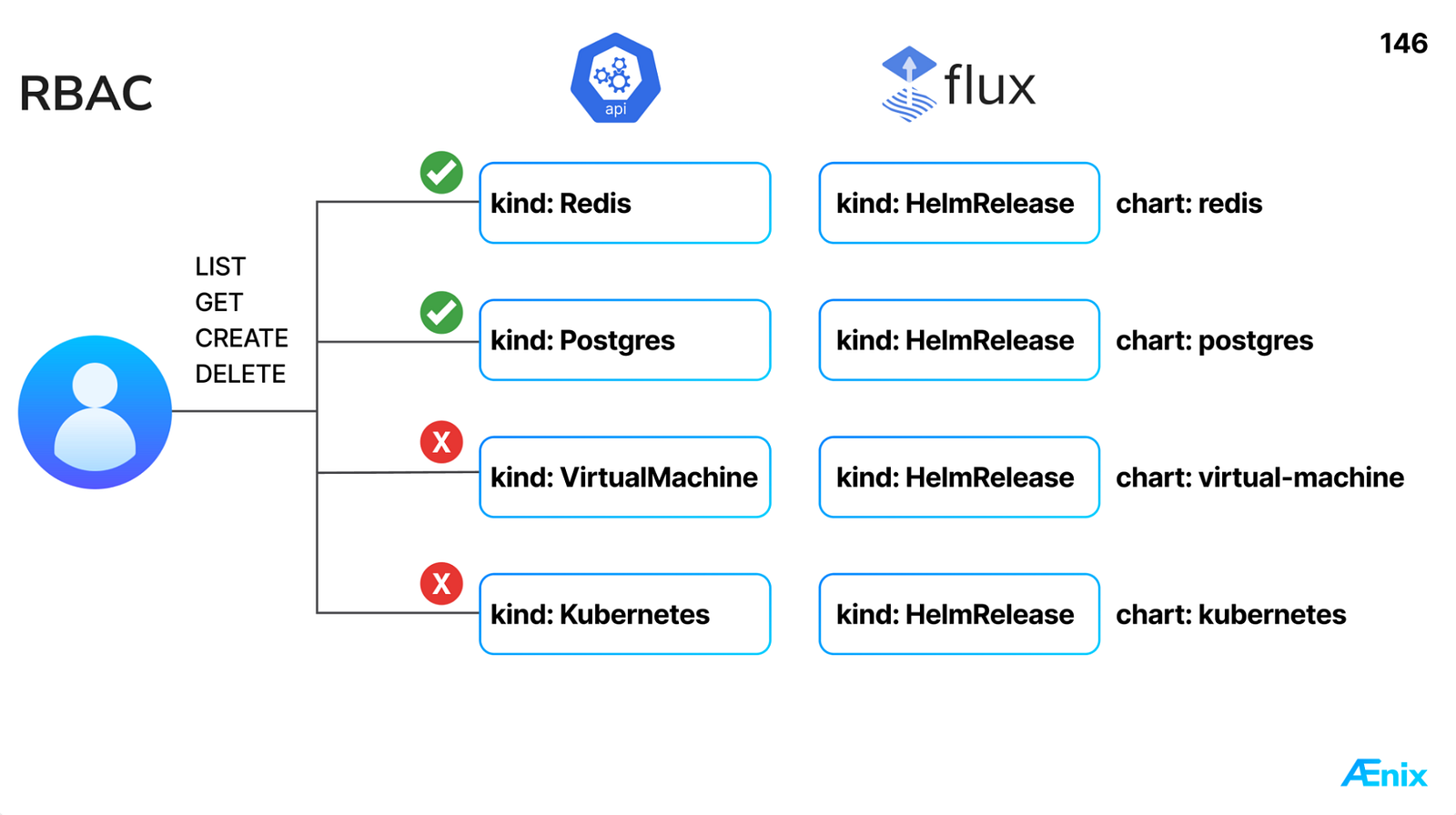
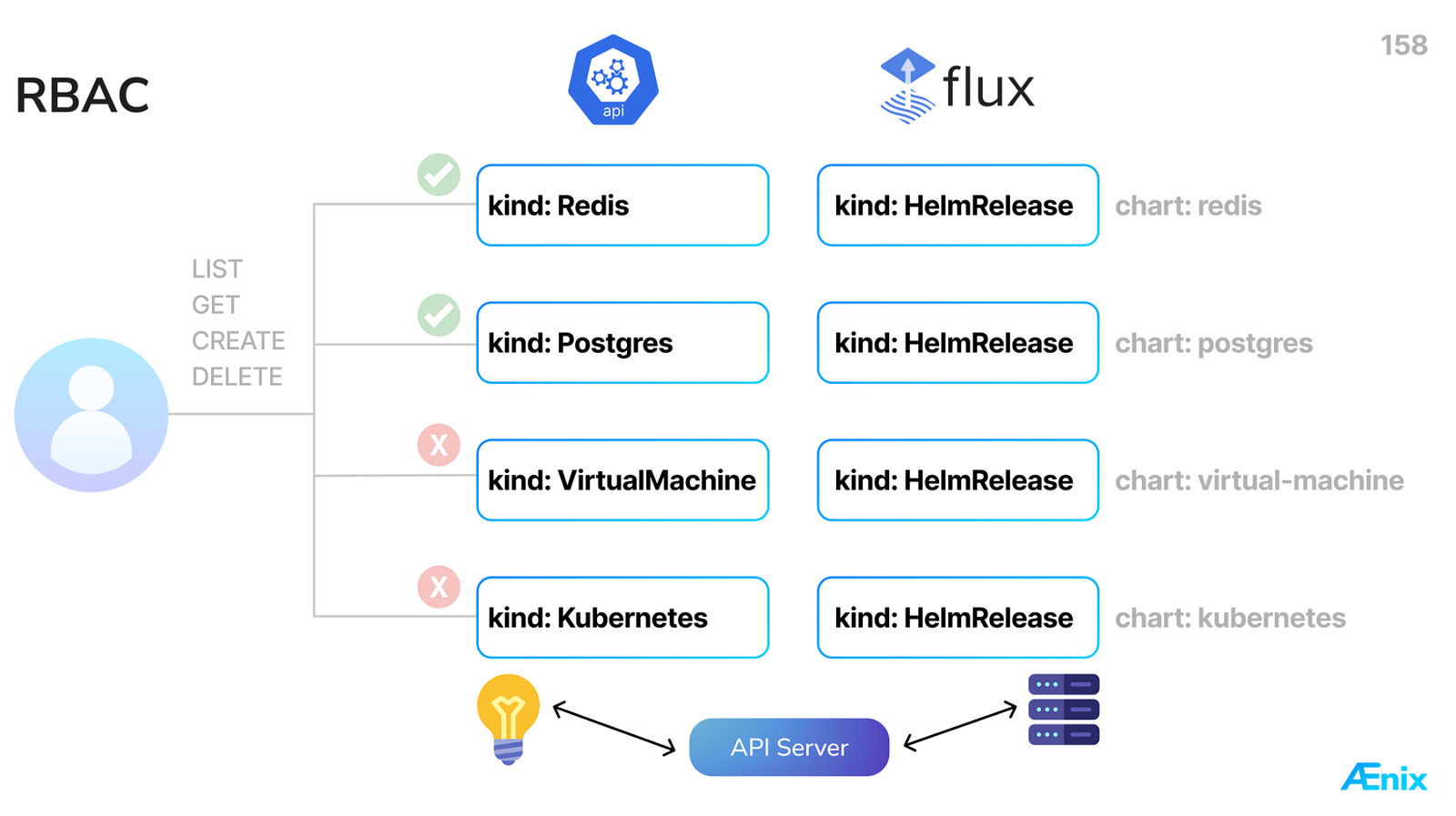
With multiple users, granting everyone access to the management cluster is not an option. Although different charts are used, they all share the same kind: HelmRelease. Consequently, RBAC policies cannot differentiate between a HelmRelease for a VirtualMachine and one for a Postgres instance. Still, service providers often require such isolation granularity.
Our solution was to introduce higher-level API objects that mirror application kinds for the underlying resources (Redis, Postgres, VirtualMachine, Kubernetes, etc.). With these in place, you can devise a granular RBAC rule that, e. g., grants access to Redis and Postgres while denying access to VirtualMachine and Kubernetes.
State Synchronization
Next, we need to synchronize the state between our higher-level API objects and the downstream HelmReleases that deploy them. Let’s examine the two approaches we evaluated and our rationale behind choosing one over the other.
The common Kubernetes pattern is to build a controller or operator that stores the desired state in your Custom Resources and generates HelmReleases from them. However, we found two issues with this model:
- It introduces a stateful component, which adds complexity and a potential point of failure. We really wanted to keep the system simple.
- Data flow is one-way: edits to a HelmRelease are not reflected back into the higher-level API objects.
Our alternative was to build a stateless API server that leverages existing in-cluster HelmReleases as its data store and dynamically generates higher-level resources on the fly. These resources only exist at request time, but users can interact with them like with any other regular Kubernetes resource. This approach mitigates the drawbacks of the previous one:
- Being stateless, it keeps the system simple.
- It supports two-way synchronization, reflecting changes between the resources and HelmReleases.
Building a custom API server is a significant undertaking. We’ll dive into how to extend the Kubernetes API and detail the specific solution we implemented in our next article. But first, let’s explore our solution from a user’s perspective and see how they interact with it.
What Our API Looks Like in Action
So, what does it feel like to use our new API? Let’s walk through deploying a Redis instance. A user creates a resource defined by the chart shown first. It gets automatically translated into a HelmRelease you see in the second manifest. Note the common pattern:
kind: Redismaps tospec.chart.spec.*, which contains the chart name and repository reference.- The service name from
metadata.name: example becomesmetadata.name:redis-example. - The application version
appVersionbecomes the chart version inspec.chart.spec.version. - Values from the spec are passed into the
spec.values.
Example: Redis
The resource created by the user:
apiVersion: apps.cozystack.io/v1alpha1
appVersion: 0.6.0
kind: Redis
metadata:
  name: example
spec:
  authEnabled: true
  external: false
  replicas: 2
  resourcesPreset: nano
  size: 1Gi
  storageClass: ""
The resulting HelmRelease:
apiVersion: helm.toolkit.fluxcd.io/v2
kind: HelmRelease
metadata:
  name: redis-example
spec:
  chart:
    spec:
      chart: redis
      reconcileStrategy: Revision
      sourceRef:
        kind: HelmRepository
        name: cozystack-apps
        namespace: cozy-public
      version: 0.6.0
  values:
    authEnabled: true
    external: false
    replicas: 2
    resourcesPreset: nano
    size: 1Gi
    storageClass: ""
We use this same pattern for everything, including tenant Kubernetes clusters. We provide Helm charts that bundle all the manifests for running Kubernetes-in-Kubernetes. Users simply work with high-level kind: Kubernetes resources. Those, in turn, generate Flux CD’s HelmReleases which deploy the rest of the charts without any external controllers.
Example: Virtual Machine
Here is the same process, this time for a VirtualMachine.
The resource created by the user:
apiVersion: apps.cozystack.io/v1alpha1
appVersion: 0.7.0
kind: VirtualMachine
metadata:
  name: example
spec:
  instanceProfile: ubuntu
  instanceType: u1.xlarge
  running: true
  sshKeys:
    - ssh-rsa AAAAAA...
  systemDisk:
    image: ubuntu
    storage: 110Gi
    storageClass: replicated
The resulting HelmRelease:
apiVersion: helm.toolkit.fluxcd.io/v2
kind: HelmRelease
metadata:
  name: virtual-machine-example
spec:
  chart:
    spec:
      chart: virtual-machine
      reconcileStrategy: Revision
      sourceRef:
        kind: HelmRepository
        name: cozystack-apps
        namespace: cozy-public
      version: 0.7.0
  values:
    instanceProfile: ubuntu
    instanceType: u1.xlarge
    running: true
    sshKeys:
      - ssh-rsa AAAAAA...
    systemDisk:
      image: ubuntu
      storage: 110Gi
      storageClass: replicated
Example: Kubernetes
Another example: a tenant Kubernetes cluster.
The resource created by the user:
apiVersion: apps.cozystack.io/v1alpha1
appVersion: 0.15.2
kind: Kubernetes
metadata:
  name: example
spec:
  host: ""
  nodeGroups:
    md0:
      minReplicas: 0
      maxReplicas: 10
      ephemeralStorage: 20Gi
      instanceType: u1.medium
      role:
        - ingress-nginx
  storageClass: "replicated"
The resulting HelmRelease:
apiVersion: helm.toolkit.fluxcd.io/v2
kind: HelmRelease
metadata:
  name: kubernetes-example
spec:
  chart:
    spec:
      chart: kubernetes
      reconcileStrategy: Revision
      sourceRef:
        kind: HelmRepository
        name: cozystack-apps
        namespace: cozy-public
      version: 0.15.2
  values:
    host: ""
    nodeGroups:
      md0:
        minReplicas: 0
        maxReplicas: 10
        ephemeralStorage: 20Gi
        instanceType: u1.medium
        role:
          - ingress-nginx
    storageClass: "replicated"
Conclusion
Let’s circle back to the challenge we set out to solve: the one that we had at Cozystack, and that every service provider has. Our goal was to deliver a platform with a unified API and UI for deploying and managing applications. This platform also required a reliable backend for lifecycle operations, clear feedback about running workloads, and RBAC safeguards.
Here’s how our Kubernetes and Helm-based solution delivers on those goals:
- Helm charts define each application as a package, bundling the custom resources and all the Kubernetes objects the application needs. After deployment, Kubernetes operators manage the application lifecycle.
- Higher‑level Custom Resources provide users with a consistent and safe interface for each application. These resources offer built-in visibility, guardrails, and a uniform schema.
- Uniform UI and API. Our dashboard renders all applications consistently, surfacing metadata, icons, and live workload status for each deployment. The exact same resources are accessible via
kubectland the Kubernetes REST API, providing a consistent Kubernetes‑native interface for both users and automation. - In our next article, we’ll show how we built a custom API server to synchronize state between Helm charts and Flux CD’s HelmRelease deployments. We’ll also cover extending the Kubernetes API through the API Aggregation Layer. Stay tuned!
We welcome feedback and pull requests: https://github.com/cozystack/cozypkg
Join the Cozystack Community
See also
- How Cozystack Was Born: The Philosophy Behind Its Architecture
- How we built a dynamic Kubernetes API Server for the API Aggregation Layer in Cozystack
- DIY: Create Your Own Cloud with Kubernetes (3-part series)
- Cozystack joins the CNCF Sandbox
- The Evolution of Virtualization Platforms: The Rise of Managed Services and Local Providers’ Edge Against Hyperscalers
- Cozystack became a CNCF Certified Kubernetes distribution
- Cozypkg: How We Simplified Local Development with Helm and Flux
By Andrei Kvapil on February 9, 2026.
Exported from Medium on October 5, 2026.