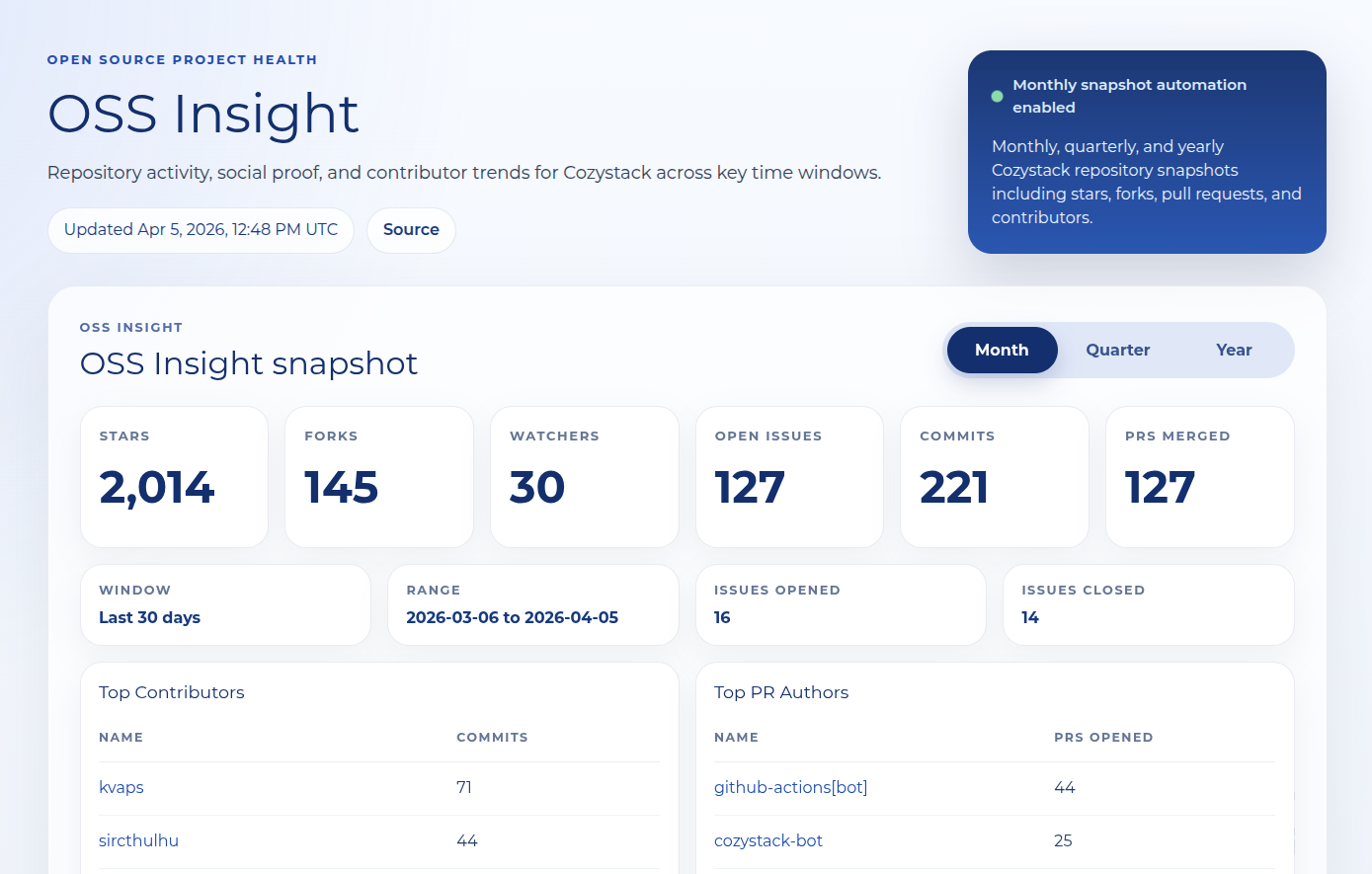
My name is Andrei Kvapil, and I’m a co-founder of Ænix — we created Cozystack, an open source cloud platform, and co-maintain it, and we help companies build infrastructure. We’re a fully remote company: 15 people at the time of writing (July 2026), several teams (two reliability teams, a development team, marketing, back office, and so on), spread across several time zones. We started out living in GitHub Projects, but the moment we began to grow we ran straight into the limits of our own process: tasks scattered across boards and chats, half of the morning sync spent figuring out what was even in flight, and unplanned work eating entire days without leaving a trace anywhere.
This article is the story of how we fixed that with aeman — a tool we built ourselves and recently open sourced. But I have to start further back.
Where this came from
Years ago I worked at another company, and it had two internal systems with wonderful names: Ford and Nixon. Colleagues there wrote about them at length, so here’s the short version. They’re boards for tracking daily tasks, where an engineer sees exactly what they’re working on today. Not a three-month backlog, not a hundred kanban columns — your day, and nothing else. For years that system kept a lot of remote teams working effectively and kept many customers’ infrastructure running.
Let me be honest: the process behind aeman isn’t entirely my idea. I took a working process-management system I’d seen at my previous company and mapped it onto our own processes and tasks. Our board now forces us to focus on what matters most — the business tasks.
Unlike Trello, this model starts from the assumption that one person can work on tasks in several teams during a single day. And the daily plan must not turn into a wall of tasks. If an engineer has 6 to 10 tasks planned but can realistically finish only 3 or 4, they end up with a permanent sense of debt, while management gets a false picture of heavy utilization. People also start switching between tasks constantly, and the brain naturally reaches for the ones that are easier to close. Hard tasks can then sit untouched for a long time. So the daily plan has to be short and honest.
Why not use an off-the-shelf tool?
I tried to build a process like this on existing tools: Trello, Asana, Notion, GitHub Projects — with varying success. Notion came closest, but I wasn’t willing to drag the whole team into yet another system and pay for it for the sake of the boards alone. And over time the board inevitably grew until it no longer fit on a screen.
GitHub Projects turned out to be the most viable option. It’s free, it offers a convenient API, and it already has everything you need: sprints, priorities, statuses, and other entities. It also extends well. That’s why we worked on it for a long time.
But it became clear fairly quickly that the problem wasn’t the tool’s capabilities — it was the UX. It takes far too many extra actions to create a task, assign an owner, and fill in the required fields. And we never managed to build a comfortable daily process around GitHub Projects. Sprints exist, for example, but they proved too awkward to use: you can’t close the current sprint and start the next one with the unfinished tasks carried over in a single action, or quickly push a task to “later” so it drops out of sight and stops competing for an engineer’s attention.
Another problem showed up over time. At every sync we were effectively looking at one column — In Progress. That’s where all the work happened, while cards in the other columns slowly turned into a task graveyard: still on the board, but no longer part of the daily process and going nowhere. GitHub Projects turned out to be an excellent place to store tasks and a weak one for managing a team’s daily focus.
That’s exactly why, when I started building aeman, I chose GitHub Projects as the backend of the new system and built the user interface and the workflow on top of it.
The core idea: exactly the cards you need today
The goal of aeman is to surface the tasks that matter today and focus the engineer on them. In an ideal world, an engineer leaves the morning sync with a list of tasks they will definitely work on that day. Everything else moves to tomorrow or to next week — and physically disappears from the board so it stops catching your eye.
The second idea: unplanned work has to be visible. Everyone has days that get eaten by a sudden incident or an urgent request from a neighboring team. Usually that work is recorded nowhere, and at the end of the sprint nobody can explain where the time went. In aeman it has a zone of its own: you log it after the fact as a single card, and the day stops vanishing without a trace (screenshots in the sections below). At the daily sync you can then talk it through and move the task into the planned block.
The third idea: multi-team work is a property of the model, not a filter. In a small company one engineer can work on tasks in several teams — this is especially true of founders, who still juggle everything. In aeman, teams are a dimension of the board: a sprint is tracked per team, each team has its own weekly plan, and the Me board collects one day’s cards from all of the engineer’s teams at once. You don’t have to hop between boards to see your day. A task also moves freely between people and teams — it can change assignees from one day to the next, and that’s a normal mode of work the tool shouldn’t get in the way of.
And the fourth idea: a team lead needs a tool that shows the status of every task within a minute, without pulling people away with extra questions.
Philosophically, aeman is closer to Todoist than to a classic kanban board. Cards are deliberately short: in normal mode you see only the title, and the description opens on a double click. The description takes free-form links — pull requests, GitHub issues, Telegram chats, anything else — and aeman recognizes them automatically and shows a button for jumping straight there. That keeps the main screen clean, and closing another task delivers the satisfying feeling familiar to anyone who uses a good task manager.
What it looks like
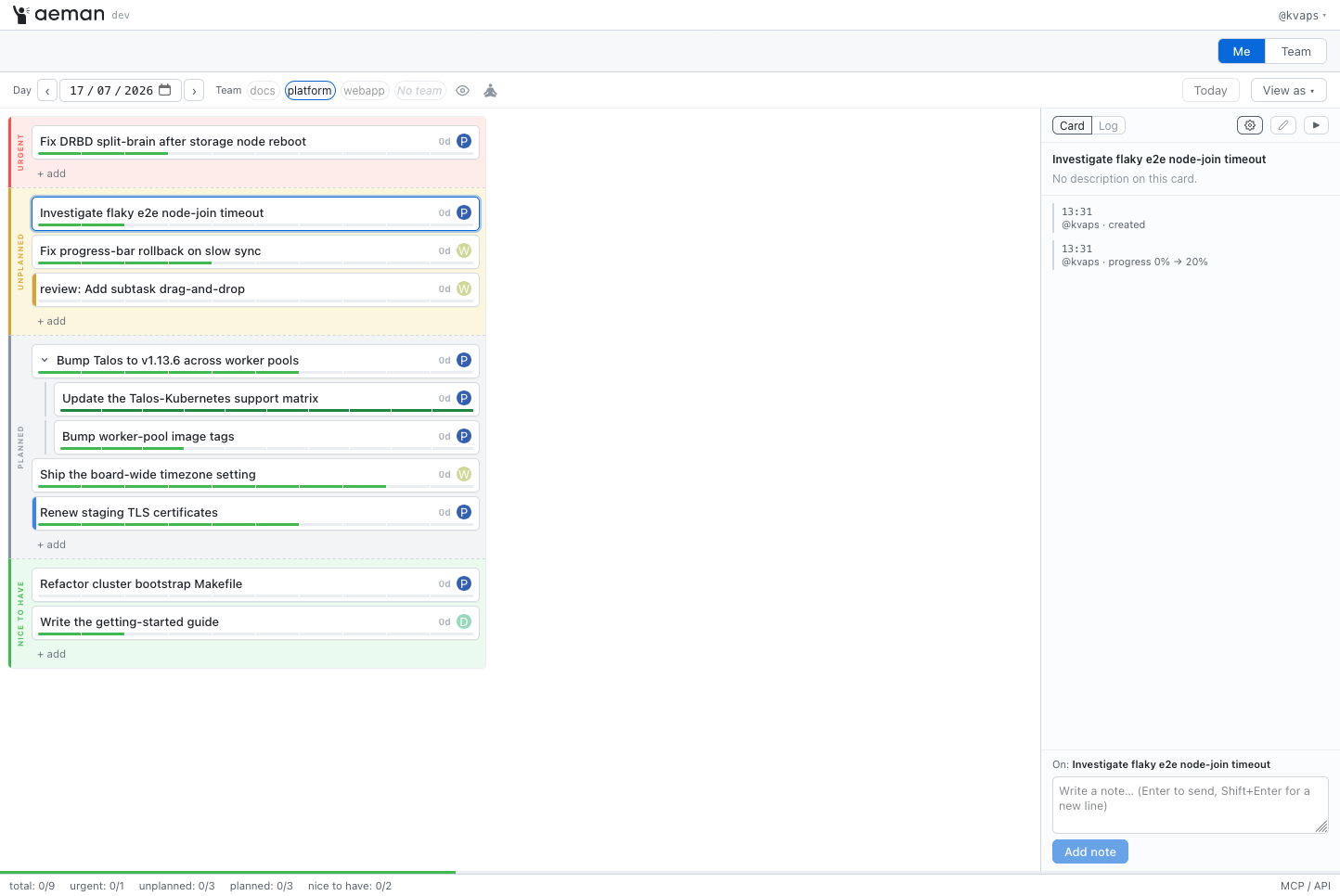
The Me board: your day
An engineer opens aeman in the morning and sees their day: cards grouped into four colored zones. This isn’t the Eisenhower matrix; the breakdown is different:
- Red — urgent, has to be done today
- Gray — planned, ordinary planned work, which may take more than one day
- Yellow — unplanned, whatever landed during the day
- Green — nice to have, do it only once everything else is finished
The board pulls in cards from all of the engineer’s teams, meaning from the current sprint of each of them. The team selector at the top narrows the list to a single team, or hides every card that’s done, blocked, or in review, leaving only what you can work on right here and right now, when it’s time to get into deep work. Each card has a completion slider from 0 to 100% in steps of 10% (dragging the progress bar to done is surprisingly satisfying), a stage (Review / Locked / Recurrent / Done) that recolors the bar, a counter of days in progress, and links to an issue or a PR. On the right there’s a notes panel: a personal log of the day where you can write things down as you work. That way you don’t have to dig through your memory at the next standup — you skim the notes and report what you did. Notes live in the context of the day; tomorrow the board is clean, but you can always step back a day and reread them.
The Team board: the whole team at a glance
The team lead’s view: a grid of people by zones for a chosen day. Columns are engineers with their avatars, rows are the same colored zones. You see immediately who’s working on what, whose work is on fire, and who’s overloaded. The lead creates cards from here too: a couple of clicks and a task is created, assigned, and prioritized.
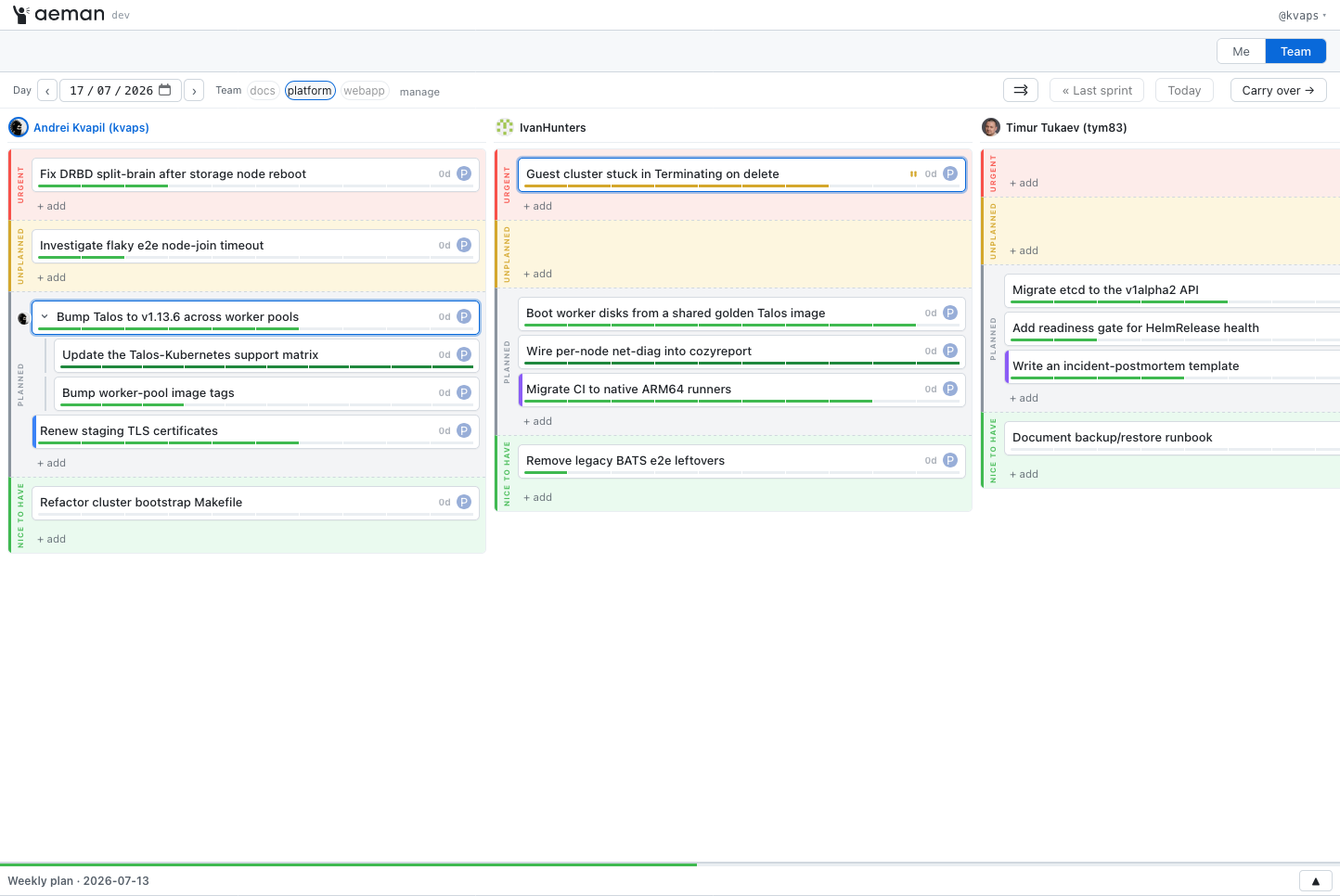
In Me mode the team lead can also impersonate an engineer (the View as button) — look at the board through their eyes and tidy it up if needed.
Daily sprints and carry-over
Our sprints are short — one day — and they count forward, not backward. At the morning sync the team first discusses what got done yesterday, and then the team lead hits Carry over: every unfinished card moves into the new sprint (today), and finished ones stay in yesterday’s history. Recurring tasks are recreated automatically. That’s what day planning is here, and it takes minutes.
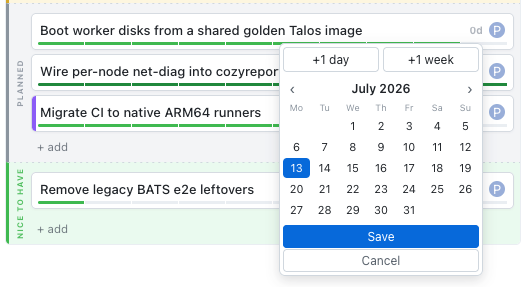
If planning decides a task definitely isn’t happening today, there are +1 day and +1 week buttons: the card disappears from the board until its day, and no history is lost. When that day comes, it shows up again.
The weekly plan
Here we departed from the original idea and started fitting our own workflow onto the tool we’d ended up with.
The founders and I used to plan the team’s week by writing a new list of weekly tasks into Google Sheets and sending each team a “focus for the week” message on Slack. That process has now moved into aeman as well.
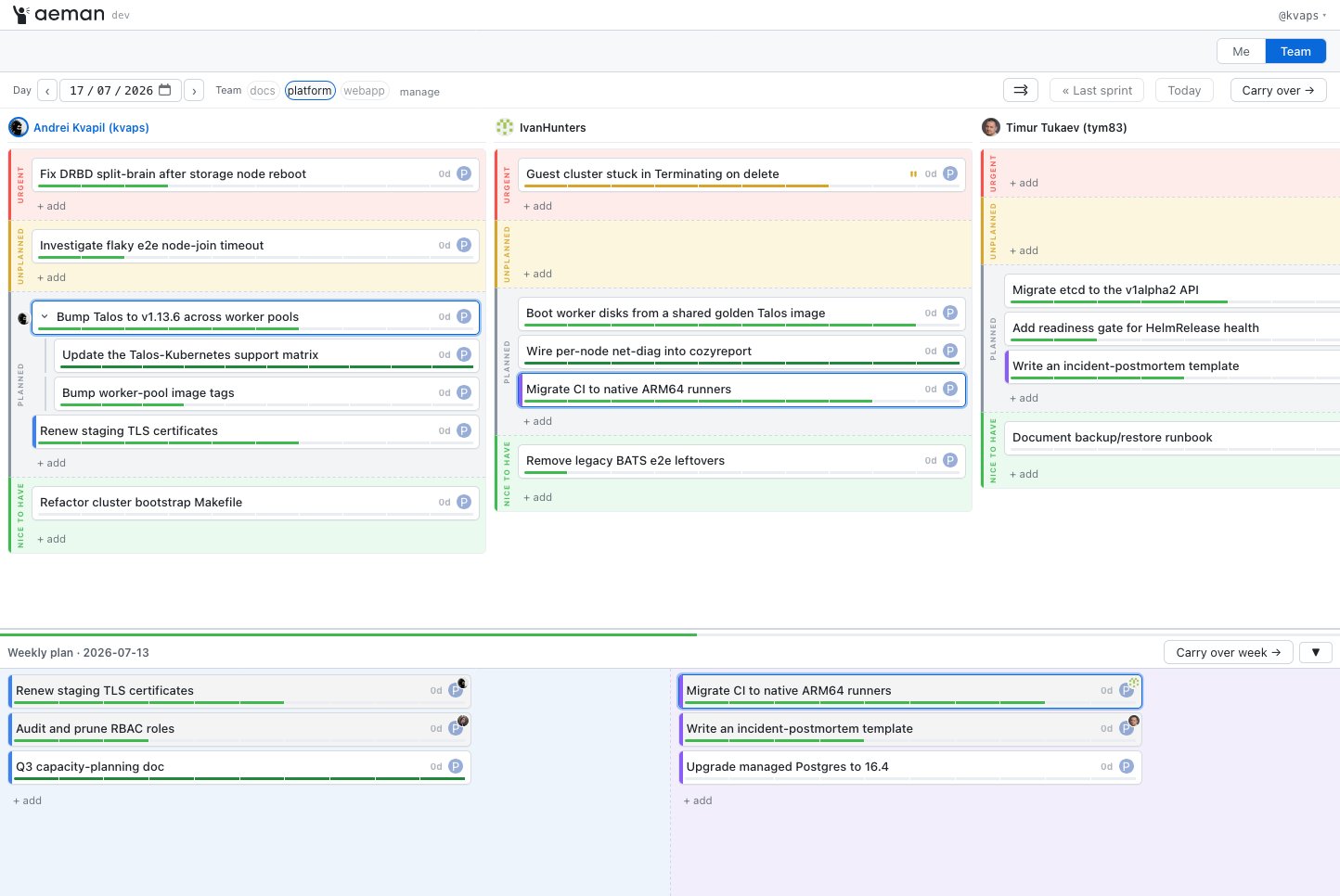
Under the team grid lives the weekly plan: the team’s business tasks for the week, laid out in two lanes, “by Wednesday” and “by Friday”. Once a week the founders put tasks there, and the tasks wait their turn. The team lead drags a plan card onto an engineer; it appears on that engineer’s daily board while staying in the plan with a colored marker. A shared progress bar shows how the team is doing against the week, and the weekly Carry over moves whatever is still open into the next week.
Reviews, subtasks, and the activity log
Sending a task to review creates a linked card for the reviewer, with a feedback loop: while the review is open, the original sits at the Review stage, and once the reviewer takes their own card to 100%, the original is released automatically. Big tasks break down into subtasks whose progress rolls up into the parent. Every action on the board is written to the card’s activity log, so you can reconstruct its whole history after the fact: who moved it, when the progress changed, and why it ended up in a different sprint.
A day with aeman
Here’s what the whole flow looks like:
- Morning sync. We open the Team board for yesterday, the team lead shares their screen, and we go through the cards: what’s done, what’s stuck, person by person, with the lead fixing statuses as we go. Then the lead hits Carry over and everything unfinished moves into today. Then we discuss what’s new: the lead creates cards on the fly and distributes them across people and zones.
- The day. Everyone works from their own Me board. Something urgent lands — a card goes into the yellow zone. Something gets blocked — the Locked stage, and the lead sees it. Progress moves along the way; thoughts and findings go into the day’s notes.
- Done — the card is at 100%, stage Done. If it needs review, Send to review, and it shows up for the reviewer.
- Tomorrow it all repeats.
Every board is live: edits by colleagues and by AI agents appear on everyone’s screen in about a second, with no reload. More on how that works below.
Under the hood
Now for the part the engineering crowd came for.
GitHub Projects v2 as the only storage
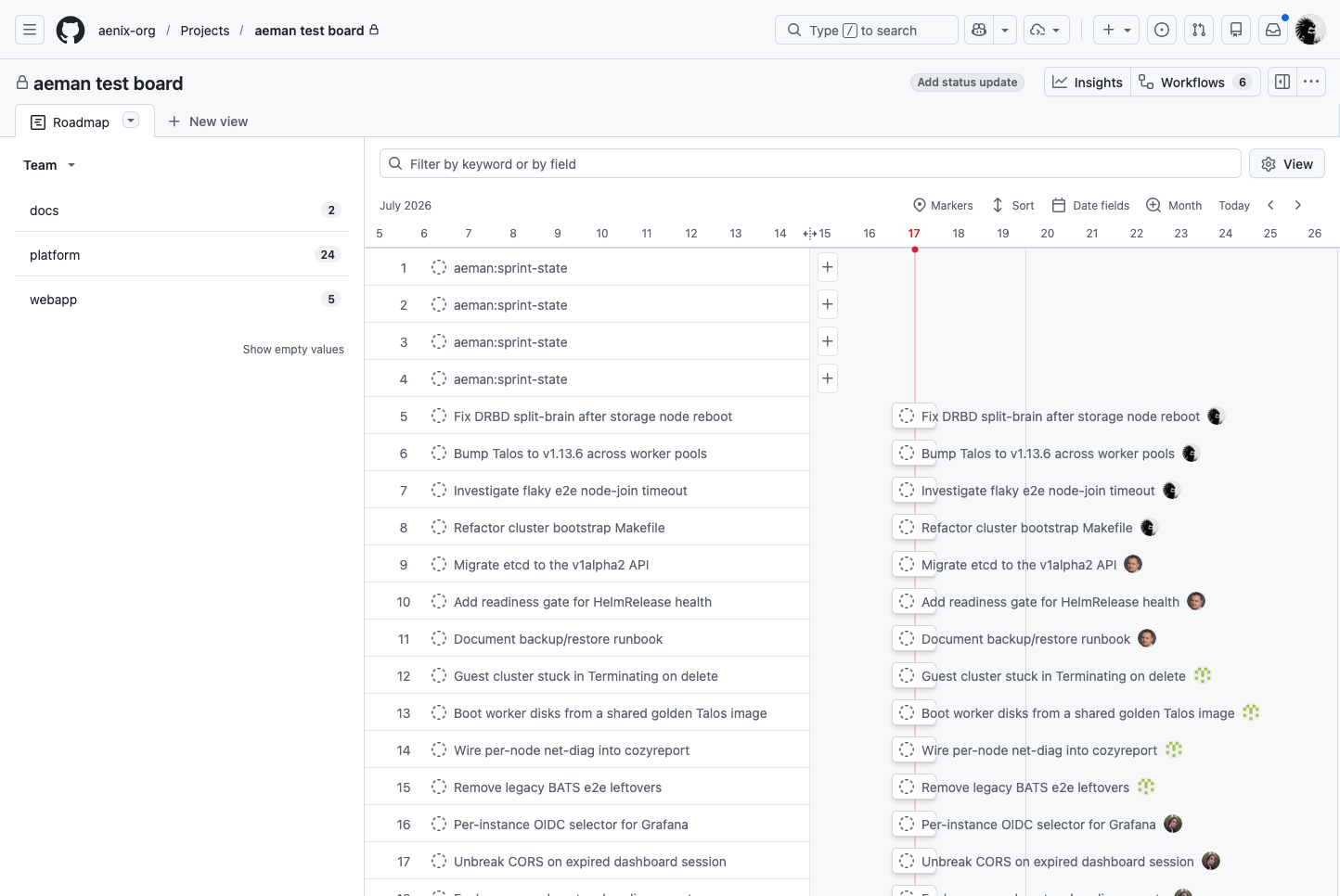
aeman has no database of its own at all. Every card is an item on a GitHub Projects board, and every field — zone, progress, sprint, weekly plan — is an ordinary project field. aeman even provisions the fields it needs lazily: point it at any empty project and the first change creates whatever is missing. You could say aeman is a specialized view over a GitHub board: the same board opens in GitHub’s native interface, the data is always yours, and you can walk away from aeman at any moment without migrating anything.
A Kubernetes-style API
The aeman API is deliberately built on the same principles as the Kubernetes API — a pattern that has proven itself for synchronizing distributed state. Each entity — Card, Sprint, Ordering, Presence — is a separate resource with the familiar kind, metadata, and spec.
The client follows the familiar list + watch scheme. It first fetches a full snapshot of the board, then opens a WebSocket and starts receiving a stream of ADDED, MODIFIED, and DELETED events. After a full resync the server sends a special Sync frame that signals the local state is completely up to date.
In effect, every open browser tab works like a Kubernetes informer with its own local cache. Any change made by another user or by an AI agent shows up on every open screen in about a second, and your own changes aren’t echoed back to you. GET /api/v1 returns a machine-readable catalog of all available resources and endpoints, so clients and AI agents don’t need to know the shape of the API in advance.
The GitHub API is slow. What to do about it
The project’s main engineering problem: GitHub’s GraphQL mutations take hundreds of milliseconds, sometimes whole seconds; bursts run into secondary rate limits; and — surprise — GitHub’s read replicas lag behind writes by several seconds. Write straight through and the UI turns into a slide show: move a slider, wait; drag a card, wait.
So writes in aeman use a write-behind scheme, and the user never waits for GitHub. Every change is applied to the server cache instantly, becomes visible on all open boards at once, and only then goes to GitHub asynchronously. Writes run through a background queue with rate limiting and automatic retries on transient errors, to stay clear of GitHub API rate limits.
The queue can coalesce consecutive changes, much like the Kubernetes DeltaFIFO. If a user changes the same card field several times in a row, only the final value is sent to GitHub. Card content follows a different rule: text is never lost. If a user edits a description or adds notes in quick succession, the queue merges them into one final version and sends it in a single request. Until the write is confirmed, new notes exist under temporary identifiers, which are then swapped for real ones automatically.
If a write still fails after all the retries, the server notifies every connected client and rereads the board state from GitHub. GitHub remains the single source of truth. On shutdown, aeman first waits for the queue to drain, so that changes already confirmed to the user aren’t lost.
GitHub doesn’t guarantee that a change is available for reading the moment it’s written. Sometimes, right after a successful write, the API keeps returning the old state for a while. Because of that a user could see a freshly moved card jump back, a deleted card reappear, or a new one land in the wrong place. To avoid this, aeman treats its own recent writes as more trustworthy than fresh data from GitHub for a short window. Once GitHub starts returning the current state, the system switches back to it automatically. As a result, the user never sees the interface roll back.
Comments and the activity log
Notes and change history also live in GitHub, with no separate database. For draft cards the log sits right in the issue body, after a special <!-- aeman:log --> marker. If a card is linked to an existing issue or pull request, notes become ordinary GitHub comments and are visible to everyone in the discussion.
Every action on the board — creating a card, changing progress, moving between sprints, sending to review, and the rest — is recorded by the server as a machine-readable event line. To avoid burying subscribers under dozens of notifications, all those events are collected into a single log comment that gets appended to over time. The log is capped at the last 200 events, and user notes are never deleted.
The result is a complete change history for every card: who moved it and when, how the progress changed, and why it ended up in one sprint or another. That log is useful not only for audit, but also as a data source for statistics and metrics.
A pluggable backend
aeman was designed from the start for a pluggable backend. Today cards live in GitHub Projects, but the system itself isn’t tied to GitHub. All interaction with storage is hidden behind a Backend interface, so supporting a new backend comes down to implementing that one interface.
In future iterations I want to add a git backend that stores cards as plain files in the repository. Neither the user interface nor the application’s business logic will have to change.
The packages under pkg/ can also be used as an ordinary Go library, which lets you embed the board engine into your own tool. There’s more on that in docs/embedding.md.
MCP for AI agents
The same binary can also run as an MCP server. That makes Claude and other AI agents full participants in the process: they create and move cards, leave notes, run carry-over between sprints, and perform other operations.
There’s no separate API for AI and no special privileges. Every action goes through the same domain layer as a human action, with the same contract and the same checks, and the changes show up for everyone immediately.
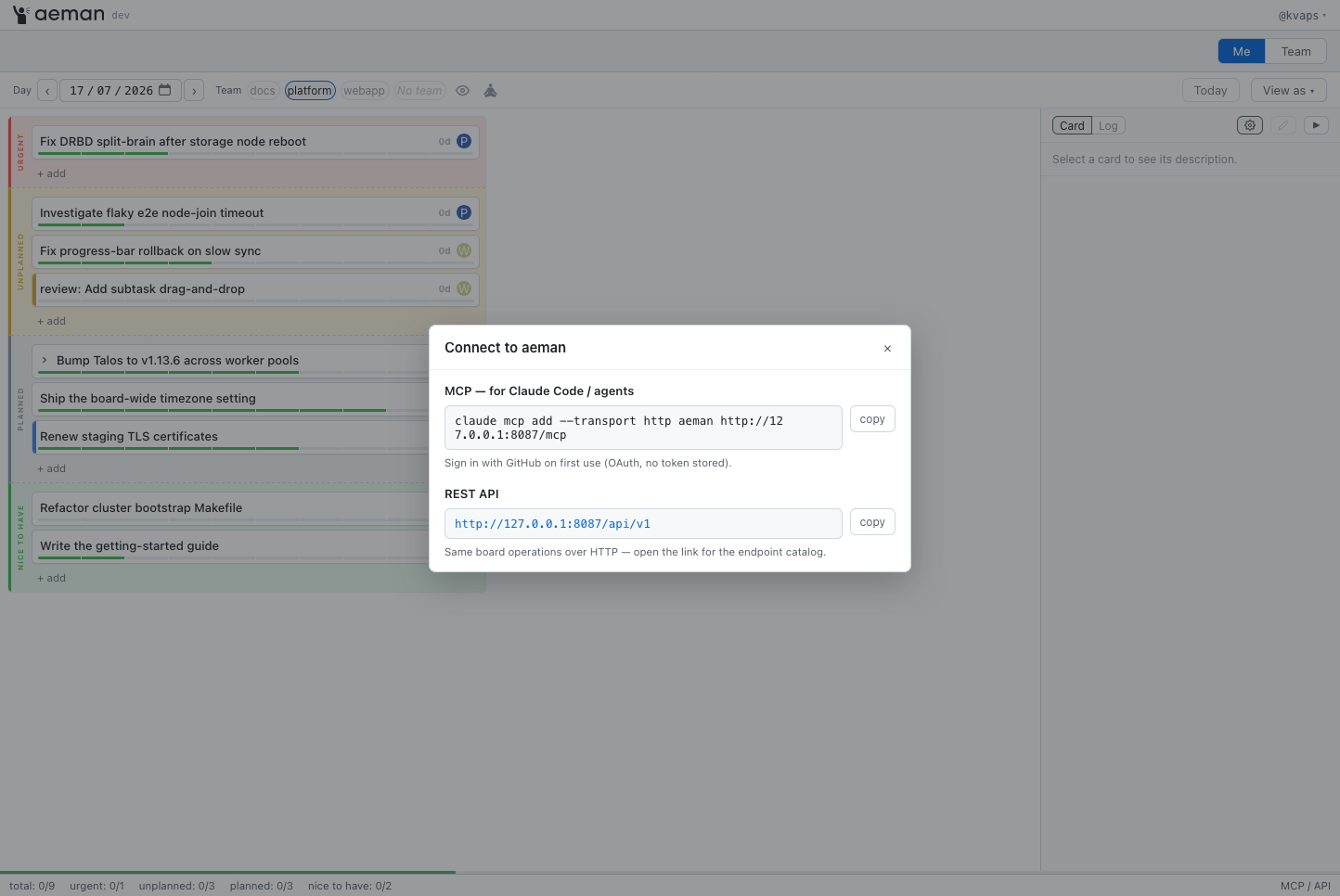
Besides the local mode, aeman offers a publicly available MCP server. Engineers can connect AI clients without installing anything locally and start working with their tasks directly from Claude Code and other AI agents.
How to try it
The simplest way to try aeman is to run it locally with your own GitHub token.
gh auth login # the project and repo scopes are required
git clone https://github.com/aenix-io/aeman
cd aeman
make build
./aeman serve
The browser opens automatically at http://127.0.0.1:8765. You can use any GitHub Project as the board — preferably a new, empty one. aeman creates all the fields it needs on the first change.
For teamwork there’s a multi-user mode. The repository ships a ready-made docker-compose.yml, login through a GitHub OAuth App is supported, and every user works with their own GitHub token. Detailed instructions are in docs/deploy.md.
Where we landed
The whole company has been living on aeman for a few weeks now. Product managers and team leads quickly took to the new approach to planning, though — as with any new tool — there was some skepticism. But the main effect turned out to be a different one: in the morning every engineer knows what they’ll be working on today, unplanned work has stopped being invisible, and the daily syncs have become far more constructive and focused.
The project is open source under the Apache-2.0 licence and available on GitHub: github.com/aenix-io/aeman.
If you decide to try aeman, I’d be glad to hear any feedback, any problems you run into, and your stories about how planning works where you are.
Focus on today: how we built aeman, a daily planning board for engineers on top of GitHub Projects was originally published in Ænix on Medium, where people are continuing the conversation by highlighting and responding to this story.