
On 1 January 2024, Niklaus Wirth died — the man who gave us Pascal, Modula-2 and Oberon, won the Turing Award, and spent his whole life waging a stubborn war on bloated software. What fewer people know is that, already well into his seventies, he sat down and designed a processor of his own: small and simple, so that he could show students a whole computer at once, from the logic gates up to the windows on the screen.
In September 2026 I took that processor and tried to run it everywhere I could reach. First right inside a browser tab — and not as an emulator, but as the very circuit Wirth drew. Then in QEMU, as an ordinary virtual machine. Then in Kubernetes, which is normally home to a very different kind of VM, the sort that runs Ubuntu and databases. And finally in Cozystack, our cloud platform, where Wirth’s machine can now be installed with a single click from the catalog, the way you’d install PostgreSQL. Along the way I finally measured something programmers have argued about for decades — what array-bounds checking actually costs. I also ran a small language model on Wirth’s processor. And, since we’re being honest, with one careless move I sent every virtual machine in a live production cluster off on a migration (nobody was hurt, but it was an unpleasant few seconds).
This turned into a very long article, because a great deal happened over nine days, and a good part of it was my own mistakes, which I then had to find and fix. I’ve tried to write so that someone who has never heard of Oberon can follow along, and I’ve tucked everything only a specialist would care about under spoilers. You can read straight through, or jump to whatever part interests you. First comes the story of Oberon itself, then how my original plan fell apart, then the processor and bounds-checking, then the browser and the lab exercises, then QEMU, Kubernetes and Cozystack, and right at the end the language model and how to install all of this yourself.
All the source code, notes and instructions live in the repository github.com/tym83/paleocomputing, and the project site is tym83.github.io/paleocomputing. If you’d rather get your hands dirty first and read afterwards, open the lab: nothing to install, the machine boots right there in your browser.
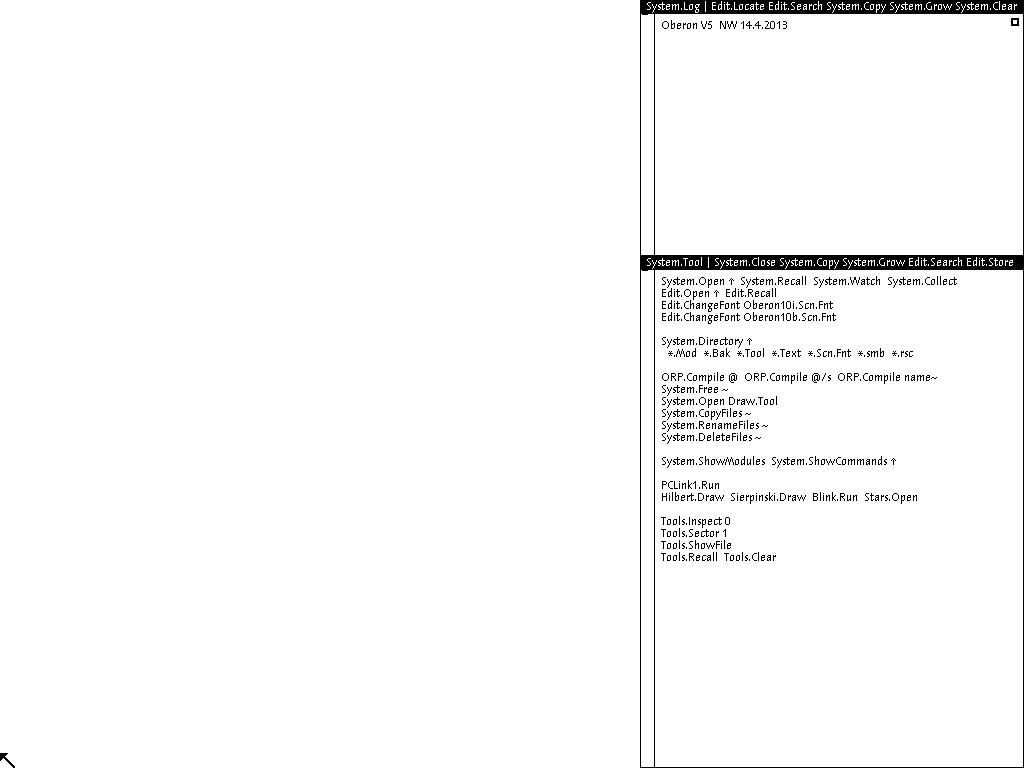
Oberon on Wirth’s actual circuit. I’ve seen this picture five hundred times, and almost every time it matched the reference down to the last dot.
What Oberon is
Oberon is at once a programming language and an operating system, built in the mid-1980s at ETH Zürich by Niklaus Wirth and Jürg Gutknecht. They started in the autumn of 1985, and by 1988 the system was genuinely up and running. By Wirth’s own account, two people wrote it in the hours left over from their day jobs — which, you have to admit, sounds fairly wild when you think about how many people it takes to write any operating system today. It ran on the Ceres workstation, also built at ETH, and students were taught on it until roughly the early 2000s.
The name, incidentally, came from Voyager. In January 1986 the probe sent back images of Uranus and its moons, and Wirth — who regarded Voyager as a model engineering project, a craft that kept working far beyond its design life — named the system after the moon Oberon. In the book he calls Oberon the largest moon of Uranus, though in fact Titania is bigger; even Wirth has his typos. And, for good measure, Oberon is also the king of the elves, which isn’t a bad namesake either.
The whole enterprise has its guiding idea set out in the preface to the project’s book: a system built from scratch should be something you can describe, explain and understand in full — one person should be able to read and understand the whole of it, from the processor to the windowing interface. By today’s standards that sounds almost like fantasy, because nobody alive understands a modern OS, together with its compiler and its processor, in full.
In 2013 Wirth released a new edition of the project, and in it he carried the idea all the way. The processor Ceres ran on had long since gone out of production, and Wirth decided that since everything else in the system was his own and comprehensible, the processor should be his own too. He designed a simple RISC processor — called RISC5 in the sources — and described it in Verilog, the language used to describe digital circuits. A circuit like that can be flashed onto an FPGA, a programmable chip, and out comes a real, working computer. Wirth’s ran on an inexpensive board with one megabyte of memory at 25 MHz. That’s roughly a hundred times slower than a single core of your phone, but it is more than enough for Oberon, because the compiler, as Wirth writes, compiles itself in about three seconds. The book and the sources for the system, the compiler and the processor are all in the open, and that is exactly what makes Oberon unique. One more detail that will matter to us: the system itself dates from the late 1980s, while the processor we’ll be running it on appeared only in the 2010s.
What makes Oberon so unusual, if you've never seen it
Any text can be a command. Oberon has no command line in the usual sense. If somewhere on the screen, in any window, there’s something of the form Module.Procedure, that is already a command. You point at it with the mouse, press the middle button, and it runs. There are menus too, but a menu here is just a line of text in a window’s title bar listing commands. Want your own menu? Write the commands you need into a text file and open it. This idea went on to strongly influence the Acme editor in Plan 9, and Rob Pike said as much himself.
You need a three-button mouse. The left button places the cursor, the middle one executes, the right one selects — and there are also chords, where you hold one button down and, without releasing it, press a second. On a laptop with no middle button we stand in for it with clicks plus modifier keys; more on that below.
There is always exactly one program. The multitasking you’re used to isn’t here. Underneath, a single loop spins, polling the keyboard and mouse and calling commands one at a time, and until a command finishes, nothing else happens. Wirth himself admits this sounds very limiting, and explains at length why, for one person at one computer, it is enough.
No header files, and no dependency hell. Each module describes its own interface, and that description carries something like a checksum. If the interface changes, the system simply refuses to run modules built against the old version — so a program built against a stale library and crashing somewhere inscrutable is, here, impossible in principle. And this is 1988.
There is no memory protection; the language stands in for it. The processor has no mechanism to stop one program from reaching into another’s memory. All the safety rests on the language being strictly typed and collecting its own garbage, with the compiler checking every array access. We’ll break exactly this in the lab exercises.
The language is small. The full report on Oberon-07 runs to 17 pages, and its epigraph is Einstein’s line about making everything as simple as possible, but not simpler.
Why bother with a museum piece in 2026? I have three reasons. The first is how deeply Oberon shaped what we use today. Go — the language half of today’s cloud infrastructure is written in, Kubernetes included — names Oberon outright as one of its ancestors; it’s right there in the Go FAQ. And Robert Griesemer, one of Go’s three authors, did his doctorate under Wirth at ETH, and in his talk “The Evolution of Go” he draws a family tree with a straight line running from Oberon to Go. The second reason is that Oberon really does fit in your head. If you want to understand how a computer works from the gate to the window, I know of no better teaching aid. And the third reason is that in 1995 Wirth wrote “A Plea for Lean Software”, a manifesto against bloated software — the source of Wirth’s law, that software slows down faster than hardware speeds up, though Wirth honestly credited the observation to his colleague Martin Reiser — and Oberon was its proof that things could be otherwise. Thirty years on, matters have, to put it mildly, only got worse.
And Oberon, pleasingly, is still alive. It has active forks that were updated just days ago, and a Russian-speaking community, OberonCore, briskly discussing all of it.
What to read and watch about Oberon (the best I found)
- Project Oberon, 2013 edition — the primary source: the book on the system, the compiler and the processor, with all of its sources.
- projectoberon.net — Paul Reed’s site, the most convenient way in: mirrors, archives, a ready-made disk image.
- The Programming Language Oberon (Oberon-07) — the whole language in 17 pages, an evening’s read.
- Wirth, “Modula-2 and Oberon” — the history first-hand: what Wirth took from Xerox PARC and what he deliberately threw out. My favorite line from it: “We were inspired by what could be done, and shown how not to do it.”
- Wirth, “A Plea for Lean Software” — the 1995 manifesto itself.
- Wirth, “Compiler Construction” — a short, very readable textbook on compilers, built around a pared-down Oberon for the same processor.
- The RISC Architecture — the processor described in a few pages.
- Video: Wirth demonstrates Oberon on Ceres, 2011.
- ETH video interview with Wirth, 2021 — the link opens the first of three parts.
- Griesemer, “The Evolution of Go” and the slides — the bridge from Oberon to Go.
- Emulators: oberon-risc-emu by Peter De Wachter, OberonEmulator by Michael Schierl (runs in the browser), Norebo — an Oberon compiler you can run from an ordinary command line, without which half of this article wouldn’t exist, and Extended Oberon by Andreas Pirklbauer.
- In Russian: the OberonCore library with translations of Wirth, the forum, Informatika-21, and the book Project Oberon: The Design of an Operating System and Compiler, published by DMK Press in 2012. Judging by the year, that’s a translation of the pre-2013 edition — the one without Wirth’s processor — though I haven’t checked myself; correct me if I’m wrong.
Where this whole idea came from
I’d been keeping a list of forgotten systems for a long time. Operating systems, languages and whole machines that once worked, sometimes very well, and then vanished — often taking with them ideas nobody has properly reproduced since. The Burroughs B5000, which back in 1961 checked data types right there in the hardware. KeyKOS, for which a power cord yanked from the wall was a normal event, not a disaster. Transputers, Lilith, the iAPX 432. Articles and books have been written about all of them, but almost nobody actually runs them, and running them was exactly what I wanted — for real, with all the guts, to see what they can do.
That’s how the series I called Paleocomputing came about. The idea behind it is simple. Many of these systems lost not because they were bad but because they were expensive. Custom silicon for a custom language cost insane money, while ordinary Intel processors got cheaper faster than anyone could build something clever. The economics are different now. Programmable chips cost pennies, the open RISC-V architecture officially permits adding your own instructions to the processor, and the CHERI project — much more on it below — essentially brings back into modern processors the very hardware memory protection Burroughs was doing before I was born. Which means the old ideas can be tested by hand again, and that is what I set about doing.
For the first episode I chose Oberon, though I wanted Burroughs more. The reason is straightforward: Oberon has absolutely everything you need to work. The processor sources, the compiler, the operating system, the book that explains all of it, living emulators and ready-made disk images. You can dive straight to full depth instead of spending a month excavating documentation — and to start a series, scale was exactly what I needed.
How it was done
Let me admit up front that most of the code in this project was written not by me but by a neural network. More precisely, by several AI agents to whom I handed out different roles. Some wrote code, others reviewed it, and still others were given the job of finding out why the whole thing didn’t work — and took it very seriously. They’ll turn up throughout the text as reviewers and auditors, and I want it clear from the start that these are not living people but the same neural networks, which I set to play the part of a captious reader, a hardware specialist, or a measurement methodologist. They worked independently of one another and of the agent writing the code, and that, I think, turned out to be the single most useful invention of the whole project. What stayed with me were the design, the decisions, the endless questions about whether everything had really been checked, and a live cluster that, as it turns out, is very easy to upset.
I mention this not to ride a fashionable topic but because the rest of the story makes no sense without it. First, everything described here was done in nine days, from the 21st to the 29th of September, and that pace would have been impossible had I written it all by hand. Second, it’s the reason some of the code can’t be handed to the big open-source projects, which I’ll come to in the section on QEMU. And third, a neural network has one very characteristic habit: it loves to report that everything is done and all the checks are green. In practice that often meant the check simply wasn’t checking anything. So most of those nine days went not into writing code but into teaching the checks to blush honestly when something was broken — a thread that runs through the whole article.
The plan that fell apart in a day
On paper the plan sounded splendid. Wirth’s real processor was to run right inside a browser tab, cycle by cycle — and not as an emulator written from the documentation, but as his own circuit. A reader could change the instruction set of that processor right there on the page, press a button, and a few seconds later watch the operating system carry on running on the altered hardware. And on top of that I meant to lay three loud claims. That the whole computer, from gates to windows, runs in a browser. That if you add to the processor a special instruction which multiplies and adds in one go, a small neural network on it will run at least twice as fast, and you can do it in about a minute. And that if you add hardware array-bounds checking to the processor, you can for the first time honestly measure what such a check costs — because, as I confidently wrote in the draft, nobody has that number.
I gave myself two to four weeks. Right.
Before sitting down to write code, I sent the plan out to five reviewers, each with an area of their own: the schedule, the hardware, the compiler, the measurement methodology, and the browser. The brief was the same for all of them: find why this won’t work. The comments came to more than eighty kilobytes of text, and after them not much of the plan was left standing.
The most galling part was that the room for new instructions in the processor, which I thought I’d found, wasn’t free at all. I’d seen a bit in the instruction encoding that is always zero, and I was going to seat my new instructions there. The hardware reviewer opened Wirth’s circuit and showed that the processor simply doesn’t look at that bit — so on a real processor all my new instructions would silently execute as the most common instruction of all, a data move, and the program would quietly do something entirely unlike what was written. There was no free room in the instruction set at all. Later, it’s true, one small spot did turn up, where Wirth’s compiler always writes zeros, and there’s a separate story about how I tried to squeeze in there.
The two-times speed-up for the neural network didn’t survive the review either. The reviewers counted straight off the circuit how many cycles each operation takes, and even if the new instruction were entirely free, it could not in principle speed the program up by more than a factor of two — and the one actually built would be lucky to manage a few percent. And right there was the key point, later borne out: the bottleneck isn’t the missing instruction at all, it’s that Wirth’s multiplier is very slow, computing the product one bit per cycle.
The number nobody supposedly has proved quite an embarrassment. The methodologist brought a list of papers where the cost of hardware memory protection had been measured many times over, including on modern Arm processors and in the CHERI project. About the only thing that was relatively new was that I wanted to use, as the workload, a system that rebuilds itself — but even that is a detail rather than a discovery.
It also emerged that in Oberon you can’t turn off array-bounds checking in ordinary code at all; it’s welded into the compiler. There was simply nothing to compare Wirth’s system against without checks, and I had to plan from the very start for my own compiler patch that produces a check-free build.
What else the reviewers tore apart
I was going to report results with a confidence interval, as proper statistics demands. The methodologist pointed out that on a simulator this is meaningless, because the same run always yields the same number, down to the cycle — there’s no spread there for an interval to come from. Spread appears only if you take many different programs, and that is what you should be measuring.
The reviewers also noted that on a real machine the video controller takes about 7% of the processor’s time, because it constantly reads memory for the screen, and that ignoring it makes every number a little rosier than reality. That two multiplications in a row on Wirth’s machine cost more than two multiplications apart. That the standard open tool for estimating a circuit’s area loses more than half of the memory elements by default. And that the whole plan had not a single intermediate point where you could stop and show people something — which, for a project done in your spare time, is fatal.
The revised schedule estimate after the review: nine to thirteen weeks working evenings. We managed it in nine days, but only because the code was written by agents — which I’ve already mentioned.
After the review I rewrote the plan. Two claims remained in the first episode. The first, that the whole computer runs in a browser. The second, that you can honestly measure the cost of bounds-checking on a fully open system where everything is visible, from the processor circuit to the compiler. The neural network and its new instruction I moved to a separate episode. And a line I’m very fond of appeared in the risk table: that the number will most likely come out boring, around six percent — and that this is the result.
Getting ahead of myself: I did eventually run a neural network on Wirth’s processor, and the reviewers were right about the main thing — it all came down to the multiplier. But that’s nearer the end.
Running Wirth’s real processor
It all starts simply. Wirth described his processor in Verilog, and that description isn’t a program but a circuit — registers, wires, and the logic between them. To run a circuit like that without an actual chip, there’s a tool called Verilator, which turns it into a C++ program that faithfully recomputes every wire of the processor on every cycle. It runs slower than real hardware, but exactly like it, with no approximations. The processor still needs a screen, a disk, a keyboard and a mouse bolted on. I built that harness myself, reproducing precisely the interface the system expects, and I didn’t touch the processor itself by a single line. That was a point of principle for me, because everything I’m going to measure later has to be measured on his circuit, not on mine.
The first working day began at one in the morning on 22 September, and by lunchtime Wirth’s real circuit had booted the real Project Oberon. Booting takes about twelve million instructions, and on my laptop the simulation gets through it in four seconds. The picture at the top of the article is from this very run.
What the boot hung on until lunchtime
First I picked the wrong bootloader. Wirth’s repository holds a bootloader that receives the system over a serial port and doesn’t read from disk at all, and since its beginning is identical to the one I needed, I spent quite a while staring at code that looked right.
Then the processor executed nonsense as its first instruction. While the processor is resetting, it still reads an instruction off the data bus, and if there are zeros there at that moment, the first thing executed is a meaningless data move instead of a jump to the bootloader, and the machine just sits. I stepped on this same bug three more times on different test rigs, and once it hid extremely well — more on that below.
And the third was the screen upside down, because Wirth’s video controller reads the image out of memory from the bottom up. The hardware reviewer predicted it in advance, and the warning saved me a heap of time.
Getting it to run is only half the job; you have to be sure it ran correctly. For that there’s a technique called lockstep comparison. You take a reference you trust and drive it alongside your own machine through the same program, instruction by instruction, comparing the contents of every register after each one. If even a single bit diverges anywhere, you find out immediately, and you know exactly which instruction it was on. For the reference I took the emulator from the Norebo project, and across the entire system boot — nearly fifteen million instructions — my circuit never once diverged from it. There was a divergence at first, mind you, and it was my fault: on a reviewer’s advice I’d written a housekeeping value into memory just in case, one the emulator writes only in a particular situation that didn’t arise in this run. The right thing was to touch nothing.
Here I should say why this matters at all. Every cycle count in this article is computed by a separate fast model, because running the real circuit under heavy loads takes far too long. And that model can be trusted exactly as far as it matches the circuit. I checked the two against each other on the same boot and got a perfect match, down to the cycle — but at first the comparison claimed the model was off by nearly sixteen percent, and I very nearly believed it. The comparison itself was lying, because it was peeking at the instruction address one cycle earlier than it should. Had I published back then that the model was 16% off, it would have devalued every number in the project. Since then I have a rule: a negative result must be checked just as carefully as a positive one, because you can go wrong in both directions.
What array-bounds checking costs
Now for the central question of the first episode. If you write a[i] in C, and i happens to be larger than the array, the program will silently read or write someone else’s memory. From that simple mistake grew a huge share of the vulnerabilities of the last fifty years, from the buffer overflows of the nineties to today’s browser security bulletins. Guarding against it is very simple: before every array access, compare the index against the length and, if it’s out of bounds, stop the program. Many languages do exactly this; Oberon always does; and in C and C++ the check traditionally isn’t written, because it’s held to be slow. So I wanted to find out just how slow it actually is, on a system where absolutely everything is visible.
For that you need three variants of the same system. The first has no checks at all, and no such Oberon exists, so I made it myself by changing a single line in the compiler. The second has the software check, as Wirth’s does, where the compiler inserts a comparison and a jump to the fault handler before every access. And the third has a hardware check, where the processor gains a new instruction that does all of this itself in one cycle. That instruction gets a section of its own. For the workload I took the Oberon compiler compiling several modules of the system itself, because it’s a real, large program rather than a synthetic test.
The first number I got was under half a percent, and I was delighted that checks cost almost nothing. Then I realized I’d compared the wrong things. I was running two different compilers, one with checks and one without, and the check-free compiler simply did less work, because it didn’t have to insert checks into anyone else’s code. What you must compare is the same work — that is, build one and the same compiler in two variants and give them the same task. Once I fixed that, the number grew several-fold.
There were a few more passes after that, and the honest answer was this. As long as the checks are removed only from the compiler itself, they cost about two percent of the time. And if you remove them from the whole system the compiler runs on, including its handling of text, files and memory, it comes to almost five percent. So for every hundred cycles of the compiler’s work, between two and five go towards making sure the program never runs off the end of an array. Whether that’s a lot or a little, each reader can decide; to my taste it’s very cheap for the absence of an entire class of vulnerabilities. With one caveat the reviewers made on the very first day: I have only one workload, so this is a number about the Oberon compiler, not about every program in the world.
Here the first surprise was waiting for me. When I recounted which checks actually sit in the code, I found there are very few array-bounds checks in Oberon, and the overwhelming majority are checks that a pointer isn’t empty — that it isn’t NIL. In the compiler alone there are more than three hundred of these against a handful of index checks. So the cost of safety in Oberon comes mostly from the program being unable to dereference a null pointer, and arrays as such are a secondary matter here.
How I got caught retelling other people's papers
First I compared my percentages against published work on memory protection on other processors, and got a very pretty little table. The auditor withdrew it in its entirety, because I’d misrepresented three of the four numbers. In one place I’d taken the figure for a lightweight protection mode, while the full one cost five times more. In another the bulk of the loss came from cache misses, and Wirth’s processor has no cache at all, so comparing that with our number is meaningless. In another I’d mistaken two different operating modes for a range of values. And in one paper the result was given as a multiplier, and I’d read it as a percentage, so a slowdown of one-and-a-half to two-and-a-half times turned, in my hands, into a slowdown of one-and-a-half to two-and-a-half percent. That last one I’m most ashamed of.
The closest thing to my own setup turned out to be a dissertation where several CHERI processors came in at 10–16%, but what’s measured there is full pointer protection, a noticeably broader thing, so it’s a bearing rather than a comparison. And the claim that nobody has this number didn’t survive even this, because as far back as 1981 there was a paper measuring the cost of checks in Pascal. Measuring it, of course. The correct thing to say is only that we didn’t find something in such-and-such sources, and that’s the only way I put it now.
How I taught the processor to check for itself
Now the hardware check. The idea is simple. Instead of two instructions — a comparison and a conditional jump — the processor gains one new instruction, which I named CHK. It takes an index and an array length and, if the index is out of range, jumps to the fault handler itself. All of it in one cycle instead of two.
The difficulty turned out to be where in the instruction to put the array length. An instruction on Wirth’s processor is 32 bits, and almost all of them are already taken. The only place the processor genuinely doesn’t use — which I proved by enumerating every possible value — is twelve bits in the middle of the instruction. Twelve bits means arrays of up to four thousand elements, which in Oberon is the overwhelming majority, so I was pleased and put the length there.
And I got a very nasty result. When a check fires in Oberon, the system reports where and exactly what error occurred, and it takes the error number from the very same instruction bits where I’d put the length. I ran an experiment with a real error, a program that reaches past the end of a hundred-element array. The ordinary system honestly reported that the index was out of the array’s bounds. Mine, with the new instruction, reported just as confidently that there had been a null-pointer dereference, because a chunk of the number 100 had landed in the error-number field. A programmer getting that message would go off hunting a non-existent pointer bug and lose half a day to it. That’s worse than the system saying nothing at all.
After that I tried to wriggle out of it a couple of times by shrinking the length to eight bits, and both times it went wrong. First the statistics showed eight bits were enough for most arrays, but then it emerged that the majority in those statistics were identical buffers for file names, hardly ever used, while the hot loops that run millions of times work with precisely the large arrays and don’t fit in eight bits. The solution turned up elsewhere. The new instruction, as it happens, doesn’t need a destination register, because it computes nothing and only checks, and the four bits that usually name that register are free. The length can be sliced in two: the four high bits go there, and the eight low bits into the middle of the instruction, positioned so they don’t touch the error number. That gave both the twelve bits of length and the correct error messages.
What the new instruction looks like in the processor circuit, and the traps it held
The entire processor edit sits under one switch, so you can build exactly the same circuit with and without the new instruction and compare them (simplified here, without the two-piece reassembly of the length):
`ifdef WITH_CHK
assign CHK     = ~p & ~q & ~u & v & (op == 1);
assign chkFail = CHK & (B >= chkLim);
`else
assign CHK     = 1'b0;
assign chkFail = 1'b0;
`endif
At first the first line had no ~u, and because of that the new instruction occupied two encodings instead of one, hijacking another, unrelated one along the way. This was found by a check that enumerates every possible instruction on the ordinary processor and on the processor with the new instruction and looks for where they behave differently. The right answer is in exactly one place; it found two.
The auditor also worked out what happens if a module carrying the new instruction is accidentally run on an ordinary processor. The ordinary processor takes it for a shift and silently corrupts one of the registers — and which one depends on the array length, and at a length around four thousand it’s the register holding a procedure’s return address. From the outside this would look like inexplicable stack corruption. Now such modules are tagged with a new format version, and the ordinary system simply refuses to load them. The funny thing is that the requirement to tag the version was in the very first review; I accepted it and then lost it.
So how much does the hardware check save in the end? On the compiler it removes about a sixth of the cost of checks; on a mixed load with arrays of various sizes, a tenth; and on purely computational code with small arrays, a half. A half, by the way, is the ceiling, and it will never be more, because two instructions became one. The difference between the loads has a very simple explanation. The instruction helps only where the array length fits in twelve bits. Where the array is larger, the compiler falls back on the old software check, and there’s no gain.
And one more lovely story from this section. For the second workload I wrote a small program with a sort and a matrix multiply. In the checked variant it fell over immediately with an out-of-bounds message, and the bug was in my program itself: I’d computed an index wrong and was overrunning the array by a factor of three and a half. The check-free variant ran silently, as though all were well, and quietly wrote two and a half thousand numbers into someone else’s memory. The bug was found only because the checks were on, and honestly I can’t think of a better advertisement for bounds-checking.
How much the new instruction costs in hardware — how much room it takes on the die, and whether it slows the processor down — I measured too, and the answer came out boring. It adds less than a percent of logic and doesn’t touch the clock frequency at all. The interesting part here is how I arrived at that boring answer, because along the way the noise in such measurements proved larger than the effect itself.
How the noise turned out to be larger than the effect
A circuit’s area is estimated with open synthesis tools, which turn a Verilog description into a set of logic elements. The first trap was that the tool, in its default mode, silently left out three quarters of the memory elements, and the only hint of it was a plus sign at the very end of one line of the report. The second was that, without explicitly stated constraints, it simply ignored the speed target, and the circuit for 200 picoseconds and for 50 nanoseconds came out identical down to the last digit.
But the worst was something else. I took Wirth’s circuit and rewrote it four times so that the logic didn’t change at all — adding redundant parentheses, say, or a pointless OR with zero. The area after that wandered by about as much as my new instruction adds. That is, the effect I wanted to measure was the same size as the difference from how a completely untouched expression happens to be written. So all one can honestly say is that it’s under a percent; and as for frequency, one way of building it showed slightly faster, another slightly slower, and picking either would be choosing a convenient answer rather than measuring one.
Then I placed and routed the circuit on a real FPGA — that is, I asked the tools to lay it out across the actual cells of a specific chip and run the wires between them. Only after that can you see the frequency the circuit will really run at. The native 25 MHz held with a large margin, the new instruction didn’t affect the frequency, and most of the delay in the circuit is in the wires, not the logic.
The auditors didn’t accept the work
By the evening of the first day I had a lot of pretty numbers, and I handed them to five auditors for acceptance. At 17:40 they reported back, and all five wrote the same word: NOT ACCEPTED, in capitals.
The most unpleasant and, at the same time, the most useful was the mutation audit. Its idea is simple and very cruel. The auditor deliberately introduces plausible errors into the processor — changing a “greater than or equal” to a “greater than” in a comparison, say — and watches whether my tests notice. If the tests stay green on a broken processor, they aren’t checking anything. Of thirty errors introduced, my tests caught ten. Two thirds of the broken processors passed every check as sound.
The reasons were very instructive. In one place a check that had failed to run counted as passed, and the report proudly announced that three of five cases had been checked and no errors found. In another, the test build was configured so that its failure didn’t stop the run, and success was determined by a smiley on the last line of output, so zero tests executed gave a fully green report. And an instruction that supposedly checked the system boot in fact checked nothing at all: with a processor that had one of its instructions broken, the machine hung right at the start of the boot, and the check still reported success. On top of that, the system boot contains not a single operation on fractional numbers, so my claim that the comparison had checked all of the processor’s arithmetic was simply untrue.
The auditors’ main conclusion was that almost all the errors happened in carrying the results over into the text. A number obtained under one set of conditions migrated into the summary as a general one. We rewrote everything we found, added the same kind of deliberate breakage to the automatic check on every change, and introduced a rule that any check must be able to fail, and that this must be demonstrated. And the next day one more gem surfaced. In all two hundred-plus processor tests, the very first instruction of the program wasn’t actually executing, because of that same bus-during-reset bug I wrote about above. It was impossible to notice, because every test began with an instruction whose result didn’t matter anyway. The most galling part is that I’d already found and fixed this bug on another rig, and had even left a comment there about tripping on exactly this.
Small joys of the early days
I wrote a script that waits for a long run to finish and checks for it by process name. The script waited an hour and a half, because it found itself — the process name was written in its own command line. Very Zen, and the whole time I thought a long compilation was under way.
Four billion instructions went to waste because the emulator and the processor write device addresses differently, and the check for whether the program touches a device never once fired.
One and the same field in a jump instruction is treated by Wirth’s compiler as 24-bit, by the disassembler as 20-bit, and by the processor itself as 22-bit. Three parts of one system, written by one man, and each right in its own way.
One of the tools for preparing tests was silently corrupting the reference disk image right there in the repository, and the screen check on the corrupted image still matched. Now everything works on copies, and the reference has checksums beside it.
Two multiplications in a row on Wirth’s machine cost almost one and a half times more than two multiplications apart, because the multiplier doesn’t manage to reset its counter in time. I was pleased with the find at first, and then learned that the multiplier’s slowness had been discussed on the Oberon forums as far back as 2016. This particular mechanism I didn’t find there, but my not finding something doesn’t mean nobody knew it.
And at 19:30 on the first day the circle closed. The Oberon compiler, running on Wirth’s real circuit, compiled itself, and the result matched byte for byte what the emulator produces. The next day the same thing came off inside the system itself, with windows and a mouse. A script of clicks and keystrokes made the system rebuild itself completely, and every file came out exactly as in the original disk image. Along the way it emerged that the official 2016 system image isn’t entirely consistent with itself: a couple of its modules were out of date, and one was missing altogether. The ordinary life of any living project — and honestly, it rather moved me.
Oberon in a browser tab
Now the first claim of this episode, the one about the browser. Wirth’s circuit, which Verilator turned into a C++ program, can then be compiled further into WebAssembly — the format in which a browser can run ordinary compiled code at nearly native speed. And then what’s spinning in the tab isn’t an emulator someone wrote from the documentation, but the very same circuit Wirth flashed onto his FPGA, with all its wires and cycles. I’ll note again that the screen, disk, keyboard and mouse around the processor are mine, built to the same interface as Wirth’s, and that the video controller, which on a real machine takes a little of the processor’s time, doesn’t figure in the measurements.
At first I was told this was a bad idea, because recomputing every wire is too slow for a browser. In practice the browser version runs almost as fast as the same simulation launched directly on the computer — a couple of percent apart. That’s about six times slower than Wirth’s real machine, so the system takes a few seconds to boot, and after that you can quite happily work with it. And the whole machine together with its disk image weighs about three hundred kilobytes — less than the average picture on any news site.
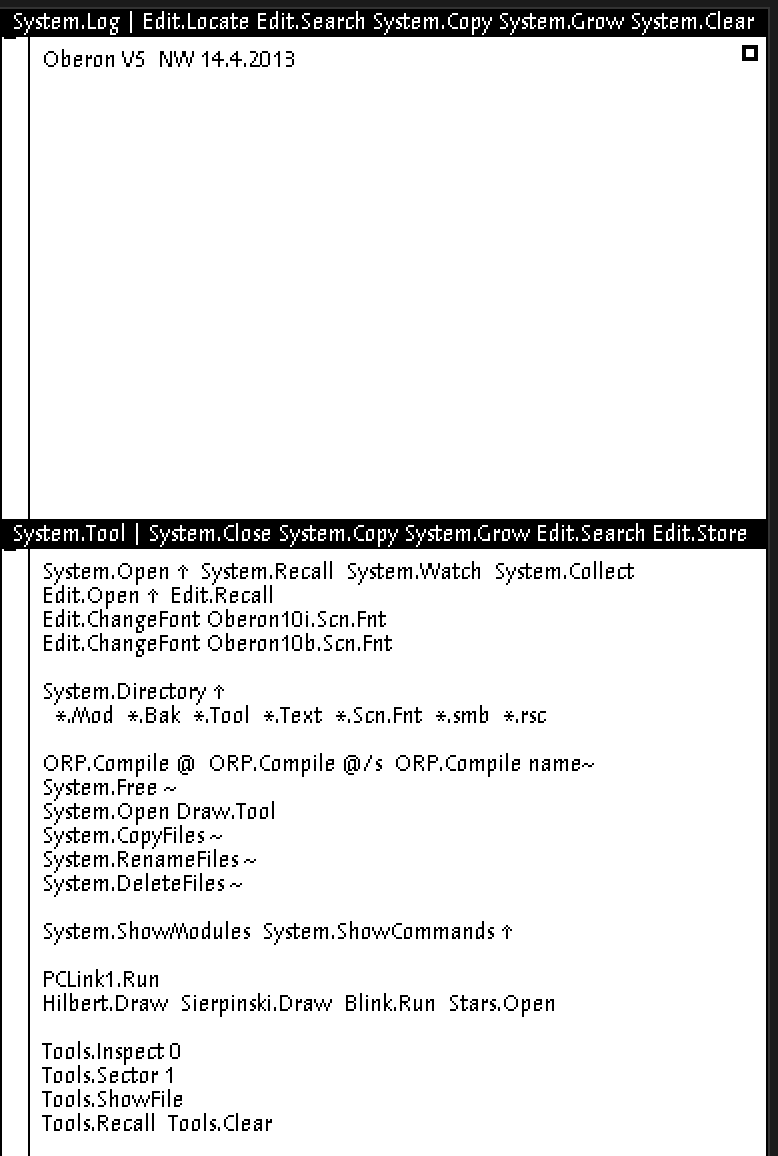
The same system in a browser. The log with the Oberon splash, and a System.Tool window whose text you click with the middle button.
What it took to make this work
The WebAssembly build needed a few stubs for functions the browser lacks, and a couple of workarounds inside Verilator itself, but that’s the dull part. What came next was more interesting.
If you open the page in a background tab, the browser draws nothing on it, and the screen stayed black even after you switched to that tab. I had to separately catch the moment the tab becomes visible.
The mouse was the most interesting of all. Oberon needs to know which of the three buttons are pressed at the same time, and the browser reports presses individually, so the state of all the buttons has to be assembled by hand. On a laptop the middle button is stood in for by a click with Alt held — not Ctrl, as one would want, because on a Mac Ctrl-click is the right button. And a Shift-click stands in for a tricky chord, where you press the left button and, without releasing it, add the right. The page first presses the left itself and then adds the right, because to Oberon it matters which button things started with.
The machine itself runs in a separate thread so as not to hang the page, and passes finished screen frames to the main thread without copying. It also computes only while someone is looking at it, and if the tab is hidden or you’ve scrolled the machine off the edge of the screen, it stops. Otherwise it would honestly burn a whole core of your computer’s processor, because the circuit doesn’t know how to idle and simply counts cycles.
Thanks to this, the machine can be dropped into any page with two lines:
<script type="module" src="https://tym83.github.io/paleocomputing/oberon/embed.js"></script>
<oberon-machine base="https://tym83.github.io/paleocomputing/oberon/"></oberon-machine>
Details and settings are on the Embed it page. There you can also switch the machine to the processor with the new check instruction and place your own files on its disk before boot.
The page where you change the processor
Originally I wanted the reader to be able to change the processor’s instruction set themselves, right there on the page. That, I’ll freely admit, I didn’t do, because rebuilding the circuit from Verilog directly in the browser proved too heavy. The fallback idea from the same plan worked instead: build several processor variants in advance and let you switch between them. On the Change the processor page there are two cores — the ordinary one, like Wirth’s, and one with the new CHK instruction — and on each you can run the same loop that walks an array.
On the ordinary processor, one array access in this loop takes eleven cycles, two of which go on the software check. On the processor with the new instruction it’s ten, because the check takes one cycle instead of two. One cycle out of eleven, exactly as intended. That boring line from the risk table came true.
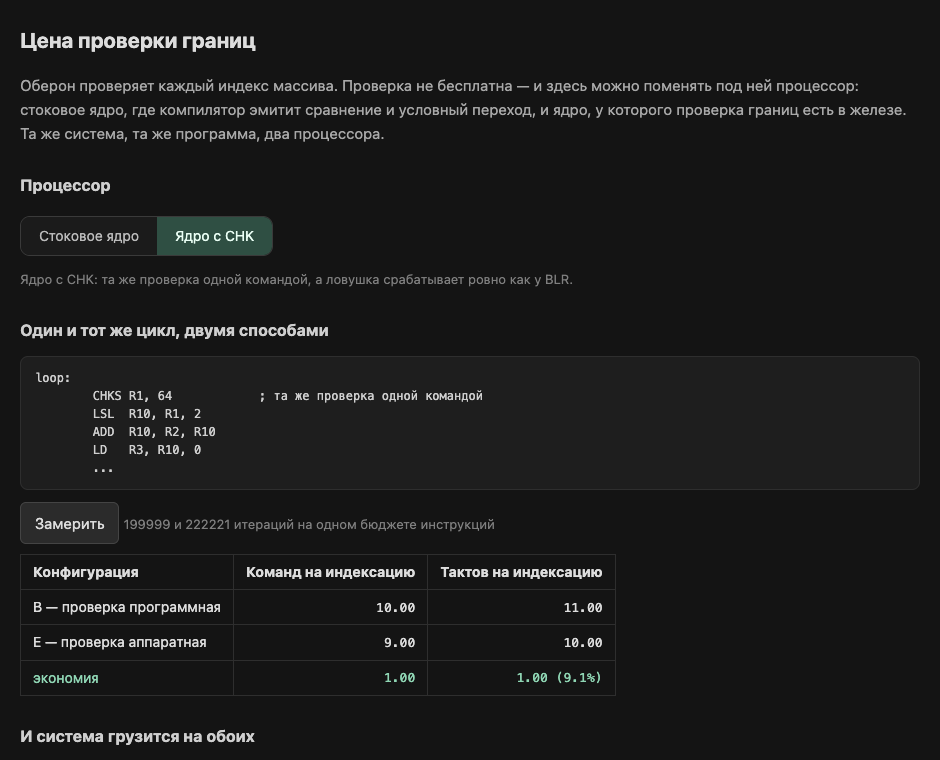
The page where you change the processor. A core switch and listings of the two variants of the loop.
How this measurement lied tenfold at first
And the main thing this page checks isn’t even the cost of the check. The ordinary system, with no new instructions at all, must boot on both processors in exactly the same way, with the same image on the screen and the same number of instructions executed. If, after the new instruction is added, the old programs behave even slightly differently, then I’ve broken compatibility and ended up with some other machine.
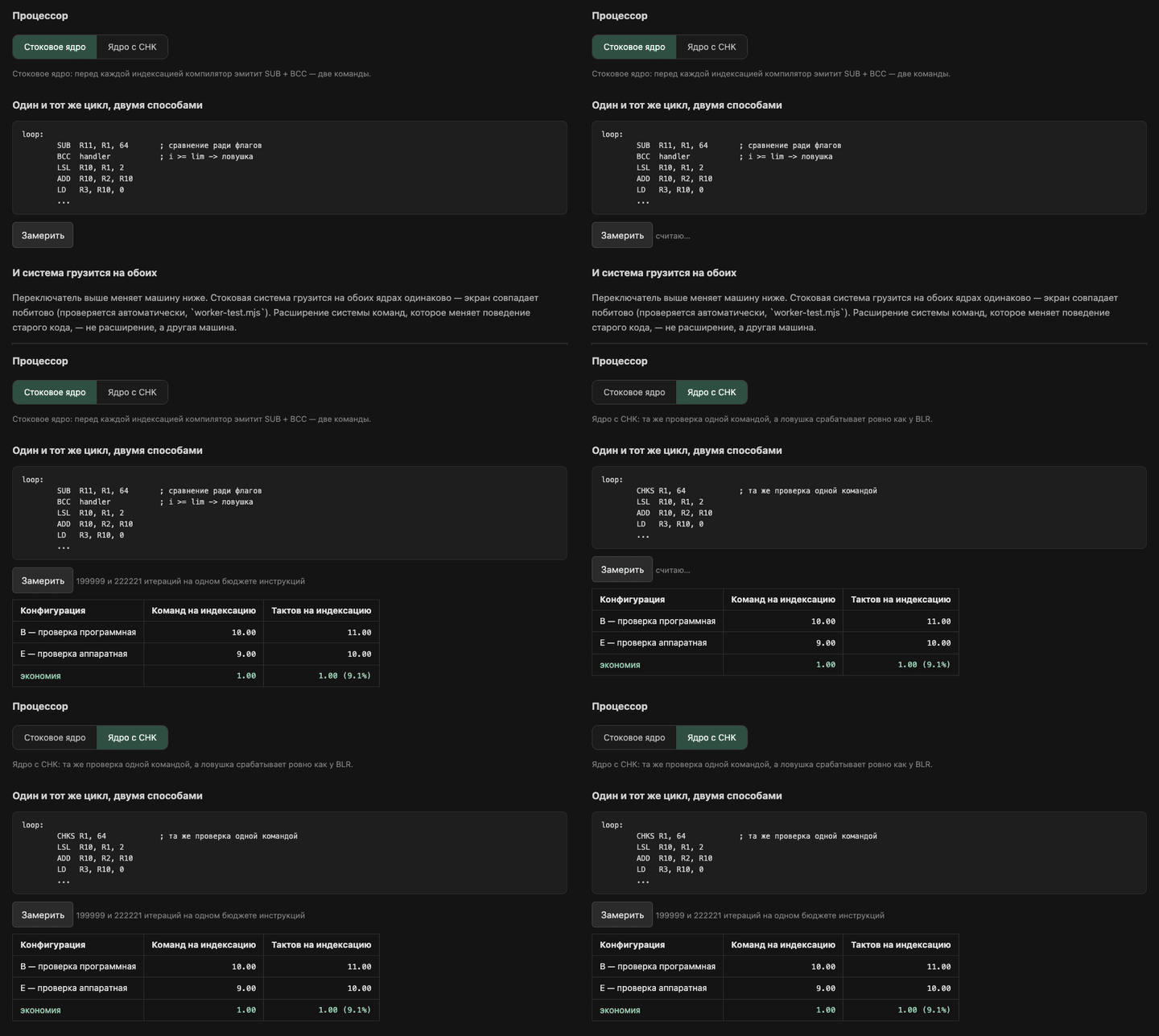
A measurement on the ordinary core, a switch to the core with CHK, and one more. The difference, as promised, is a single cycle.
Thirteen lab exercises
Since the machine runs in the browser, you can learn on it. The lab has thirteen exercises, and each is checked by the machine rather than taken on trust. The check looks into the memory, registers or disk of the emulated computer itself and sees whether you did what was asked. The exercises are graded by level: first just look, then change, break, measure and, finally, build your own.
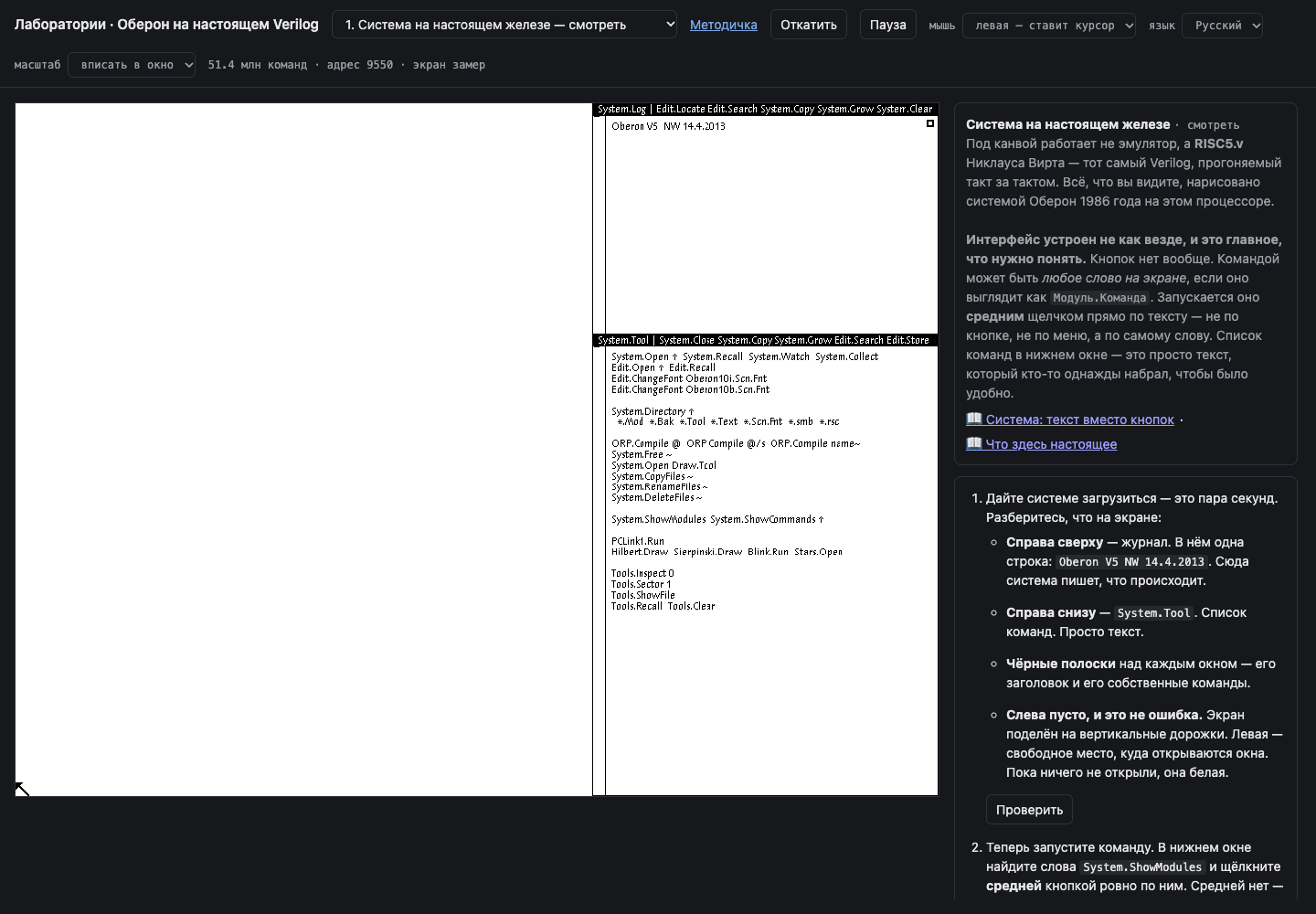
The lab. On the left the machine, on the right the exercise and a check button that looks straight into the emulated computer’s memory.
And this is what the Oberon interface looks like in action. A middle-click on the text System.ShowModules opens the list of loaded modules, and another, on Hilbert.Draw, draws a Hilbert curve. No buttons, only text:
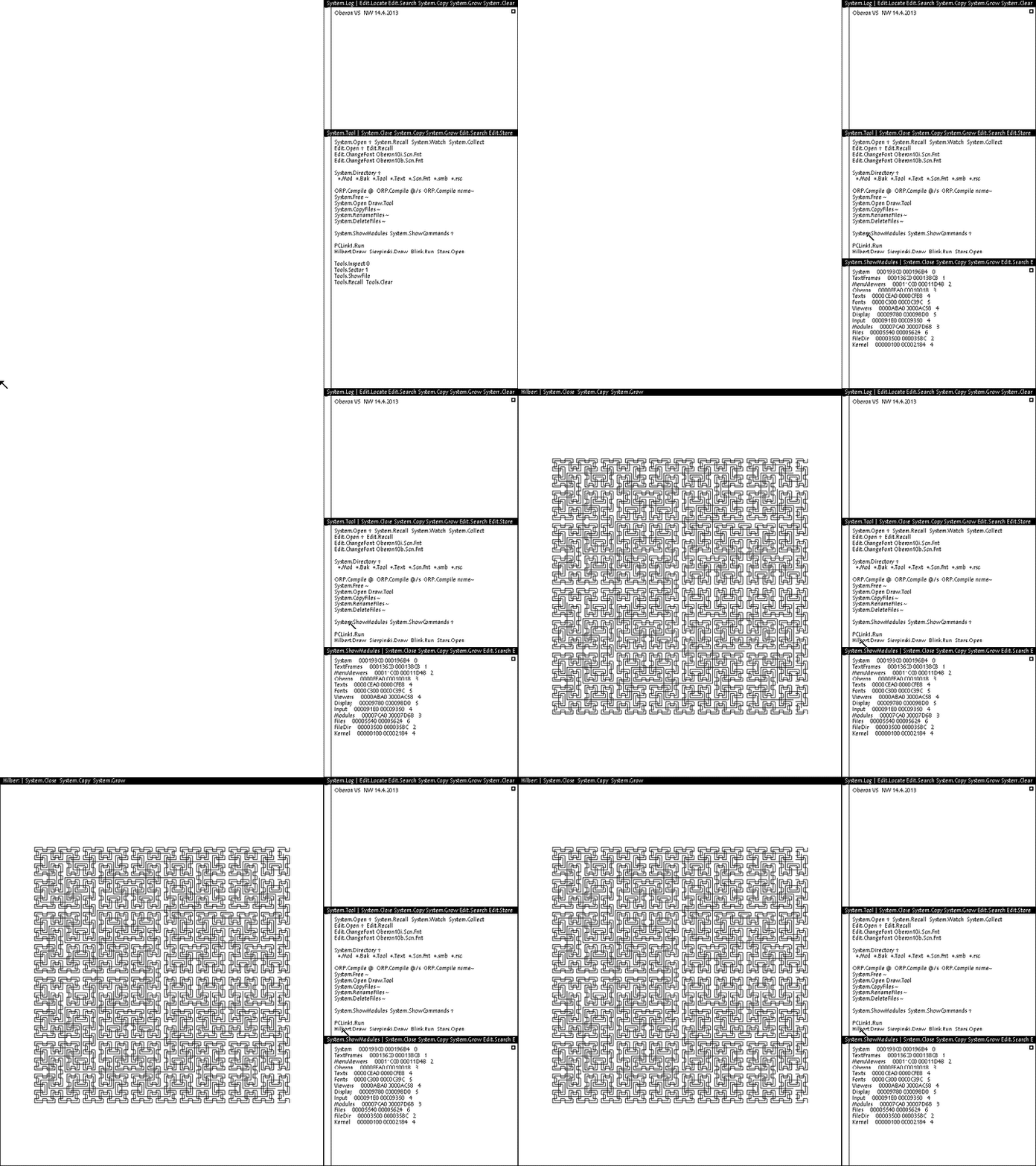
A middle-click on text — that is how you run a program.
| # | Exercise | Level | What you learn |
|---|---|---|---|
| 1 | The system on real hardware | look | that Wirth’s circuit runs under the picture, and how an interface where any text can be a command is built |
| 2 | Your first module | look | how to type, save and compile a program in the built-in editor |
| 3 | The interface key | change | why Oberon has no header files, and how the system guards against incompatible modules |
| 4 | There is no memory protection here | break | what happens if you write garbage straight into screen memory, and how one instruction kills the machine outright |
| 5 | How many cycles per instruction | measure | why, on a machine with no cache, you can count the cycles in your head |
| 6 | Memory runs out mid-instruction | break | why garbage collection works only between instructions |
| 7 | The system rebuilds itself | build | how to rebuild a module inside the system and find the image’s inconsistency with your own hands |
| 8 | Two generations of the compiler | look | why a compiler that builds itself still proves nothing |
| 9 | Inside the compiler | change | where in the compiler the processor’s instructions are born |
| 10 | The garbage collector from the inside | look | that garbage collection is an ordinary task the system calls about once a second |
| 11 | One task at a time | break | why one hung task stops the whole system |
| 12 | The cost of a check, by hand | measure | how to measure three variants on your own loop — no check, software, and hardware |
| 13 | Your own built-in procedure | build | how to add a new built-in procedure to the language by rebuilding the compiler right inside the system |
By default the lab opens in English, and switches to Russian with a button or a link carrying ?lang=ru, and the choice is remembered. Beside it sits an eight-chapter handbook that begins with what’s real here and ends with what we measured, and it has an English version too. If you teach computer architecture and want to take these exercises for your own use, write to me and I’ll help you set them up. They’re open, and the machine can be embedded in your own page with the same tag.
What the lab exercises showed me
The garbage collector in Oberon is very lazy. It runs only if the user has managed twenty actions or memory is nearly out, so a few hundred kilobytes of garbage can sit around indefinitely. And it works only between instructions because it can’t scan the stack, and finds all live objects solely through modules’ global variables.
The automatic typing in one of the exercises was silently corrupting the program. Because of an error in the key table, the closing bracket wasn’t being typed, yet the file was saved just fine, so the check, which looked only for the file’s presence, noticed nothing.
And the button that rolls the machine back to the start didn’t work for a long time, because in Wirth’s circuit the processor’s registers aren’t zeroed on reset. On the first run Verilator zeroes them; on a subsequent one whatever was there remains. On a real FPGA it would be exactly the same, so this is a crutch specific to my rig.
A separate embarrassment of this section is that the lab on the site was dead for a while. The exercise list was empty and an eternal spinner hung on the screen. First I found one error in the page’s code and fixed it, but that didn’t help. The real cause was that the page’s file had no closing tag on its script. I’d considered this harmless — the browser will forgive it — and had even taught the site’s automatic check to forgive it too. But by the HTML standard, if a file ends inside an unclosed script, the browser marks that script as already executed and simply doesn’t run it, issuing neither an error nor a warning. Now the automatic check opens the site in a real browser and requires the page to have as many exercises as the sources do. In short, I no longer say the browser will forgive anything.
And what does the check cost on modern processors?
All right — on Wirth’s processor the software check costs two cycles out of eleven, and the hardware one costs a single cycle. But Wirth’s processor is a very simple machine that executes one instruction after another and guesses at nothing. How do things stand on the processors in our laptops and servers?
I took the same array loop, wrote it in C and in Rust in three variants. In the first there’s no check at all; in the second it’s written the way the language itself writes it; and in the third the compiler is forbidden to throw it away. All three variants I ran everywhere I could reach. Let me note straight away, because without it the numbers can’t be read: the loop is deliberately chosen to be as favorable to the check as possible. The array is small and always sits in the processor’s fastest memory, and the check always passes, so it’s easy for the processor to predict its outcome. On top of that, I forbade the compiler to vectorize — to process several array elements with one instruction — even though in real code checks are costly primarily because they get in the way of exactly that. I wanted to see the check on its own, without everything else.
| Processor | How much the check slows this loop |
|---|---|
| RISC5, software check | by 22% |
RISC5, new CHK instruction | by 11% |
| Apple M4 | not visible, lost in the noise |
| AMD EPYC | not visible, lost in the noise |
| Server-class Arm Neoverse N2 | by 2–6% |
| CHERIoT, hardware check | not one extra instruction |
First, the check itself hasn’t changed at all in forty years — everywhere it’s the same comparison and conditional jump as on Wirth’s machine. Second, the check as the language writes it cost nothing at all anywhere, because modern C and Rust compilers worked out for themselves that the index in this loop never goes out of bounds and threw the check away. Wirth’s compiler can’t do that; it always leaves the check in.
And why is the check invisible on AMD and Apple but visible on the server Arm? This strikes me as the most interesting result of the first half of the project. A modern processor executes several instructions per cycle and reorders them itself to keep all its execution units busy. If a program has little work, the extra check instructions simply drop into the free slots and cost nothing, like a passenger who boards a half-empty bus and crowds no one. I checked this by gradually adding work and checks to the loop and watching for when the checks start to cost time. On AMD one or two checks really do cost nothing, and from the fourth they begin to. On the server Arm each check adds a little time from the very start, because that core has fewer free slots. Wirth’s processor has no free slots at all — it executes one instruction at a time, and every check instruction is a cycle that always gets paid for.
What CHERI does
CHERI is an architecture in which a pointer knows its own bounds — that is, along with the address it stores where the region of memory it’s allowed to reach begins and ends, and the processor checks those bounds itself on every memory access. Such a pointer is twice as wide as an ordinary address, and a program can’t forge it. I wanted to put CHERI on the same ladder, and not on a big, complex processor where an extra instruction can cost anything at all, but on the closest relative to Wirth’s processor. I took CHERIoT-Ibex, a simple 32-bit core that also executes instructions one at a time and has no cache, and ran the same loop on its circuit.
The result was very telling. On CHERI the check takes not a single instruction in the loop, because it’s built into the memory read itself. The loop with protection is exactly the same length as the loop without it. To make sure the protection really works, I narrowed the pointer’s bounds to 32 elements, and the program fell over on precisely the 33rd. And there is no check-free variant on CHERI, and never will be, because there’s simply nothing to turn it off with. The published work confirms this. On CHERI the check itself is nearly free, and what you pay for is the pointer width, because wide pointers take up twice the room in memory and in cache.
And so a ladder emerged. On Wirth’s processor the software check costs two instructions and two cycles, the new CHK instruction costs one instruction and one cycle, and CHERI costs zero instructions. The wide modern processors stand off to the side: they have as many instructions as Wirth’s, but as long as the core has free slots those instructions cost almost nothing. And between CHK and CHERI a gap yawned on this ladder for a long time — one I closed only at the very end of these nine days.
Wirth’s machine in QEMU
The browser is wonderful, but I wanted Wirth’s machine to live where ordinary virtual machines live, with its own console, disks, restarts and all the trappings of a proper hypervisor. Almost every VM on Linux is launched, one way or another, by QEMU, a program that can impersonate computers of the most varied architectures. Wirth’s processor, of course, isn’t among them, so it had to be written from scratch — that is, QEMU had to be taught to understand all of RISC5’s instructions and its idiosyncratic fractional arithmetic, and then a board had to be assembled around the processor, with memory, a disk, a keyboard, a mouse and a screen.
We had one advantage here that almost nobody writing a new architecture for QEMU has. Usually the correctness of such work is checked against documentation and test suites, whereas we had the processor’s own circuit and a reference emulator already checked against it over fifteen million instructions. So we checked QEMU not against paper but against the circuit, instruction by instruction, by that same lockstep technique. Across one and a half million instructions of the boot, no divergence was found; the image on the screen matched the circuit down to the last dot; and the list of modules that opens on a click in System.ShowModules was exactly the same, with the same addresses in memory. The number of dark dots on the screen after boot — 18,607 — became my reference from then on, and wherever the machine ran, that is what I compared the screen against.
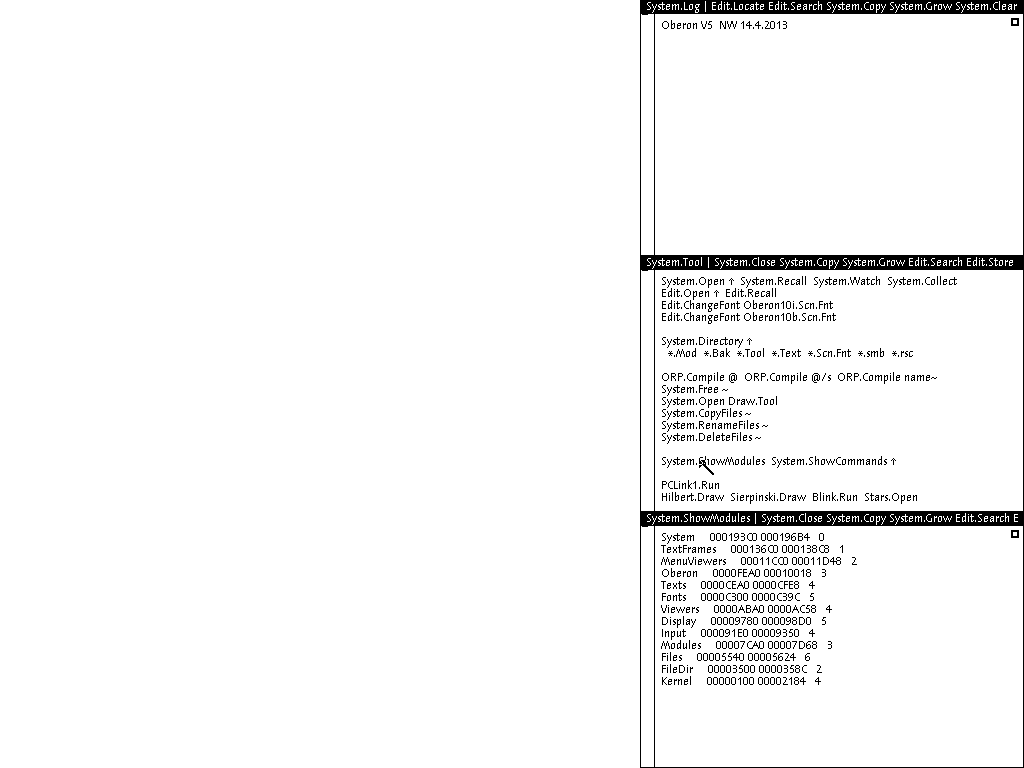
A middle-click on System.ShowModules in QEMU. The same modules at the same addresses as on Wirth’s circuit.
A rule that's in no description of the processor
The first divergence in the lockstep comparison happened very early, on the two hundred and twenty-fourth instruction, and the bootloader hadn’t even reached its first disk read. Wirth’s processor, it emerged, updates the flags showing whether a result is negative and whether it’s zero on any write to a register, including when it merely loads a number from memory. This isn’t in the processor’s description, but it is in the circuit, and Wirth’s bootloader relies on it: right after loading a number from memory, it checks whether it’s zero without doing a separate comparison. It’s for things like this that you check against the circuit and not the documentation.
The fractional arithmetic I did myself too, rather than taking QEMU’s ready-made version, because Wirth’s arithmetic isn’t standard. It rounds differently, handles very small numbers differently, and so on, and a standard implementation would give plausible but different results. The first comparison showed a couple of dozen divergences, and I was already about to fix my code when the comparison itself proved wrong, and the arithmetic had matched on the first try. Had I trusted it, I’d have broken working code.
You can build and run it like this (in detail, in the QEMU guide):
git clone https://github.com/tym83/paleocomputing && cd paleocomputing
make -C qemu build        # builds QEMU in a Docker container
docker create --name oberon-payload ghcr.io/tym83/paleocomputing/oberon-run:v0.1.17
docker cp oberon-payload:/opt/oberon/payload/prom.bin .
docker cp oberon-payload:/opt/oberon/payload/oberon.dsk .
docker rm oberon-payload
.qemu-work/build/qemu-system-risc5 -machine oberon -bios prom.bin \
  -drive if=none,id=sd0,file=oberon.dsk,format=raw -vnc :0
The first command builds QEMU with our processor; the next three pull the bootloader and the system disk out of a ready-made image; and the last one starts the machine. Watch the screen with any VNC client at 127.0.0.1:5900, and if you add chk=on to -machine oberon, you get the processor with the hardware check. Booting without hardware acceleration takes up to a minute, so don’t be alarmed if at first you see only the bootloader screen.
Why this is a separate build rather than a patch to mainline QEMU is also worth explaining. The QEMU and libvirt projects don’t accept code that a language model had a hand in writing — even where it’s only suspected. I have a public repository that says honestly how it was made, so this can go upstream only if someone rewrites the code by hand. The GPL, meanwhile, expressly permits your own build, and the hardest part of the work — an exact description of the processor’s behavior and a way to check any implementation of it — remains useful regardless. One further nuisance is that our processor is written against the very newest development version of QEMU, so already-released versions won’t build it.
libvirt, which won’t take your word for it
The next layer is libvirt. It’s the library through which almost everything that manages VMs on Linux talks to QEMU, from the virsh command-line tool to KubeVirt, which is coming up next. The question was whether a new architecture could be plugged in with no edits at all. It couldn’t — but not for the reason I expected.
First I simply put the architecture risc5 in the machine description, and libvirt refused right away, saying it didn’t know such an architecture. So I got clever, called myself an architecture it did know, and slipped it my own program. libvirt refused again, but this time more deeply. It doesn’t trust what’s written in the machine description; it asks QEMU itself what it can impersonate, QEMU honestly calls itself risc5, and there’s no such name in libvirt’s list. Deceiving it through the machine description is impossible.
So there’s no getting around a libvirt edit, and the edit was tiny — about ten lines in five places. I made it so that the list of architectures is taken from a separate file, and the next old machine would be a new line in that file rather than new code. The build checks each edit separately, because an edit that silently failed to apply is worse than none: libvirt would build without errors but not know the architecture. This came in handy at once, when in a new version of libvirt the relevant piece of code moved to another file, and the build announced it loudly instead of quietly building a broken library.
How libvirt crashed on an honest answer
And here at once is a fine story about why you can’t trust your eyes. The first screenshot from under libvirt looked entirely correct, but a byte-by-byte comparison with the reference found several thousand differences. I managed to suspect the mouse, the moment the screenshot was taken, and libvirt itself — and I’d simply miscomputed the address of video memory from hexadecimal into decimal and missed by 512 bytes. That’s exactly four rows of the screen, and the difference is completely invisible to the eye. After the fix, the screen matched the reference byte for byte.
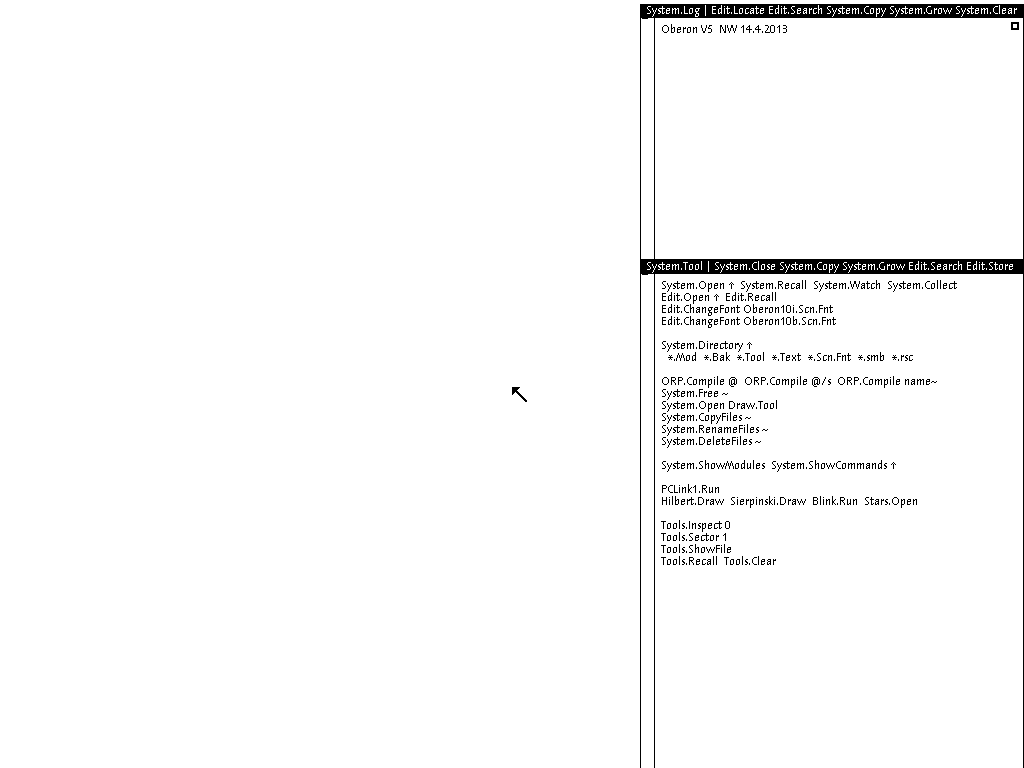
Oberon under libvirt. It looks exactly the same as it did with the 512-byte shift, which is why I no longer trust my eyes.
KubeVirt without a fork
One layer up sits KubeVirt. It lets you run virtual machines in Kubernetes the same way you run ordinary containers, and manage them with the same tools. Inside, each such VM has a housekeeping pod, and it’s there that libvirt and QEMU live. I needed to slip a machine of an entirely different architecture in there, and to do it without making my own copy of either KubeVirt or Cozystack. A private copy of a large project stays with you forever, and you have to drag it by hand through every update, so I very much wanted to avoid that.
A standard extension point that few people know about came to the rescue. Before starting a VM, KubeVirt can hand its description to an external handler and then run whatever the handler returns. The handler can be an ordinary script sitting in the Kubernetes configuration, so you don’t even need to build a separate image for it. Our handler receives the description of a perfectly ordinary VM — with an Intel processor, disks and networking — and reshapes it into Wirth’s machine. It changes the architecture, turns off hardware acceleration (which, for a foreign architecture, doesn’t exist anyway), substitutes our emulator, bootloader and disk image, and throws out everything Wirth’s machine doesn’t have — which is almost everything KubeVirt adds by default.
The emulator itself and the patched libvirt do have to be placed into the housekeeping image that KubeVirt starts all its VMs from. Everything else KubeVirt and Cozystack handle themselves. So for Wirth’s machine the cluster needs exactly two things an ordinary user can’t do: allow external handlers, and install our housekeeping image. The administrator agrees to this once, and after that any user installs the machine from the catalog, much as you’d install a driver package.
The refusals that only show up on real KubeVirt
First I ran the description KubeVirt gives an ordinary VM through the handler and fed the result to libvirt on my own desk. It all started up, the screen matched the reference, and I decided it was done. On real KubeVirt inside our Cozystack the machine wouldn’t start, and there were four refusals, not one of which had appeared on the desk.
First QEMU refused, because KubeVirt requires the machine to support power management, which Wirth’s machine doesn’t have. Then it refused because KubeVirt asks to be allowed to add processors on the fly, and Wirth’s machine has one processor and never any more. The third refusal was the funniest. I removed the section with system information from the description, and now KubeVirt itself fell over, because it reads that section after startup. I put the section back, and QEMU refused again, because it doesn’t support such information for this architecture. In the end the section had to stay, and one small setting had to be removed — the one that makes libvirt pass it to QEMU. Since then I remove exactly what’s refused and not a line more, because a broad sweep of the broom breaks what was working. And the fourth refusal came when I updated KubeVirt while our housekeeping image had been built for the previous version. Now the image is built separately for each supported version of KubeVirt.
There was one more quiet trap with the housekeeping image. We take KubeVirt’s standard image and replace only libvirt in it, and the version of our libvirt has to match, exactly, the one already in the image. Get it wrong and the image builds without a single error, but our library ends up beside the standard one rather than in place of it, and it’s the standard one that runs. So now the build checks that there’s exactly one libvirt in the image, and the correspondence between KubeVirt and libvirt versions is recorded in a single file and can’t be set by hand.
Sixteen seconds to a cluster-wide migration
This is probably the most instructive story of the project, and it’s about my own inattention; the code has nothing to do with it.
The housekeeping image KubeVirt starts VMs from is set for the entire cluster at once. To swap it out, I edited the KubeVirt configuration right on the live cluster — our working rig, on which, among other things, other people’s VMs were running. Sixteen seconds later KubeVirt began migrating every virtual machine in the cluster onto the new image, without stopping them. The thing is, Cozystack has automatic updates of running machines enabled by default, and KubeVirt did exactly what it was told: since the housekeeping image had changed, all the machines needed moving to the new one. Over five hours it attempted to migrate the machines more than a hundred times, and more than half the attempts failed. Nothing crashed and no data was lost, and the successful migrations incidentally showed that our image can migrate machines — but the picture was not a pretty one. Here’s how I stopped it:
kubectl -n cozy-kubevirt patch kubevirt kubevirt --type=merge \
  -p '{"spec":{"workloadUpdateStrategy":{"workloadUpdateMethods":[]}}}'
This command turns off automatic updates of machines, but it’s an emergency brake, not a solution. It doesn’t cancel migrations already under way, the setting will come back at the next Cozystack update, and going entirely without auto-updates is also bad, because after a KubeVirt update the machines would stay on the old housekeeping image. The most galling part of this story is that I knew where to look. I simply checked that the new image existed, and didn’t think to check what it would do to the cluster.
Why half the migrations failed became clear from the logs, and the image had nothing to do with it. By default KubeVirt migrates no more than two machines at a time off a single server; the rest wait their turn and often don’t get one. Quotas got in the way too. During a migration a machine exists in two copies at once and takes up twice the memory, so a machine that has eaten its user’s entire quota will never migrate live. The quota needs headroom, at least enough for the largest machine.
A catalog for Cozystack
Cozystack is an open platform from which you assemble your own cloud on top of Kubernetes. We at Ænix build it together with the community, and it’s part of the CNCF, the foundation where Kubernetes itself lives. The platform has a web interface, users — here called tenants (like separate accounts in a cloud) — virtual machines, and an application catalog holding databases, Kubernetes clusters, caches and the rest. And recently a mechanism for pluggable catalogs appeared in the community. Anyone can publish their own set of applications and plug it into their platform, and then those applications show up for users alongside the built-in ones. For paleocomputing I made exactly such a catalog, inventing nothing beyond what’s already in the platform.
The catalog is split into four parts, because they have to be trusted differently. The first holds the machines and environments for users — the real VM with Wirth’s processor, the browser lab, the handbook, and a bundle that installs all of it at once. The second holds the Oberon language environment, in which you can run Oberon programs as ordinary jobs in the cluster. The third places boot images into the platform’s shared storage, and the fourth swaps out that KubeVirt housekeeping image. These last two touch the whole cluster, and so are installed only with the administrator’s explicit consent.
The catalog is plugged in like this:
cozypkg tap oci://ghcr.io/tym83/paleocomputing/machines:v0.1.17
cozypkg tap oci://ghcr.io/tym83/paleocomputing/languages:v0.1.17
cozypkg add paleocomputing.machines
cozypkg add paleocomputing.languages
# what touches the whole cluster is installed only with the administrator's explicit consent
cozypkg tap oci://ghcr.io/tym83/paleocomputing/images:v0.1.17
cozypkg tap oci://ghcr.io/tym83/paleocomputing/platform:v0.1.17
cozypkg add paleocomputing.platform --allow-privileged
The tap command only plugs the catalog into the platform; add installs its contents. That distinction once confused me too, and at first it wasn’t in the documentation at all.
Before installing the last part, be sure to look at the automatic-machine-update setting in KubeVirt. With Cozystack’s default settings, changing the housekeeping image will send every VM in the cluster off on a migration, and this happens on install, on uninstall, and at every KubeVirt update. Exactly what happened to me. This hole was found by one of the reviewers while checking this very article, so now, if auto-update is on, the component changes nothing and waits until the administrator explicitly permits the migration. You can permit it with the setting allowWorkloadUpdate: true at install time, or with the annotation paleocomputing.io/allow-workload-update=true on the KubeVirt resource. And one more thing. The catalog-plugging utility doesn’t yet verify the digital signature, so if you’re installing this somewhere more serious than a home rig, check the signature yourself; the instructions say how.
After it’s plugged in, a Paleocomputing section of its own appears in users’ catalogs. There’s a wrinkle, though, which I hit while taking the screenshots for this article. The current Cozystack web interface shows only three sections in its sidebar — the ones hard-wired into its code — and hides all the rest at the very end of the full list of applications. At first I couldn’t find my own section either. And yet the whole point of a pluggable catalog is to bring your own sections, not to dissolve into someone else’s. So we’ll be fixing this in Cozystack itself, and the interface will have to show any sections a catalog brings.
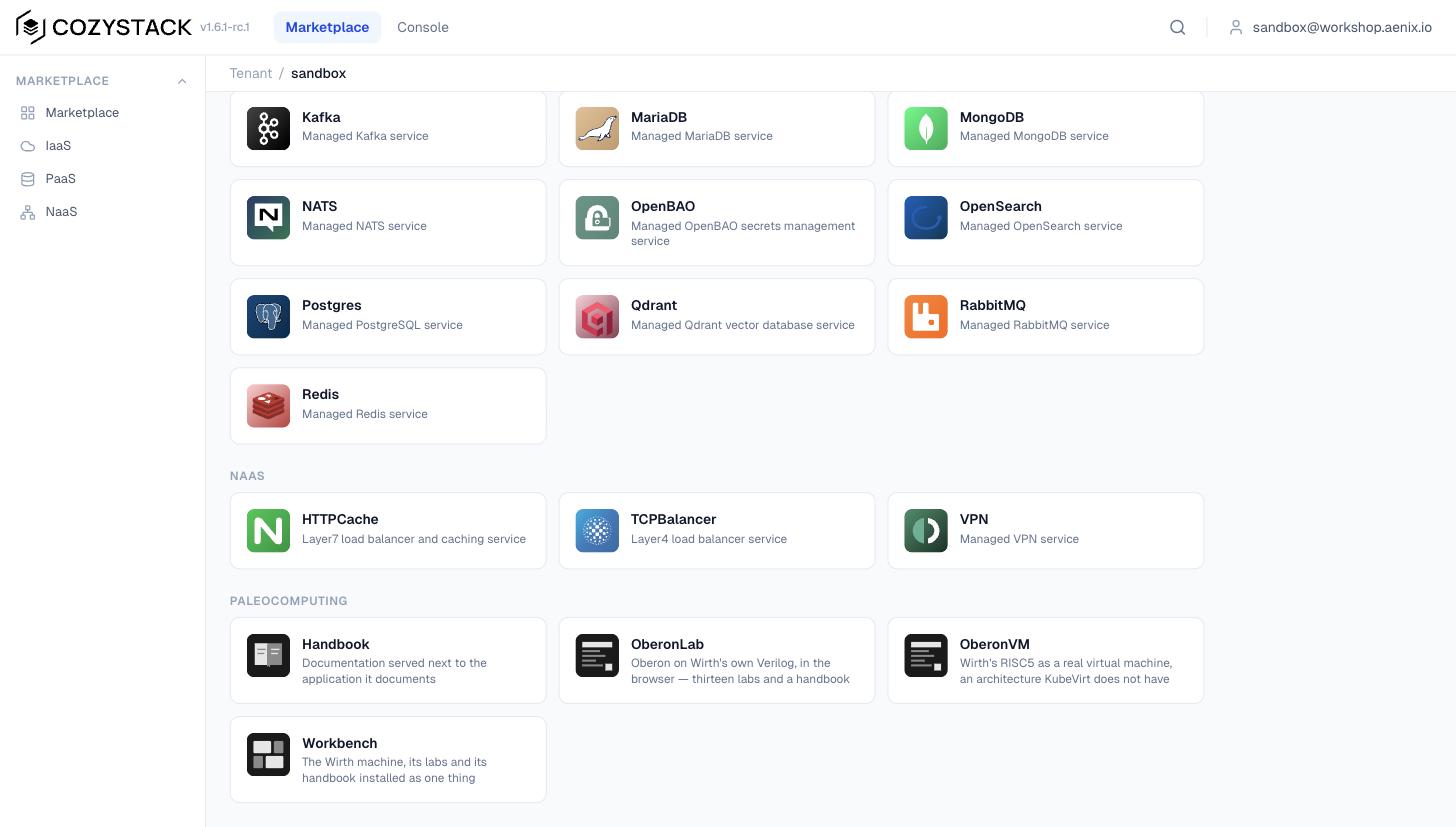
The Paleocomputing section in the full application list. It isn’t in the sidebar yet; we’re fixing that in Cozystack.
The machine is installed with a form in the web interface or with one short description:
apiVersion: apps.cozystack.io/v1alpha1
kind: OberonVM
metadata:
  name: wirth
spec:
  memory: 128Mi
  hardware: chk     # or base, the ordinary Wirth processor
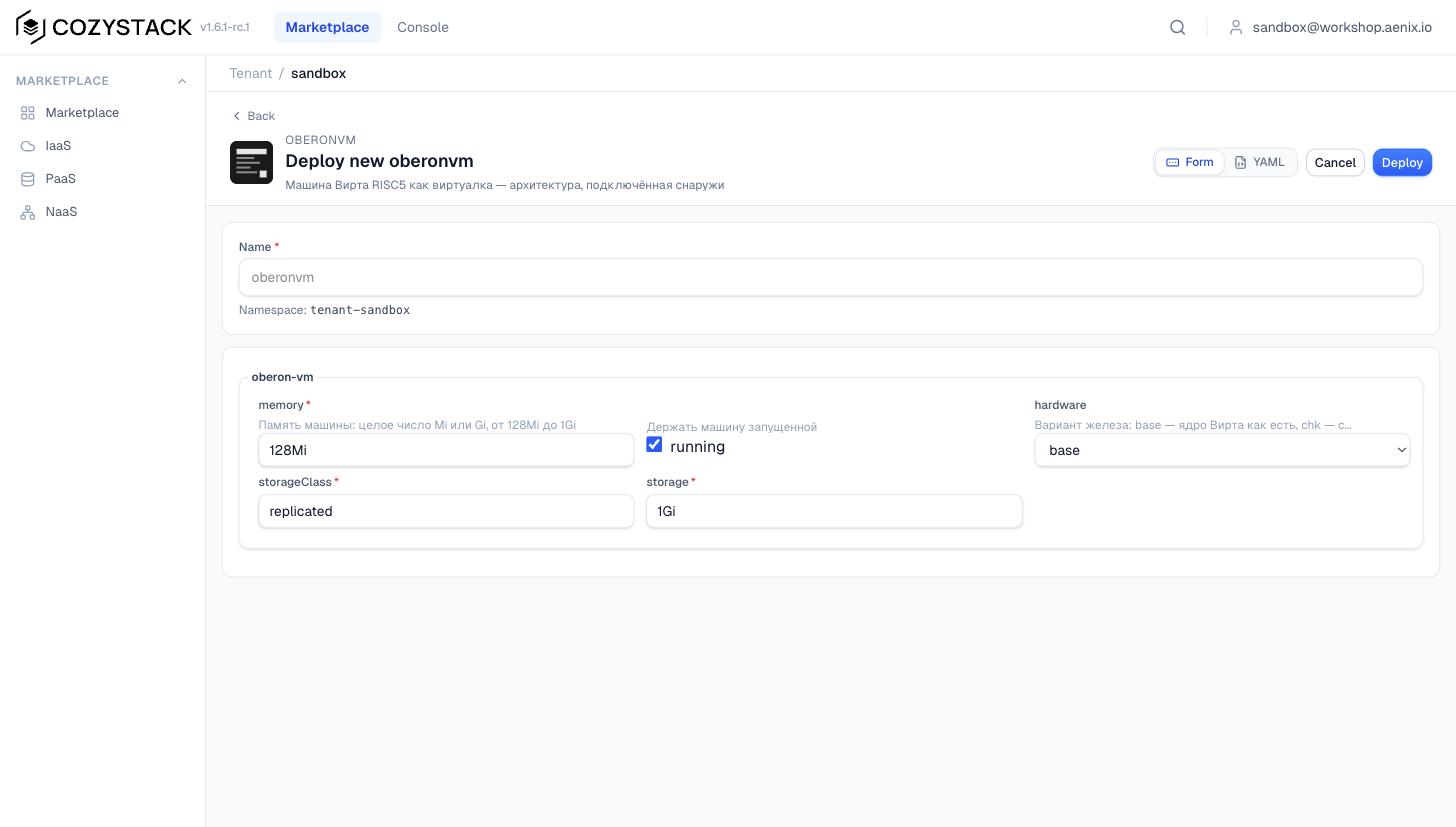
The OberonVM form: memory, processor variant and disk size. That’s the whole machine.
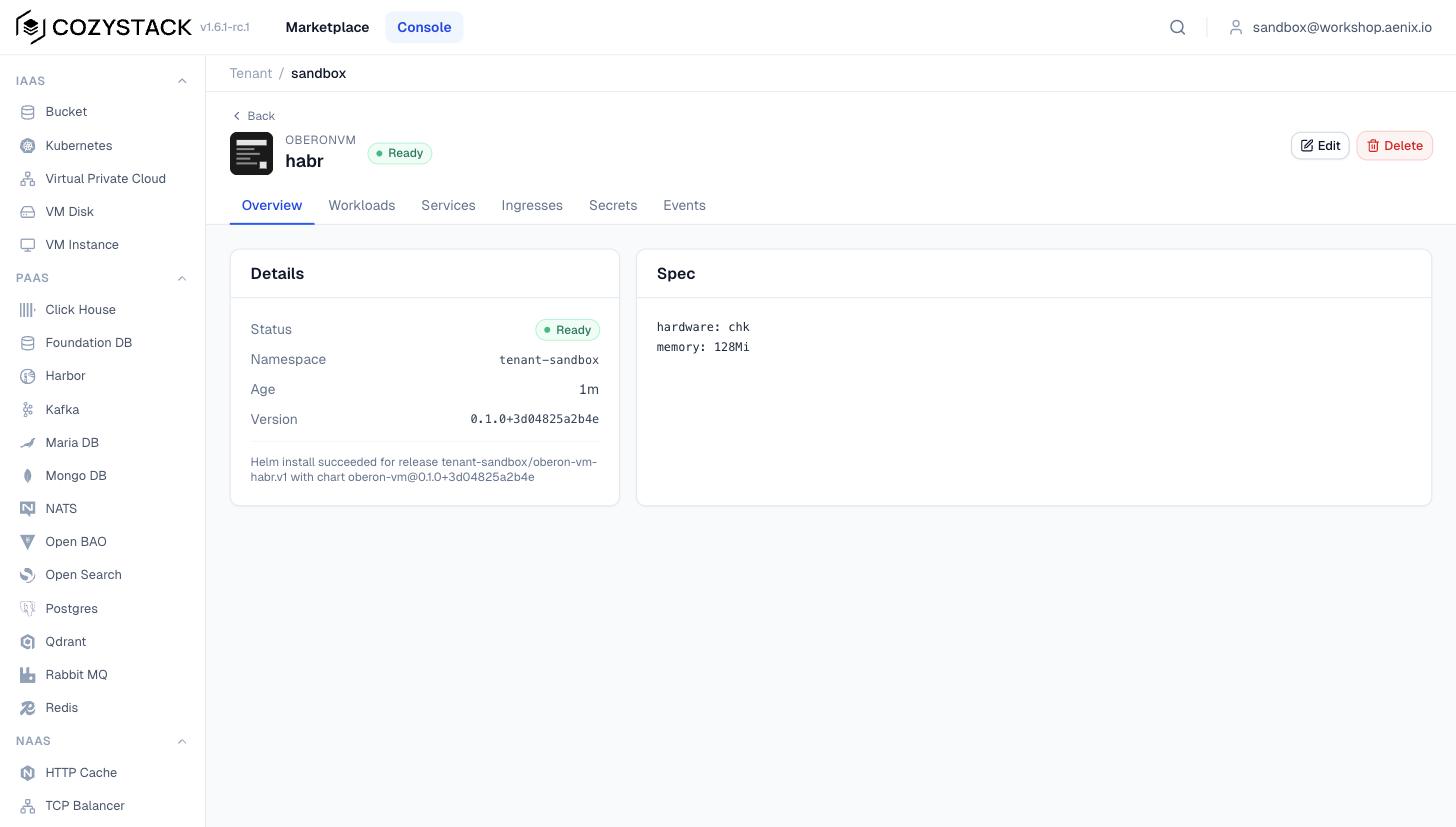
The finished machine in the interface, with its status and a list of what’s running under it.
There’s no screen for the machine in the web interface yet; in the current versions only ordinary VMs have one. You can look at it with the virtctl utility, with the user’s own privileges and any VNC client:
virtctl -n tenant-sandbox vnc oberon-vm-oberon-vm-habr
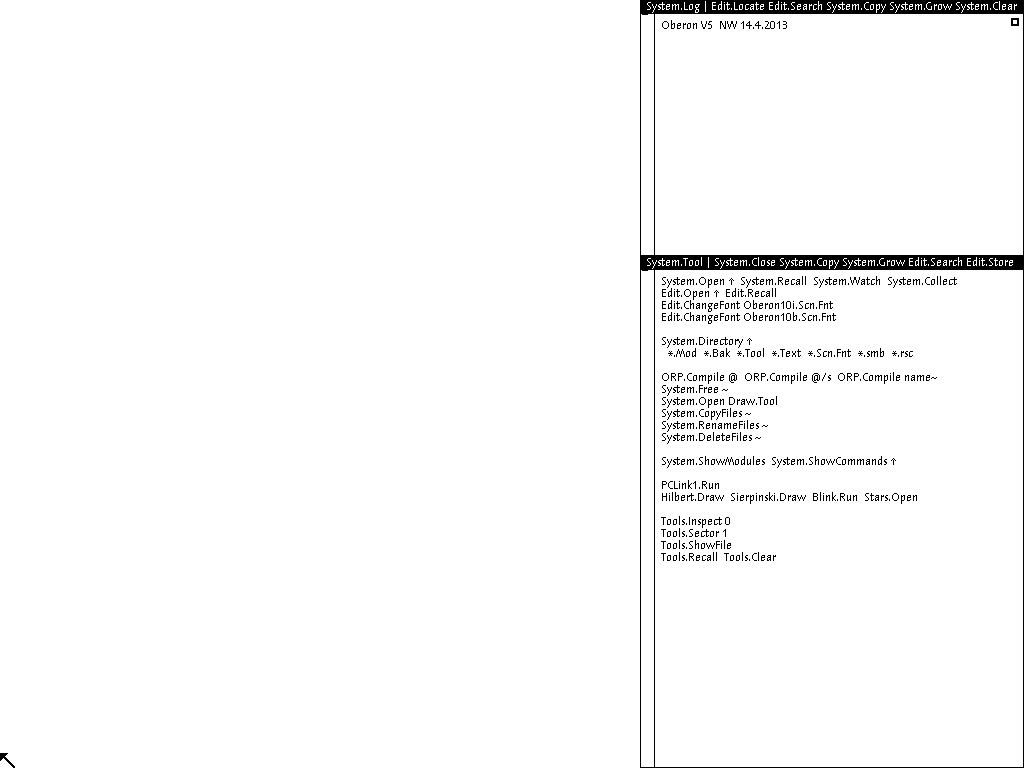
Wirth’s machine in the cloud, captured with an ordinary user’s privileges. The very same 18,607 dark dots.
It’s arranged so that the next old machine won’t require new code. Everything that sets Wirth’s machine apart from the others is recorded in one small file, which I call the machine’s passport: the architecture, the emulator, the bootloader, the disk, the processor variants and the memory limits. Everything else is shared, and the handler for KubeVirt is one and the same for all machines — it simply reads the passport. The next machine, Lilith for instance, is a new passport, not a copy of the code. To prove this isn’t empty talk, the tests include a second, fictional machine of a different architecture, and it builds without a single edit to the code.
What a machine's passport looks like
kind: Machine
name: oberon
image: ghcr.io/tym83/paleocomputing/oberon-run:v0.1.17
domain:
  arch: risc5
  machine: oberon
  emulator: /usr/local/bin/qemu-system-risc5
  vcpus: 1
  graphics: vnc
  terminationGracePeriodSeconds: 0
payload:
  path: /payload
  files:
    - {name: prom.bin,   role: firmware, qemu: ["-bios", "{path}"]}
    - {name: oberon.dsk, role: disk,     qemu: ["-drive", "if=none,id=sd0,file={path},format=raw"]}
variants: {base: {}, chk: {chk: "on"}}
memory: {default: 128Mi, min: 128Mi, max: 1Gi}
The time allowed for a graceful shutdown is set to zero here, because Wirth’s machine can’t hear a request to shut down, and KubeVirt would wait half a minute on it in vain at every restart. The bootloader is replaced with a new one at every catalog update, while the disk is placed once and thereafter belongs to the user, so its files survive updates.
Everything green, and nothing works
While I was fussing with the cluster, the same trap recurred six times in one evening, and I started a note under exactly that title. Each time a check reported success while in fact nothing worked. The catalog is built, but the main file isn’t inside it. The install succeeded, but the machine isn’t running. The server answers that all is well, but the image doesn’t contain the machine itself. The build is green, but the file being copied doesn’t exist. Then there was a seventh time — those very sixteen seconds.
What only shows up on a live cluster
The browser-lab image was published for a long time without the machine itself. The page was there, the processor and disk weren’t, and the check made do with the page being served. Along the way I discovered that, because of one line in the list of ignored files and the fact that the Mac’s filesystem doesn’t distinguish upper- and lower-case, an entire forty-one-file language library never made it into the repository.
The machine with the hardware-check processor started up, but was actually running on the ordinary one. The package for Cozystack, it emerged, contained its own copy of the handler, and I’d been editing another. Now the automatic check compares the copies.
The machine’s screen in Kubernetes was blank at first, because the handler had thrown out the image output along with everything else superfluous. When I put it back, QEMU stopped starting, because the keyboard layouts hadn’t been placed in the image.
One housekeeping task hung with no errors at all. In Cozystack, only pods with a special label may reach the Kubernetes control-plane server, and the network layer silently doesn’t answer the rest. Had it been a lack of permissions, the refusal would have come immediately, so the hang itself was the clue.
And with the digital signature, none of my releases matched what the community catalog expects, because the catalog expects a signature from a build off the main branch, and I was releasing by tag. This was found by reading the sources of the utility, which, as I discovered, doesn’t verify the signature at all.
On the evening of 27 September there was an episode I’m still a little ashamed of. We were reworking how the machine is described in the cluster, and the releases came in a queue. The first stopped at its own checks. The second hung dead, because the task that prepares the machine’s disk was waiting for the machine to start, and the machine was waiting for the disk. The third found two more bugs. At that point I lost my patience and asked the agent why we were shipping release after release, and couldn’t it just check things properly the first time (in the original this was put more forcefully).
It could, and after that the release process changed. Now every change is first built as a test version, a separate sandbox in the cluster switches to it, and a scenario, acting as an ordinary user, installs the machine, checks that it started on the right processor, compares the screen against the reference, restarts it, deletes it, and confirms that nothing was left behind. Only if all of that passes does the change reach the main branch and become a release. A second such scenario checks the component that changes the housekeeping image, and, for good measure, runs an ordinary Ubuntu on our image to confirm we haven’t broken the neighbors. The first release to pass all of this before publication was v0.1.14, and the stuck machines came up by themselves afterwards.
Amusingly, the scenario itself had bugs of its own, even while the system was working. For example, Ubuntu’s boot was at first verified via a helper program inside the guest, which simply isn’t in a clean Ubuntu image, so the check would have waited forever. Then it was verified via the login prompt on the console, and a console without a real terminal stays silent. And the wait function counted only the pauses, not the total elapsed time, so twenty minutes of waiting turned into two hours. The script waited very patiently by a long-since-booted Ubuntu.
The component that watches the housekeeping image
Swapping out KubeVirt’s housekeeping image by hand is a bad idea, for three reasons. It’s shared by all the cluster’s VMs, so a mistake breaks everyone. It has to match the KubeVirt version, and after a Cozystack update it will stay old and break all the machines. And my first manual method incidentally froze several other KubeVirt settings I had no intention of touching.
So the catalog has a separate component that looks at the KubeVirt configuration every half a minute and puts its own part in order. If we have an image for the current KubeVirt version, it installs it. If not, it removes its edit, and the cluster returns to the standard image. Wirth’s machines then won’t start, but everything else will work. If anything at all looks questionable, it likewise removes its edit, and if it couldn’t read the configuration, it touches nothing. It makes its edit in such a way that if KubeVirt ever changes the shape of its configuration, the edit won’t slot the image into the wrong place but will loudly refuse to apply.
And this component the sandbox caught too. On the live cluster it crashed, because it passed one of the utilities information about every server in the cluster at once, and on a real cluster that information is enormous. In the tests the servers were tiny and the test cluster consisted of a single one, so nothing crashed there. Now a test with a cluster of three thousand large servers turns red on the old code.
Servers on Intel and on Arm
When I started building all this for Arm servers too, I was asked why builds for different processors are needed at all if we’ve already added the Oberon architecture to KubeVirt. It’s a good question, and the confusion is natural, because there are two architectures here. One is the architecture of Wirth’s machine, which QEMU impersonates, and it doesn’t depend on the server. The other is the server’s real processor, Intel or Arm. The emulator and libvirt are ordinary programs, and they have to be built separately for each server processor. It’s like an emulator for a games console, where the console is one thing but the emulator’s builds for Windows and for Mac are different.
Our housekeeping image was built only for Intel. And since it replaces the standard image for every VM in the cluster, on a cluster of Arm servers not a single machine would start — not just Oberon. The Arm build went through at once, but the actual launch on Arm stopped three times. First, the image with the bootloader and disk existed only for Intel. Then, that one of the build tools is also released only for Intel. And the third problem was the most interesting. On Arm, KubeVirt always gives a VM modern firmware with its own flash memory, and Wirth’s machine has no flash memory at all, so QEMU exited immediately after starting. On Intel this isn’t visible, because the default firmware there is different. Not one of these three problems was visible in the code or in the built image — only on a live server with the right processor.
Now all of this works on two versions of KubeVirt and on both processor types, and the screen matches the reference in all four combinations. In fairness I’ll note that on Arm I tested bare KubeVirt in a throwaway test cluster, and I haven’t yet run Cozystack on Arm servers.
How to install the machine without Cozystack, on your own KubeVirt
All of this works on ordinary KubeVirt too, without Cozystack, and the automatic check proves it on every change. It brings up a throwaway cluster, installs KubeVirt, swaps out the housekeeping image, starts the machine and compares the screen. Detailed instructions are in kubevirt/GUIDE.md; in short, there are three steps:
# 1. allow external handlers (on servers without /dev/kvm you also need useEmulation: true)
kubectl -n kubevirt get kubevirt kubevirt -o json \
  | jq '.spec.configuration.developerConfiguration.featureGates |= ((. // []) + ["Sidecar"] | unique)' \
  | kubectl replace -f -

# 2. install the housekeeping image for your KubeVirt version
git clone --depth 1 -b v0.1.17 https://github.com/tym83/paleocomputing && cd paleocomputing
KV=$(kubectl -n kubevirt get kubevirt kubevirt -o jsonpath='{.status.observedKubeVirtVersion}')
echo "$KV ghcr.io/tym83/paleocomputing/virt-launcher:$KV-paleo-v0.1.17" > /tmp/launchers.txt
kubectl -n kubevirt create configmap kubevirt-paleo-launcher-status
export KUBECTL=kubectl KUBEVIRT_NAMESPACE=kubevirt LAUNCHER_TABLE=/tmp/launchers.txt
R=marketplace/repos/platform/packages/system/kubevirt-paleo-launcher/files/reconcile.sh
until sh $R once && [ "$(kubectl -n kubevirt get cm kubevirt-paleo-launcher-status \
  -o jsonpath='{.data.state}')" = Applied ]; do sleep 10; done

# 3. install the machine with ordinary Helm and open its screen
python3 marketplace/tools/pin-images.py --release v0.1.17
helm install wirth marketplace/repos/machines/packages/apps/oberon-vm \
  -n oberon --create-namespace --set storageClass=<your StorageClass>
virtctl -n oberon vnc oberon-vm-wirth
Bear in mind that allowing external handlers takes effect across the whole cluster, and anyone who can create VMs directly will be able to slip their own handler into them. On a shared cluster this is worth weighing. And the automatic machine updates from the story above are worth remembering here too.
The second episode: a language model on Wirth’s processor
Remember the claim from that very first plan, that a new instruction which multiplies and adds in one go would double the speed of a neural network on Wirth’s processor? The reviewers demolished it, but a line with their estimates stayed in my list of deferred tasks afterwards. The new instruction, by their reckoning, would give a few percent; a fast multiplier, more than one and a half times. It sounded like a result, but behind those numbers there was neither a program nor a way to reproduce them — only arithmetic off the cycle table. I’d wanted to check it by hand from the start.
The task boiled down to this. A small language model was to run inside the Oberon system itself. A program in Oberon, compiled by the system’s own compiler, reads the model’s weights from a file and prints text, and all of it executes on Wirth’s real circuit, cycle by cycle. And then I’d need to work out where the time goes and check both of the reviewers’ estimates.
Wirth’s machine hasn’t much memory — one megabyte for everything, screen included — so the model came out truly tiny. It predicts the next letter from the previous eight, and has about forty-three thousand parameters. For comparison, the models we chat with have millions of times more. Yet even a model like this takes up almost half of the machine’s free memory. I trained it on an ordinary laptop in a few dozen seconds, on the text of Alice’s Adventures in Wonderland, long since in the public domain.
Why not a transformer, and why not integers
Modern models are built as transformers, and one could write such a model too, but it does the same underlying arithmetic and, on top of that, demands several hundred more lines of intricate maths on Wirth’s non-standard fractional numbers. For the question of what a multiplication costs, that would add nothing.
And converting the model to integers, which usually speeds up computation on weak hardware, would give nothing on Wirth’s processor. On Wirth’s machine, integer multiplication is even slower than fractional multiplication, so integers would only add work. This was settled by arithmetic, not fashion.
Here’s what the model writes if you start it with alice was:
alice was one thought all the tell you spo
Shakespeare can rest easy. But what interests us here isn’t the literature, it’s the stopwatch.
The main requirement was that the text the model prints on Wirth’s circuit match, byte for byte, a reference computed on an ordinary computer. For that, the reference had to be computed not with the usual Python facilities but in exactly the same arithmetic as Wirth’s processor, repeating every operation in the same order. Otherwise nothing would have matched. I separately worked out how far Wirth’s arithmetic diverges from the standard, and found that almost all the intermediate numbers differ in their last digits. The generated text never once diverged, mind you, but that’s simple luck. A comparison against ordinary Python would have been right almost always, and one day inexplicably wrong — the worst kind of bug, because it can be neither reproduced nor explained.
The text matched everywhere. On the emulator, where this check now runs automatically on every change; on Wirth’s circuit; on the circuit with the fast multiplier, of which more below; and inside the real system with windows. The program and the weights are placed on the disk, two middle-clicks first compile the program and then start the generation, and the finished text is read off the disk and matches the reference. In QEMU, the same.
Where the time goes
On Wirth’s processor with its native multiplier, the model prints about nine letters a second. On a live machine, where the video controller takes a little of the processor’s time, slightly fewer. In short, nine letters a second, with luck.
When I looked at what the processor was busy with all that time, the picture was very clear. Almost forty percent of all cycles go on fractional multiplication, and most of that time is simply waiting for the slow multiplier to finish counting. Wirth’s is serial and computes the product one bit per cycle, so a single multiplication takes twenty-six cycles. Another quarter of the time goes on reading from memory. And here another interesting thing emerged. The simplest line of the program, where a product is added to a sum, Wirth’s compiler turns into twenty-seven instructions, of which only four are useful. All the rest is reading and writing the sum to memory, the loop counter and — yes — bounds checks and NIL checks again. The thing is, Wirth’s compiler can’t keep variables in the processor’s registers and goes to memory for them every time. One of the reviewers predicted this from the sources on the first day and guessed the cycle count almost exactly. This, by the way, isn’t an oversight but deliberate simplicity: the whole of Wirth’s compiler is under three thousand lines and builds itself in seconds, and complex optimization simply didn’t fit that budget.
The fast multiplier
Since it all comes down to the multiplier, I wrote a fast one. It does the same thing as Wirth’s, but not one bit per cycle — all at once, in one or two cycles — with the rounding and other subtleties rewritten exactly after Wirth. It’s switched on the same way as the CHK instruction, with a single toggle when building the processor.
The main requirement of it was as strict as everything else: the results must match Wirth’s multiplier to the last bit. I ran tens of millions of pairs of numbers through it, including all the awkward edge cases, and found not a single divergence. And to make sure the check can notice errors at all, I deliberately spoiled the rounding in one place, and it found tens of thousands of divergences.
With the fast multiplier the model ran 1.6 times faster — about fourteen letters a second instead of nine. The estimate from the profile predicted exactly that, but on a simple machine with no caches that’s more a confirmation that the profile was computed correctly than a real prediction. Even if multiplication became entirely free, the program couldn’t be sped up by more than 1.64 times, because the other cycles don’t go anywhere. So the reviewers’ number didn’t quite come true, but on the main point they were right: the multiplier was indeed the bottleneck.
For the system’s ordinary work, though, the fast multiplier gives nothing at all. The compiler building itself does, across forty million instructions, a mere thirty-one fractional multiplications, and the system boot does none. The slow multiplier was a perfectly sensible choice for a machine on which you write text and build programs. The language model was the first task for which it became the bottleneck.
And what of the new instruction that multiplies and adds, the one this all began with? I didn’t implement it; I estimated it from the counters. On Wirth’s ordinary multiplier it would give one and a half to six percent, on the fast one up to ten. So the main lever here isn’t the new instruction but a compiler that learns to keep the sum in a register instead of running to memory for it. But that I no longer measured.
In hardware the fast multiplier was even smaller than the native one, because an FPGA has ready-made hardware multiply blocks (its DSP slices), and all the serial-counting logic simply vanished. The single-cycle variant, mind you, noticeably lowers the processor’s top frequency, while the two-cycle one is almost as fast and doesn’t touch the frequency. The native 25 MHz holds with a large margin in both cases, so you’d only have to choose between them if someone wanted to overclock Wirth’s machine.
Two finds along the way
The first find concerns the comparison of fractional numbers. Wirth’s compiler compares them the same way as integers, through subtraction and a check of the processor’s flags, and for some comparisons it uses the overflow flag. Only that flag is changed exclusively by integer operations. As a result, if an integer overflowed somewhere in the program before a comparison of fractional numbers, the comparison can give a wrong answer. I checked this with a very simple program. First it honestly says that one is less than two; then it overflows an integer; after which it reports, just as confidently, that one is not less than two. This reproduces both on the emulator and on the circuit. My model has no overflows, and the reference checks for that. I claim no novelty here: surely someone has seen this already; correct me if you know where.
The second find was funnier. The model needed to save a text file to disk, and here it emerged that in the whole project nobody had ever written anything to our QEMU, because the system boot only reads from disk. And it couldn’t write, because the disk was attached without write permission, and the very first attempt to save anything brought QEMU down entirely. On top of that, Oberon’s filesystem places new data past the end of the disk, and the disk image was exactly the size the system occupied, so the file silently wasn’t saved either.
When I fixed that and ran the machine in Kubernetes, writing still didn’t work — now because of file permissions. The task that places the machine’s disk onto its volume was supposed to permit writing, but did it in a way that actually permitted nothing. All that time the disk in the cluster was read-only, and had anyone saved a file inside Oberon, the machine would have crashed. Nobody noticed, because nobody was saving anything. Now the permissions are set explicitly, including on already-created disks, and the sandbox check scenario asks QEMU itself whether it opened the disk for writing.
All the details, tables and commands for reproducing this are in the episode write-up, and the essentials can be reproduced in a couple of minutes with cd impl && make lm-check && make lm-profile.
Descriptors, between CHK and CHERI
The CHK instruction checks an index against a length that the compiler baked into the instruction itself, which means the compiler has to know the array length in advance. CHERI keeps the bounds in the pointer, and the check can be neither forgotten nor bypassed. Between these two extremes there historically sat descriptors as well, as in that very Burroughs B5000 of the early sixties. A descriptor is a pointer that carries the array length with it, and the processor checks it on every access, so the compiler no longer needs to know anything in advance. I wanted to put this rung on the ladder and measure it on the same fully open system.
The very first observation narrowed the task sharply. In Oberon the compiler knows the length of almost any array in advance, because the language simply has no pointers to arrays and no variable-length arrays. There’s one exception: when an array is passed to a procedure prepared to accept an array of any length. Inside such a procedure the length isn’t known in advance, and that’s exactly where a descriptor has something to do. Everywhere else CHK already copes.
I fit the descriptor into an ordinary 32-bit word. Wirth’s processor has a 24-bit address, but the machine has only a megabyte of memory, and twenty bits are enough for a megabyte, so I gave the remaining twelve bits to the array length — up to four thousand elements and a bit. And with it one new instruction, which takes a descriptor and an index, computes the element’s address and, if the index runs past the length, jumps to the fault handler. An ordinary address, fed in place of a descriptor, looks like a zero-length array, so any access through it is immediately treated as an error. This is the closest analogue of CHERI’s central rule — that without permission there is no access — that you can build without a special hardware tag.
The new instruction was checked as strictly as CHK: with the same deliberate breakages, lockstep comparison against the emulator, and a check that the ordinary system boots the same on a processor with the new instruction as on the ordinary one. And once again the first attempt lied. The run with deliberate breakages first reported that it had caught them all. The script that introduced the breakages was itself crashing, the circuit wasn’t building, and the fact that nothing had built was being counted as a caught breakage. Now a circuit that fails to build counts as a failed check, not a passed one.
On the same loop as on the two-core page, the descriptor turned out to be the fastest of all — faster even than the variant with no checks at all, eight cycles per access against nine. There’s no miracle in this. The new instruction also computes the array element’s address, which usually takes two more instructions, and had I made an identical instruction without the check, it would run just as fast. The lesson here is a different one, and I like it: if the bound travels with the pointer, the check can be hidden inside an instruction you need anyway. That is exactly how it’s done in CHERI, where the check sits inside the memory read.
Next I taught the compiler to use descriptors where the length isn’t known in advance, and asked the system to rebuild itself with the new compiler. It rebuilt, and the next generation of the compiler matched the previous one byte for byte. This is an important check, because if the compiler had anywhere forgotten to turn a descriptor back into an ordinary address, the address would have been wrong and there’d have been no match.
And then the real system found two boundaries I’d never have thought of myself. The first concerns array length. In the whole of Project Oberon there isn’t a single array longer than four thousand elements, but in the tools I built it with there turned up a sixteen-thousand-element buffer, and the compiler honestly refused to build it rather than silently truncating the length. The second boundary was more interesting. When I built many modules in one run, memory in the emulator crept past a megabyte, and my descriptor can address only a megabyte, so the build simply hung, silently. Hence a very telling conclusion. A pointer with bounds can’t be squeezed into the width of an ordinary address, because as soon as there’s more memory, there’s no room left for the length. That’s exactly why CHERI’s pointers are twice as wide as an address and, on top of that, compress the bounds cleverly.
What does all this construction cost on large loads? On a synthetic program that works heavily with arrays of unknown length, descriptors give a speed-up of about a quarter, for the same reason as in the loop: they save on computing the address. On the compiler, though — a real program — they instead give a tiny slowdown, under a percent, and I spent quite a while hunting for where it comes from, because by calculation it should have been a speed-up. It had nothing to do with descriptors: every time the program passes a string to a procedure, the compiler now assembles a descriptor for it, which made the code a little longer, and the system spends slightly more time loading modules. Had the compiler prepared the string descriptors in advance, this wouldn’t happen, but that I no longer did.
On the FPGA the processor with descriptors still holds its 25 MHz, has about five percent more logic, and the new instruction landed, for the first time, on the circuit’s critical path — its longest signal path — meaning it could limit the frequency in future. CHK never once did that.
In the end the ladder looks like this:
| Rung | Where the bound is stored | Check instructions in the loop | Main cost |
|---|---|---|---|
| RISC5, software check | in the code | 2 | slowest of all |
RISC5, CHK | in the instruction itself | 1 | doesn’t work if the length isn’t known in advance |
| RISC5, descriptor | in the pointer | 0 | memory up to a megabyte, arrays up to four thousand elements |
| CHERI | in a wide, tagged pointer | 0 | pointers twice as wide |
A descriptor removes the check from the loop just as CHERI does, but in Oberon it has almost nothing to protect beyond what CHK already does. And the key thing that sets it apart from CHERI: a descriptor stays an ordinary number, and a program permitted low-level operations can assemble any descriptor from any length and any address. It’s precisely here that CHERI puts a special tag that can’t be forged. A system built entirely with descriptors I haven’t yet booted on the real circuit; this processor isn’t in the browser or the catalog yet either; and all the details and commands for reproducing it are in the episode write-up.
How to install all of this yourself
There are four ways, from the very simplest, where you need install nothing, to your own cloud.
The easiest is to open the lab in your browser and do at least the first four exercises. You’ll see how an interface where any text can be a command works, write your first module, and break the machine by writing garbage straight into screen memory. If you don’t want the exercises, the Just run the system page holds the bare system, and the Change the processor page lets you see the cost of a check with your own eyes. The middle mouse button is stood in for by a click with Alt, and the two-button chord by a click with Shift. Of the things worth trying yourself, I’d suggest a middle-click on System.ShowModules, to see how few modules the system needs after boot, and on Hilbert.Draw, because it’s simply pretty. And then lab exercises twelve and thirteen, the most hardware-facing: in one you measure the three processor variants yourself, in the other you add a new built-in procedure to the language and rebuild the compiler right inside the system.
If you want Wirth’s machine as an ordinary VM, build your own QEMU from the commands in the QEMU section or from the guide. It’s worth trying the processor variants with the hardware check and with descriptors there.
If you have your own KubeVirt, there’s a guide and the short version in the spoiler above. The two latest KubeVirt versions are supported, and servers on both Intel and Arm. You can start with a throwaway test cluster; the same scenario the automatic check runs can be launched by hand. And I’ll repeat the warning once more, because I got burned by it myself: the housekeeping image is changed for all of the cluster’s VMs at once, so on a working cluster, first check whether automatic machine updates are on.
And if you have Cozystack, it’s enough to plug in the catalog with the commands from the Cozystack section, and your users will get Wirth’s machine, the lab, the handbook and a bundle that installs it all at once. The details are on the project page. If you need to show students or colleagues how a whole computer is built, this is probably the quickest way. As for the automatic machine updates, the component now asks about them itself and won’t touch anything without explicit consent.
And if you’d like to check up on us, the command cd impl && make deps && make check will, in about eight minutes, run all the processor tests, the system boot, the lockstep comparison against the reference, the compiler self-build, and a rebuild of the whole system with a byte-for-byte comparison. For this you’ll need Verilator and a C++ compiler.
What I took away from this
First, on bounds-checking. It’s cheaper than commonly thought, but I wouldn’t call it entirely free. On Wirth’s processor — very simple, no caches, no branch prediction — it cost the compiler between two and five percent of the time, depending on which part of the system you remove it from. And most of that cost comes from null-pointer checks, not array-bounds checks. On large modern processors, in my deliberately favorable loop, it’s invisible, because the extra instructions drop into free slots; on the server Arm it’s visible, if only a little. In real programs checks are costly primarily because they stop the compiler from processing arrays in batches, and that I didn’t measure. CHERI hides the check right inside the memory read, and then there’s no check in the program at all.
Second, the bottleneck often turns out not to be where you look for it. For the neural network everyone, myself included, wanted a clever new instruction, while the bottleneck was the old slow multiplier. Replacing it sped the model up 1.6 times, whereas the new instruction, by estimate, would have given a few percent. The reviewers said this on the very first day, and a measurement a week later confirmed it. First measure, and only then add hardware.
Third, a pointer that knows its own bounds has to be made wider than an ordinary address. My descriptors, fit into an ordinary word, ran up against a megabyte of memory and arrays of up to four thousand elements, and that is exactly why CHERI’s pointers are twice as wide.
Fourth, the nastiest bugs are found only by a live environment. My tests were good, but the most interesting things were found by real KubeVirt, real Cozystack and a live Arm server — from a machine that needs no power management, to a network layer that silently doesn’t answer, to sixteen seconds before the whole cluster migrated. Since then I release a new version only if it has first passed a full check in the sandbox.
And fifth, a neural network writes code fast and proves it works slowly. Nine days for all of this happened only because the code was written by agents. But more than half of those days went into teaching the checks to blush honestly, and for every pretty number there was an auditor — also an agent — who took it apart. If a check has never once turned red, it most likely isn’t checking anything, especially when you badly want everything to work out. And a separate open question is what to do with code like this in open-source projects. QEMU and libvirt won’t accept it at all; the CNCF, by contrast, takes it calmly; and how open source is to live with this isn’t yet very clear.
In place of a conclusion
All of this is open. The sources are in the repository, our code under the Apache-2.0 license, and the processor for QEMU under the GPL, like QEMU itself. The site with the lab is tym83.github.io/paleocomputing. Every find, with the commands to reproduce it, is in the repository in the impl/docs folder, and about Cozystack itself you can read at cozystack.io.
Coming up next in the series: the Burroughs B5000 with its hardware memory protection; Lilith, Wirth’s very first machine, which will need only a new passport; and, patience permitting, my own board with Oberon on an FPGA, to finally measure the cycles not in simulation but on real hardware.
If you use Oberon in teaching, or simply wrote in it once, tell me in the comments — I’m very curious where it lives now. And do correct me if I’ve gone wrong somewhere; judging by this article, that happens to me regularly.
A quick poll: what will you do after this article?
- Open the lab and break the machine by writing garbage into screen memory
- Go check auto-updates for the VMs on my own cluster. Right now
- Rewrite everything in Oberon (Go is basically Oberon, only with goroutines)
- Keep turning off bounds-checking for the sake of a couple of percent
- I wrote in it back in the nineties, and I have something to say in the comments
- Made it as far as the poll, which is an achievement in itself
P.S. A special thank-you to Niklaus Wirth. I never met him, but for nine days I talked to his circuit, and it lied to me almost never. Unlike my own checks.