Quick facts
- Project: kubepkg 1.3, Apache License 2.0, github.com/kuberoot-dev/kubepkg
- Package format: Unmodified Helm chart plus a descriptor, stored in an OCI registry; installable with plain Helm, Flux or Argo CD
- Public repository: 49 packages built from recipes, from cert-manager and Cilium to vLLM and Milvus
- Backends: Helm SDK (default), werf’s Nelm, Flux HelmRelease, Argo CD Application
- Trust: Signed index, a TUF-style root of trust with threshold root keys, an admission webhook that pins image digests
- Air-gapped installs: One bundle with index, charts and images, verified on import against keys brought in separately
Linux has apt, dnf and pacman, and nobody remembers what life was like before them. Kubernetes, ten years in, still has nothing that does that job across components. Helm installs a single chart beautifully, and Argo CD and Flux are very good at keeping a cluster in sync with Git. What none of them knows is that half your other components need cert-manager, that KubeVirt cannot be downgraded once it has been upgraded, or that the CRDs one release installed must not quietly disappear along with it. Everyone who builds a platform on Kubernetes ends up writing that layer themselves, from scratch, every time.
This post is about kubepkg, a Kubernetes package manager that runs on any cluster, installs ordinary Helm charts and works the way Debian does: a package repository, a signed index and packages built from upstream sources. In the first part of this series I explained why I started all this, why I think we should treat Kubernetes the way we treat the Linux kernel, and how my toolkit for building Kubernetes distributions works. I only touched on the idea of a universal package manager there, one you can easily embed in any platform or drop into a vanilla cluster. This post goes inside kubepkg and shows what it can do. Every example comes from a live cluster running in a Cozystack tenant.
Where kubepkg came from

How kubepkg came about
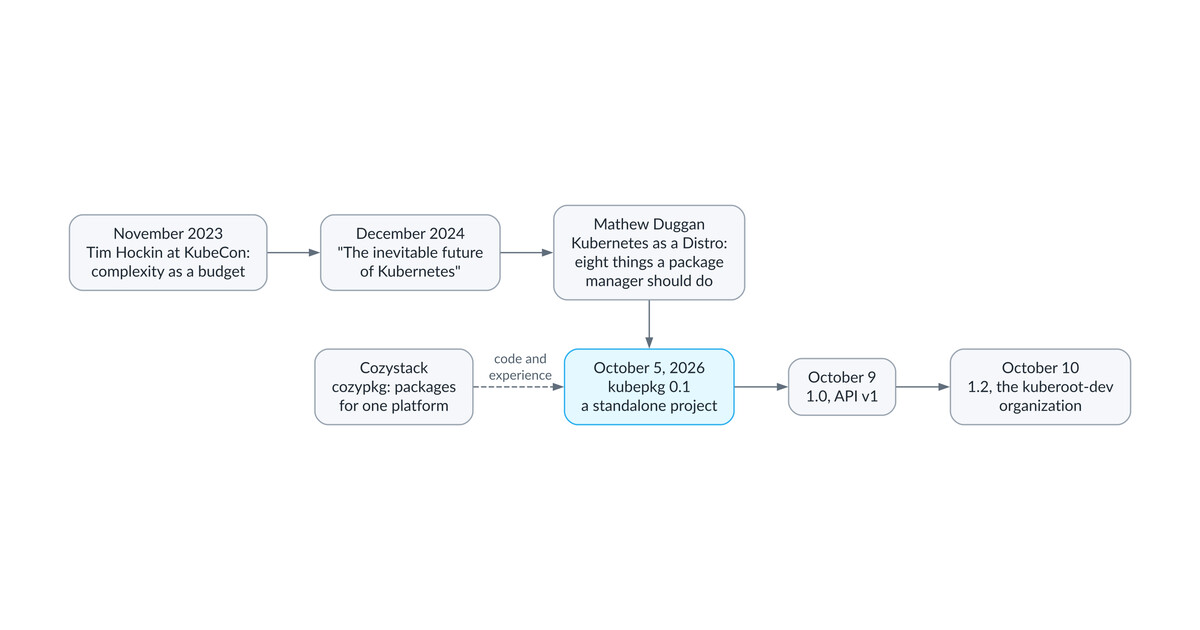
The first part tells the whole story, so here is the short version. Responding to an old article of mine, Mathew Duggan wrote that “the root cause of all of this is simply a lack of a meaningful package management system for Kubernetes,” listed what such a system should do, and later, in What would a Kubernetes 2.0 look like, even gave it a working name: KubePkg. The name of my project is no coincidence.
I did not start from a blank page (and truth be told, I did not really write the code myself at all). The starting point was cozypkg, a tool from the Cozystack project. When Cozystack moved to a package-based architecture, it needed to install and upgrade dozens of components in the right order and keep a clear history of what had happened. cozypkg did that job well, but it was welded to that one platform, so in early October I took part of its code and built a standalone project on top of it, one that depends on no platform and works just as well in a vanilla cluster as inside any Kubernetes platform. Everything below describes version 1.3, which already has a v1 API with a compatibility promise and lives in the kuberoot-dev GitHub organization, next to kuberoot, the distribution builder it was made for.
What Helm is missing
Helm is great at templating and installing a single release. The trouble starts when you have many releases and they depend on each other. Helm does not resolve dependencies between releases: chart dependencies pull subcharts into the same release, so if your application needs cert-manager installed as a separate release, Helm finds out only when the install fails with no matches for kind "Certificate". It does not know which component serves which API, so it cannot tell you that the Prometheus Operator is already in the cluster because someone else put it there. Out of the box, it does not show you what an upgrade will change; that takes the helm-diff plugin. And it has no real opinion about CRDs beyond “install once, never touch again,” even though CRDs are the most dangerous thing in Kubernetes: they are shared by the whole cluster, they outlive the release that installed them, and deleting a CRD deletes every object of that type.
Every platform plugs these holes in its own way. Deckhouse has modules, OpenShift has OLM, Rancher has its catalog, and each is built around its own platform rather than meant to be picked up by anyone else. kubepkg is meant to be the package layer for people who build platforms and distributions. It does not replace Helm, Argo CD or Flux; it works on top of them and alongside them.
Why apt for Kubernetes never happened
The idea is not new, and I am far from the first person to have it. Helm itself launched in 2015 billed as “the package manager for Kubernetes,” and formally it is one: it has packages, repositories and versions. But apt’s value was never in the archive format; it was in knowing how packages coexist, and Helm never grew that layer. Over the past decade, people have tried again and again to extend or replace Helm, and almost every attempt ended the same way.
Back in 2016 CoreOS built KPM, its own package format with its own registry, which later grew into App Registry and the Applications section of Quay. After Red Hat bought CoreOS, KPM stopped being developed, and in 2022 Quay.io removed Applications as well. In 2018 Microsoft, Docker and a few other companies proposed CNAB, a universal bundle format for cloud applications of any kind; its reference implementation, Duffle, has long been archived, and the only living implementation is Porter, a CNCF Sandbox project with a small user base. D2iQ came up with KUDO, a declarative way to describe operators with a package format of its own, and its last release shipped in the spring of 2021. In 2024 Glasskube loudly called itself the next-generation package manager for Kubernetes and collected a few thousand stars on GitHub, but the team moved on to another product and the repository is now archived. Even Kubeapps, which never invented a format at all and was simply a convenient catalog on top of Helm charts, was archived in August 2025 and now lives on as a fork maintained by SAP.
The survivors are the ones with a big platform behind them. OLM works very well inside OpenShift, and kapp-controller from Carvel, whose model of packages and repositories is very close to what I wanted to build, grew up alongside Tanzu. But both have stayed inside their vendors’ ecosystems, and almost nobody uses them outside.
The reason is always the same, and it is not technical. A new package format needs someone to package software in it. The people behind cert-manager, Cilium or KubeVirt will not maintain yet another format for a tool nobody uses yet, and users will not adopt a tool that lacks the packages they need. So a project like this lives exactly as long as its own team keeps repackaging other people’s releases, and when the team burns out or the company changes course, the project dies. Meanwhile the Helm chart has become the de facto delivery standard: most major Kubernetes projects publish one themselves (KubeVirt, below, is a notable exception), with every release, and Artifact Hub lists thousands of them.
That leads to the central design decision in kubepkg. A package is an unmodified Helm chart, and everything Helm does not know about sits next to it in a separate descriptor. I am not asking anyone to repackage anything. A recipe takes the upstream release as is, and when upstream publishes no chart, as with KubeVirt, the recipe builds one from the release manifests, so the result is still an ordinary chart. A built package lives in an OCI registry and installs without kubepkg, with plain Helm, Flux or Argo CD, so even if kubepkg vanished tomorrow, the charts would still install. The price is that we are bound by what Helm can do, and everything it lacks, from install order to component readiness to CRD ownership, has to happen outside the chart rather than inside it. The rest of this post shows how.
What a package is: an unmodified Helm chart plus a descriptor
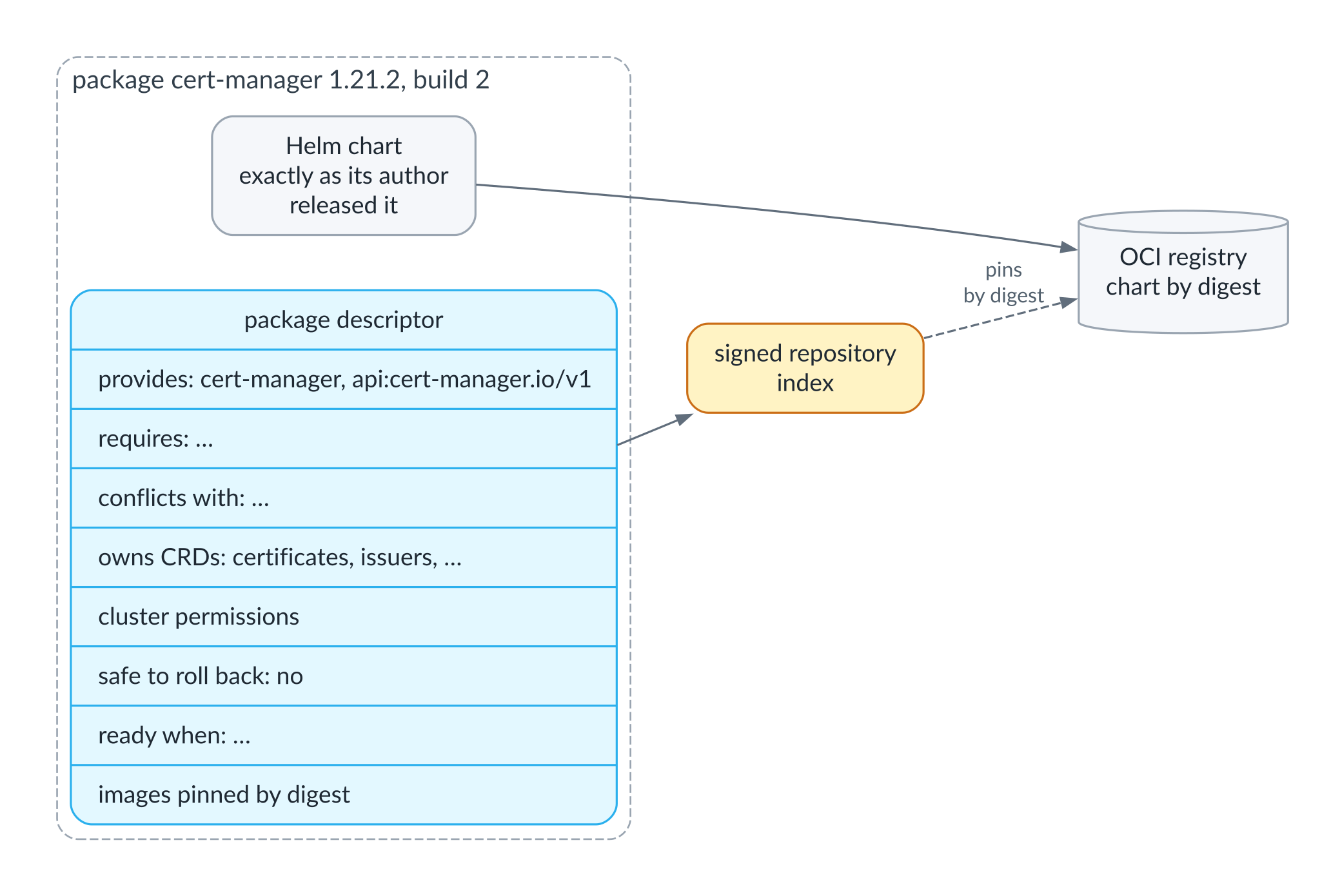
What a package is made of
The diagram shows what goes into the descriptor next to the chart. The more interesting part is how it works.
A package can consist of several components, each a separate chart and a separate release in its own namespace. KubeVirt is a good example: first the operator goes in, then the KubeVirt custom resource that tells the operator to roll out virtualization. The second component makes no sense until the first one is ready, so kubepkg installs them one after the other.
Dependencies come in two kinds. A package can require another package within a version range, say cert-manager 1.20 or later and no higher than major version 2. Or it can require a capability, such as api:monitoring.coreos.com/v1, the API the Prometheus Operator’s CRDs serve. A capability is satisfied either by a package that provides it or by the cluster itself, if the cluster already serves that API. So the Prometheus Operator someone installed by hand three years ago counts, and kubepkg will not ask you to install it a second time.
Built packages remain ordinary Helm charts in an OCI registry. If you decide tomorrow that you do not need kubepkg, Helm, Flux, Argo CD or werf (Alexey, Ilya, Ivan, Dmitry — a big hello to you!) will install those charts just fine.
What it looks like in the cluster
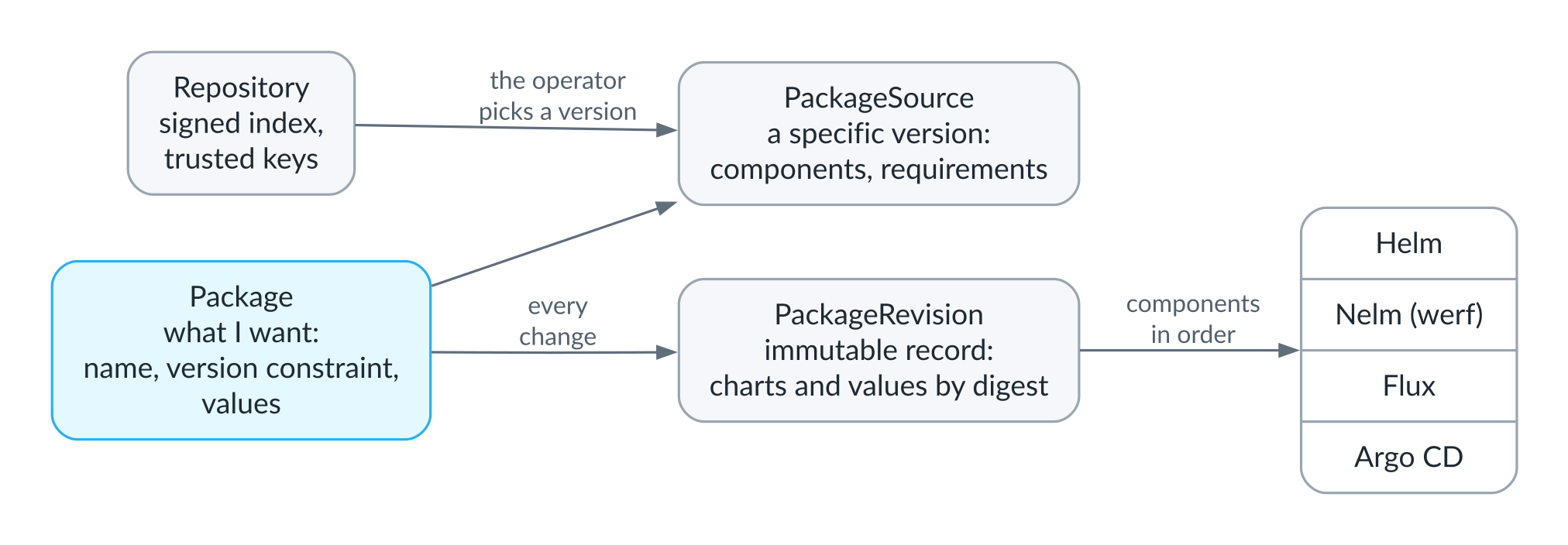
kubepkg objects in the cluster
kubepkg has no package database of its own. All of its state lives in ordinary Kubernetes resources, and on a single cluster there are only four of them.
A Repository is a subscription to a package repository: the index URL and the keys the cluster trusts. A Package describes what you want: the package name, a version constraint, your values for the charts. A PackageSource is the specific version of the package the operator picked from the repositories. And a PackageRevision is an immutable record of exactly what was applied, down to the digest of every chart and every set of values.
You only ever change the Package; the operator does the rest. It picks a version, checks requirements, conflicts and CRD ownership, and if the desired state differs from the current revision, it records a new revision and applies the components in dependency order. It can apply them itself through the Helm SDK, or hand that work to werf’s Nelm, Flux or Argo CD.
First steps
The operator installs as an ordinary Helm chart, and then you subscribe the cluster to a repository. The project’s public repository is built from kubepkg-recipes and currently holds 49 packages, from cert-manager and Cilium to vLLM and Milvus.
helm install kubepkg oci://ghcr.io/kuberoot-dev/charts/kubepkg \
  --namespace kubepkg-system --create-namespace --wait

curl -fsSLO https://raw.githubusercontent.com/kuberoot-dev/kubepkg-recipes/main/keys/index.pub
kubepkg repo add main https://kuberoot-dev.github.io/kubepkg-recipes/index.yaml --public-key index.pub
From this point on, the operator accepts the repository index only if it is signed with that key.
Before installing anything, it is worth seeing what will happen. kubepkg plan resolves a package and everything it needs against the current state of the cluster, and changes nothing:
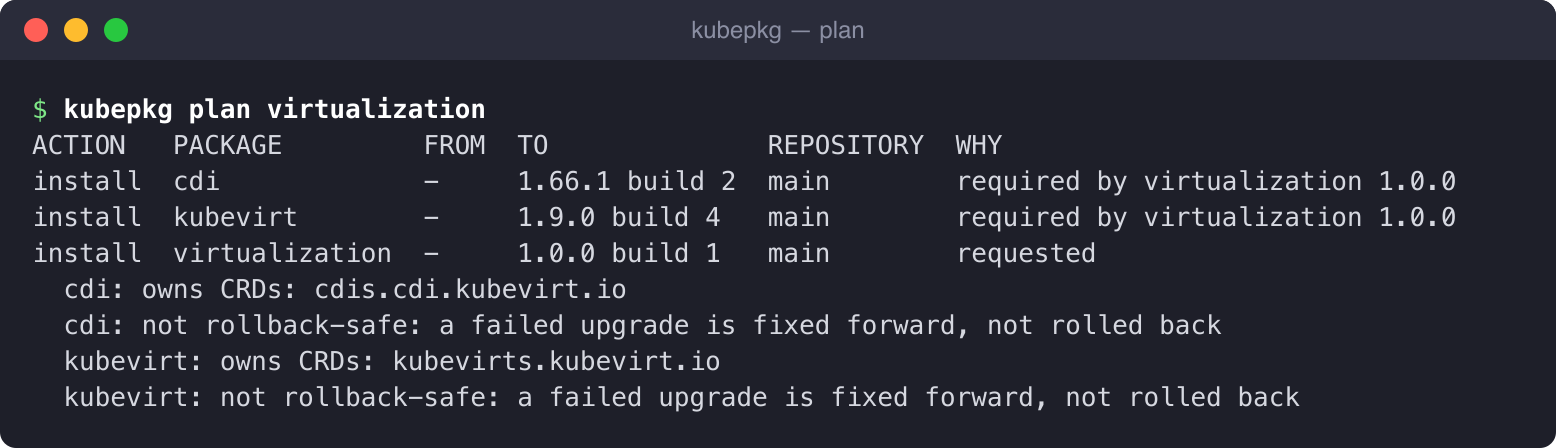
kubepkg plan
Here virtualization is a meta-package. It installs nothing itself; it only requires KubeVirt and CDI in compatible versions. The plan shows where each package comes from, which CRDs it will own and whether it can be rolled back. The same command works nicely in CI on every pull request, so reviewers see the consequences of a change and not just a YAML diff.
Installing shows the same plan and writes one Package object per package into the cluster; the operator takes it from there:
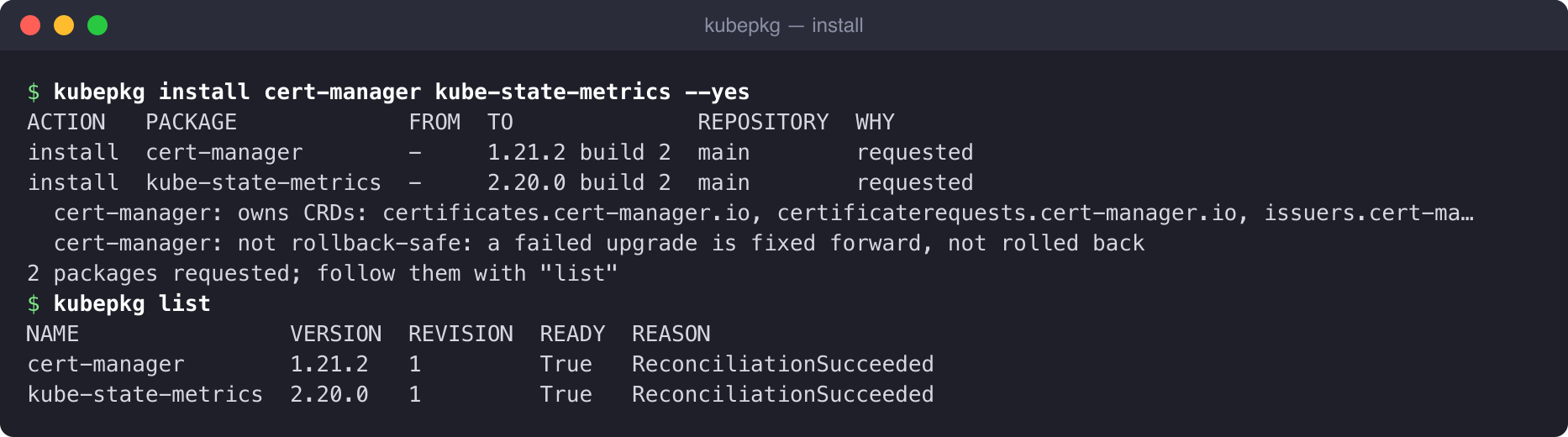
kubepkg install
Every change to a package, whether a new version or different values, creates a new revision. The old ones stay, and you can return to any of them. A rollback also creates a new revision with the old contents, so history only grows and is never rewritten:
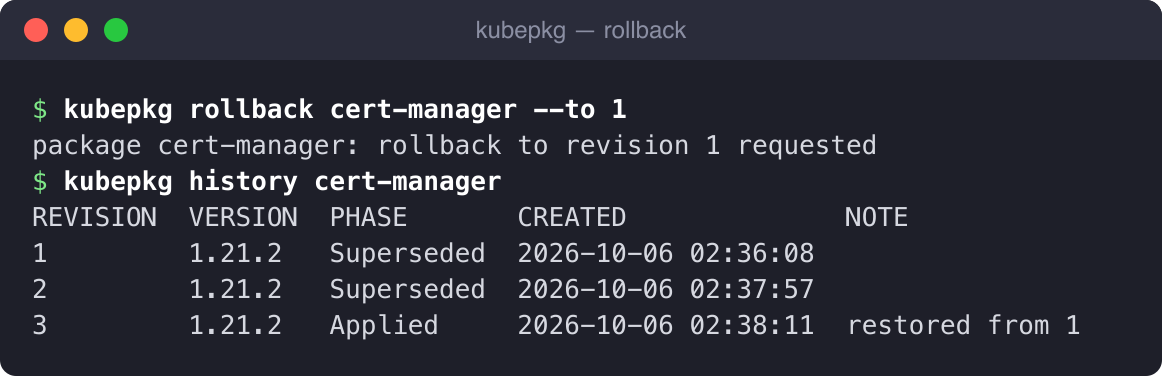
kubepkg rollback
A package repository built from source

How the repository is built
The main idea I borrowed from Debian is that the repository’s maintainer, not the software’s author, builds the packages. Debian builds its .deb files from upstream sources, and kubepkg does the same. It does not matter what upstream ships: a ready-made Helm chart, a set of manifests or a source tarball with a chart buried somewhere inside. The maintainer writes a recipe in which every source is pinned by digest, followed by instructions for turning it into a chart: which values to set, which patches to apply, which objects to drop.
You do not have to write a recipe for a new package from scratch: kubepkg init downloads the upstream release, pins it, lists its CRDs and images and writes a draft you then refine. I will show this on a live example in a moment.
Here is part of the real KubeVirt recipe. It is built from the release manifests rather than a third-party chart, and a patch drops virt-operator’s required affinity for control-plane nodes, which managed clusters do not expose for scheduling:
spec:
  version: 1.9.0          # upstream version
  build: 4                # our fourth build of this version
  sources:
    operator:
      url: https://github.com/kubevirt/kubevirt/releases/download/v1.9.0/kubevirt-operator.yaml
      sha256: f11307caafc3c23ffedf9887d8beb5a4419e2694da242fa68f63d1ec820de2e0
  charts:
    kubevirt-operator:
      from: [operator]    # plain manifests get wrapped into a chart
      exclude: [{kind: Namespace}]
      patches:
        - kind: Deployment
          name: virt-operator
          merge: {...}
kubepkg build turns the recipe into a chart in a registry, and kubepkg repo index gathers every version of every package into a single index and signs it. The same recipe always builds to the same content, down to the digest. Installing into a cluster never reaches out to upstream again: everything it needs is in your registry and pinned by digest in the signed index. A published version never changes; a fix ships as a new build of the same version.
The index is a single static file that you can put on GitHub Pages, in S3 or behind nginx. That is exactly how the public repository works: every merge to main builds the packages, pushes the charts to GitHub Container Registry and publishes a signed index on Pages.
Example: from draft to install
Let’s walk the whole path on a real cluster. We will take podinfo, a small demo application with an official Helm chart, and publish it in a repository of our own. Here the registry and the index web server run right inside the cluster, but with GitHub Container Registry and Pages everything looks exactly the same.
It all starts with a draft recipe. kubepkg downloaded the chart, pinned it by digest and, importantly, rendered it on its own and listed every image it runs, also by digest:
$ kubepkg init podinfo --chart oci://ghcr.io/stefanprodan/charts/podinfo@6.9.2
wrote podinfo/recipe.yaml; review it, then run: kubepkg validate podinfo
$ cat podinfo/recipe.yaml
apiVersion: kubepkg.dev/v1
kind: Recipe
metadata:
  name: podinfo
  annotations:
    kubepkg.dev/description: "Podinfo Helm chart for Kubernetes"
    kubepkg.dev/home: https://github.com/stefanprodan/podinfo
spec:
  version: 6.9.2
  build: 1
  sources:
    upstream:
      chart:
        repository: oci://ghcr.io/stefanprodan/charts
        name: podinfo
        version: "6.9.2"
        digest: sha256:8eacab4365d917867e855bfb4729afdbff28bead3fd9dc01923ab50b26aa4380
  charts:
    podinfo:
      from: [upstream]
      # values: {}                   # the package's defaults over the upstream ones
  package:
    provides: [podinfo]
    crds: []
    images:   # what the charts run, pinned; add images an operator deploys on its own
      - docker.io/curlimages/curl:7.69.0@sha256:d845b6dd655da0e9ae0623065a35185f9b4438aa717fd1c9a3b89843e8b4ff26
      - docker.io/giantswarm/tiny-tools:latest@sha256:8ccea5962d6e24cf90ac726ff8af6ad25ba8dc6a691ad47cb455e3dfcd3f4c22
      - docker.io/stefanprodan/grpc_health_probe:v0.3.0@sha256:0d7bd9c77ef35c3f0432142b5689ae460331a4fecfa469590fe11f3d575669e4
      - ghcr.io/stefanprodan/podinfo:6.9.2@sha256:cab90e04829cdae73199a8402882a4e3ccaf251b8a0d50bdefede0ab3f6371e7
    rollback:
      safe: false   # true once rolling back to the previous version is known not to lose data
    variants:
      - name: default
        components:
          - name: podinfo
            path: podinfo
            install: {namespace: podinfo}
The draft is only a starting point; the decisions in it belong to the maintainer. Here I set two replicas by default and declared rollback safe, because podinfo stores nothing and the previous build can always start again. Validation, build and publishing take four commands:
$ grep -n -E 'values:|safe:' podinfo/recipe.yaml
21:      values: {replicaCount: 2}
31:      safe: true    # stateless: the previous build can always run again
$ kubepkg validate podinfo
podinfo: ok
$ kubepkg build podinfo --registry oci://demo.demo.svc:5000/demo --plain-http -o dist
published oci://demo.demo.svc:5000/demo/podinfo, wrote dist/podinfo-6.9.2-1.yaml
$ kubepkg repo keygen demo
wrote demo.key (private) and demo.pub
$ kubepkg repo index dist --plain-http --sign-key demo.key -o /site/demo/index.yaml
signed /site/demo/index.yaml.sig
wrote /site/demo/index.yaml: 1 packages, 1 versions
$ ls /site/demo
index.yaml
index.yaml.sig
The registry now holds the chart, and the web server holds the signed index. All that is left is to subscribe the cluster and install the package:
$ kubepkg repo add demo http://demo.demo.svc:8000/demo/index.yaml --public-key demo.pub
repository demo added
$ kubepkg search podinfo
NAME     LATEST  REPOSITORY  DESCRIPTION
podinfo  6.9.2   demo        Podinfo Helm chart for Kubernetes
$ kubepkg plan podinfo
ACTION   PACKAGE  FROM  TO             REPOSITORY  WHY
install  podinfo  -     6.9.2 build 1  demo        requested
$ kubepkg install podinfo --yes
ACTION   PACKAGE  FROM  TO             REPOSITORY  WHY
install  podinfo  -     6.9.2 build 1  demo        requested
1 packages requested; follow them with "list"
$ kubepkg list
NAME                VERSION  REVISION  READY  REASON
cert-manager        1.21.2   2         True   ReconciliationSucceeded
kube-state-metrics  2.20.0   1         True   ReconciliationSucceeded
podinfo             6.9.2    1         True   ReconciliationSucceeded
$ kubectl -n podinfo get deploy,pods
NAME                      READY   UP-TO-DATE   AVAILABLE   AGE
deployment.apps/podinfo   2/2     2            2           10s

NAME                          READY   STATUS    RESTARTS   AGE
pod/podinfo-c4fdfd856-7sd7c   1/1     Running   0          10s
pod/podinfo-c4fdfd856-f628c   1/1     Running   0          10s
It took about ten commands to go from a link to someone else’s chart to a running package in your own signed repository, and none of them meant writing a template.
Why not everything rolls back
In the first part I explained why rolling back with snapshots of cluster state does not work: a snapshot of objects does not roll back data. If a new KubeVirt version has already migrated the stored objects to a new API version, putting the old manifests back will not bring the old data back; it is more likely to break whatever still worked. Here is how kubepkg handles it in practice.
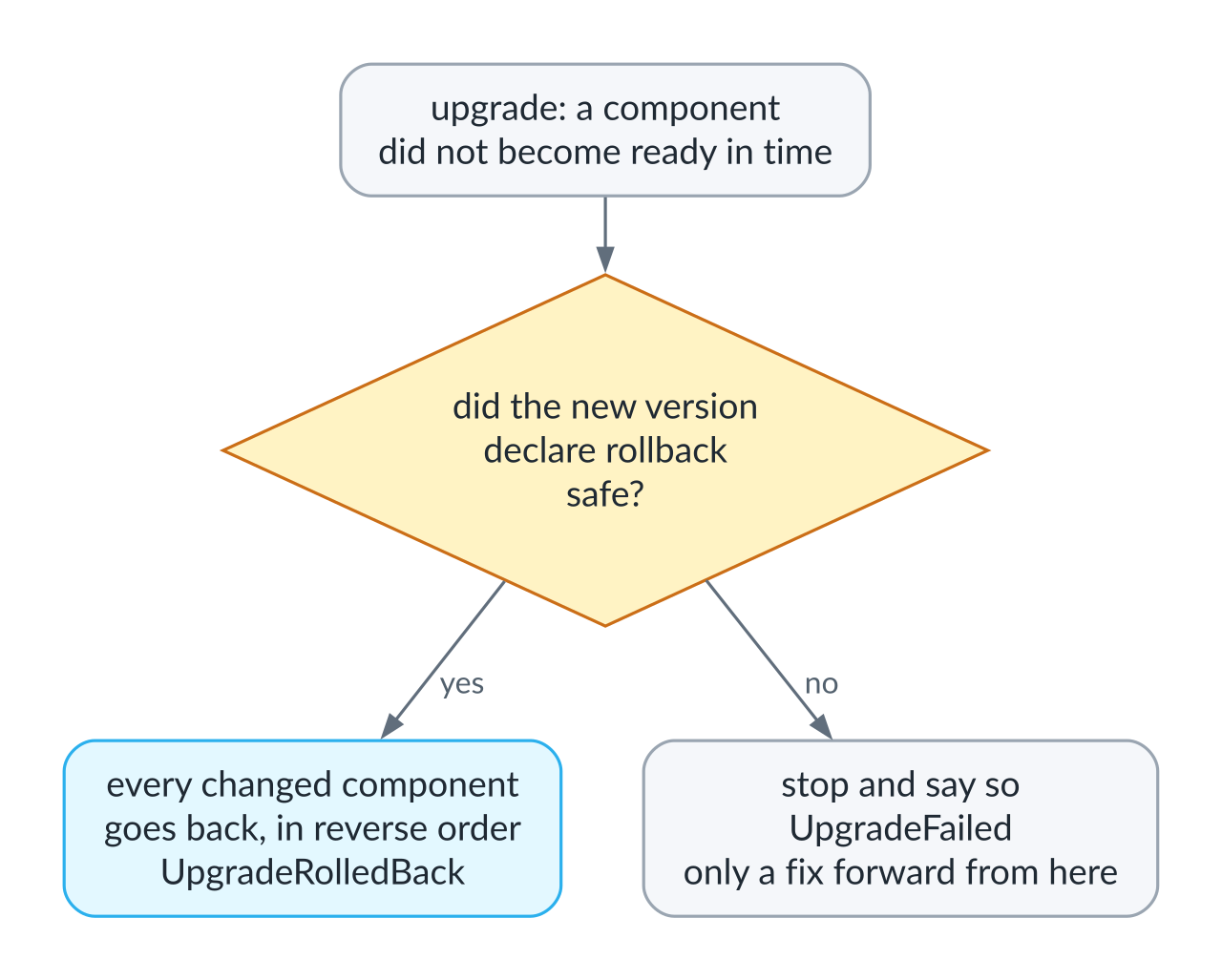
The rollback decision
Whether rollback is safe is declared by the author of the new package version, because only they know what its migrations do. If an upgrade fails and the new version has declared rollback safe, every component that was already changed goes back to the previous revision, in reverse order. If it has not, kubepkg stops and says plainly that the upgrade failed and the only way out is to roll forward with a fix. A rollback that corrupts data is worse than a failed upgrade. For cases where something has to happen before an upgrade, such as taking a backup or running a migration, a package can include a pre-upgrade component, typically a Job, that receives the “from” and “to” versions.
Live: a bad build rolls back on its own
Back to podinfo. I recorded this part later, in a separate run on a cluster that also runs virtualization, so the package list looks different. The podinfo recipe declares rollback safe. To keep the wait short, we give the package two minutes to become ready and have the repository re-read every thirty seconds. A change to the package is recorded as a revision too, so podinfo now gets revision 2:
$ kubectl patch package podinfo --type merge -p '{"spec":{"upgrade":{"timeout":"2m"}}}'
package.kubepkg.dev/podinfo patched
$ kubectl patch repository demo --type merge -p '{"spec":{"interval":"30s"}}'
repository.kubepkg.dev/demo patched
Now imagine the maintainer ships a bad build. In this build, podinfo starts but never becomes ready, like an application that cannot reach its database after an upgrade or fails its own health checks:
$ grep -n -E 'build:|values:' podinfo/recipe.yaml
10:  build: 2
21:      values: {replicaCount: 2, faults: {unready: true}}
$ kubepkg build podinfo --registry oci://demo.demo.svc:5000/demo --plain-http -o dist
published oci://demo.demo.svc:5000/demo/podinfo, wrote dist/podinfo-6.9.2-2.yaml
$ kubepkg repo index dist --plain-http --merge /site/demo/index.yaml --sign-key demo.key -o /site/demo/index.yaml
signed /site/demo/index.yaml.sig
wrote /site/demo/index.yaml: 1 packages, 2 versions
Half a minute later the operator sees the new build in the index and starts the upgrade. The new pods are not ready, while one old pod is still running and serving requests:
$ kubepkg list
NAME            VERSION  REVISION  READY  REASON
cdi             1.66.1   5         True   ReconciliationSucceeded
cert-manager    1.21.2   5         True   ReconciliationSucceeded
kubevirt        1.9.0    4         True   ReconciliationSucceeded
podinfo         6.9.2    2         False  Progressing
virtualization  1.0.0    1         True   ReconciliationSucceeded
$ kubectl -n podinfo get pods
NAME                       READY   STATUS    RESTARTS   AGE
podinfo-84df66bbb8-bwpkg   0/1     Running   0          7s
podinfo-84df66bbb8-vlcwb   0/1     Running   0          7s
podinfo-c4fdfd856-kjts4    1/1     Running   0          116s
Two minutes later the timeout expires. The new build still declares rollback safe (the maintainer changed only the values), so kubepkg brings back the previous one on its own, without waiting for a human. Revision 3 is marked as failed, with the reason, and revision 4 restores the contents of revision 2:
$ kubepkg history podinfo
REVISION  VERSION  PHASE       CREATED              NOTE
1         6.9.2    Superseded  2026-10-18 08:33:16
2         6.9.2    Superseded  2026-10-18 08:34:34
3         6.9.2    Failed      2026-10-18 08:35:04  component podinfo failed: upgrade podinfo/podinfo: resource Deployment/podinfo/podinfo not ready. status: InProgress, message: Pending termination: 1 context deadline exceeded
4         6.9.2    Applied     2026-10-18 08:37:08  restored from 2
$ kubectl get package podinfo -o jsonpath='{range .status.conditions[*]}{.type}={.status} {.reason}: {.message}{"\n"}{end}'
Ready=False UpgradeRolledBack: revision 3 failed (component podinfo failed: upgrade podinfo/podinfo: resource Deployment/podinfo/podinfo not ready. status: InProgress, message: Pending termination: 1
context deadline exceeded), restored revision 2; failed 1 time(s), trying again at 2026-10-18T08:37:35Z, or set kubepkg.dev/retry to try now
$ kubectl get package podinfo -o jsonpath='{.status.retry}{"\n"}'
{"attempts":1,"nextAttempt":"2026-10-18T08:37:35Z"}
$ kubectl -n podinfo get pods
NAME                      READY   STATUS    RESTARTS   AGE
podinfo-c4fdfd856-kdllf   1/1     Running   0          10s
podinfo-c4fdfd856-kjts4   1/1     Running   0          3m59s
The package deliberately stays not ready. It is running the previous build, but the desired state, the newest build in the repository, has not been reached, and a human should learn about that, not just the operator’s log. kubepkg does not give up, though. It retries the same upgrade on its own, first after thirty seconds and then doubling the wait each time, up to ten minutes, and records in status.retry how many attempts there have been and when the next one is due. That way a cluster nobody is watching recovers from a transient failure on its own, or picks up a fixed build 3 as soon as the maintainer publishes it. A change to the package or the kubepkg.dev/retry annotation takes effect immediately, while a rollback a human made with kubepkg rollback is never retried. Here is how things look a couple of minutes later, with no fixed build yet. By now the upgrade has failed twice, the operator has restored the working version both times, and it is waiting a minute before the next attempt:
$ kubepkg history podinfo
REVISION  VERSION  PHASE       CREATED              NOTE
1         6.9.2    Superseded  2026-10-18 08:33:16
2         6.9.2    Superseded  2026-10-18 08:34:34
3         6.9.2    Failed      2026-10-18 08:35:04  component podinfo failed: upgrade podinfo/podinfo: resource Deployment/podinfo/podinfo not ready. status: InProgress, message: Pending termination: 1 context deadline exceeded
4         6.9.2    Superseded  2026-10-18 08:37:08  restored from 2
5         6.9.2    Failed      2026-10-18 08:37:35  component podinfo failed: upgrade podinfo/podinfo: resource Deployment/podinfo/podinfo not ready. status: InProgress, message: Pending termination: 1 context deadline exceeded
6         6.9.2    Applied     2026-10-18 08:39:38  restored from 4
$ kubectl get package podinfo -o jsonpath='{.status.retry}{"\n"}'
{"attempts":2,"nextAttempt":"2026-10-18T08:40:35Z"}
Readiness is a separate problem. Even with --wait, Helm considers a release ready once the objects it created report ready; it knows nothing about what an operator does afterward. The KubeVirt chart creates a single KubeVirt resource and returns right away, and the operator then spends several more minutes rolling out the actual virtualization stack. A package can state the condition under which a component is really ready, for example when the KubeVirt resource reports the Available condition, and until that holds, the next component does not start and packages that depend on it wait.
CRDs as part of the package
CRDs are awkward for any package manager. They are shared by the whole cluster: a cluster holds exactly one copy of each, so two releases cannot ship their own copies side by side. They outlive the release that installed them, and deleting a CRD deletes every object of that type in every namespace. Helm’s answer is radical: CRDs in the crds directory are installed once and never upgraded.
kubepkg makes CRD ownership a first-class concept. A package declares which CRDs it owns, and the plan shows this before anything is installed. Two packages cannot own the same CRD, and kubepkg refuses to install a second package that claims one already owned. A CRD can be handed over from one package to another, for instance when a component moves between packages. When a package is removed, its CRDs stay in the cluster by default, along with their objects, and you have to ask explicitly to delete them. kubepkg also makes sure Helm does not quietly delete CRDs that a chart ships in its templates and drops in a new version.
Trust: signed indexes, a TUF root of trust and pinned images
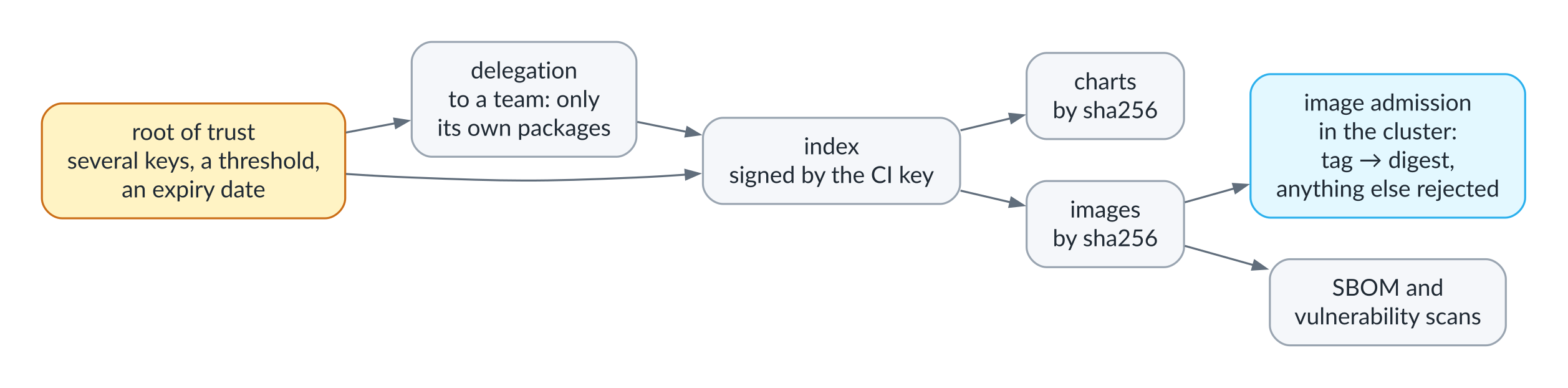
The chain of trust
Every repository comes with its own keys, and the cluster decides for itself whom to trust. It accepts an unsigned repository only when that is explicitly allowed.
A simple repository is signed with a single key. A serious one gets a root of trust following the design of TUF (The Update Framework): a signed file that records which keys the cluster trusts and what each of them may sign. There are several root keys, held offline by different people, and changing the root takes a set number of their signatures, say any two of three, so a single stolen or lost key decides nothing. The index itself is signed by a separate key that lives in CI. If that key is compromised, the root key holders publish a new root version naming a new index key, and clusters pick it up by following the chain of roots, with no change to their configuration. An index can carry an expiry date, and a cluster never accepts an index older than the one it already has, which protects clusters from someone feeding them an old index full of old, vulnerable versions. Finally, the root of trust can hand some packages over to another team: a team’s keys are valid only for the packages delegated to it, and versions of those packages are accepted only with enough of the team’s signatures, so the CI key alone can no longer publish them. This is how trust works in large archives where different packages are maintained by different people.
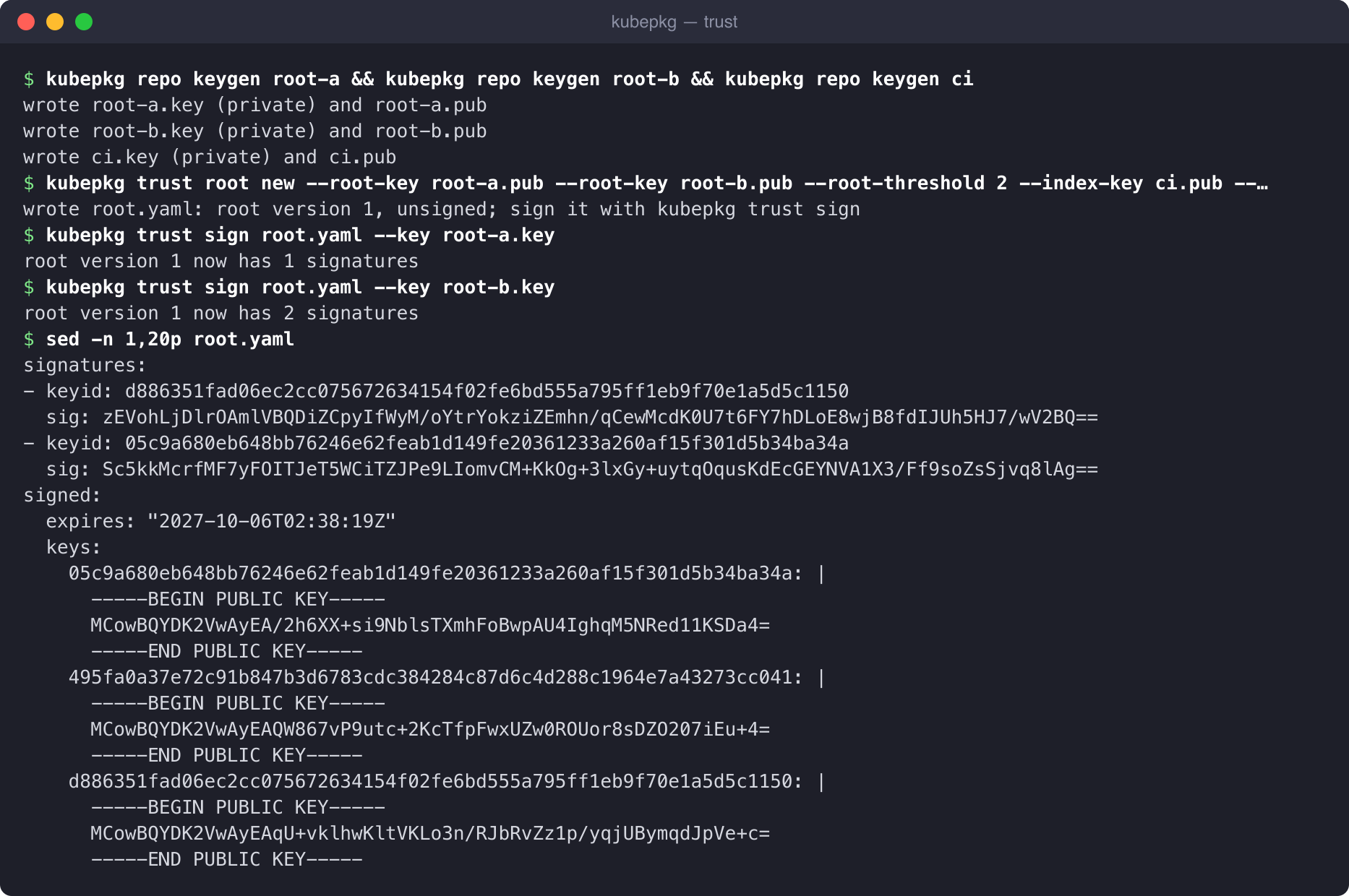
A root of trust with two keys
Because the index pins every chart and every image the recipes list by digest, its signature covers what the repository installs into a cluster. That opens up three more things. kubepkg sbom writes a software bill of materials (SBOM) in CycloneDX format, for a single package or for the whole cluster. kubepkg scan runs Trivy against every image the packages pin and can fail a CI job if it finds critical vulnerabilities. And the image policy has the cluster enforce that package namespaces run exactly the images the index pinned.
That last one deserves a closer look. Charts nearly always reference images by tag, and a tag in someone else’s registry can start pointing at a different image at any moment. When a pod is created, kubepkg’s mutating admission webhook appends the pinned digest to the tag, so nodes pull exactly the image the index vouches for. In enforce mode, an image that no installed package pins is simply rejected:
Error from server: admission webhook "pods.images.kubepkg.dev" denied the request: no installed package pins docker.io/library/busybox:1.36; namespace cert-manager runs only images packages pin (kubepkg.dev/image-policy=enforce)
The operator issues and renews the webhook’s certificate itself. That is on purpose: kubepkg cannot depend on cert-manager, because it may well be the thing that installs cert-manager.
Without the internet: air-gapped installs from a verified bundle
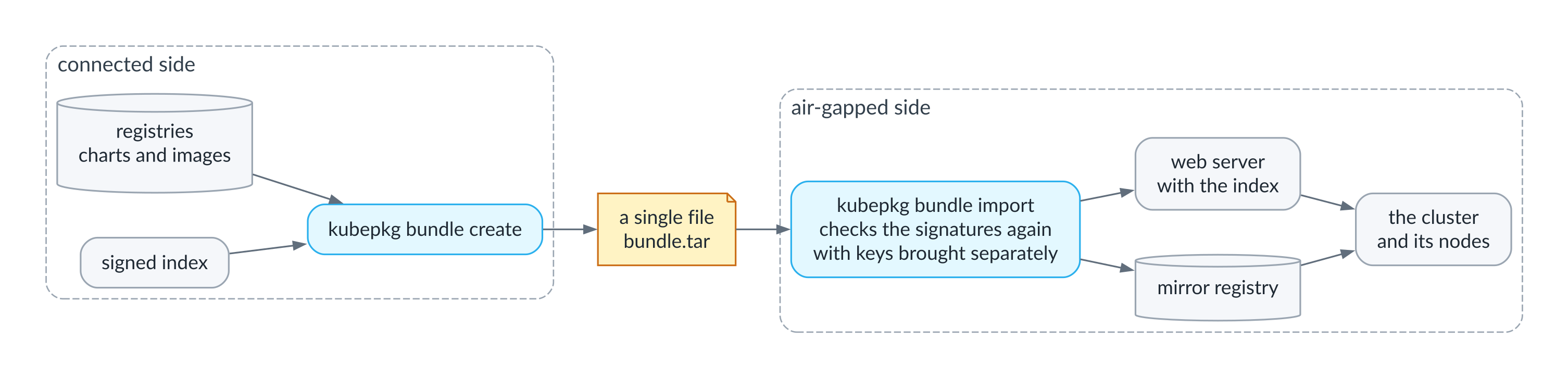
Installing in an air-gapped environment
Plenty of clusters never see the internet at all: government, banks, industrial sites, sovereign clouds. For these air-gapped environments kubepkg builds a bundle, a single file holding the signed repository index, the charts of the selected packages and all their dependencies, and every image those packages run.
What follows is a real run on a test cluster. The kubepkg operator in it is cut off from the outside world by a Cilium network policy and can see only the cluster itself, and a mirror registry and a web server for the index run inside the cluster. The bundle is built on a connected machine from the public repository:
$ kubepkg bundle create cert-manager kube-state-metrics --repo https://kuberoot-dev.github.io/kubepkg-recipes/index.yaml --public-key index.pub -o platform-2026-10.tar
wrote platform-2026-10.tar: 2 packages, 2 charts, 0 package trees, 5 images
$ ls -lh platform-2026-10.tar
-rw-r--r--. 1 root root 377M Oct 12 03:30 platform-2026-10.tar
$ kubepkg bundle inspect platform-2026-10.tar
created 2026-10-12T03:30:25Z

PACKAGE             VERSION         REPOSITORY
cert-manager        1.21.2 build 3  main
kube-state-metrics  2.20.0 build 3  main

IMAGE                                                                                                                                  PINNED BY   PACKAGES
quay.io/jetstack/cert-manager-cainjector:v1.21.2@sha256:c85268c64f2e0e76684bf5fe8906caff34b82523561c6affe0fae3546bd87562               repository  cert-manager
quay.io/jetstack/cert-manager-controller:v1.21.2@sha256:70f532fd9cfde0b09d55687200942399d89838bc2d5d5b45152eb799a15912b8               repository  cert-manager
quay.io/jetstack/cert-manager-startupapicheck:v1.21.2@sha256:46e75b6866359ffb5d82624f41e3ed1c70b2994982702ced547ce5edb418a8f5          repository  cert-manager
quay.io/jetstack/cert-manager-webhook:v1.21.2@sha256:a60e2dac46dbb8a7f3df95c54ce941012f54c2fe022f0ee55aaa1ab40ed957ae                  repository  cert-manager
registry.k8s.io/kube-state-metrics/kube-state-metrics:v2.20.0@sha256:42cfe3723a5f058171c627537fb57a3ea0f26e4380fa18555a95cb1a1b4cfc5b  repository  kube-state-metrics

2 charts, 0 package trees
Every image in the list is pinned by digest, and it was pinned by the repository, that is, by the signed index, not by the bundle itself. That matters for what comes next.
The interesting part happens inside the air gap. kubepkg does not trust a bundle just because it showed up. First, let’s feed the import a bundle with one chart corrupted in transit, simulated by appending a single byte to its archive:
$ kubepkg bundle import tampered.tar --public-key index.pub --mirror oci://demo.demo.svc:5000/mirror --plain-http --site /site
error: the bundle does not check out: chart kube-state-metrics 2.20.0-3 in the bundle has digest sha256:ff78152558d651ae9564bdb4a2ec705d7e234be872e83753398596ff79fda8df, the package pins sha256:2bf8279f5f6195dfb6332dfb8c1251bdcf5a00754dd97102411a614f685d329e
The tampering is caught, and the error shows both digests: the one we got and the one the signed package pinned. Next, let’s take the genuine bundle but verify it with the wrong key:
$ kubepkg bundle import platform-2026-10.tar --public-key other.pub --mirror oci://demo.demo.svc:5000/mirror --plain-http --site /site
error: the bundle does not check out: repository main: index is not signed by a trusted key
kubepkg takes the keys you trust only from the command line, never from the bundle itself, so they have to cross the air gap separately, for example together with your configuration. With the right key, the import puts everything in place and also writes settings for the nodes:
$ kubepkg bundle import platform-2026-10.tar --public-key index.pub --mirror oci://demo.demo.svc:5000/mirror --plain-http --site /site --node-config node-config
verified and imported 2 packages: 2 charts, 0 package trees, 5 images into oci://demo.demo.svc:5000/mirror
repository files: /site/main/; serve them over HTTP and point the cluster's repositories there
node settings for quay.io, registry.k8s.io: node-config
operator: helm upgrade kubepkg ... --set mirror=oci://demo.demo.svc:5000/mirror
$ find /site node-config -type f
/site/sbom.cdx.json
/site/main/index.yaml
/site/main/index.yaml.sig
node-config/containerd/certs.d/quay.io/hosts.toml
node-config/containerd/certs.d/registry.k8s.io/hosts.toml
node-config/talos-registries.yaml
$ cat node-config/containerd/certs.d/quay.io/hosts.toml
server = "https://quay.io"

[host."http://demo.demo.svc:5000/v2/mirror/quay.io"]
  capabilities = ["pull", "resolve"]
  override_path = true
Nodes pull images through the container runtime, not through kubepkg, so alongside the mirror you also need these settings: with them, containerd goes to the mirror for quay.io images, and for Talos there is a ready-made machine config patch. The charts keep referencing quay.io, the digests do not change, and the pod gets exactly the image the index pinned. In this run only the operator was cut off and the nodes could still reach the internet, so I have not tested this part; I am just showing the configuration. In a real air gap the mirror also needs a name the nodes can resolve and a certificate they trust, because containerd does not use cluster DNS.
What remains is to point the operator at the mirror and at the index on the internal web server:
helm upgrade kubepkg oci://ghcr.io/kuberoot-dev/charts/kubepkg -n kubepkg-system --reuse-values \
  --set mirror=oci://demo.demo.svc:5000/mirror \
  --set 'repositories[0].name=main' \
  --set 'repositories[0].url=http://demo.demo.svc:8000/main/index.yaml' \
  --set-file 'repositories[0].publicKeys[0]=index.pub'
Let’s confirm the operator really is cut off and cannot reach the public repository:
$ kubepkg repo list
NAME  PRIORITY  PACKAGES  READY  URL
main  0         49        True   http://demo.demo.svc:8000/main/index.yaml
$ kubepkg repo add public https://kuberoot-dev.github.io/kubepkg-recipes/index.yaml --public-key index.pub --priority -1
repository public added
$ kubepkg repo list
NAME    PRIORITY  PACKAGES  READY                URL
main    0         49        True                 http://demo.demo.svc:8000/main/index.yaml
public  -1        0         False (FetchFailed)  https://kuberoot-dev.github.io/kubepkg-recipes/index.yaml
$ kubepkg repo remove public
repository public removed
The main repository is now read from the internal web server and accepted, while the public one stays out of reach. Let’s install a package and look at what the mirror holds:
$ kubepkg install kube-state-metrics --yes
ACTION   PACKAGE             FROM  TO              REPOSITORY  WHY
install  kube-state-metrics  -     2.20.0 build 3  main        requested
1 packages requested; follow them with "list"
$ kubepkg list
NAME                VERSION  REVISION  READY  REASON
cert-manager        1.21.2   2         True   ReconciliationSucceeded
kube-state-metrics  2.20.0   1         True   ReconciliationSucceeded
$ python3 -c 'import json,urllib.request; [print(r) for r in json.load(urllib.request.urlopen("http://demo.demo.svc:5000/v2/_catalog"))["repositories"]]'
mirror/ghcr.io/kuberoot-dev/kubepkg-packages/cert-manager/cert-manager
mirror/ghcr.io/kuberoot-dev/kubepkg-packages/kube-state-metrics/kube-state-metrics
mirror/quay.io/jetstack/cert-manager-cainjector
mirror/quay.io/jetstack/cert-manager-controller
mirror/quay.io/jetstack/cert-manager-startupapicheck
mirror/quay.io/jetstack/cert-manager-webhook
mirror/registry.k8s.io/kube-state-metrics/kube-state-metrics
Along the way, the cert-manager already in the cluster moved to the fresh build from the mirror and got revision 2; it was the new build, not the mirror itself, that created that revision. Published versions sit in the mirror under the paths of their original registries, so the package descriptions do not change, and switching on the mirror does not create new revisions by itself.
Adopting what is already installed
Real clusters already have things running in them: a cert-manager installed with helm install two years ago, an operator applied with kubectl apply, a monitoring stack deployed by a vendor’s script. Nobody wants to reinstall any of that, least of all in production. kubepkg adopt takes such installations under management in place. It finds the release, shows what it found and changes nothing until you confirm:
$ kubepkg adopt cert-manager
adopt cert-manager 1.21.2 build 2 from main

COMPONENT     RELEASE                    FOUND                                                     THEN
cert-manager  cert-manager/cert-manager  cert-manager v1.21.2 (app v1.21.2), revision 2, deployed  upgrade in place to the package's chart, keeping its 2 top-level values
Once you confirm, the release is upgraded in place to the package’s chart, keeping its current values. The Deployment stays the same object, pods are not needlessly recreated, and from then on the package has revisions, rollback, dependencies and CRD ownership. Objects installed without Helm are taken over too, but only in the first revision, so that a later accidental name clash never turns into a silent takeover of someone else’s object.
Helm, werf, Flux and Argo CD
The operator decides what to install and in what order, but it can hand the actual applying of manifests to another tool. By default it installs charts itself through the Helm SDK and needs nothing in the cluster besides itself. With werf it works through Nelm, werf’s deployment engine. With Flux every component becomes a HelmRelease, and with Argo CD every component becomes an Application:
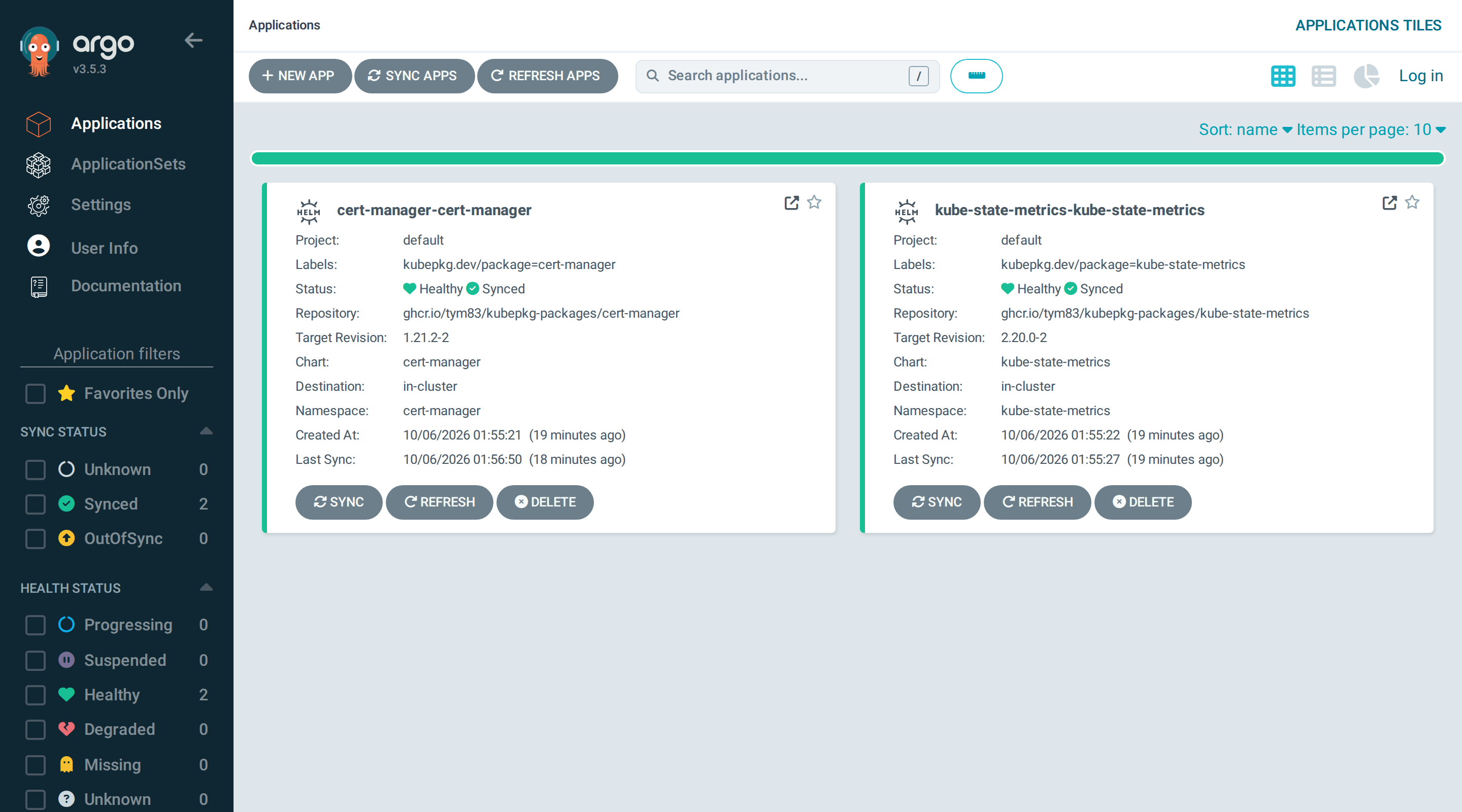
Applications kubepkg created in Argo CD
Nelm deserves a closer look. It grew out of a partly rewritten Helm codebase, understands the same charts and stores releases in the same format, but it keeps a much closer eye on what happens to resources during an install, orders them more precisely within a release and, unlike Helm, also updates CRDs from the chart’s crds directory on upgrade. While an install runs, Nelm shows the state of every resource along with its errors and pod logs, so when an upgrade gets stuck you see the reason right away instead of digging through the cluster afterward. For packages like KubeVirt or Cilium, whose upgrades are hard to follow as it is, that makes a real difference.
Turning it on takes one operator setting, backend: werf, and nothing extra has to be installed in the cluster, because the Nelm binary already ships in the operator image, pinned by checksum. The operator prepares and verifies charts exactly as it does for Helm, then installs a release through Nelm for each component of the package. Since the release history stays Helm-compatible, releases show up in both nelm release list and helm list, and rolling back a whole package works just as it does with Helm. Adopting things someone once installed by hand works too, because Nelm can force-adopt existing resources into a release.
You may wonder why kubepkg does not write a werf project and instead calls Nelm separately for each component. A werf project deploys a single Helm release per environment into one namespace, while a kubepkg package often consists of several releases in different namespaces, like virtualization, where KubeVirt and CDI live apart. So the integration happens at the level of the engine, not the project. The road runs the other way too: built kubepkg packages remain ordinary charts in a registry, and a werf project can pull them in as dependencies.
Ordering, requirements, readiness conditions and revisions work the same with every backend. The difference is who applies the manifests and whether a whole package can be rolled back: Flux and Argo CD own those releases themselves and give kubepkg no rollback it can drive across components, so with them a package cannot be rolled back as a whole, and kubepkg says so up front.
There is a third way too, with no operator at all. kubepkg render resolves packages and their dependencies and writes the result out for Flux, Argo CD or helmfile, with the correct order expressed through dependsOn, sync waves or needs. You commit the result to Git, and from then on kubepkg is out of the picture. You lose revisions, rollback and CRD ownership checks, though, so a middle ground is usually more convenient: keep Package objects in Git, let Argo CD or Flux apply them, and let kubepkg work out how to bring the cluster to the desired state safely.
Many clusters: the kubepkg hub and canary rollouts
In the first part I wrote that kubepkg deliberately leaves fleet management to Argo CD, Flux, OCM and Karmada. For a large fleet that still holds, but it turned out that platforms need something much simpler: say once that every production cluster runs cert-manager 1.21 and virtualization 1.0, and roll changes out in waves without standing up a separate system for it.
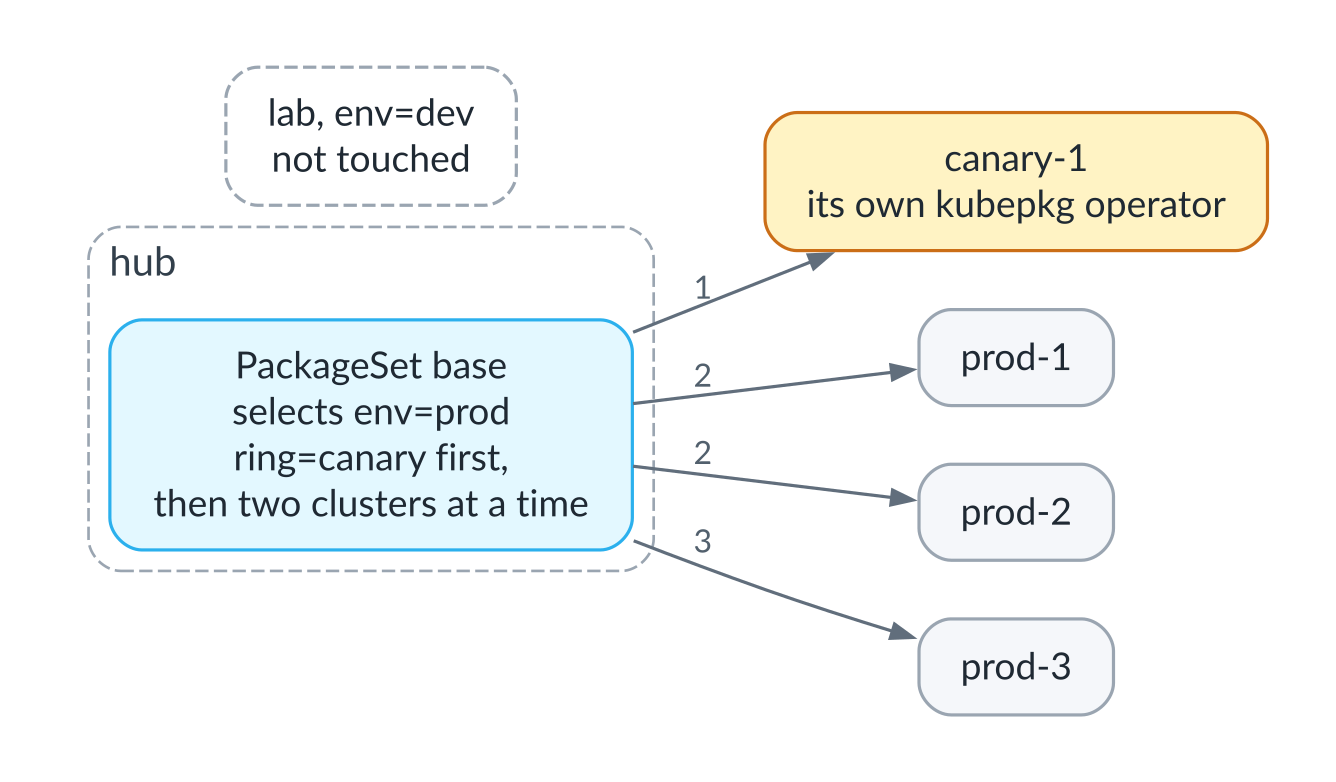
The hub and its clusters
That is what the kubepkg hub is for. It is a cluster that knows its members by their labels and writes Repository and Package objects into them according to a PackageSet. Each member runs its own kubepkg operator, so revisions, rollbacks and readiness stay local and keep working even when the hub is unreachable. The hub never touches objects it did not create, and it reports a conflict when it finds one.
A change to a set can be rolled out carefully: canary clusters first, then a limited number of clusters at a time, stopping as soon as any cluster reports a failed upgrade.
Live: a canary rollout across two clusters
Let’s take two real clusters. The hub registers itself as a canary under the name self, and the second cluster under the name edge:
$ kubepkg cluster add self --kubeconfig hub.kubeconfig --label env=prod --label ring=canary
$ kubepkg cluster add edge --kubeconfig edge.kubeconfig --label env=prod
$ kubepkg cluster list
NAME  KUBERNETES  READY  LABELS                STATUS
edge  v1.35.6     True   env=prod              kubepkg is installed
self  v1.35.6     True   env=prod,ring=canary  kubepkg is installed
The set says that every production cluster should run kube-state-metrics, canaries first, then one cluster at a time. The version is pinned exactly on purpose: with a range, every member would move to a newer build on its own as soon as the repository got one, bypassing the waves:
apiVersion: kubepkg.dev/v1
kind: PackageSet
metadata:
  name: prod
spec:
  clusterSelector: {matchLabels: {env: prod}}
  rollout:
    canary: {matchLabels: {ring: canary}}
    maxInProgress: 1
  repositories:
    - name: fleet
      spec:
        url: https://kuberoot-dev.github.io/kubepkg-recipes/index.yaml
        publicKeys: [...]
  packages:
    - name: kube-state-metrics
      spec:
        version: "2.20.0"
        upgrade: {timeout: 90s}
        components: {kube-state-metrics: {values: {replicas: 1}}}
Until the package is ready on the canary, edge waits, and the set’s status says exactly that: it is waiting for the canaries. Then the package shows up on both clusters. The next change, two replicas instead of one, behaves the same way: for a while the canary already runs two replicas while edge still runs one, and the change moves on only once the canary is ready.
Now let’s break the set by pointing it at an image tag that does not exist. On the canary the upgrade does not become ready within ninety seconds and is rolled back, and the rollout stops:
$ kubepkg set status prod
prod: 0 of 2 clusters ready, 1 updated
rollout paused: stopped after a failure on self: kube-state-metrics: revision 3 failed (component kube-state-metrics failed: upgrade kube-state-metrics/kube-state-metrics: resource Deployment/kube-state-metrics/kube-state-metrics not ready. status: InProgress, message:…; change the set to go on

CLUSTER  UPDATED  KUBE-STATE-METRICS
self     yes      2.20.0
edge     no       2.20.0
The broken change never reached edge, which keeps running the previous image. Fixing the set, say with the correct values, is a new change, and the rollout carries on with it:
$ kubepkg set status prod
prod: 2 of 2 clusters ready

CLUSTER  UPDATED  KUBE-STATE-METRICS
self     yes      2.20.0
edge     yes      2.20.0
$ kubepkg set list
SET   CLUSTER  UPDATED  READY  STATUS
prod  self     yes      1/1    -
prod  edge     yes      1/1    -
This run checked one more thing. When edge moves from the production set to a test set that also carries kube-state-metrics, just by changing its label, the package is not reinstalled: the Deployment stays the same object, the revision history continues, and only the owner and the values from the new set change.
Observability
The operator exports Prometheus metrics: the readiness of every package, its version and revision, revision outcomes, and whether each index loaded and how old it is. The chart can optionally install a ServiceMonitor, alerts and a Grafana dashboard:
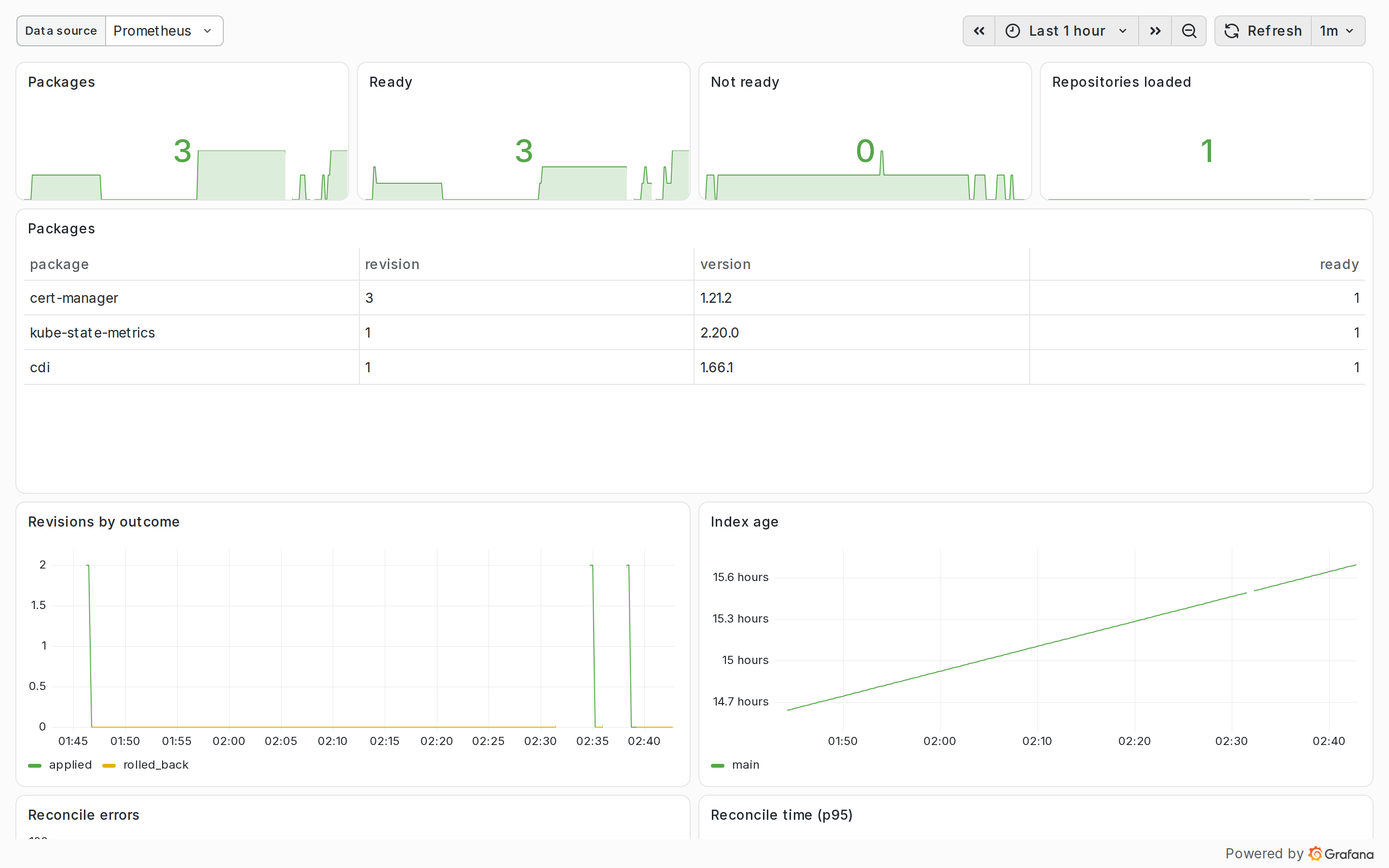
The kubepkg dashboard in Grafana
A dedicated alert watches the age of the index. If an index has an expiry date and the publishing pipeline quietly breaks, clusters will eventually start rejecting the index. With the alert’s threshold set below the expiry, it fires before that happens.
A distribution as a meta-package
Everything above adds up to the main scenario kubepkg was built for. A Kubernetes distribution is a cluster plus a set of components in versions that were tested together. In kubepkg such a set is described by a meta-package, which has no charts of its own, only requirements:
apiVersion: kubepkg.dev/v1
kind: Recipe
metadata:
  name: mydistro
spec:
  version: 2.0.0
  package:
    variants:
      - name: default
        requires:
          - {package: cert-manager, version: "~1.21"}
          - {package: kube-state-metrics, version: "~2.20"}
          - {package: virtualization, version: "~1.0"}
      - name: minimal
        requires:
          - {package: cert-manager, version: "~1.21"}
Installing version 2.0 of the distribution installs every component in the right order, and upgrading to 2.1, which requires cert-manager 1.22, moves cert-manager to that version. Variants give a distribution profiles, such as the default and minimal ones above.
This is exactly why kubepkg has no clever version solver like apt’s or npm’s: the exact versions that were tested together are pinned by the distribution’s meta-package, and the constraints inside the packages themselves stay minimal.
Settings that belong to the cluster rather than to a package, such as the cluster domain, the certificate issuer or the storage class, go into a single Secret, and the operator layers them underneath the values of every component. Charts whose strict values schema rejects unknown keys receive only the platform keys that schema declares, so they install unmodified.
Embedding kubepkg in someone else’s platform
kubepkg is designed to be part of someone else’s platform, whether that is a Kubernetes distribution, a managed service or an internal developer platform. No fork is needed at any level. At the configuration level, a platform can serve kubepkg’s resources under its own API group, such as packages.example.org, so its users see the platform’s own API; it can put its own labels on every package namespace and pick a backend. At the build level it adds plugins, in any language, that connect its internal artifact store or copy images into its registry. And at the code level, everything kubepkg’s binaries do lives in Go packages, from which a platform can assemble its own operator and its own CLI with its own name, trust rules and backends.
The resource API, kubepkg.dev/v1, has been under a compatibility promise since 1.0. Breaking changes can only come in 2.0, older API versions stay served for the whole 1.x line, and the operator migrates stored objects to the new version on its own.
How kuberoot uses kubepkg
kuberoot became kubepkg’s first and most demanding user. There, the package manager has no administrator to install it with a chart and keep an eye on it afterward: a node boots, and a few minutes later it has to be running a complete distribution, without a single manual command.
So in kuberoot the kubepkg operator runs not as a pod in the cluster but as a service of the node itself, next to the API server. kinit, the system’s first process, starts it according to the distribution’s profile, and the operator’s flags live in the same profile as everything else:
- name: kubepkg-operator
  after: apiserver
  args:
  - /usr/bin/kubepkg-operator
  - --backend=helm
  - --values-secret=kube-system/kuberoot-platform-values
  - --registry-secret=kube-system/kuberoot-registry-credentials
  - --image-policy=enforce
  - --webhook-namespace=kube-system
  - --webhook-service=kubepkg-webhook
  - '{{if eq .Store.Kind "etcd"}}--leader-elect{{end}}'
This way the package manager does not need a working cluster to come up, and it can install even the CNI plugin, without which the nodes stay NotReady and ordinary pods cannot start. In a highly available cluster the operator runs on every control-plane node, but only one of them acts, chosen through Kubernetes leader election (a Lease object). The image policy webhook lives on the node as well, and the API server reaches it through a Service without a selector, to which each control-plane node adds its own address.
Next, kinit subscribes the cluster to a repository. The kubepkg CRDs ship in the system image, along with the public key of the public repository, added at build time, and on first boot kinit applies the Repository resource and the first package, CoreDNS, which needs this particular cluster’s DNS Service IP:
apiVersion: kubepkg.dev/v1
kind: Repository
metadata:
  name: main
spec:
  url: https://kuberoot-dev.github.io/kubepkg-recipes/index.yaml
  publicKeys:
    - |
      -----BEGIN PUBLIC KEY-----
      ...
---
apiVersion: kubepkg.dev/v1
kind: Package
metadata:
  name: coredns
spec:
  version: "~1.14"
  components:
    coredns:
      values:
        service:
          clusterIP: "10.96.0.10"
The repository URL and key can be overridden with kernel parameters if a company runs its own package repository. After that, kinit runs kubepkg install kuberoot-<distribution> --yes and repeats the command until the operator accepts it. The operator does everything else.
kuberoot distributions in the repository
Every kuberoot distribution is described in the repository as a package made mostly of requirements, and you can read a distribution’s composition straight from its recipe. The base edge distribution requires only CoreDNS, metrics-server and local storage. The observability distribution is built on top of edge:
apiVersion: kubepkg.dev/v1
kind: Recipe
metadata:
  name: kuberoot-observability
spec:
  package:
    variants:
      - name: default
        requires:
          - {package: kuberoot-edge, version: "~0.2"}
          - {package: victoria-metrics, version: "~1.153"}
          - {package: victoria-logs, version: "~1.53"}
          - {package: perses-operator, version: "~0.5"}
The AI distribution also builds on edge and leaves GPU support, inference, training and vector databases to separate meta-packages, ai-gpu, ai-inference, ai-training and ai-rag, installed as each cluster needs, because one cluster needs only inference while another needs the whole set. The full platform, with DRBD storage, policies and backups, is a meta-package too, kuberoot-platform-full, and installs with a single command on any distribution that runs pods.
What a package needs to know about the node
A kuberoot node is not your ordinary Linux box: there is no systemd, no udev and no D-Bus, and kernel modules are loaded at boot, after which loading modules is disabled. The Piraeus chart assumes all of the above by default, and without a hint its LINSTOR satellites simply will not come up on the nodes. The hint lives in the platform values, a single Secret that kinit puts into the cluster:
linstorNode:
  drbdLoaded: true
  systemd: false
  hostNetwork: true
The operator layers these values underneath every package’s values. There is a single Piraeus package in the public repository for every cluster: on an ordinary cluster it runs with its defaults, while on kuberoot it sees the platform values and builds the satellite configuration for nodes without systemd on its own, without loading DRBD a second time.
What kuberoot found in kubepkg
The most useful thing kuberoot gave kubepkg was three rounds of feedback, and nearly all of it came not from kubepkg’s own tests but from distributions doing real work.
An operator running on a node cannot read the registry credentials file on an administrator’s machine, so credentials now come from a cluster Secret. And since a distribution cannot create that Secret ahead of time without clobbering someone else’s data on the next boot, a missing Secret now means “no credentials” rather than an error. The image policy in warn mode returned its warnings to whoever created the pod, which is the ReplicaSet controller, so nobody ever saw them; now the webhook also records an Event on the pod’s owner. A Cilium installed with plain helm install before the package existed used to stay outside kubepkg’s management and leave its release in the failed state. Cutting power to a control-plane node in the middle of an install used to leave the release stuck in pending-install forever; now it finishes installing on its own a few minutes after boot. And dependent packages used to take a long time to notice that a requirement was already ready, because the operator processed packages one at a time.
The most interesting finding came from the Kubernetes conformance tests. The operator put the image policy label on every namespace it installed packages into, and CoreDNS and metrics-server go into kube-system. The test that checks preemption of pods by a critical pod failed like this:
admission webhook "pods.images.kubepkg.dev" denied the request: no installed package pins
registry.k8s.io/pause:3.10.2; namespace kube-system runs only images packages pin
Since then the policy leaves system namespaces alone, and the operator no longer re-enables a policy an administrator has turned off. Filtering platform values by the chart’s schema came out of the same series: the strict schemas of MLflow and JupyterHub rejected the linstorNode key, which they have no use for, and the recipes had to carry patches for it. Now they don’t.
The last two pieces of feedback made it into version 1.3. The observability distribution does not need Grafana: its dashboards are on Perses, and Grafana would have been the heaviest pod on the node. A meta-package used to be able to require VictoriaMetrics but not configure it, and the only way to switch Grafana off was a second variant of the recipe. Now a requirement carries values for the dependency:
requires:
  - package: victoria-metrics
    version: "~1.153"
    components:
      victoria-metrics:
        values:
          grafana: {enabled: false}
A meta-package’s values go on top of the platform values, and values the user set in the package itself beat them all. If two meta-packages ask the same dependency for different things, the operator applies nothing and names both packages instead of quietly picking a winner. The second piece of feedback was about failed installs: they used to stay failed even when a fixed build was already in the repository, and in a cluster nobody watches, which is exactly what kuberoot clusters are, the package just stayed broken. Now the operator retries a failed revision with a growing pause, from thirty seconds up to ten minutes, and applies a new build from the index right away.
What’s next
kubepkg is an MVP, and I know full well that the road from a first version to a tool a large bank trusts with production is a long one. I maintain the public repository myself for now, and the real value of a repository lies in the people who curate it. The trust model has not been through an external audit. Some scenarios have been tested on test clusters, not through years of operation.
Still, I think the main thing worked out. You can build a package layer for Kubernetes without inventing a new format or breaking existing tools, and it can be shared across platforms instead of being rewritten every time. Everything is open source under the Apache License 2.0: the package manager in kuberoot-dev/kubepkg, the public repository’s recipes in kuberoot-dev/kubepkg-recipes, and the documentation at kuberoot-dev.github.io/kubepkg. If you are building your own platform and recognize your own problems in this post, bring feedback, packages and arguments. As the exchange with Duggan showed, an argument is the best way to get things like this moving.