Quick facts
- Project: kuberoot, Apache 2.0, github.com/kuberoot-dev
- Distributions: edge, router, hypervisor, AI, real-time, IoT, observability, workstation
- Node management: node.kuberoot.dev resources through API aggregation, no shell, no SSH
- Upgrades: A/B slots, signed bundles, automatic rollback after a failed boot
- Conformance: 462 of 462 tests on Kubernetes 1.37 (not yet submitted for certification)
- Package manager: kubepkg: unmodified Helm charts plus a descriptor, capability-based dependencies, TUF and cosign
This series began with a simple thought experiment: what if we treated Kubernetes the way we treat the Linux kernel? What if, instead of wrestling vanilla Kubernetes into shape one component at a time, engineers could simply pick up a ready-made distribution? Everything that follows grew out of that question. A caveat up front: the code that comes with this series is a set of experiments, and I doubt anyone will rush to run it in production. But I believe ideas like this deserve to be argued over and examined from every angle. Conversations of this kind are how an industry moves forward, and how we get to see familiar things in a new, sometimes unexpected, light.
The engineering behind it is still fairly raw, and I would be genuinely glad if people who like the idea itself joined the project and helped turn it into something technically far more serious.
Why I am doing this
kuberoot is not my first experiment with what Kubernetes could be, and it is probably worth explaining where it came from, because from the outside the earlier experiments looked more like jokes.
First came Sheeternetes, a container orchestrator that keeps its state in a Google Sheets tab instead of etcd and runs its reconciliation loop in Apps Script instead of a conventional controller. We then load-tested it, wrote an operator for it, built a container registry that lives in spreadsheet cells, federated two clusters through a shared sheet, and in the end moved the entire kube-scheduler into a single spreadsheet formula. Then came Tatarnetes, a fork of Kubernetes, Talos and the Kubernetes Dashboard that speaks Tatar. And then paleocomputing, where we ran Kubernetes on Project Oberon, on top of RISC5, the processor Niklaus Wirth designed for his own operating system.
They looked like jokes, and they were meant to be fun, but for me each one was a way of finding the line where the Kubernetes contract ends and the implementation begins: what is essential to it, and what is an accident of one particular codebase. If an orchestrator keeps working after its datastore has been replaced with a spreadsheet and its scheduler with a formula, then the essence of Kubernetes is not etcd or the scheduler’s code, but the resource model and the reconciliation loop. kuberoot grew out of those experiments. This time the question was not how far you can stray from Kubernetes as we know it, but what you can build if you take it seriously as a kernel.
I also want to thank my colleagues at Ænix. Talking with them and watching them work is where the ideas in this article took shape.
How it all started
In the fall of 2023, at KubeCon in Chicago, Tim Hockin, one of the engineers who started Kubernetes, stood on stage and talked about how Kubernetes grows more complex with every release, and how that complexity is not free. Every feature that only one user needs becomes a weight that everyone else has to carry; the project’s own developers find it harder and harder to hold the whole thing in their heads, and the engineers who run it find it harder and harder to make sense of all its knobs. Hockin suggested treating complexity as a budget: the project has one, it can spend it, but it can only spend it once, and so it has to learn to say no to whatever would eat that budget without giving enough back.
The idea stuck with me, because it seemed to carry a corollary that nobody had said out loud. If the complexity that machine learning, network appliances or industrial controllers need does not fit into the budget of the project’s core, it still has to live somewhere, ideally somewhere it does not burden anyone else. The Linux world found that place long ago. The kernel stays a kernel, something few people know intimately, let alone work on directly, and everything specific moves into distributions. Nobody expects Linus Torvalds to personally look after routers, medical scanners and game consoles. In December 2024 I wrote about this in “The inevitable future of Kubernetes”, arguing that sooner or later Kubernetes would follow the path of the Linux kernel, and that specialized distributions would grow around it, each with its own build system, its own defaults and its own package manager.
To my surprise, the article got thoughtful responses, from people whose opinions I value a great deal. Mathew Duggan wrote a post called Kubernetes as a Distro, in which he agreed that the problem was real but disagreed with my diagnosis. “I understand the idea,” he wrote, “but I think the root cause of all of this is simply a lack of a meaningful package management system for Kubernetes.” Helm, in his words, “has done the best it can,” while Operators “are proving too complicated for normal people to write,” and what we need is “something between the very easy to use but easy to mess up Helm and the highly bespoke and complex to write Operator concept.” He listed eight things such a system should do, and I will come back to that list. And Tim Hockin, whose talk had prompted the article in the first place, joined the discussion on Reddit and wrote a reply that I have reread many times since.
I am a vocal proponent of treating Kubernetes as the “kernel” of an OS, but it’s hard to be dogmatic for a number of reasons.
People expect it to have in-the-box solutions to many problems, partly because it has had those in the past and partly because the world of kube is vastly different than that of Linux. The latter was originally aimed at hobbyists, which gave rise to many distributions. Kube is much more business focused. How many Linux distributions really cater to businesses? 2 or 3.
We, perhaps mistakenly, ship in-the-box solutions for things like networking (kube-proxy) and service discovery (DNS) and cluster lifecycle (kubeadm). Even the scheduler is more user-space than kernel.
We, again mistakenly, ship binary builds. The Linux kernel is built by distribution builders.
I don’t know that the kernel analogy works when it comes to things like compile time options. It makes sense for the kernel much more than for kube, I think. Perhaps the analog there is more like “use a simpler scheduler” than compile-flags.
Anyway, I will keep pressing for building new things ON kube rather than IN kube.
I would push back on the “2 or 3,” and I will come back to this reply point by point, because almost every point in it ended up becoming one of the decisions described below.
In the summer of 2025 Duggan returned to the subject in a new post, What would a Kubernetes 2.0 look like, and went further still. His wish list: “Ditch YAML for HCL”; “Allow etcd swap-out” for smaller clusters; go “Beyond Helm” with a native package manager he called KubePkg, “because if there’s one thing the Kubernetes ecosystem needs, it’s another abbreviated name with a ‘K’ in it”; and make IPv6 the default. The package manager in this project carries the same name.
In hindsight, the most interesting thing about that exchange is that Duggan and I were both right; we were simply looking at the same problem from opposite ends. A distribution without a package manager turns into yet another monolith that cannot be upgraded piece by piece, and a package manager without a distribution is a tool with nothing to assemble. Debian is three things at once: apt, the archive and the judgment about what goes into it. None of them survives without the others. Rather than keep debating it in comment threads, I decided to build what we had been talking about and see what survives once theory has to turn into code.
What came out of it
What came out is a project called kuberoot. It is a toolkit for building Kubernetes distributions, modeled on what Buildroot does for embedded Linux. You describe the distribution you want, and the toolkit turns that description into a bootable image with its own Linux kernel, its own init system and its own Kubernetes, ready to be installed on bare metal or in a virtual machine. Alongside it grew kubepkg, a package manager that succeeds our earlier cozypkg and was shaped in large part by Duggan’s list of requirements, together with an archive of packages for it. I consider this triangle of a builder, a package manager and a package archive to be the main result of the work; everything else follows from it.
To find out whether the idea survives contact with reality, I built eight distributions with the toolkit and deliberately made them as unlike one another as I could. There is an ordinary general-purpose cluster, a network router without a single container, a hypervisor that moves virtual machines between nodes while they run, a platform for language models with the GPU driver built in, a real-time node for industrial workloads, a gateway for industrial sensors, an external monitoring cluster, and a workstation that lives inside the cluster. Had the idea been wrong, it would have shown by the second or third distribution, because each new one would have demanded a rewrite of the foundation. That never happened. After the first two, each new distribution took about a day to get booting, because each time the only code to write was a profile and whatever was genuinely new, usually a single program on the node.
Below I will walk through how it all works, which decisions we made and why, how this differs from what the industry has today, and where I see the benefits and the risks. The article is long because it is meant as a map for the rest of the series, in which each major part will get its own article with live demonstrations.
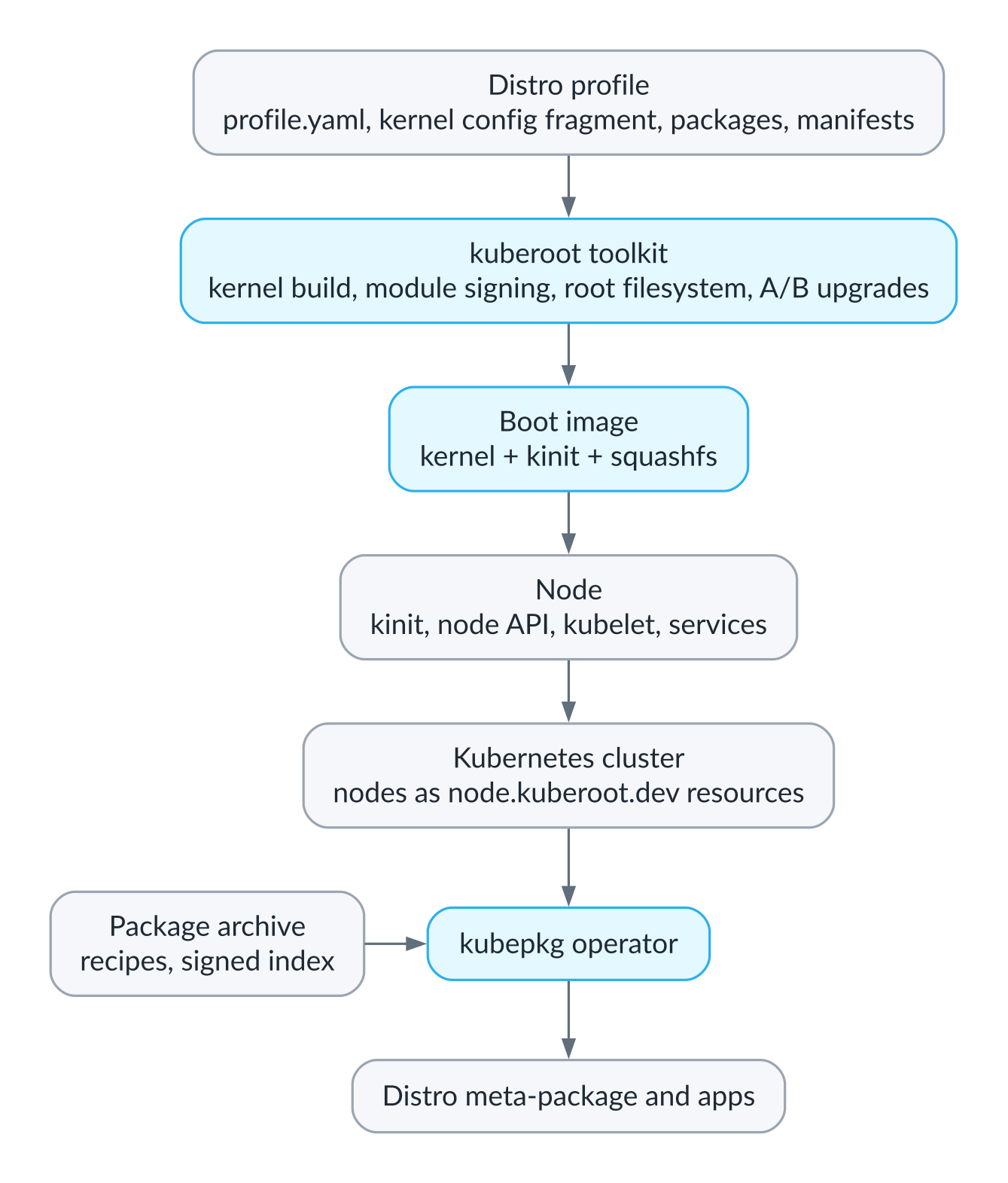
The three parts of the project: the toolkit builds the image, the node brings up the cluster, kubepkg installs everything else
Why Kubernetes needs a kernel of its own
Here is how Kubernetes usually lands on a machine. First a general-purpose operating system is installed, then Kubernetes is installed on top, and from that moment the two systems lead parallel lives. The operating system is updated by its own package manager and configured over SSH or through a configuration management tool, while Kubernetes behaves as if there were nothing underneath it and never had been. While everything works, the arrangement is perfectly convenient, but things keep going wrong at the seam between the two. A storage kernel module fails to build against the new kernel that arrived with a routine security update. The GPU driver drifts out of step with the libraries inside a container. A kernel parameter that one program needs gets in the way of another. An OS update reboots a node at exactly the moment a database migration was finishing on it. And in moments like these it turns out that nobody owns the seam: the OS administrator considers it a Kubernetes problem, and Kubernetes simply does not know it exists.
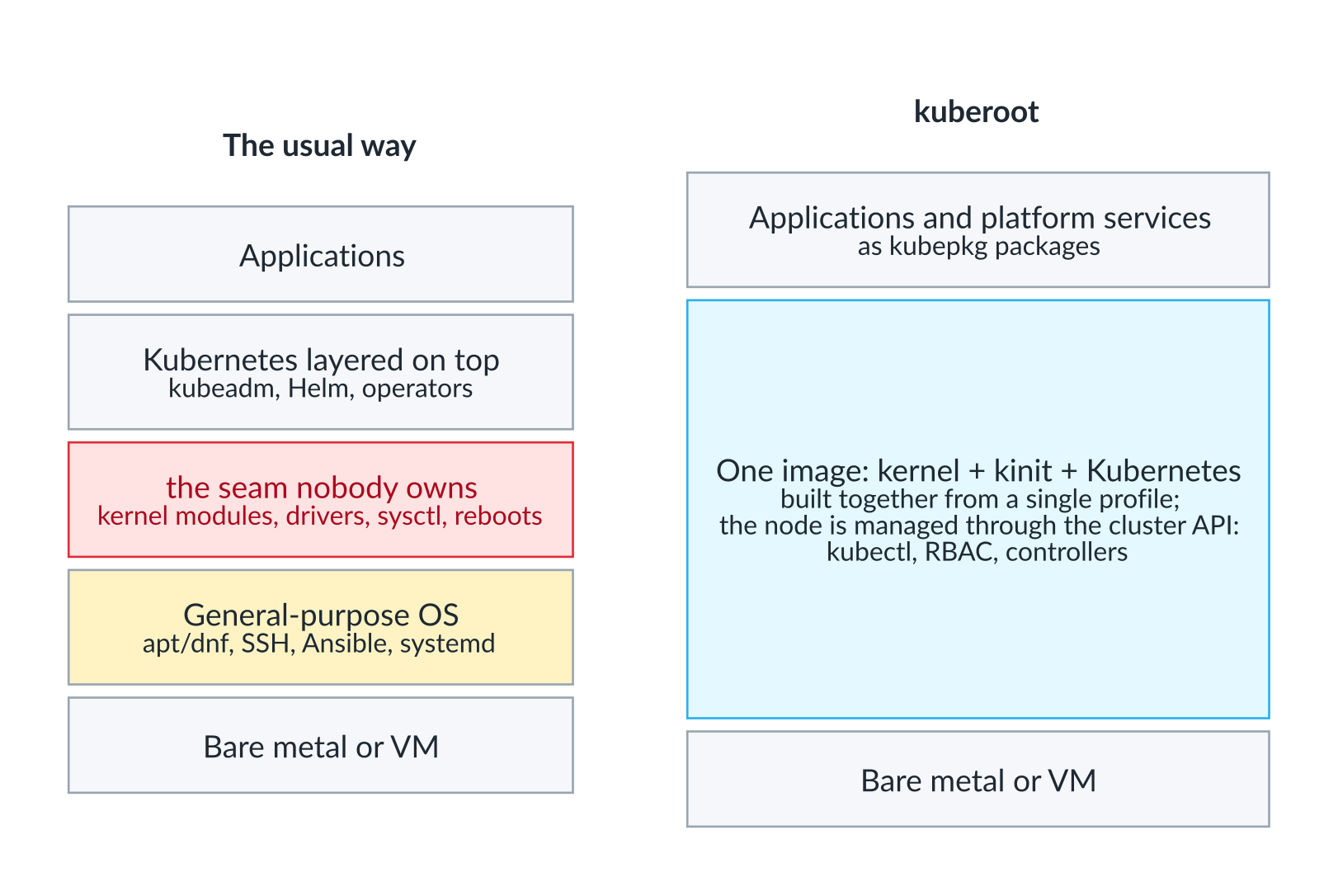
On the left, the usual stack with a seam nobody owns; on the right, one image built from one profile
Talos Linux has already taken a very important step in the right direction and shown that an operating system for Kubernetes can be immutable, shell-less and managed through an API. We followed in its footsteps in many ways and learned a great deal from it. But Talos has its own API and its own tool for managing nodes, so the line between the node and the cluster is still there; it has just become neater and safer. I wanted to see what happens if that line disappears entirely, so that the node is managed through the same API as the cluster, with the same kubectl, the same RBAC and the same controllers.
There is a second reason, and to me it matters even more than the first. Once the kernel, the system services and Kubernetes are built together, in one build and from one description, you can do things that on ordinary Linux are either impossible or painful. You can build a Kubernetes with no containers at all, whose API serves purely as the control panel for a machine, as in our router. You can build a real-time kernel and line the kubelet’s reserved cores up with the ones the kernel keeps for the scheduler tick and housekeeping, so that it hands the remaining, isolated cores to pods exclusively. You can make the GPU driver part of the operating system, signed with the kernel’s own key, instead of installing it through a privileged container that compiles a kernel module right on the node. These are the things the project was really started for. Managing nodes through the cluster API turned out to be a happy side effect.
Inside the node
The image and the boot
Every kuberoot distribution is built into a single bootable image. It contains a Linux kernel built from source; kinit, a small init that runs as PID 1 in place of systemd; and an immutable squashfs root filesystem holding Kubernetes, containerd, the cluster datastore, our own programs and the bare minimum of system utilities those programs need. There is no shell, no package manager and no SSH. The kernel is built as an EFI stub and boots straight from UEFI firmware. On an installed disk, systemd-boot sits in front of it only to choose between the two system slots and to count boot attempts.
When a node boots, kinit mounts the system filesystems, reads its parameters from the kernel command line, brings up the network from those parameters or over DHCP, sets the kernel parameters that Kubernetes and the particular distribution need, and loads the kernel modules listed in the profile. Then it writes 1 to /proc/sys/kernel/modules_disabled, and until the next reboot no process on the node, not even one running as root, can load another module. And because the kernel enforces module signatures and trusts only a key generated for that one build, even before that point it accepts no module except its own. The signing key is ephemeral: it is created for a single build and then thrown away, so even we cannot sign a module for a kernel that has already shipped.
Next, kinit works out the node’s role. If the node is bringing up its own cluster, it generates the cluster’s certificate authority, certificates for every component, the service account signing key, and the kubelet and container runtime configuration. If it is joining someone else’s cluster, it takes everything it needs from a join ticket, which I will come to shortly. Then it starts the services listed in the distribution’s profile, each in its own cgroup, with dependencies such as “start the kubelet only once the API server answers,” with health tracking and with restarts for anything that falls over.
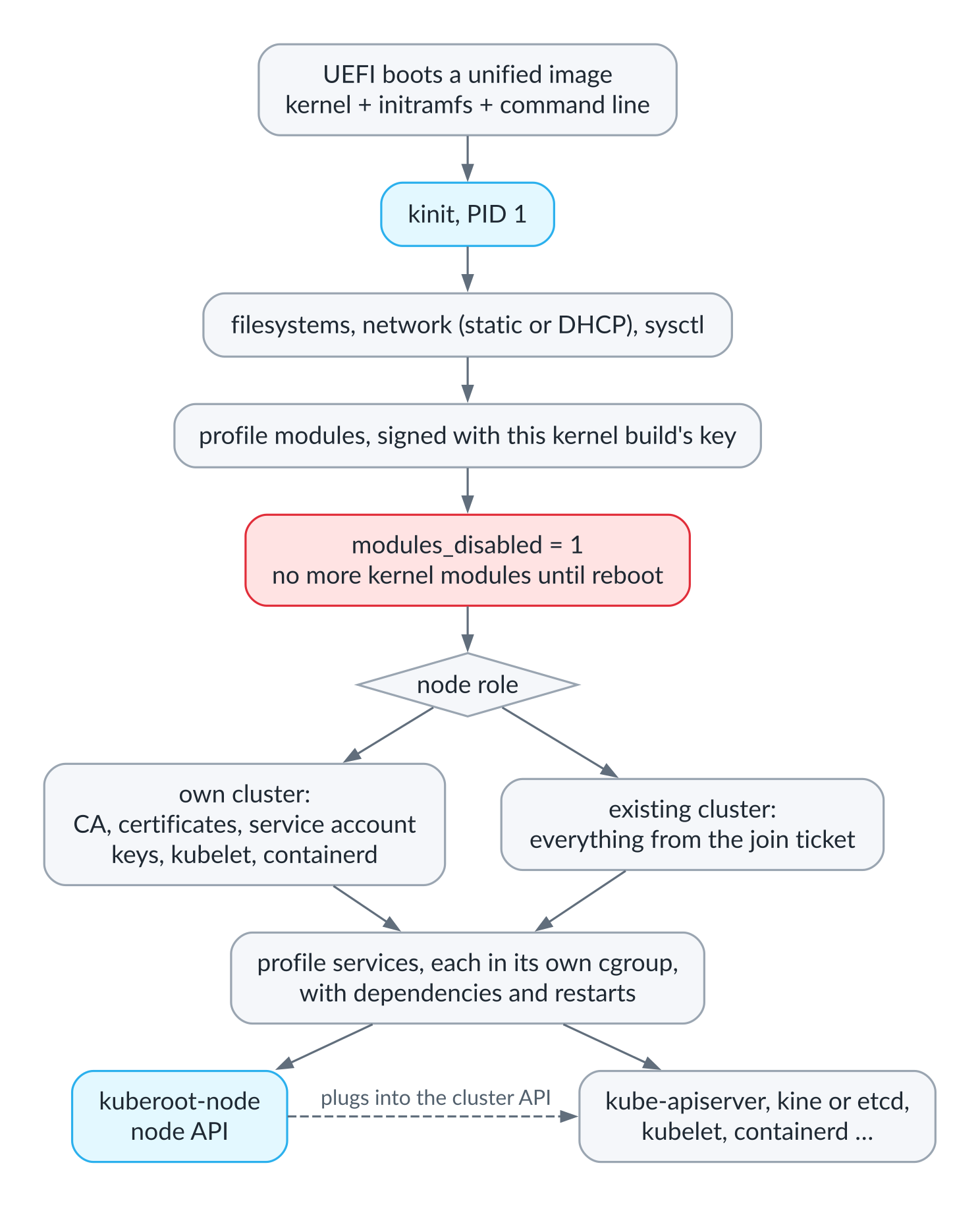
Node boot: from UEFI to the profile’s services
The node API
One of those services, kuberoot-node, serves a small node API, and this is the part I most wanted to build. It is built on k8s.io/apiserver, the same library as kube-apiserver itself, and is registered with the cluster through the API aggregation layer, the same mechanism metrics-server and other extensions use. To an administrator, the node becomes a set of ordinary Kubernetes resources in the node.kuberoot.dev group: you can read them, change them, watch them and control access to them with RBAC exactly as you would for pods or Services.
| Resource | What it does |
|---|---|
| osconfigs | the node’s operating system settings and what the node reports about itself |
| nodeservices | the services kinit runs, with their state, restarts and logs |
| disks | block devices |
| installations | installing the system to disk from boot media |
| bootentries | the two boot slots and which of them is booted |
| upgrades | writing a signed update into the inactive slot |
| memberships, jointickets | nodes joining a cluster |
| statebackups | backups of a control-plane node’s state |
Authorization works the way it does for any aggregated API: a request arrives through the cluster’s API server, which vouches for the user’s identity, and the node API asks the cluster with a SubjectAccessReview whether that user may do what they are asking. While there is no cluster yet, or while it is down, the node serves its API on its own, with its own certificate authority, so an administrator can repair a node whose cluster has died. On a control-plane node the API gathers resources from every node in the cluster and presents them under names of the form <node>.<name>, finding each node by the address in its Node object. That means you can see the kubelet service on the third node with a single command, without logging into it and without even knowing its address.
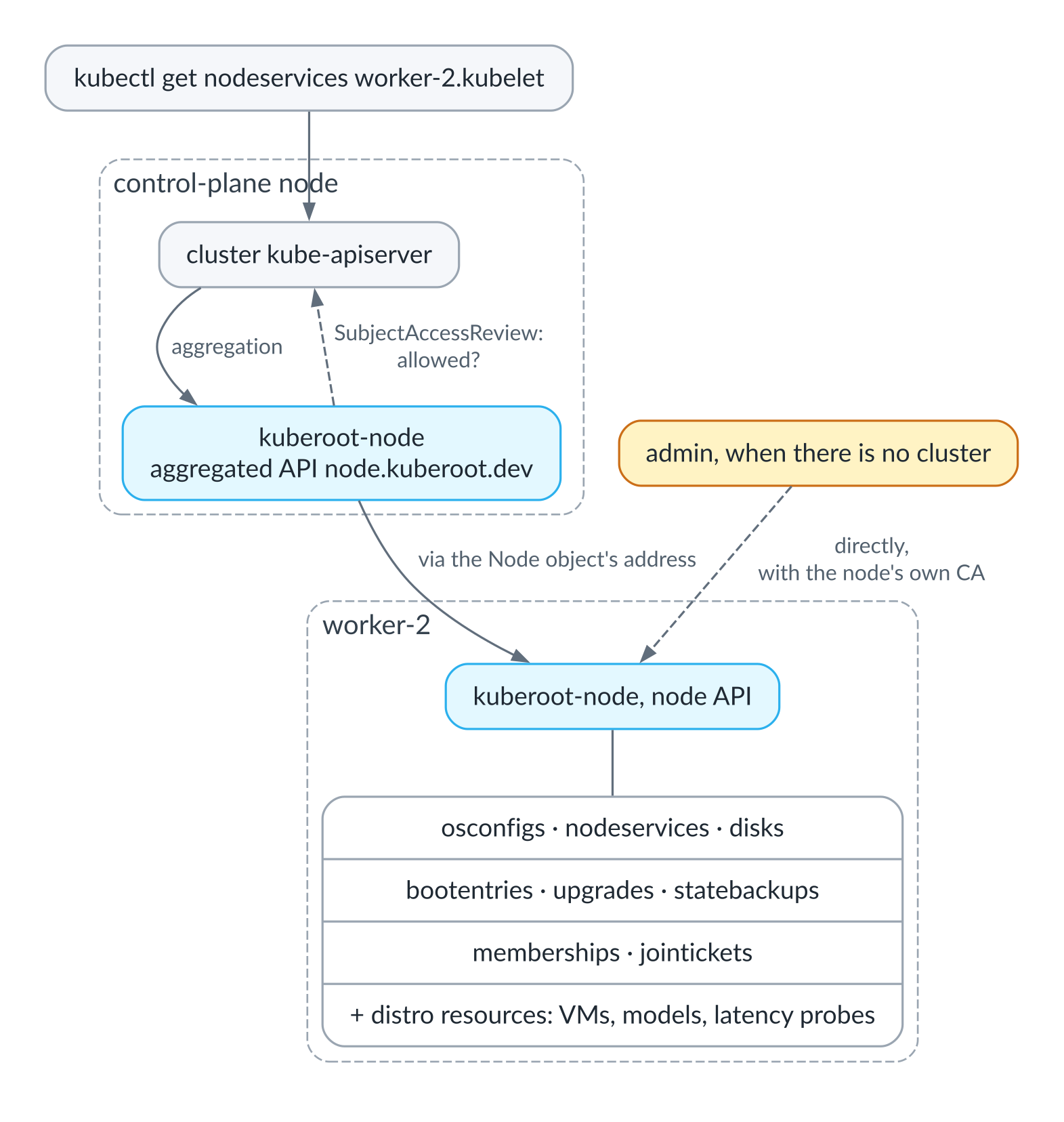
A request for a service on a worker node goes through the cluster API; when there is no cluster, the node API answers on its own
$ kubectl get nodeservices
NAME                      STATE     PID   RESTARTS   MEMORY   CPU   AGE
containerd                Running   202   0          104Mi    0s    2m7s
kine                      Running   201   0          82Mi     2s    2m7s
kube-apiserver            Running   198   0          309Mi    7s    2m7s
kube-controller-manager   Running   282   0          135Mi    2s    2m2s
kubelet                   Running   280   0          112Mi    1s    2m2s
kuberoot-node             Running   204   0          127Mi    1s    2m7s
Distributions add their own resources to this API. The hypervisor adds volumes and virtual machines, the AI distribution adds model servers, the real-time distribution adds latency tests, and I will get to all of them below.
Upgrades and rollback
Upgrades work the way they do on modern phones and cars. Installing to disk creates a boot partition, two system partitions of a gigabyte each, and a state partition holding everything mutable: certificates, the cluster database, kubelet and containerd data, and the node’s settings. A new release, signed with the project’s key, arrives as an Upgrade resource carrying a URL and a hash. It is verified and written into the inactive slot, and the node reboots into it on probation, with a limited number of attempts. If the system comes up after the reboot and its services are running, the slot is marked good and becomes the default. If not, the node falls back to the previous release on its own, with no human involved, but only to a release that was itself once confirmed as good.
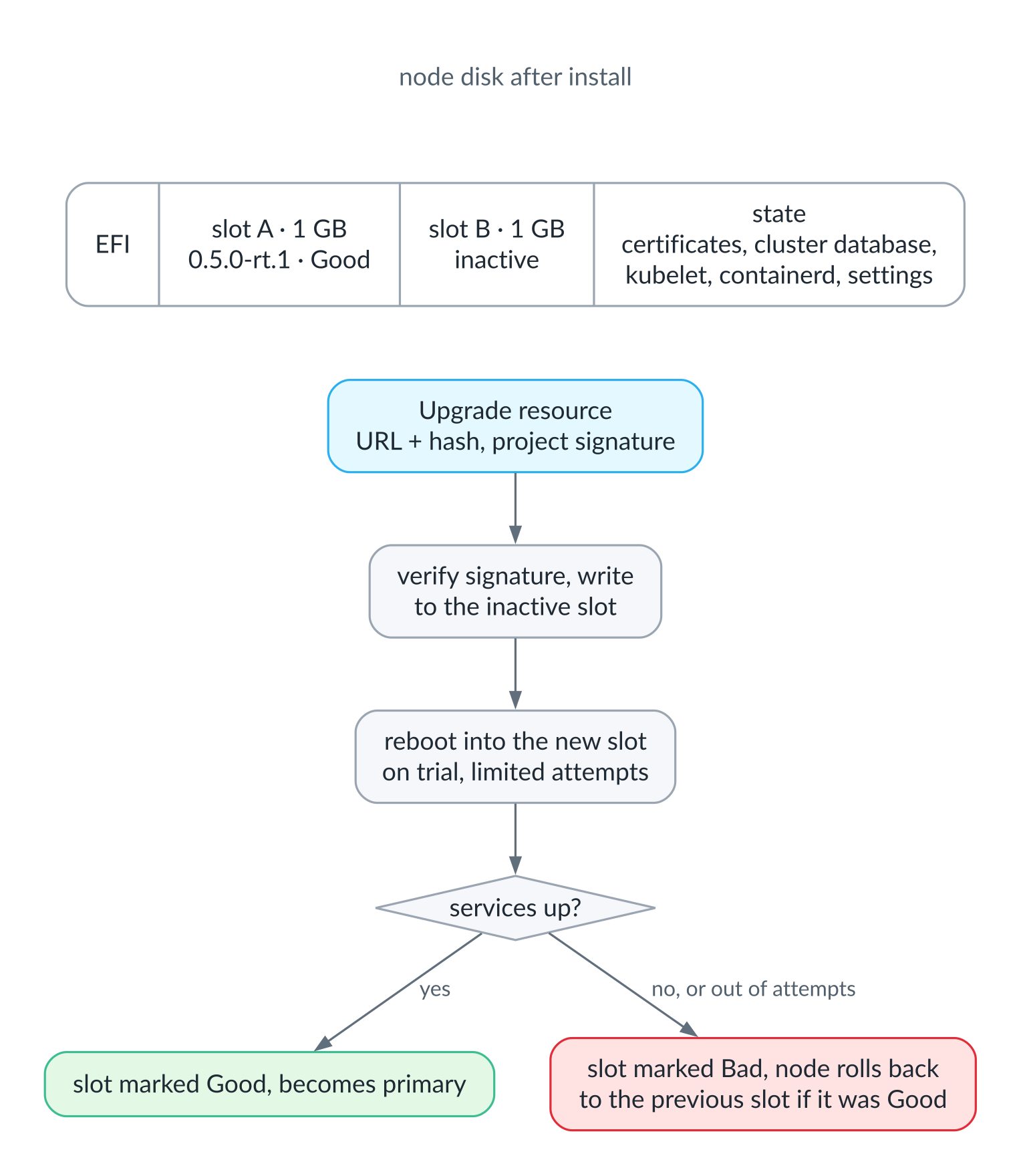
Disk layout and the upgrade path: a new release has to pass its trial first
$ kubectl get bootentries
NAME     RELEASE      STATE   TRIES LEFT   BOOTED   DEFAULT
slot-a   0.5.0-rt.1   Good    0            false    true
slot-b   0.5.0-rt.2   Bad     0            true     false
This output was captured when a new release of the real-time distribution could not start the kubelet. The kubelet’s static memory manager had checkpointed the memory layout it saw under the previous kernel. The new kernel left slightly less memory usable, the checkpoint no longer matched, and the kubelet refused to start until someone deleted its state file by hand. The node declared the slot bad and rolled back by itself, and all that was left for me was to find the cause and teach kinit to delete the CPU and memory manager checkpoints at boot, when there are no containers yet and the checkpoints describe nothing.
Joining, backups and networking
A new node joins through the same API. On a control-plane node you create a join token, a familiar idea from kubeadm, k3s or Docker Swarm, except that ours is not a single string but a credential bundle, similar in spirit to a Talos machine config. A JoinTicket resource is issued for one specific node, expires within a day, and carries the cluster’s address, its certificate authority, a single-use bootstrap token for the kubelet and the certificate the cluster will use to trust the new node’s API. The ticket is handed to the new node as a Membership resource in that node’s own API. The node reconfigures itself for its new role and obtains its certificates, the kubelet registers with the cluster, and the kubelet’s serving certificate requests are approved automatically, but only for addresses outside the pod and Service networks, so that a node cannot obtain a certificate for an address it does not own.
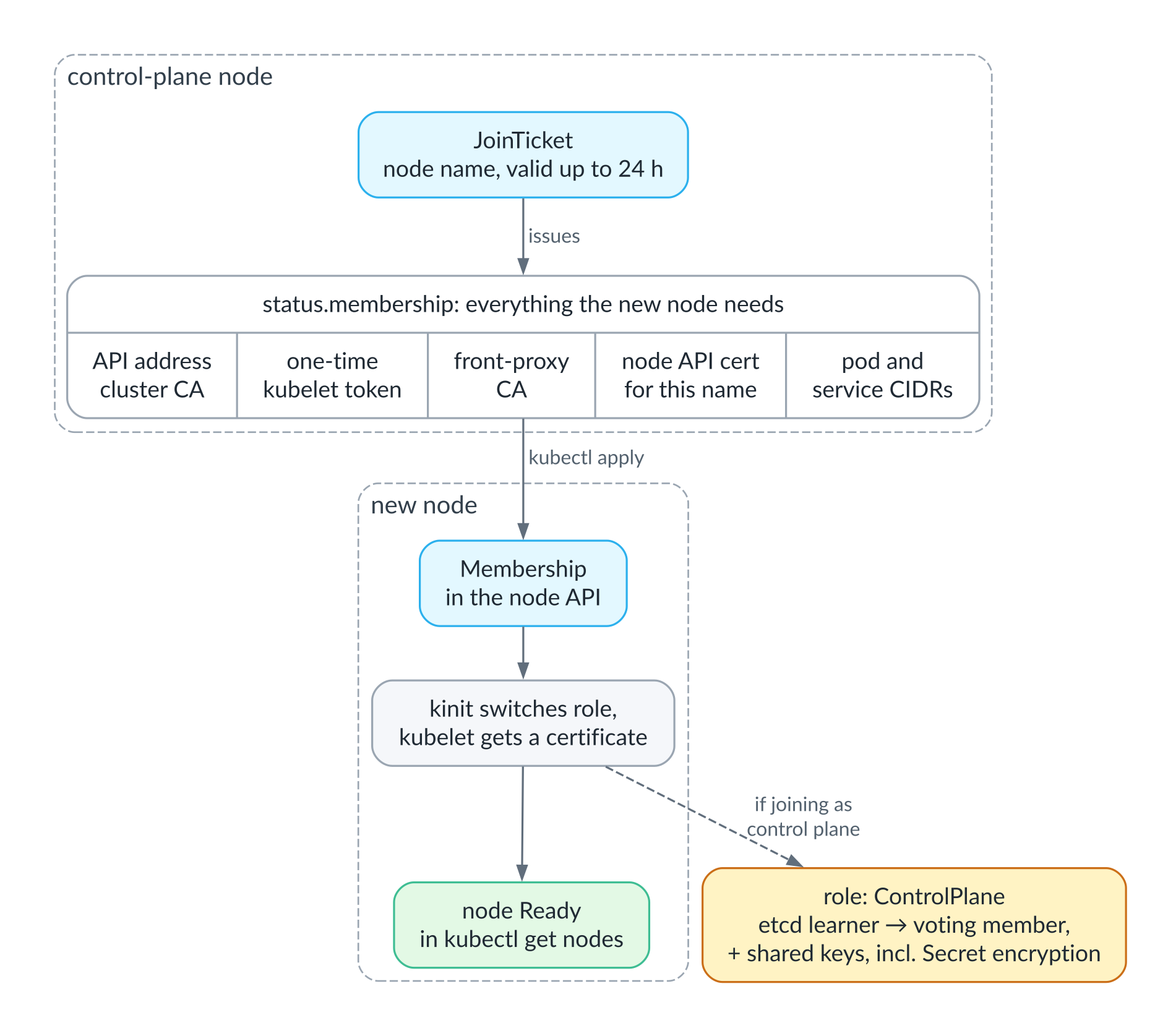
The join ticket: what is inside and how a node joins the cluster
Backups of a control-plane node’s state are taken on a schedule or on demand through a StateBackup resource. A backup contains exactly what the installer carries over: the certificate authorities and certificates, the node’s identity, the kubelet’s certificates and a consistent snapshot of the cluster database. It is encrypted with age and shipped to object storage. When installing the system on a new machine, you can point it at a backup to restore from, and the cluster comes back with its old certificates and its old data, so the worker nodes do not even have to join again.
By default the pod network is built over VXLAN by the node service itself, without any external components, and when all nodes share one layer-2 segment, there is a direct routing mode with no encapsulation. If you need something more serious, the built-in network can be switched off and Cilium installed as a package; storage works the same way, with Piraeus installed as a package on top of DRBD, whose kernel module already sits in the image, signed.
Security above the node
The package manager can require that only images pinned by digest in a package may run in the packages’ namespaces, and the distributions do exactly that by default. For applications there are typed intents. A user describes an application with a high-level resource, and a controller expands it into a Deployment, a Service and the other primitives inside a sealed namespace where an admission policy lets only that controller change them; not even the cluster administrator can, short of removing the policy. This is our answer to Duggan’s proposal to replace YAML with a typed language: rather than change the language, we shrank what a person has to write by hand in the first place.
The datastore and conformance
By default the cluster state is kept not in etcd but in kine on top of SQLite, just as Duggan suggested for smaller clusters. For a single control-plane node this is noticeably lighter and simpler to operate, and for a highly available control plane we use etcd on three nodes. The choice is made once, when the cluster is created. The second and third control-plane nodes join with the same join ticket, only with the control-plane role: the node joins etcd as a learner, a member without a vote, catches up with the others and only then is promoted to a voting member. Along with the ticket it receives the cluster’s shared keys, including the service account signing key and the key that encrypts Secrets at rest; without the latter, as we found out in testing, a new API server could not read a single Secret. The etcd cluster has its own certificate authority, separate from the cluster’s. Worker nodes reach the API servers through a load balancer built into the node itself, with no virtual IP and no external load balancer, so the setup works on any network.
To test it, I cut the power to the node that was the etcd leader at that moment. Over four minutes of monitoring, the API, as the workers saw it through their load balancer, never stopped answering, and a service on a worker node never noticed a thing: leadership passed to a neighbor, and forty seconds after power came back, the node I had switched off rejoined on its own. A node that is gone for good can be replaced: it is removed from the etcd member list through the node API, and its successor joins as a new member. On such a cluster the database part of a backup is simply an etcd snapshot.
Along the way we learned something subtle about kine. The Kubernetes API server expects its datastore to compact history every five minutes, but kine compacts on its own schedule and by default always keeps the most recent thousand revisions, and a small, quiet cluster can take hours to accumulate a thousand changes. Old object versions lived for hours, and one of the conformance tests for paginated lists, which waits for the revision behind a continue token to be compacted away and expects the server to answer 410 Gone, kept timing out. The fix was a single parameter; finding the cause took half a day and several false leads.
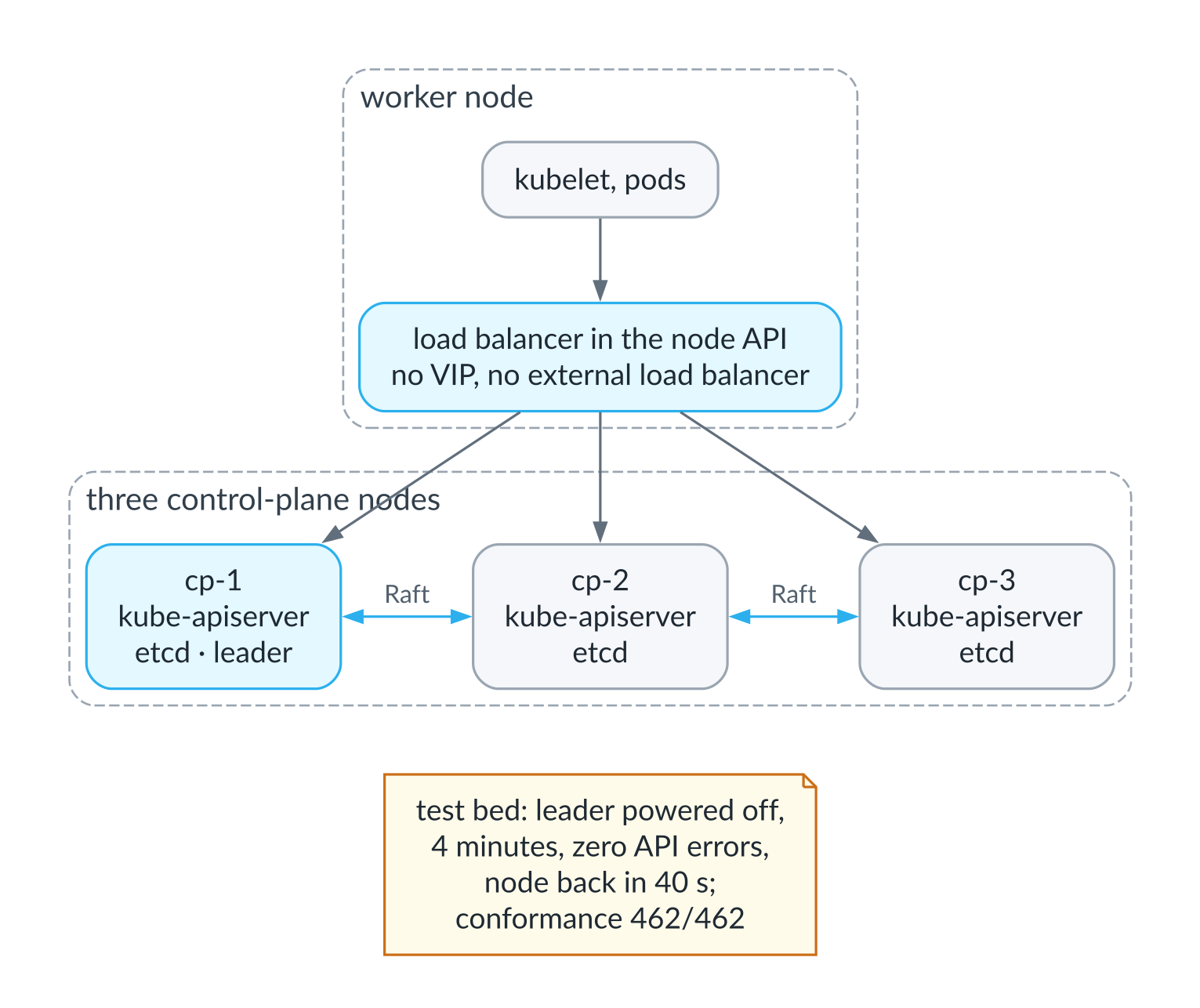
A highly available control plane: three etcd nodes and a load balancer on every worker
Finally, the distributions that run pods pass the official Kubernetes conformance test suite. It is the same suite the CNCF certification program uses to check that a distribution really is Kubernetes and not merely something that looks like it. It consists of the tests in the project’s main repository that are marked as Conformance; they run against a live cluster and check the behavior of the API, the scheduler, networking, DNS, storage and everything else users are entitled to rely on. Results for certified distributions are published in the k8s-conformance repository, and the tests are run with tools such as Sonobuoy or hydrophone; we used hydrophone. On a fresh three-node cluster running Kubernetes 1.37, the AI distribution passed all 462 tests, and not in a stripped-down form but with everything on it: models, the agent and the GPU driver in the image. A highly available cluster with three etcd control-plane nodes passed all 462 as well. We have not submitted the results for CNCF certification yet. This mattered to me from day one: none of the rest means anything unless there is real Kubernetes under the hood rather than an imitation of it.
The node’s internals, from boot, upgrades and backups to the reasons it has no shell, will get a detailed article of their own.
How a distribution is put together
Describing a distribution
Now to the reason all of this was started. A kuberoot distribution is described by a single profile file and a small directory next to it, and I want to go through that description in some detail, because it is what answers the question of whether you can build your own Kubernetes for your own purpose without rewriting everything from scratch and without maintaining a fork of an operating system.
The profile lists which kernel modules to load at startup and with which parameters, which kernel parameters to set, which services to run on control-plane and worker nodes, with which arguments and in which order, what to add to the kubelet configuration, which resources to apply to the cluster on first start, and whether to install packages. Service arguments are written as templates into which kinit substitutes the node’s address, certificate paths and network settings, so the same profile works on any node. Here, for example, is how the AI distribution’s profile declares the NVIDIA driver modules and the service that manages the cluster’s models.
apiVersion: kuberoot.dev/v1alpha1
kind: Distribution
metadata:
  name: ai
spec:
  modules:
  - name: drbd
    params: usermode_helper=disabled
  - name: nvidia
  - name: nvidia_uvm
  roles:
    controlPlane:
      generators: [node, cluster, containers, kubelet]
      addons: true
      packages: true
      services:
      - name: kuberoot-aictl
        after: apiserver
        args:
        - /usr/bin/kuberoot-aictl
        - --kubeconfig={{kube "admin.kubeconfig"}}
        - --listen=:8000
The kubelet settings a distribution adds on top of the base ones are described in the profile too, and kinit will not let a profile override anything the node cannot live without, such as authentication and certificates. This is where the real-time distribution, for instance, turns on the static CPU and memory manager policies and reserves the first two cores for the system.
Next to the profile there may be a kernel configuration fragment, if the distribution needs its own kernel; a list of additional system programs to put into the image; a script that adds to the image what packages cannot provide, such as the NVIDIA driver or the hypervisor; and manifests to apply to the cluster at startup, for example the distribution’s own resource definitions and the RBAC rules for them.
The build
The build goes through several steps, and all of them are shared by every distribution. First the kernel is built from the base configuration plus the distribution’s fragment, if there is one, and each kernel variant is built in its own directory, so that the real-time distribution with its PREEMPT_RT kernel does not get in anyone else’s way. Then third-party modules are built against that kernel, such as DRBD for replicated disks or NVIDIA’s open GPU kernel modules, and signed with the key generated during the kernel build. Next come our own programs. Together with Kubernetes, containerd, the datastore, a minimal set of system utilities and the distribution’s additions, they go into the root filesystem, and the initramfs is built last. The finished system is packed into a signed update bundle, which nodes verify before installing, and into boot media for the first installation.
The versions of everything that comes from outside, from Kubernetes and containerd to the NVIDIA driver and the inference engine, are pinned in a single file, and everything built from source is built from pinned tags, so two builds of the same commit produce functionally identical systems (not bit-for-bit identical, since every kernel build gets a fresh signing key). Heavy builds, such as the kernel or the GPU build of the inference engine, run on a build machine rather than on a developer’s laptop.
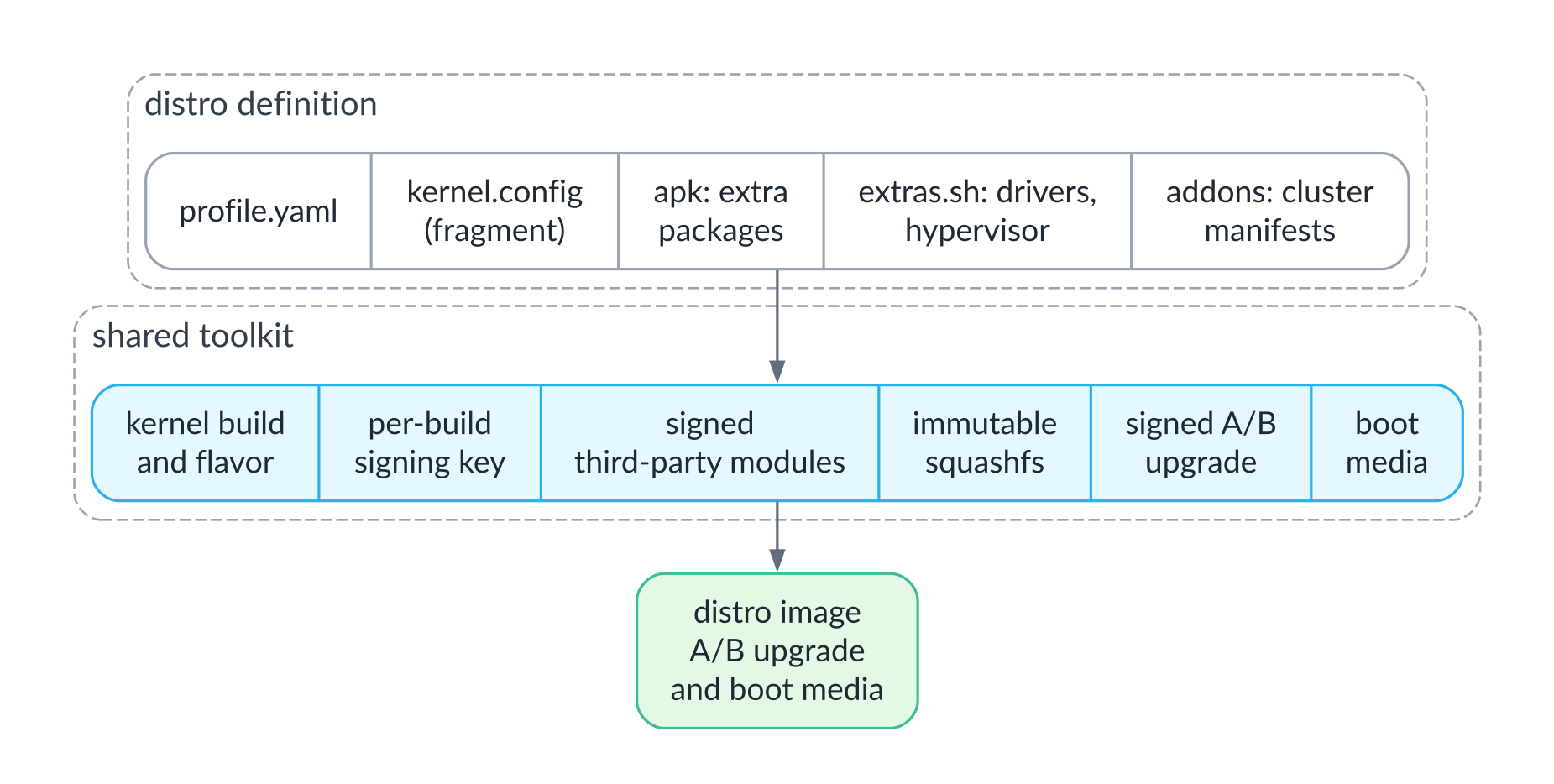
What a distribution is built from: its own description plus the shared toolkit
Everything else comes for free. Installation to disk, upgrades with a trial period and rollback, backup and restore, nodes joining the cluster, node management through kubectl, the package manager and conformance testing are the same for every distribution, and the author of a new one does not have to think about any of them.
A new kind of object, in two places
If a distribution needs an object that Kubernetes does not have, say a virtual machine, a language model, an industrial sensor or a network interface, it is added in two places. On the node, a new resource appears in the node API, backed by an ordinary process that knows how to do whatever that object needs, whether that is running a hypervisor, serving a model, polling a sensor or programming routing tables. On the control plane, a controller appears together with its own CustomResourceDefinition; it decides which node should run what, hands each node its share through that node’s API, and collects their state back.
This is exactly the pattern Kubernetes has been extended with for years, just pushed one layer down, onto the machine itself, and that is why new distributions came together so quickly. Over time, the distributions began to share parts. The mechanism that puts changes on trial and rolls them back automatically, which first appeared in the router, was later moved into a shared package and is now used by the sensor gateway and the monitoring cluster as well. Likewise, the loop that reconciles each node resource independently, so that a long operation on one object cannot hold up the rest, is shared by virtual machines and model servers.
A detailed walkthrough of the builder, with an end-to-end example in which we build a small distribution from scratch step by step, will be a separate article.
The package manager, and Duggan’s list
Where it came from
The kubepkg package manager grew out of cozypkg, the packaging tool we built for the Cozystack platform when we moved it to a package-based architecture. In Cozystack it solved a very specific problem of that platform; for kuberoot it had to be reworked into a standalone project that runs on any Kubernetes cluster, not just ours, and plugs into a platform through configuration rather than forks. Along the way it gained capability-based dependency resolution, a dry-run plan of changes before anything is installed, signatures and per-repository trust, air-gapped installs, the ability to adopt components that are already installed, an image admission policy, SBOMs and vulnerability scanning, and much more, which I will cover in a separate article.
What a package is
A package in kubepkg is an ordinary, unmodified Helm chart plus a small descriptor next to it that says what the package provides and what it requires, what it conflicts with, which CRDs it owns, which permissions it needs in the cluster, whether it is safe to roll back to the previous version, and how to tell that each of its parts is healthy. This was a deliberate choice. There have been plenty of attempts to give Kubernetes its own package format, and they all foundered on the same fact: vendors already publish Helm charts and will not repackage them for the sake of a new standard. Finished packages remain ordinary charts in OCI registries, so they can be installed without kubepkg too, through Flux, Argo CD or Helm itself, and kubepkg can either install them on its own or hand them over to Flux or Argo CD.
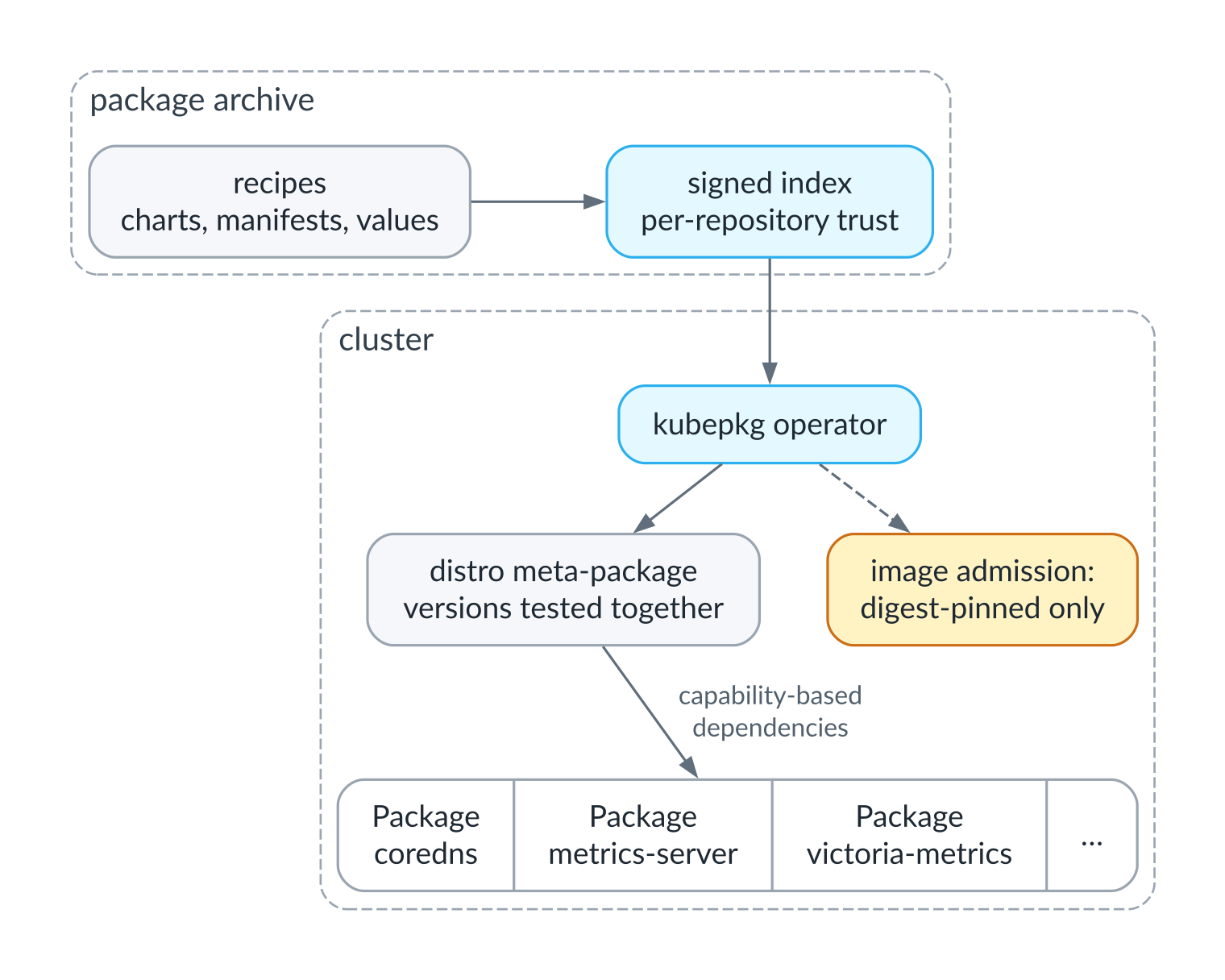
From a recipe in the archive to a package in the cluster
A distribution in this model works the way a Linux distribution does: a base plus a meta-package that pins the versions of a tested set and pulls it in as a whole. When a node running a distribution brings up a cluster, kinit installs that distribution’s meta-package by itself, and from then on the user brings in whatever they need. For the AI distribution, for example, the archive has ready-made configurations for inference, for document search and for training, each of them a meta-package as well, and the archive currently holds more than forty packages, from networking and storage to job queues and vector databases.
Duggan’s eight points
Duggan and I agreed on a lot and disagreed on some things, and I think it is worth going through his eight points, because behind every disagreement is a decision we made deliberately.
Centralized State Management. Duggan asked for “a robust, centralized state store for all deployed resources, akin to a package database.” We concluded that Kubernetes already has such a store, its own API server, and that a second database next to it will inevitably drift away from the live objects, as already happens with Helm and its release secrets. So kubepkg keeps its state in its own cluster resources and derives everything else from the live objects.
Advanced Dependency Resolution. apt, pip and npm all have a mechanism that takes constraints such as “this package needs version 2.3 or later of some library” and works out a combination of versions that satisfies every package at once. The trouble is that a solver will happily produce a combination that is formally valid but has never run as a whole, and distributions do not work because of clever solving; they work because they ship sets that were tested together. So kubepkg resolves dependencies by capability, that is, by APIs, CRDs and named capabilities such as ingress, keeps version constraints to a minimum, and leaves exact versions to the distribution, which pins them in its meta-package.
Granular Resource Lifecycle Control. Here we agree completely, with one caveat. Ordering an installation only helps if every part of a package defines for itself what being healthy means, so health checks are part of the package rather than something bolted on later.
Secure Packaging Standards. Signatures, yes; a single “centralized trust system,” no. Trust in kubepkg is organized per repository, the way Debian archives work, each with its own keys; artifacts are signed with cosign from the Sigstore project, and repository metadata follows The Update Framework (TUF). On top of that, a cluster can require that only images pinned by digest in a package may run in the packages’ namespaces.
Native Support for Multi-Cluster Management. This we deliberately left out of scope. Managing fleets of clusters is already the job of Argo CD, Flux, OCM and Karmada, and kubepkg tries to do one thing well in one cluster and to be easy to drive from those tools.
Rollback Mechanisms. A snapshot of cluster objects does not roll back data: volumes, database schemas after a migration, CRDs after one of their versions has been removed. Even apt makes no promises about downgrades. So in kubepkg, rollback safety is declared as a property of each package version; only what is declared safe is rolled back automatically, and for everything else a backup is taken before the upgrade.
Declarative and Immutable Design. Agreed on the declarative part, less so on templates: a package is still a Helm chart, because that is what vendors ship. But the desired state lives in cluster resources, and the plan of changes can be computed in CI from the same resources that live in Git, before anything in the cluster changes.
Integration with Kubernetes APIs. Agreed, with one important addition the list does not mention. The hardest part here is CRDs. They are shared by the whole cluster, they outlive the release that installed them, and deleting a CRD deletes every object of that type, so CRD ownership is a concept of its own in a kubepkg package.
As for Kubernetes 2.0 as Duggan imagines it, we have covered part of that road too, though not always the way he proposed. The default datastore in our distributions is lightweight, as he suggested. Instead of replacing YAML with HCL, we shrank what has to be written by hand, using typed intents. There is a package manager, though it is not built into Kubernetes but lives next to it. What we do not have yet is IPv6 by default.
Back to Tim Hockin’s reply
Hockin had doubts about the Linux kernel analogy, and it is only fair to give them the same treatment as Duggan’s points, because in many ways working on kuberoot turned out to be a test of each of them.
Kubernetes is business-focused, and businesses need only a handful of distributions. That is hard to argue with if you think of general-purpose distributions; companies really do choose between two or three. But businesses consume an enormous number of specialized Linux distributions; they just do not call them that. Inside the firmware of a router, a storage array, a hypervisor, an industrial controller, a medical device, a television or a car there lives a Linux distribution built for one job, and almost none of their owners know what is inside. That class, not yet another Ubuntu, is what I had in mind, and that is why our distributions turned out to be a router, a hypervisor, a real-time controller and a gateway rather than three competing general-purpose clusters.
Too much ships in the box (kube-proxy, DNS, kubeadm), and even the scheduler is closer to user space. Here Hockin and I are in complete agreement, and kuberoot takes the thought all the way. Which Kubernetes components run is decided by the distribution’s profile. The router and the sensor gateway have no kubelet, no scheduler, no kube-proxy and no container runtime; the hypervisor keeps the kubelet only so that the cluster can see its nodes and notice when one fails, and runs no pods; DNS is installed as a package; and the cluster lifecycle lives entirely in kinit and the node API, so kubeadm is not needed at all. In our reading, then, the Kubernetes kernel is the API server, the datastore and the controllers, and everything else becomes a choice the distribution makes.
Kubernetes ships binary builds, while the Linux kernel is built by distribution builders. Here we have stopped halfway, for now. We build the Linux kernel ourselves, together with third-party modules and signing, but for Kubernetes itself we use the project’s upstream binary releases, pinned by version, because for our purposes building from source has not bought us anything yet. The architecture allows it, though, and if a distribution ever needs its own kubelet or its own API server, it will be able to build them the same way it builds the kernel today.
Compile-time options make less sense for Kubernetes than for the kernel, and the analog is more like “use a simpler scheduler.” This turned out to be exactly right. In kuberoot the role of compile-time options is played by the distribution profile, which decides which components run and with what settings, which datastore to use, and whether there should be pods at all. We really did not need compile flags, but the ability to drop a component or swap it for a simpler one was needed in every single distribution.
Build new things ON kube rather than IN kube. And this is perhaps the best description of what came out. Not one of kuberoot’s capabilities required changing Kubernetes. The node API plugs in through aggregation; virtual machines, models, sensors and routing rules are described by their own resources with their own controllers; packages are installed by an operator; and the agent-operator is constrained by a ValidatingAdmissionPolicy, which Kubernetes has out of the box. All of it is built on Kubernetes, and none of it is built into it.
Eight distributions
Now that it is clear what they are built from, we can walk through the distributions themselves. Each will get its own article with details and demonstrations; here I will try to show what makes each of them interesting and how it works inside.
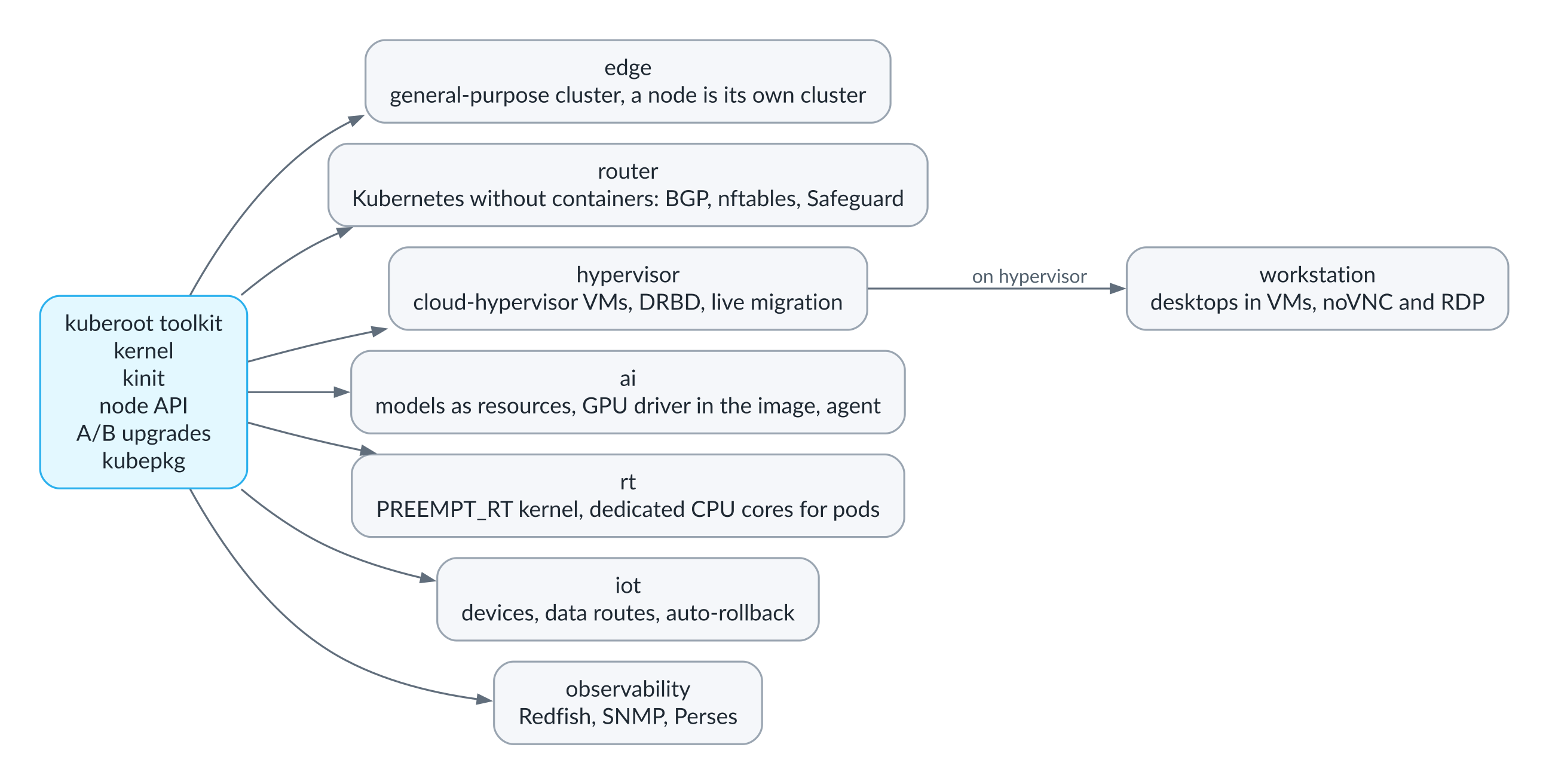
Eight distributions on one toolkit
Edge
This is where everything started, and where everything else was tested. It is a general-purpose cluster of one or more nodes, and a single node can be a cluster all by itself, a complete one with an API server, a scheduler and a package manager, while other nodes join it with join tickets. Such a node is handy wherever there is no engineer but there is a need for a few services: a shop, a warehouse, a factory floor, a branch office, a cell tower. The node is installed from a USB stick, upgrades itself with automatic rollback on failure, backs up its own state and restores from those backups, and everything above the base arrives as packages.
For the edge distribution there is a meta-package for the full platform, which turns a small cluster into a self-sufficient site with storage on DRBD through Piraeus, monitoring and logs on VictoriaMetrics and VictoriaLogs, application backup through Velero, policies through Kyverno, a load balancer for services, and ingress. On this distribution we ran the conformance tests and checked upgrade rollback, sudden loss of power on the control-plane node, network partitions between nodes, moving applications to another cluster through a backup, and load tests. This is where we found the most bugs, which spared us from hunting for them in the other distributions. One of them was particularly instructive. After a sudden power loss, the cluster datastore sometimes stayed locked, and we had to teach it to wait for the lock instead of crashing.
Router
This is a Kubernetes without a single container, and to me it is the clearest proof that the Kubernetes API can simply be a convenient control panel for a machine. The profile of this distribution has no kubelet, no containerd, no scheduler and no kube-proxy: the API server simply keeps the router’s configuration, with RBAC, audit and watch. Network interfaces and VLANs, routes, NAT, firewall zones and rules, a DHCP server, a BGP speaker and its peers are all described by resources in the router.kuberoot.dev group and applied by a program on the node that talks directly to the kernel’s networking stack, keeps its own nftables table, runs the DHCP server and the BGP daemon, and marks its routes with its own routing protocol ID so that it never touches routes installed by anything else.
The best thing about this distribution is that it protects you from yourself. With a Safeguard resource enabled, every change goes on trial first, in the spirit of commit confirmed on Junos. The node applies it and waits for confirmation, and if you have accidentally cut off your own access and failed to confirm the change in time, it rolls back to the last confirmed configuration by itself, and the rollback survives a node reboot too. And to keep you from locking yourself out in some especially inventive way, port-forwarding rules are rejected if they would capture the addresses and ports the node is managed through. Anyone who has ever driven to the server room in the middle of the night because of one wrong line in the firewall rules will appreciate this better than I can.
Hypervisor
The hypervisor runs virtual machines directly on KVM with Cloud Hypervisor, with no pods, no libvirt and no intermediate management layer. A machine is described by a VirtualMachine resource that specifies CPUs, memory, disk size, the image to write the disk from and the number of disk replicas, and a controller on the control-plane node decides where the machine should run and where the copies of its disk should live.
Machine disks are DRBD 9 volumes backed by files on the nodes and replicated synchronously, so every write reaches the other copies before it counts as done. DRBD quorum is enabled, so a node cut off from the majority of copies stops writing to the disk altogether, and that is what saves you from split-brain: a machine started on another node after a failure will never share its disk with a stale copy. Machines on different nodes live on one network: a bridge on each node is connected to the others over VXLAN, and a gateway on the control-plane node hands out addresses and gives the machines a route to the outside world.
Pull the plug on a node, and after half a minute the controller declares it dead and starts the machine on a node with an up-to-date copy of the disk; in under two minutes the machine is running there with the same disk and the same address. When the old node comes back, its copy of the disk catches up with the others, and the node itself does not start the machine a second time. We tested this both by cutting power and by cutting the network, and there was not a single split-brain.
For maintenance, a machine can be live-migrated to another node without rebooting the guest. For the duration of the move, the volume runs in DRBD dual-primary mode, writable on two nodes at once; a Cloud Hypervisor instance waiting to receive the machine is started on the target node; the source node streams the running machine’s memory to it; and after the move the disk is writable on only one node again. A move starts only when every copy of the disk is connected, and it is rolled back if it does not finish in time or if a node disappears along the way.
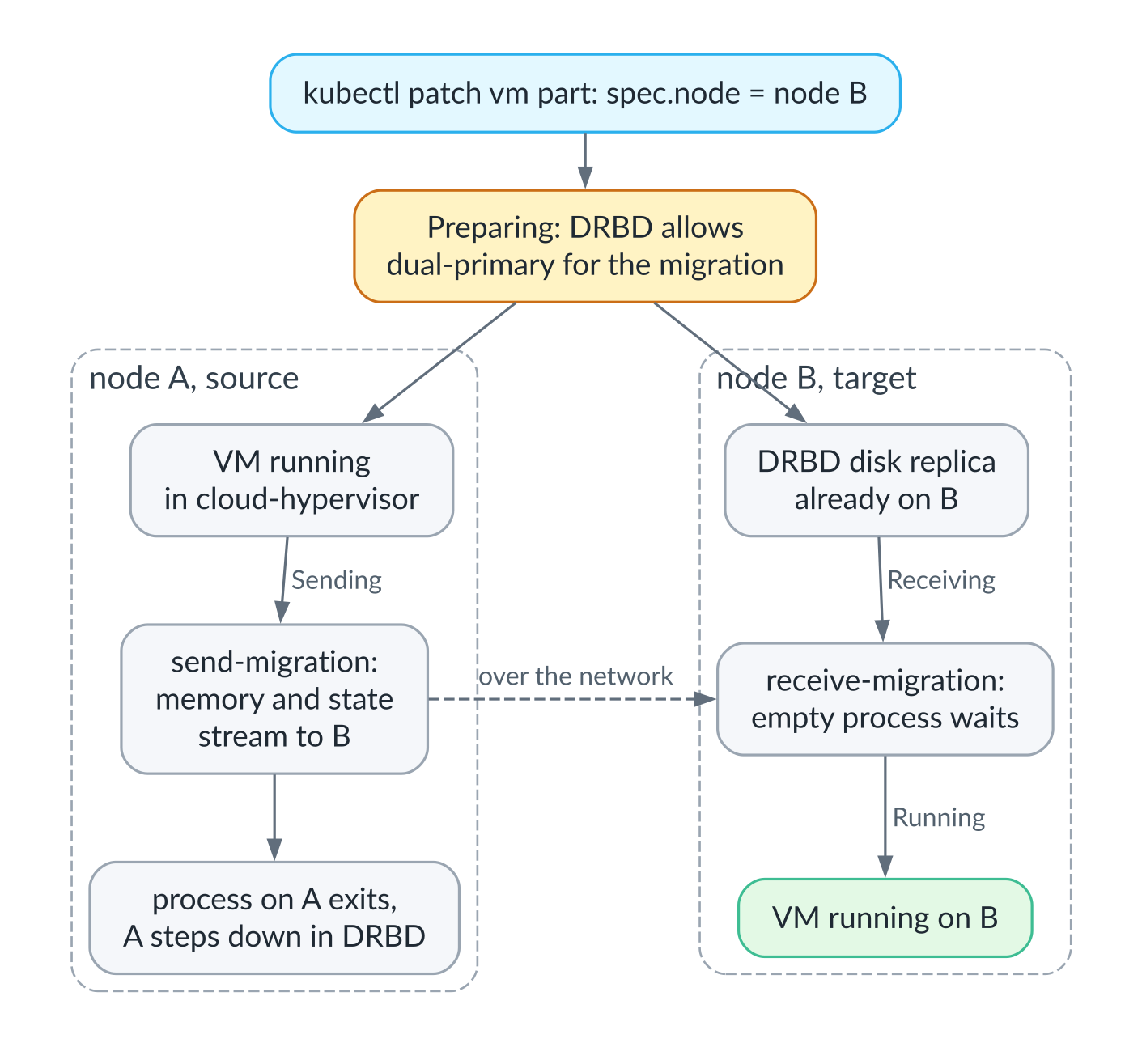
Live migration of a virtual machine between nodes
$ kubectl patch vm part --type merge -p '{"spec":{"node":"kuberoot-af49e9"}}'
11:22:46 Migrating  kuberoot-221a17  Preparing  moving alive from kuberoot-221a17 to kuberoot-af49e9
11:22:53 Migrating  kuberoot-221a17  Receiving
11:23:00 Migrating  kuberoot-221a17  Sending
11:23:06 Running    kuberoot-af49e9             moved alive from kuberoot-221a17
In our lab such a move took about twenty-five seconds. This is live migration, the feature many teams first bought vSphere for, built as an ordinary Kubernetes resource, with the same RBAC and the same automation as everything else.
AI
The AI distribution is the edge distribution plus two mechanisms of its own, and each deserves a proper look.
The first is language models as a cluster resource. You describe a model with a Model resource, saying where to get its weights and what their hash is, how many replicas you want, the context size and how many requests to serve at once, and the cluster does the rest. The controller picks the nodes, trying not to put models on the control-plane node while there are workers available; the nodes download the weights, verify them against the hash, start the model server as an ordinary node process, and expose the model through one shared OpenAI-compatible endpoint that routes requests by model name, round-robin across that model’s ready replicas, and passes streaming responses straight through.
The most interesting part is how a new version rolls out, which works as a canary release. The new version is first installed on one node, and once it is ready there, it receives a probe request. Only if it answers do the remaining nodes switch to it, one at a time, each after the previous one has started serving the new version, and before switching, each node is drained: taken out of routing, it finishes the requests it is already serving. If the new version fails to start, does not become ready within fifteen minutes or does not answer the probe, the cluster goes back to the previous version by itself and remembers not to try this version again until it changes. In our tests a deliberately broken version was rolled back in eleven seconds, and the two other replicas of the model never even touched it, while a version change under a load of four parallel clients with long streaming responses went through without a single cut-off response.
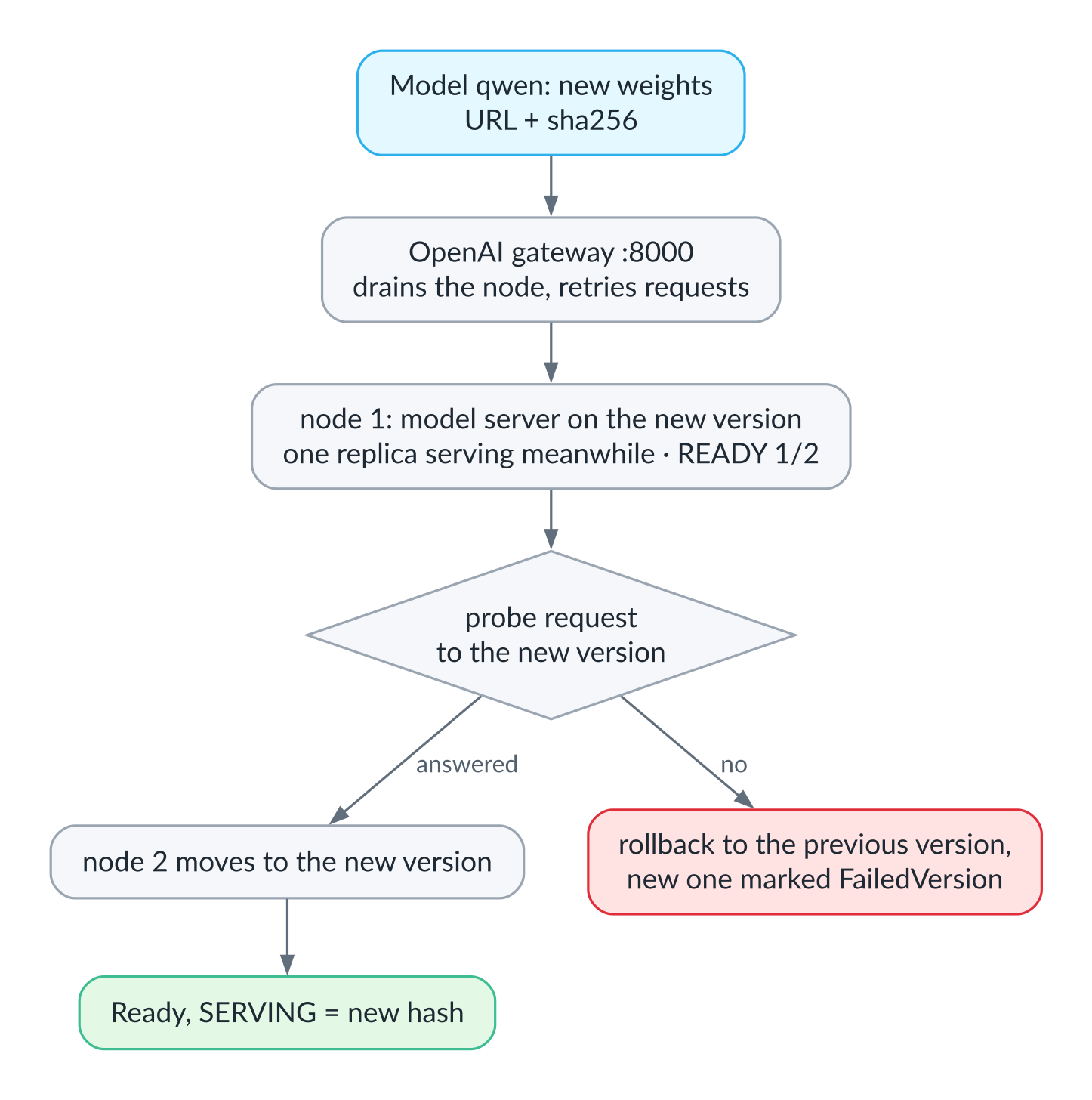
Canary rollout of a new model version
$ kubectl patch model qwen --type merge -p '{"spec":{"source":{"url":".../qwen2.5-0.5b-q5_k_m.gguf","sha256":"041474…"}}}'
$ kubectl get model qwen -w
NAME   READY   PHASE        SERVING   MESSAGE
qwen   2/2     RollingOut   74a4da…   trying the new version on kuberoot-05b48c
qwen   1/2     RollingOut   74a4da…   trying the new version on kuberoot-05b48c
qwen   2/2     RollingOut   74a4da…   moving to the new version
qwen   2/2     Ready        041474…
About thirty seconds passed between the first line and the last. The second line shows the first node taken out of service while it switches versions, with the model answering from a single replica; in the third, the new version has already answered the probe, and the second node is moving to it.
Model servers live on the node in a cgroup of their own with a memory limit, and that too is a lesson we learned the hard way. A model that had mistakenly been given a context of two million tokens started claiming memory lazily, and instead of the server simply being killed, the node, the control-plane node no less, sank into endless thrashing. Now model servers cannot take the memory reserved for the system, and a freshly started server gets a high OOM score, making it the kernel’s first candidate when memory runs out, so that neighboring models that are already running do not suffer.
In this distribution the NVIDIA driver is part of the operating system. The open kernel modules are built for our kernel and signed with its key, and the driver libraries, the nvidia-smi utility and the firmware sit alongside them. With no udev on the node, the node creates the device files itself and describes the GPUs to the container runtime through CDI. Pods get GPUs the usual way, through a device plugin, and the loader cache inside the container is refreshed for the injected libraries. Nodes with GPUs carry a label by which GPU packages find them, and the cluster’s models can also run on GPUs directly: the node gives each model server cards no other model server holds and records the assignment, though the device plugin does not know about these cards yet, so for now a node’s GPUs should go either to pods or to models, not both. All of this has so far been exercised without physical GPUs, as the section on risks explains.
The program that serves a model on a GPU, with CUDA libraries for every generation of cards built in, weighs about a gigabyte and simply did not fit into the one-gigabyte system slot. That pushed us toward what I think is a better design: the inference engine is now part of the model’s version, on equal footing with the weights. It is downloaded by the nodes that run it, verified against its hash, and a change of engine rolls out as carefully as new weights, through a probe node and with rollback. The system image stays small, and the engine can be upgraded without upgrading the OS.
The rest of the ecosystem is installed as packages: the Kueue job queue and the Volcano batch scheduler, the vLLM and Ollama inference engines, the LiteLLM gateway and the Open WebUI interface, training through KubeRay and Kubeflow Trainer, JupyterHub and MLflow, the Qdrant and Milvus vector databases, PostgreSQL with pgvector, object storage for datasets, and GPU packages, including sharing one card between pods with HAMi. We installed and tested most of them live on our test cluster.
The second mechanism is the agent-operator, which I will certainly write about separately, because I think this is where we ended up with the most interesting architecture in the project. The agent is a language model that watches the cluster, finds problems such as nodes that are not ready, services that keep restarting or model servers that have crashed, reads their logs and suggests what to do about them. But it cannot do anything itself. All it can do is create a Remedy resource, a proposal limited to five possible actions: restart a node service, restart a model server, roll a model back to its previous version, reboot a node or hand the question to a human. And it chooses only the action, and only from those allowed for that problem, because its output is constrained by a JSON schema. What the action applies to is taken from the problem itself, not from the model’s answer.
A proposal is carried out by ordinary code, and only after a human has approved it or a policy has explicitly allowed it, no more than a set number of times per hour. Even an approved action will be refused if it is dangerous in itself, for example rebooting a control-plane node, or rebooting a node while another node is already down. The agent has an identity of its own with permission only to read and to create proposals, and the rule that it may not approve or change its own proposals is enforced not by the agent but by the Kubernetes API server itself, through a ValidatingAdmissionPolicy.
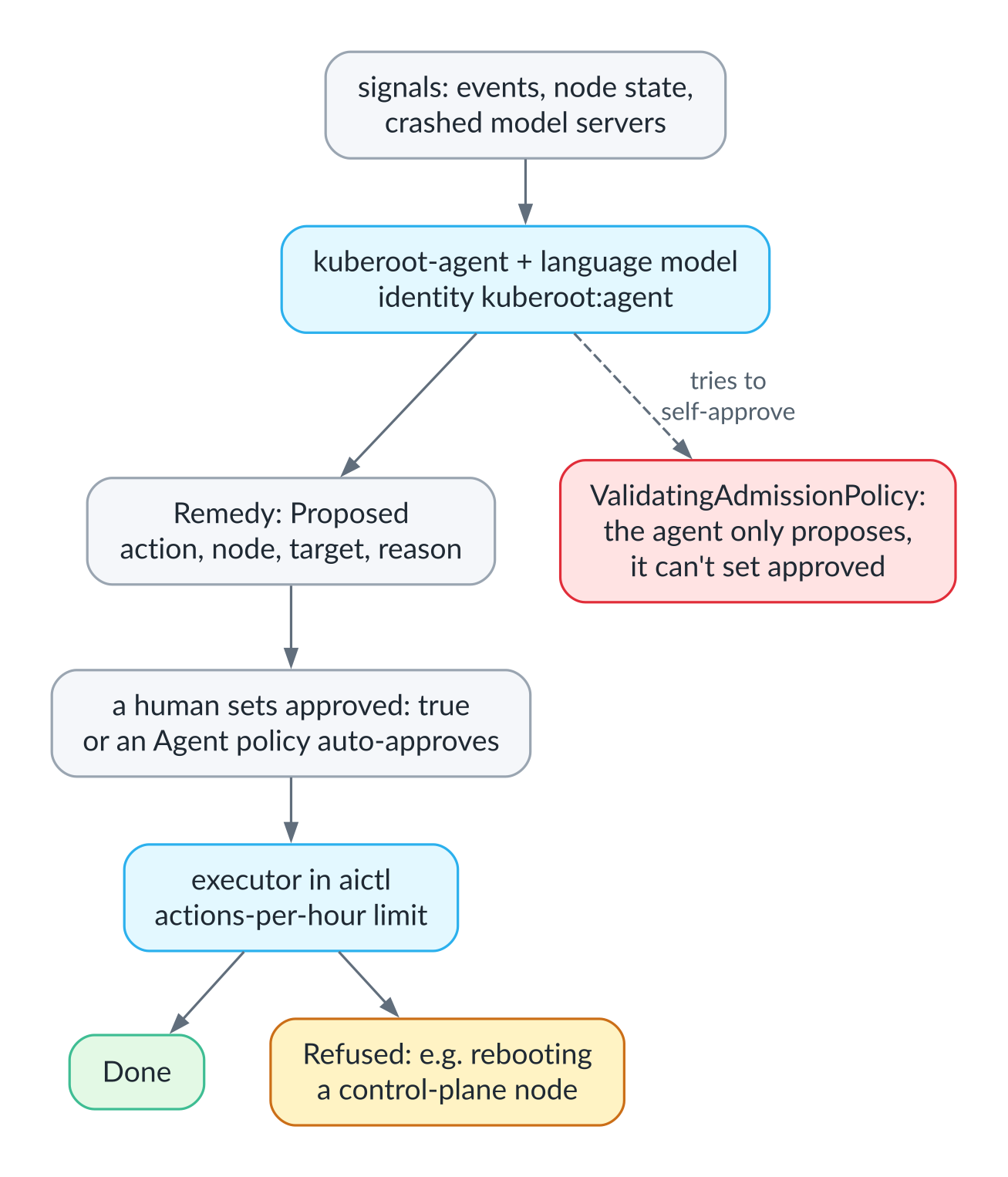
The agent only proposes; a human or a predefined policy decides
$ kubectl get remedies
NAME                       ACTION               NODE              TARGET   PHASE      REASON
restartmodelserver-xdv9t   RestartModelServer   kuberoot-05b48c   huge     Proposed   The server of model huge on node kuberoot-05b48c failed, and the logs indicate a possible training context overflow...
reboot-cp                  RebootNode           kuberoot-71a85e            Refused    node kuberoot-71a85e runs the control plane
This output shows both the strength and the weakness of the approach. A small half-billion-parameter model read about the context overflow in the log and still proposed a restart, when the right move would have been to hand the question to a human, and that is exactly why, by default, nothing runs without approval. It seemed important to me to put this architecture in place now, before models get convincing enough to tempt us into giving them a longer leash than they deserve.
RT
The real-time distribution is built for industrial controllers and other jobs where it matters not just to compute, but to compute on time. The kernel here is built with PREEMPT_RT and a 1,000 Hz timer; every CPU core from the third onward runs tickless, with RCU callbacks and kernel housekeeping moved off it, and interrupts are pinned to the first two. The kubelet, with its static CPU and memory manager policies, hands the isolated cores to pods exclusively, together with memory from the same NUMA node, so a pod running a real-time task gets its cores to itself and can run at real-time priority.
The latency a node actually delivers is measured through the node API as well. A LatencyTest resource runs a cyclictest-style measurement at real-time priority on the isolated cores and returns minimum, average and maximum latency and percentiles for each core, so a node can be checked before it goes into service with an ordinary kubectl command.
$ kubectl logs -n rt-demo rt-probe2
Cpus_allowed_list:	2-3
policy	: 1
prio	: 19
This pod got cores 2 and 3 to itself and runs with the SCHED_FIFO scheduling policy.
IoT
The gateway for industrial devices, once again, does without containers. Devices, such as a press controller that speaks Modbus TCP, are described by Device resources with a list of points, that is, registers with their types, scaling and polling period, and Route resources describe under what condition and where to send the data. Conditions are written in CEL, the same language Kubernetes uses for validation rules, and they are edge-triggered: an alarm goes out once, at the moment the condition becomes true, not on every poll. The program on the node keeps one connection to each device and to each MQTT broker and gets by on thirty-five megabytes of memory.
Here too there is protection against a bad configuration, and it is even smarter than the router’s. A change rolls itself back if, after it, something that used to work has stopped working, for example a device stopped answering or a broker stopped accepting messages. And if the trial goes well, the change confirms itself, with no human involved.
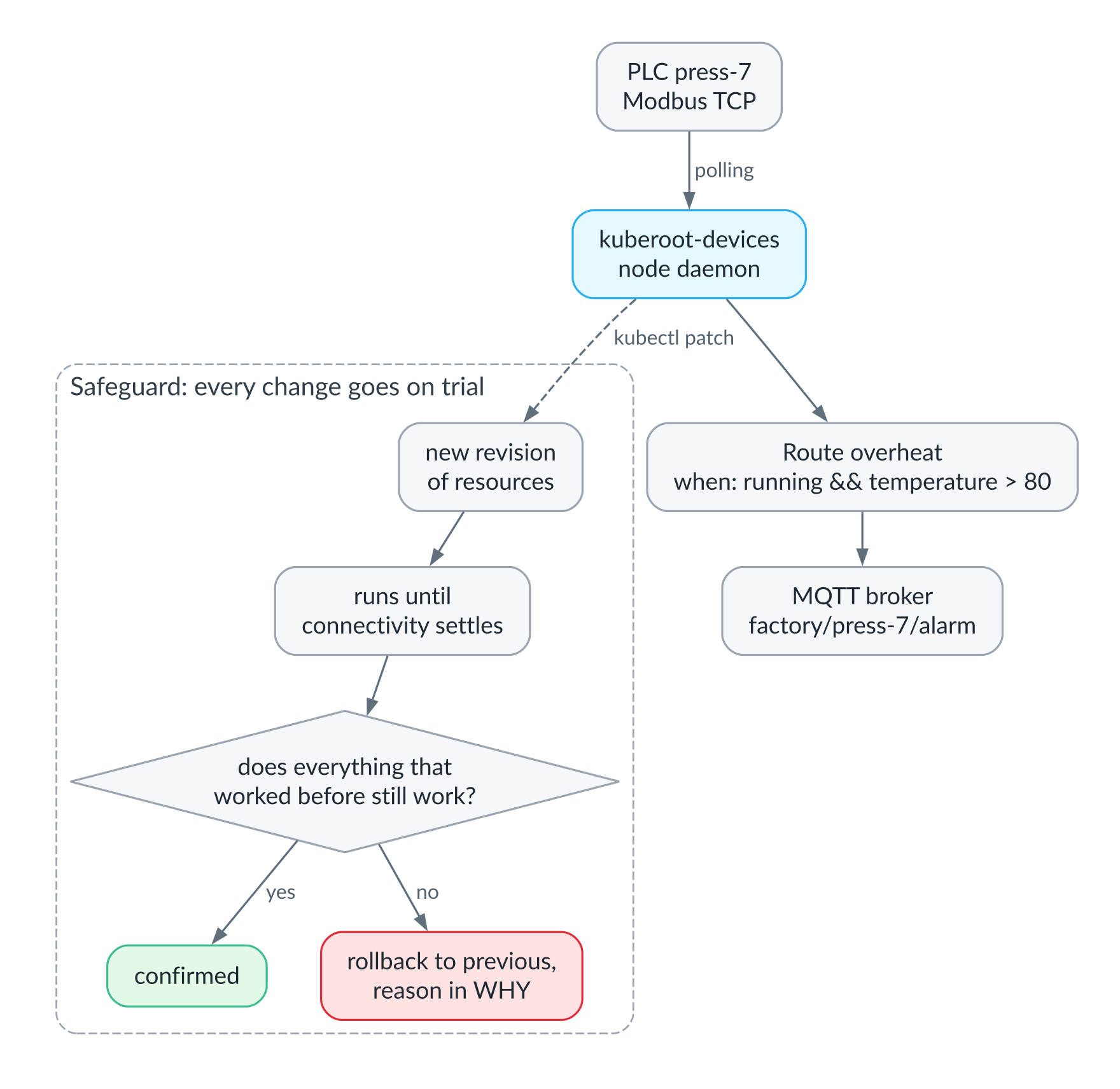
A device, a data route and a Safeguard that automatically rolls back changes that broke what used to work
$ kubectl get devices,routes,safeguards
NAME      PROTOCOL     ADDRESS              CONNECTED   VALUES
press-7   modbus-tcp   10.244.156.46:5020   true        temperature=91.2C cycles=42 running=true

NAME       DEVICE    WHEN                          SENT
overheat   press-7   running && temperature > 80   2

NAME      RUNNING        ROLLEDBACK     WHY
default   17b81762470b   80bcbf1eab69   the change broke what worked before it: route overheat stopped working

$ mosquitto_sub -t 'factory/#'
factory/press-7/alarm {"device":"press-7","values":{"temperature":91.2},"when":"running && temperature > 80"}
The last Safeguard line shows that one of the recent changes, which sent alarms to a broker that did not exist, was rolled back automatically, and the WHY column says why.
A gateway node fits into a virtual machine with 1.25 gigabytes of memory, and curiously enough, most of that memory goes not to our code but to the Kubernetes API server itself. The next step here is a node without an API server of its own, managed from a central cluster, for truly tiny devices, along with the OPC UA and Modbus RTU protocols.
Observability
The seventh distribution is meant to be an external monitoring cluster that watches the hardware and software around it and is built to survive whatever it is watching. When a data center goes down, monitoring that lives in the same data center and on the same platform goes down with it, at the very moment it is needed most. So the monitoring cluster is installed on one, two or three small servers with their own operating system, their own upgrades and replicated storage, and depends on none of the systems it observes.
Servers and their BMCs, switches, power distribution units and UPSes are described by the same Device resources as the industrial sensors, just with different protocols. The program on the node polls BMCs over Redfish, walking the systems, chassis and managers and collecting their health, temperatures, fan speeds, power draw and log entries; it polls network hardware over SNMP, including SNMPv3; and it checks the availability of services from the outside with HTTP, TCP and ICMP probes, where an unreachable service counts as a reading rather than an error. The program exposes everything it collects as metrics and registers itself for scraping, so there is no need for a scattering of separate exporters, and a change that breaks polling of targets that worked before it is rolled back automatically, just as in the gateway. In our lab a broken BMC address was rolled back in a minute and a half, and the program itself took about forty megabytes.
The data goes into VictoriaMetrics and VictoriaLogs. Dashboards are built in Perses, which reads from both, and are described as Kubernetes resources, so they can be reviewed in Git like code. There is also a dead man’s switch, the Heartbeat resource, which calls an external address at a set interval, but only while the monitoring system itself sees fresh data. A cluster that has stopped collecting metrics falls silent just like one that has crashed, and the external receiver finds out at once. The nastiest kind of outage, after all, is the one your monitoring stays quiet about because it died first.
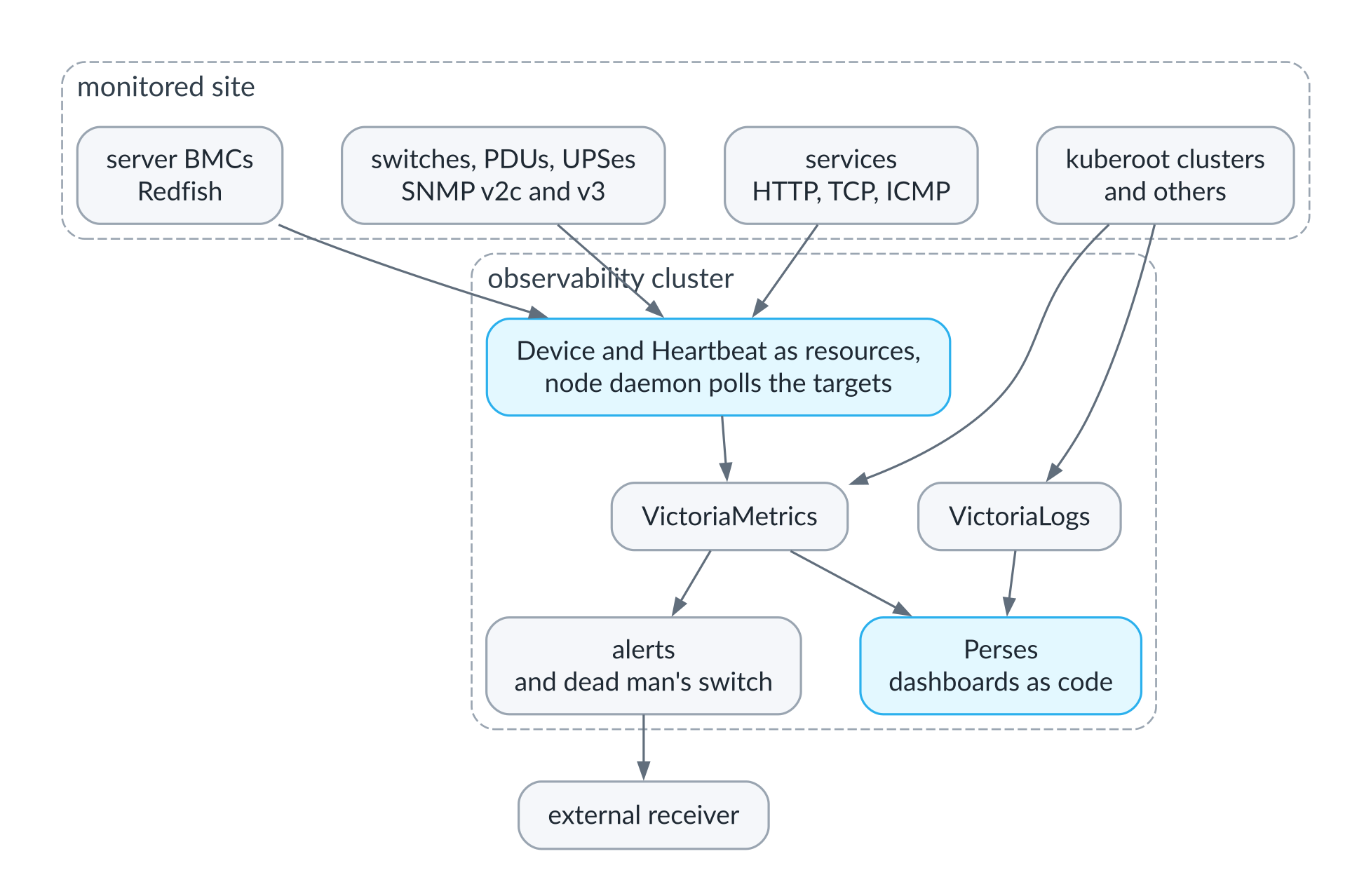
The external monitoring cluster: what it watches and where it sends the data
Workstation
The eighth distribution answers the question of whether your desktop can live inside the cluster. The desktop here is a hypervisor virtual machine described by a Workspace resource, with a replicated disk, and it keeps running when its owner closes the laptop and opens from any browser or RDP client. Cloud Hypervisor has no graphical console, so the desktop is brought up by the guest itself, configured on first boot through cloud-init, whose data the hypervisor serves to each machine over the network after checking its source address. The gateway through which the browser reaches the desktop runs as a process on the control-plane node, without pods, like the rest of the hypervisor, and lets you in only with the workspace’s token.
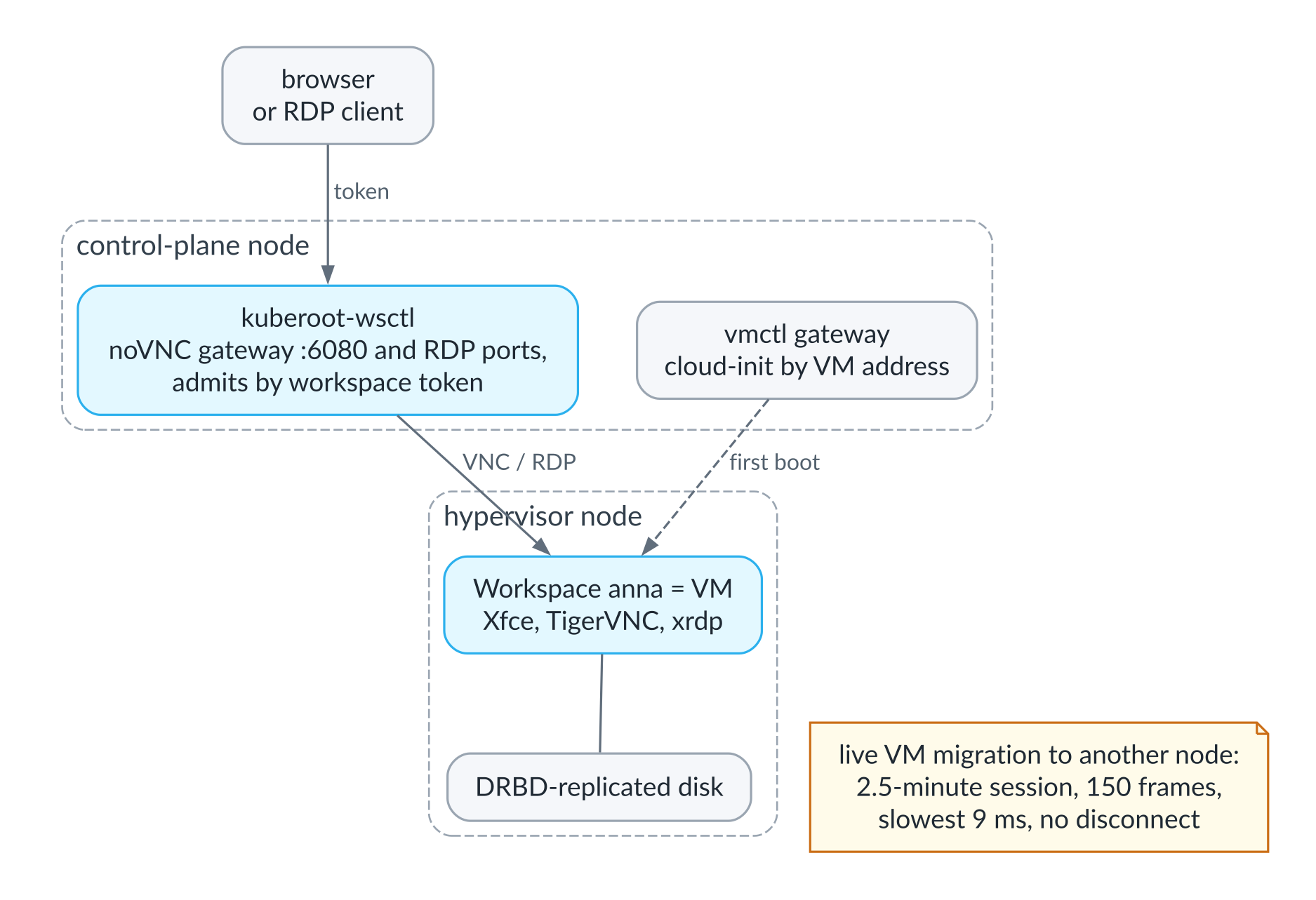
A workspace in the cluster: from the browser to the virtual machine
The best thing about this distribution is inherited from the hypervisor. A session open in the browser survived a live migration of the virtual machine to another node, and over two and a half minutes of monitoring not a single desktop frame was lost; the slowest took nine milliseconds to arrive. What you get is the core of VDI without Citrix or VMware Horizon, though not yet its enterprise trimmings: the gateway does not terminate TLS, there is no single sign-on against a user directory, and Windows desktops exist only on paper for now, because licensing stands in the way.
The decisions we made, and why
If you boil everything above down to a handful of decisions, you get roughly the following list, and each item on it, I think, deserves a debate of its own.
We decided that a node should be managed through the same API as the cluster, not through a separate tool. That gives us one RBAC model, one audit log and the ability to automate nodes with the same controllers as everything else. The price is that the node API has to work even when there is no cluster yet, or no cluster anymore, so the node can serve its API on its own, with its own certificate authority.
The kernel is our own: it loads only modules signed with its own key and forbids module loading altogether once the system has booted. That closes off a whole class of attacks and ends version drift between drivers and the kernel, but it means that any third-party module, whether for storage or for a GPU, has to be built together with the kernel, and that responsibility for the kernel’s security updates now rests with us.
The system is immutable and is upgraded as a whole into a spare slot, on probation. That gives us rollback without human involvement and identical nodes, but it requires all mutable state to live separately and to be carried carefully from one release to the next, and we have already seen state saved by one release keep another from booting.
A distribution is a profile plus a meta-package, and everything shared lives in the toolkit. That makes new distributions cheap, but it takes discipline to keep the toolkit from sprouting special cases for individual distributions.
A package is an unmodified Helm chart plus a descriptor, not a new format. That lets us use everything that has already been published, but where Helm falls short, so do we.
Containers stay out of places that do not need them. The router and the sensor gateway run without a container runtime, and the hypervisor runs no pods, which makes them simpler, lighter and more predictable, but it means that every such object needs a program of its own on the node.
Heavy data, whether model weights or inference engines, does not live in the system image but is downloaded by the nodes that need it, verified against its hash and rolled out with the same care as everything else.
And we decided that machine intelligence in infrastructure may only propose, and that approval, audit and prohibitions must be built into the architecture and enforced by the API server, not left as a setting someone can forget to turn on.
How this differs from what exists today
kuberoot’s closest relative is Talos Linux, and I have already described the difference: our node is managed by Kubernetes itself rather than by its own API and its own tool, and we have a toolkit for building many different distributions, whereas Talos is a single distribution with an extension mechanism. Bottlerocket and Flatcar share the immutable, A/B-upgraded design, and Kairos also builds images and drives upgrades from the cluster, but none of them, as far as I know, exposes the node itself as Kubernetes resources or treats the whole stack as a family of purpose-built distributions. What sets us apart from k3s and k0s is that they are Kubernetes distributions installed on top of someone else’s operating system, while we build the operating system together with Kubernetes. What sets us apart from Ubuntu plus kubeadm plus a configuration management system is the absence of the seam I talked about at the beginning. And what sets us apart from OpenShift and similar platforms is that we are not building one big platform for everyone, but letting you build a small one, specialized for your own task.
Then there are products that individual distributions can be compared with: VyOS for routing, vSphere and Proxmox for virtualization, EdgeX and Node-RED for industrial gateways, KubeEdge for managing devices at the edge of the network. We are not competing with any of them on the number of features, because we would lose. What we are showing is that the same job can be done within one shared management model, where the router, the hypervisor, the models and the sensors live in one API, with one RBAC model, one audit log and one set of automation tools.
A word about Cozystack, which we develop at Ænix. kuberoot is not meant to replace it. Rather, it is an exploration of what the next layer beneath platforms like it might look like, and much of what comes out of it may eventually find its way there, if the project’s community finds it useful.
What this gives you
To those who run clusters, it gives nodes that do not need to be managed separately from the cluster, upgrades that roll themselves back, and an operating system that cannot drift, because it has no shell, no package manager and no way to load a foreign module into the kernel. Backing up a control-plane node and restoring it on another machine comes down to two resources rather than a several-page runbook.
To those who build platforms and products on Kubernetes, it gives a way to build a distribution for their own niche, be it a network appliance, a storage system, an industrial controller, an inference cluster or an edge device, without starting from zero and without maintaining a fork of an operating system. And a package manager in which tested sets of components ship as a single whole, rather than as a pile of separate charts whose compatibility everyone has to check for themselves.
To those who buy infrastructure products, it gives one management model where today there are several: routers, hypervisors, clusters and sensors are all configured the same way, with one RBAC model and one audit log, so one team can run the network, the hypervisors and the clusters without a separate toolchain for each.
And to the industry as a whole, to put it grandly, it offers a working model in which Kubernetes really does become a kernel, and the specifics move into distributions. Then the complexity budget Tim Hockin talked about is spent not in the project’s core but where that complexity is actually needed, and it is paid for there too.
Where the risks are
There are plenty of risks, and they are worth naming up front.
The main one is that this is still a small project, developed in our spare time by a very small team, and everything in it has been tested in our own lab, not in someone else’s production. The highly available control plane is very new, and although it survived losing its leader and passed the conformance tests, it has so far been tested only in the lab, and the etcd certificates, like the rest of the PKI, are not yet rotated automatically. The kine-on-SQLite datastore suits a single node and small clusters well, but we have already found non-obvious things in it, such as the fact that by default it does not compact history on quiet clusters, and we will surely find more.
A kernel of our own means our own responsibility for its security. Today we have pinned versions and rebuilds, but not a well-oiled process that would ship an update within a few days of a vulnerability being published in the kernel or in any component of the image, and that is something we will have to build before anyone puts kuberoot somewhere it matters.
Hardware support is still narrow. The main architecture is amd64, and on arm64 some things are not finished yet. The GPU driver is built and signed but has not yet been tested on real GPUs, and the real-time latency figures were measured only inside virtual machines, where they say more about the host’s hypervisor than about our kernel.
Having no shell on the node is not only a safeguard but also an inconvenience when diagnosing problems, and we have yet to prove that the set of node API resources is enough to get to the bottom of any 3 a.m. outage. There has been no independent security audit.
And finally, the package manager runs into the same problem that tripped up every similar project before it. The value of Debian is not in apt but in its package archive and the people who maintain it, and without a community willing to take on the upkeep of recipes, the archive will stay small, however well the manager itself is designed.
Join us
Everything I have described is open source under the Apache 2.0 license and lives in the kuberoot-dev organization on GitHub: the builder and the distributions in the kuberoot repository, the package manager in kubepkg, and the package archive in kubepkg-recipes. I would much rather keep building this with others than on my own.
Right now the project has one maintainer, and I make the decisions, but that is a starting point, not a destination. The description of how the project is run explains how responsibility passes to those who contribute steadily, and how decisions will become shared once there are three maintainers or more.
All kinds of help are welcome. You can build a distribution for your own task and tell us where the toolkit got in your way. You can test what we could not test ourselves: on real GPUs, on arm64, on real-time hardware. You can take on package recipes for the components you use yourself, which is perhaps the most valuable help of all. You can look at the code and the architecture with a critical eye, especially the security. Or you can simply join the discussion and tell me I am wrong, because that is exactly the kind of conversation this project started with.
In the next articles in the series I will explain in detail how a node managed through kubectl works, how to build your own distribution with our toolkit, and how the package manager works and how it differs from its predecessors; then I will go through each distribution in turn, with live demonstrations, and write separately about the agent-operator and our work on the datastore. And once the series is out, I would love to revisit the conversation that started all this nearly two years ago and see what has changed since, both in the industry and in the views of the people who took part. The code is already written; what remains is to explain how it is built and how it works.