Quick facts
- Project: kuberoot, Apache 2.0, github.com/kuberoot-dev/kuberoot
- On the node: kine, kube-apiserver, a trimmed controller manager, the node API and kuberoot-router; no kubelet, no containerd, no scheduler
- Configuration: Nine resources in router.kuberoot.dev: Interface, Route, NATRule, FirewallZone, FirewallRule, DHCPServer, BGPRouter, BGPPeer, Safeguard
- Lockout protection: A change that cuts off management rolls itself back in about 63 seconds with a 60-second confirm timeout, without a reboot
- Compared with: VyOS, OpenWrt 24.10 and Debian 12 with FRR, nftables and dnsmasq, in the same QEMU test bed
- Bugs found and fixed: Thirteen, each re-measured with the scenario that found it
In the first part of this series I called kuberoot’s router distribution the clearest proof that the Kubernetes API can serve as a convenient control panel for a machine, and I promised each distribution a post of its own. There is another reason to start with the router: of all the distributions, it has strayed furthest from Kubernetes as we know it. It runs no containers and has no scheduler or kubelet. Yet it is a full Kubernetes API server, with RBAC, audit, watch and everything kubectl and GitOps tools can do with one. This post covers how it is built and what it can do, how we tested it against scenarios drawn from post-mortems of real outages, how it stacks up against VyOS, OpenWrt and plain Linux with FRR and nftables, and where the tests say a router like this makes sense and where something else serves you better.

A router node runs five services and not a single container
Why a router needs the Kubernetes API
An ordinary router’s configuration lives in a world of its own. Every vendor has its own command language, its own configuration file format and its own way of changing it, and most of the time that way is a person typing commands by hand over SSH. Once there are many devices, people start building automation around that world: scripts that parse command output, Ansible, configuration templates, and, from the large vendors, NETCONF and gNMI with YANG data models, a candidate configuration and a commit that rolls itself back unless it is confirmed. Over the past twenty-odd years, network engineers have assembled, piece by piece, almost everything you need to manage the state of a large fleet: a typed configuration model, validation before a change is applied, access control, a change log, subscriptions to operational state, configuration locking against two people editing at once, and rollback.
Read that list again: the Kubernetes API server provides almost all of it for every resource, for free and in the same form. Every resource has a schema, and the server rejects invalid values before they get anywhere. Permissions can be granted per resource kind and per verb, for example letting the on-call engineer read routes but not change them. Every change goes through the audit log. You can watch any resource and learn about a change the moment it happens. Two simultaneous edits to the same object do not silently overwrite each other, because every object carries a resourceVersion and the server rejects an update made against a stale one. And kubectl diff, server-side apply, Argo CD and Flux work with these resources exactly as they work with a Deployment, because to them these are ordinary resources.
That is the whole idea. Take the part of Kubernetes that stores, validates and distributes desired state, that is, the API server and its datastore, and throw away everything to do with containers. The router configuration becomes a set of Kubernetes resources, and a program on the node brings the kernel’s network stack in line with them.
What runs on the node
A router node boots from the same image and through the same kinit as every other kuberoot distribution, but its profile starts only five services: kine, which serves the etcd API to the API server and keeps the data in SQLite; the Kubernetes API server; the controller manager; the node API; and kuberoot-router, the program that makes the node a router. The controller manager is cut down to the six controllers any API server needs: the garbage collector, the namespace controller, two controllers for service accounts and their tokens, the root CA publisher, which puts the cluster’s root CA certificate into a ConfigMap in every namespace, and the ClusterRole aggregation controller. This profile runs no kubelet, containerd, kube-proxy or scheduler. The binaries are still in the image, because the root filesystem of every distribution is built by the same script, but nothing on a router node starts them, and they never show up in the service list.

Node services and memory after boot
On top of the common image the profile adds two Alpine packages: dnsmasq, which hands out addresses over DHCP and caches DNS, and bird2, which exchanges routes over BGP. kuberoot-router starts both programs and writes their configuration itself. If one of them keeps crashing, kuberoot-router restarts it with increasing backoff and reports in the matching resource’s status that the program is in a crash loop.
kuberoot-router watches nine kinds of resources and applies them to the kernel directly. It configures network interfaces, their addresses, MTU, VLANs and routes through netlink, the same kernel interface the ip utility uses. It marks the routes it creates with a dedicated routing protocol ID, 107 (the proto field in ip route output), and removes only routes carrying that ID, so it never touches a route added by another program or installed by the DHCP client on the uplink. It keeps the firewall and address translation in a single nftables table and replaces that table as a whole in one atomic nftables transaction. The kernel commits the whole batch at once, so there is never an intermediate state in which the old rules are gone and the new ones are not yet in place. It applies a change as soon as its watch delivers it, and it also reconciles the kernel every ten seconds, in case someone has changed something behind its back.
Nine resources
Resources in the router.kuberoot.dev group describe the whole router configuration.
| Resource | What it configures |
|---|---|
| Interface | addresses and MTU of an interface, or a VLAN on a parent interface |
| Route | a static route |
| NATRule | source NAT (masquerade) on an egress interface, or port forwarding (DNAT) to a host behind the router |
| FirewallZone | a firewall zone: which interfaces belong to it, what it may reach on the router itself and which zones it may forward to |
| FirewallRule | a rule that accepts or drops traffic before the zone policies |
| DHCPServer | address assignment on an interface and a caching DNS for that network |
| BGPRouter | the router’s AS number and the prefixes it originates |
| BGPPeer | a BGP session with a neighbor |
| Safeguard | commit-confirm: a confirmation window for changes, described below |
A home gateway, with the uplink on eth0 and the home network on eth1, takes five resources.
apiVersion: router.kuberoot.dev/v1alpha1
kind: Interface
metadata: {name: lan}
spec: {link: eth1, addresses: [192.168.10.1/24]}
---
apiVersion: router.kuberoot.dev/v1alpha1
kind: NATRule
metadata: {name: out}
spec: {masquerade: {outLink: eth0, sources: [192.168.10.0/24]}}
---
apiVersion: router.kuberoot.dev/v1alpha1
kind: DHCPServer
metadata: {name: lan}
spec: {link: eth1, rangeStart: 192.168.10.100, rangeEnd: 192.168.10.199}
---
apiVersion: router.kuberoot.dev/v1alpha1
kind: FirewallZone
metadata: {name: wan}
spec: {links: [eth0], input: Drop, management: true}
---
apiVersion: router.kuberoot.dev/v1alpha1
kind: FirewallZone
metadata: {name: lan}
spec: {links: [eth1], input: Accept, forwardTo: [wan]}
eth0 does not need a resource of its own here: if a network interface has no Interface resource, the router leaves it alone, and the node’s DHCP client keeps the address it got from the provider.

kubectl apply of five resources: the client gets an address over DHCP and reaches the outside world through NAT
Every resource reports in its status whether the node has applied it and, if not, why. Interfaces show their state and MAC address, a DHCP server shows the addresses it has handed out, a BGP peer shows the session state and the number of routes received. If two resources conflict, for example when two Interface objects claim the same interface, the one that sorts first by name wins, and the other’s status explains why it was not applied. The rest of the configuration keeps working: one mistake does not break the whole router.

A resource the node cannot apply explains why in its status
Protection against your own mistakes
The nastiest mistake a remote router’s administrator can make is a change that leaves the router unreachable. Network history is full of them. The best-known one happened at Facebook in October 2021, when a change to the backbone configuration cut off not only the users but also the tools engineers needed to fix the network. kuberoot router has two defenses against this kind of mistake.
The first one is simple. In a firewall zone with management: true, the ports of the API server and the node API, 6443 and 50000, are accepted on the zone’s interfaces ahead of any user rule, whatever those rules say. A port-forwarding rule on those interfaces cannot hijack those two ports either: the DNAT stage exempts them before any port-forwarding rule is evaluated.
The second mechanism goes further. It is called Safeguard, and the idea behind it is old and proven: Juniper routers have long had it as commit confirmed, and VyOS, Cisco and Cumulus have it too. A configuration change first goes on trial. The router applies it and waits for confirmation, and if no confirmation arrives within the allotted time, two minutes by default, it reverts to the last confirmed configuration on its own. A change that cuts the administrator off cannot be confirmed, so it undoes itself.
Our implementation differs in two ways. First, the revision that has to be confirmed is computed over the whole router configuration at once, across all eight kinds of configuration resources: it is the first twelve characters of a SHA-256 hash of their specs. What goes on trial, then, is not a single command or resource but the router’s entire state: interfaces together with routes, address translation, firewall, DHCP and BGP. A revision is confirmed by name, by writing its hash into spec.confirm, so confirming one revision cannot accidentally confirm the next one. Second, the last confirmed configuration is stored on the node’s disk, so a rollback survives both a controller restart and a reboot.

A change cuts off access, no confirmation arrives, and a minute later the router restores the confirmed configuration
How we tested it
Feature tables tell you little about a router: nearly every router checks most of the boxes, and in nearly every one some feature breaks the moment the network stops behaving the way the documentation expects. So we drew our test scenarios from post-mortems of real outages instead: a change after which the device can no longer be reached; an upgrade interrupted by a power cut halfway through writing; a second administrator editing the same configuration at the same time as the first; a BGP neighbor that silently stopped forwarding traffic but did not close the session; an overflowing NAT connection table; a disk that filled up or started returning errors. That gave us thirteen scenarios, and we ran each of them on four systems: router, VyOS, OpenWrt and Debian 12 with FRR, nftables and dnsmasq configured by hand the way a careful administrator would.
All four systems ran under identical conditions, in a test bed that lives in a single Kubernetes pod with access to KVM. Each router runs in QEMU with two cores and two gigabytes of memory, the network segments between the virtual machines are QEMU sockets, and behind the router sits a separate gateway VM that injects delay, loss or a rate limit on demand, or blackholes traffic. Client, router, gateway and receiver are wired the same way for all four systems, and management access to the router goes over a separate out-of-band interface and never crosses the measured path.

The gateway adds 50 ms of delay on the return path: average RTT 0.9 → 51.0 → 1.0 ms
A test bed like this has one limitation worth stating up front: a network built from QEMU sockets runs in user space, so throughput figures show not line rate but only how the routers compare with each other under identical conditions. Everything else, from rollback times to the number of lost records, is measured properly, because it depends on the systems themselves rather than on the network around them.
We held ourselves to three rules. A result is a recorded measurement with its raw data stored alongside; a script that merely exists proves nothing. Runs spoiled by the test bed or by a script bug are never deleted; they stay in the record, marked and excluded. And every failure of kuberoot router is a finding to be fixed in code and re-measured, not explained away.
| Scenario | What it checks |
|---|---|
| R-B1, R-B2 | boot, memory, idle disk writes, throughput |
| R1 | a change that cuts off the administrator |
| R2 | an upgrade that fails to download, fails to boot, crashes or stops forwarding, and a power cut in the middle of an upgrade |
| R3 | stale configuration, two administrators editing at once, and manual kernel changes that bypass the system |
| R4 | DHCP under load, whether handed-out addresses survive a reboot, guest VLAN isolation |
| R5 | NAT with hundreds of thousands of connections, and a SYN flood |
| R6 | a firewall with 100 to 20,000 rules |
| R7 | a full BGP table on little memory |
| R8 | BGP export policy and max-prefix limits |
| R9 | silent BGP neighbor failures, link drops and a restart of the BGP program |
| R10 | the management API under load, RBAC and dangerous changes |
| R11 | disk writes; a slow, full and failing disk |
Baseline numbers
An idle router node uses about 800 MB of memory, most of it held by the Kubernetes API server. That is noticeably more than OpenWrt, which gets by with about a hundred megabytes, and more than Debian, which has about 250 MB in use after boot; kuberoot router is roughly on par with VyOS. An upgrade image is 360 MB, compared with 649 MB for the VyOS ISO and 126 MB for the OpenWrt image.

Memory and services of an idle router node
Like the other three systems, kuberoot router leaves packet forwarding to the Linux kernel, so their throughput is almost identical: for routing and NAT, router, VyOS and Debian top out at about 300–340 Mbit/s, and OpenWrt at 270. The direct path from client to receiver without a router gives about a gigabit on the same test bed, so the roughly 300 Mbit/s ceiling is the limit of the router VM with its two cores, not of the test network.
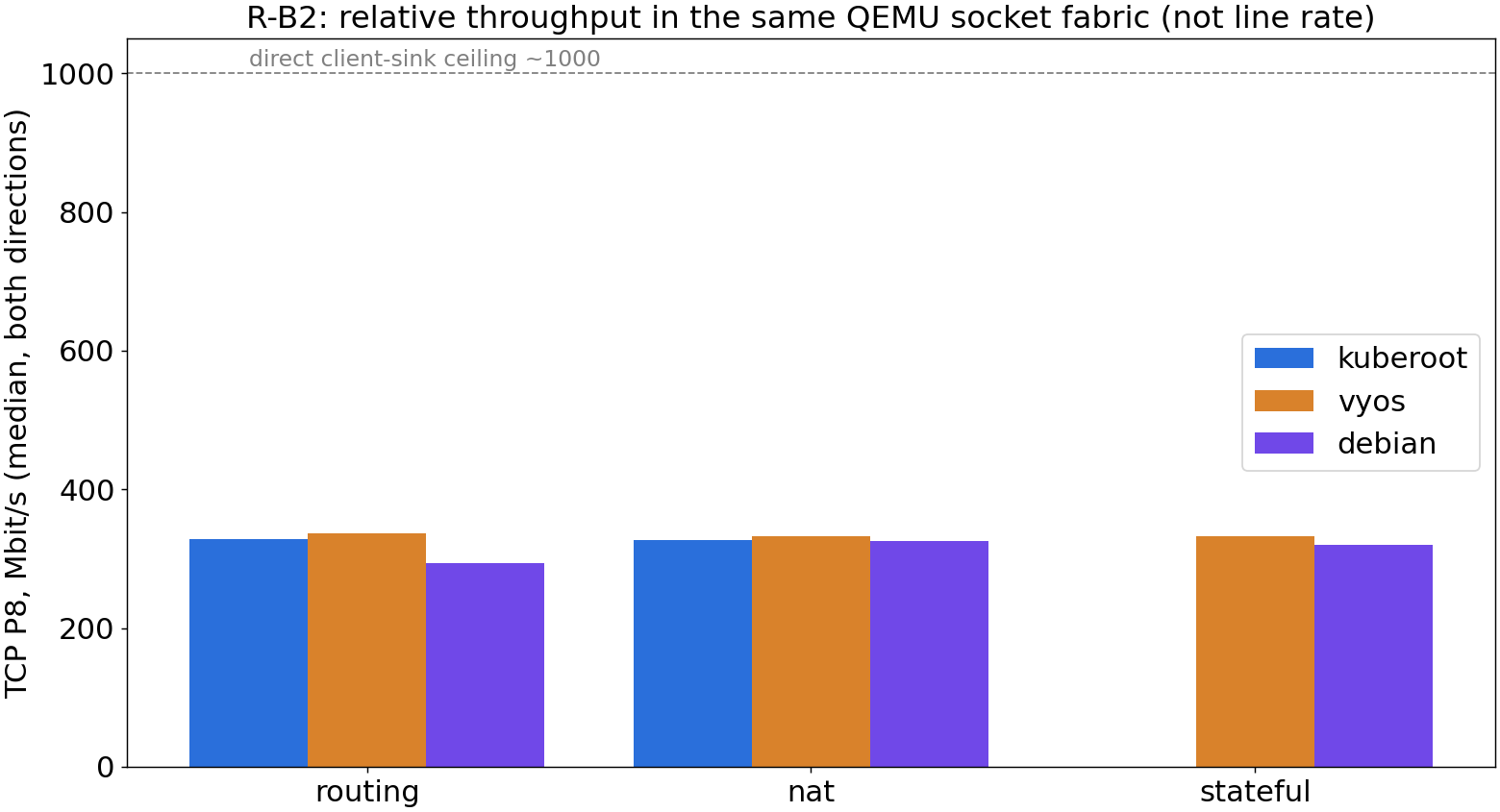
Relative throughput in the same QEMU network
A change that locks out the administrator
For a remote router, this is the scenario that matters most. We tried four ways of locking yourself out: changing the address of the management interface, deleting the return route, moving the interface to another VLAN and blocking access with a firewall rule. The confirm timeout was 60 seconds, nobody sent a confirmation, and we timed how long it took for management to become reachable again.
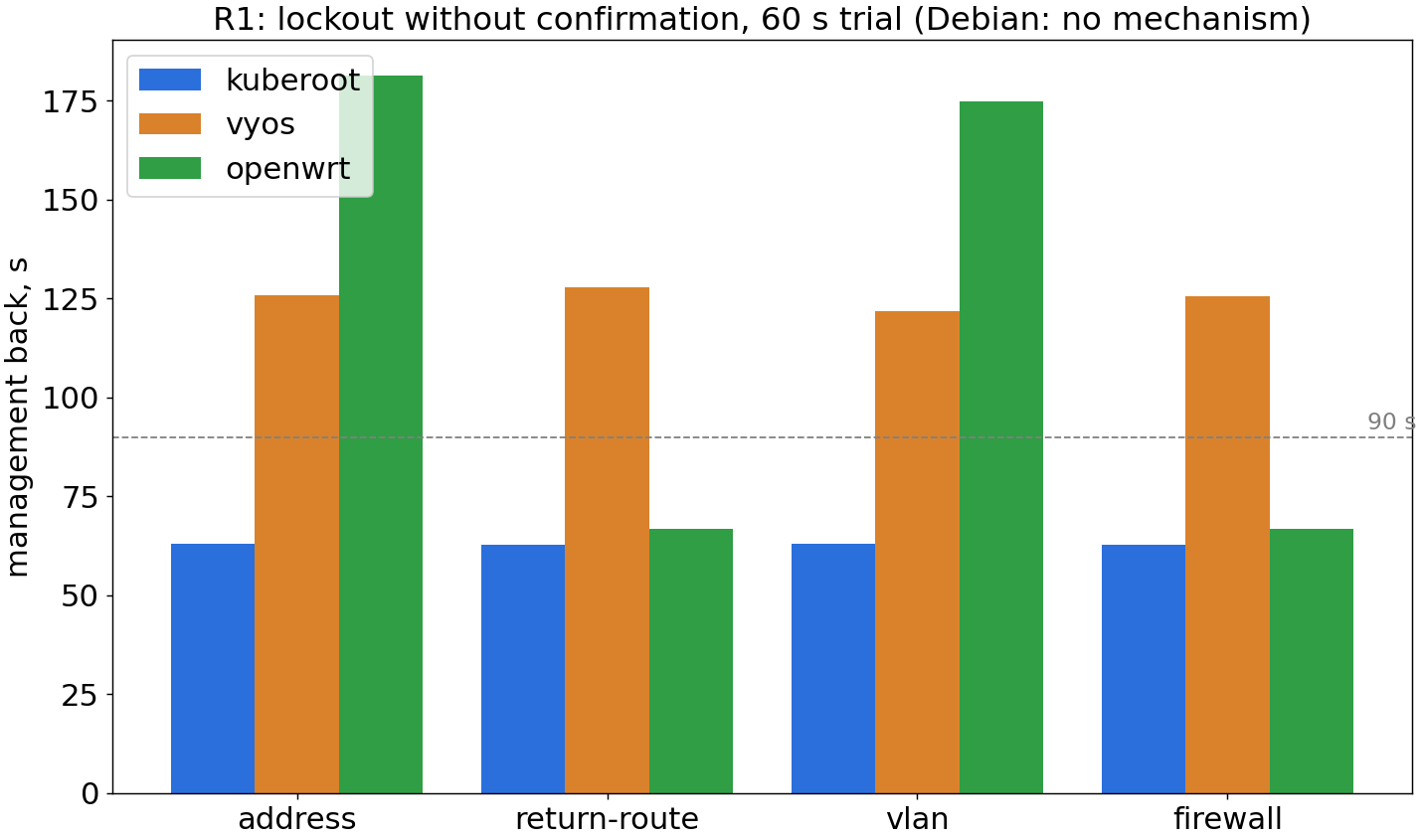
How long management was unreachable after an unconfirmed change
In all four cases, kuberoot router restored access in 62.8–65.1 seconds, three to five seconds after the timeout expired, and without a reboot. Then we made it harder: we rebooted the node in the middle of the confirmation window and killed the router controller. The rollback still came on time, because the deadline is computed from the change timestamp persisted on disk, not from when the process started, and a reboot does not give an unconfirmed change a second chance.

Moving the management interface to another VLAN and rebooting in the middle of the confirmation window
VyOS can also roll back unconfirmed changes, with commit-confirm, but it does so by rebooting: access came back in 122–128 seconds, and the router forwarded no traffic the whole time. OpenWrt rolls changes back through rpcd without a reboot, but its speed varies: a route and a firewall rule came back in 67 seconds, an address and a VLAN in 175–181. Debian has no such mechanism, and after each of the four changes we had to restore access by hand through the console.

VyOS: rollback by reboot
We also checked a stale confirmation. The administrator confirmed revision N, then applied N+1, and the same automation sent the confirmation for N once more. kuberoot router did not accept it as confirming the new revision and rolled N+1 back, as it should have.

A confirmation of an old revision does not confirm the new one
A failed upgrade
Upgrades in the router distribution work the same way as in every other kuberoot distribution: there are two system slots, the new version is written into the inactive slot, boots as a trial boot and becomes the default slot only if it passes its health checks within the probation window. We checked what happens if the upgrade does not download completely, arrives truncated, crashes at startup, boots but stops forwarding traffic, or if power is lost in the middle of writing.
An incomplete or truncated upgrade package was rejected with an error, and the working slot was left untouched. A version that crashed at startup was declared bad after five crashes, and the node returned to the previous slot by itself in 210 seconds. Thirty power cuts while the new slot was being written and while the bootloader was switching ended in thirty recoveries, with no manual intervention and no loss of confirmed configuration: the API came back in a median of 17.4 seconds, and forwarding in a median of 67.5 seconds (worst case 103 seconds).
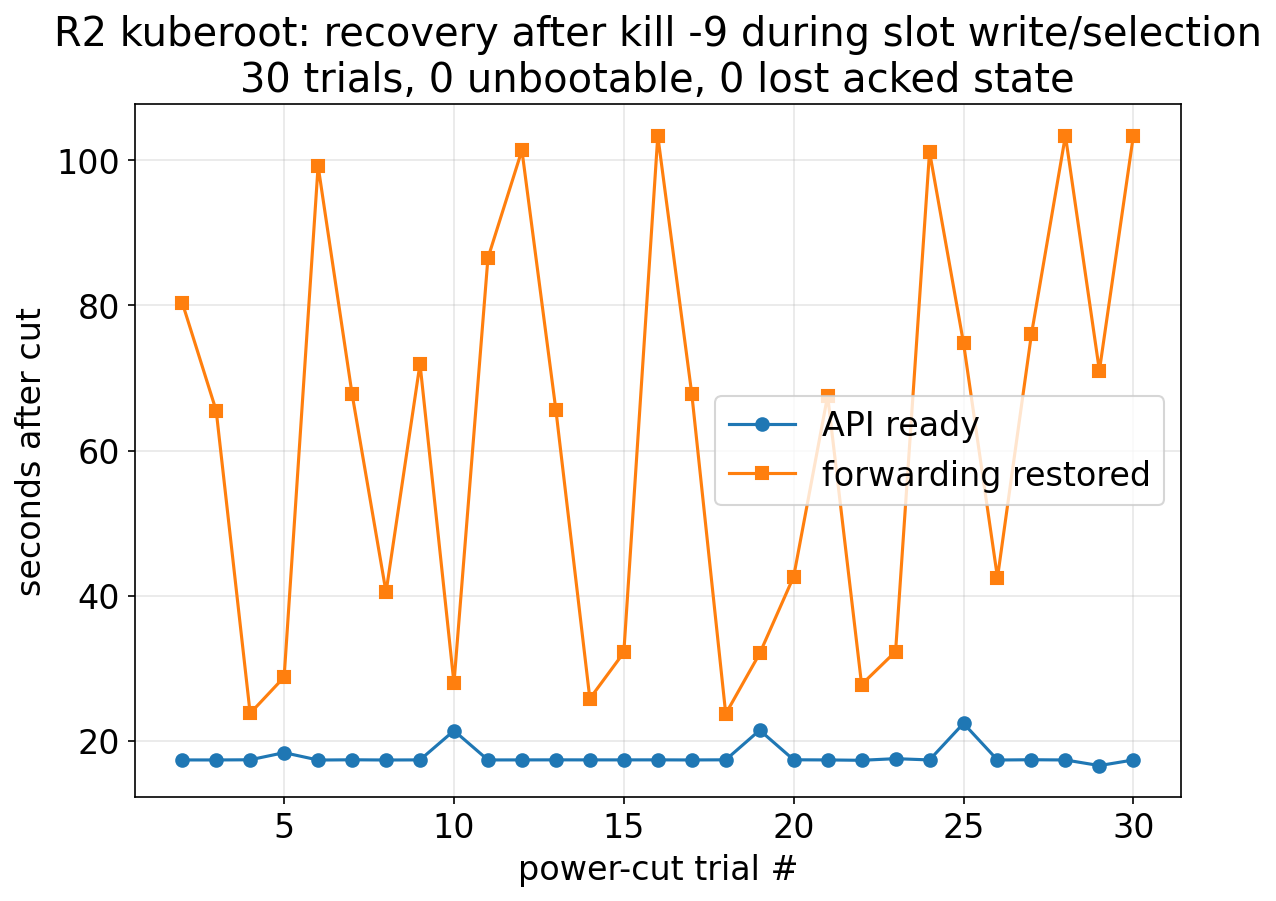
Recovery time after 30 power cuts in the middle of an upgrade
The version that booted but stopped forwarding traffic, however, exposed the first serious bug in kuberoot router. During probation the node checked only its own health: the API server answers, the services are running. After 86 seconds it declared that version good, while an external client was losing every packet.

Before the fix: a version that does not forward is declared good while the client sees 100% loss
The fix added external forwarding probes to the probation checks: in Safeguard you can list addresses that must be reachable through the router. The same bad version on the fixed image was rejected, and the node stayed on the previous one.

After the fix: a version that does not forward is rejected
The other systems fared worse in this scenario. VyOS rejected the incomplete and the truncated image, but a single power cut while it was writing the new image made the half-written image the default boot entry, and the next boot dropped to an initramfs shell. We had to repair it by hand over the serial console. OpenWrt checks an image with sysupgrade -T, and that check let both the incomplete and the truncated image through. A power cut during flashing reset the router to factory settings, leaving it with no management access at all.

OpenWrt: after a power cut during flashing the router returned to factory settings
Concurrent edits and out-of-band changes
When two people edit a configuration, you need protection against the second one silently overwriting the work of the first. In kuberoot router, that protection comes from Kubernetes itself: the server rejects an update carrying a stale resourceVersion with a 409 Conflict. If a GitOps tool keeps applying a revision that Safeguard has already rolled back, router does not put it on trial again and does not cut the administrator off every ninety seconds. And a firewall rule deleted from the kernel behind kuberoot-router’s back came back in 1.4 seconds in our run; the controller re-checks the kernel every ten seconds.

A rule deleted from the kernel comes back in 1.4 seconds
The other systems fare worse. VyOS did not restore a rule deleted from the kernel within the 40-second observation window. Of two simultaneous configuration sessions, the losing one prints “locked” but exits with code 0, so a script never learns that its change was not applied. And when automation keeps applying a change that cuts off access, VyOS applies it each time, waits and reboots, in an endless loop. When two people edit the configuration at once, OpenWrt keeps whichever change was written last and tells the first administrator nothing, and when a lockout change is repeated it rolls it back every 66–70 seconds, also in an endless loop. Debian does not notice changes made behind its back at all.

VyOS: repeating a change that cuts off access reboots the router again and again
DHCP
For this scenario we modeled an office with two internal networks behind one router: a work network for employees and a guest network for visitors, separated by a VLAN tag. Guests should reach the internet but never see the work computers.
kuberoot router hands out addresses through dnsmasq, and under a load of 100 requests per second, 99% of clients got an address within 10 milliseconds. VyOS was faster still at 2 milliseconds, while OpenWrt and Debian lagged far behind at 18 and 23 seconds. After a reboot, kuberoot router remembered all 100 leases, and every client got its previous address; OpenWrt keeps its lease database in RAM and lost every lease after a reboot. The guest network was isolated: not one of 20 packets from the guest network reached the work network, and not a single untagged guest frame appeared on the work network.

DHCP under load and guest VLAN isolation
A weak spot turned up when clients released their leases and immediately requested addresses again, as happens when a room full of laptops reboots at once. Twenty such clients got their addresses only after 19.9 seconds, against our 10-second threshold, and received 22 refusals along the way. The culprit was dnsmasq’s address-conflict detection: before offering an address, it pings it to make sure nobody is already using it. We found a second bug as well: two clients with different MAC addresses but the same DHCP client identifier got the same address from dnsmasq. kuberoot router now runs dnsmasq with the ping check disabled and identifies clients by MAC address, ignoring the client identifier. The same twenty clients got their addresses in 0.076 seconds without a single refusal, and the two clients with a shared identifier got different addresses. The trade-off is that a client that changes its MAC address gets a new address instead of its old one.

Twenty clients give back their addresses and get them again at once; two clients with a shared identifier get different addresses
At the end of this recording the script reports 88 guest packets on the work network. That is not a leak: both networks share one trunk link, and the script counted guest frames carrying the VLAN 20 tag, which the untagged work hosts drop; newer libpcap also matches the capture filter against VLAN-tagged frames. There was not a single untagged guest packet on the work network, and neither ping nor a TCP connection from the guest network reached the work computers.
NAT and an overflowing connection table
In the first run, kuberoot router lost this round. The kernel’s conntrack table defaults to a limit of 65,536 entries, and of 100,000 concurrent connections only 58.9% were established. Worse, management suffered when the table was full: the 99th percentile of API response time rose to 10 seconds, and 6 of 116 requests failed. VyOS, with a conntrack limit of 262,144 entries, tracked all 100,000, while OpenWrt and Debian, with the same limit as router, stopped at 60%.
We fixed both problems. kuberoot router now sizes the table from the amount of memory, one entry per 8 KB rounded to a power of two, which on 2 GB gives the same 262,144 as VyOS. If the administrator has set the size through OSConfig, the router leaves it alone. And connections to the router’s own Kubernetes API and node API are now exempt from connection tracking, so management does not depend on how full the table is. In the rerun all 100,000 connections were established, with the 99th percentile of API response time at 74 milliseconds.

100,000 connections through the router after the fix
To check the second fix, we deliberately set the table back to 65,536 entries through OSConfig and filled it again. As before, 59.7% of connections through the router were established, while the API answered 280 requests with a full table without a single failure, at a 99th percentile of 64 milliseconds.

A full connection table and management at the same time
Thousands of firewall rules
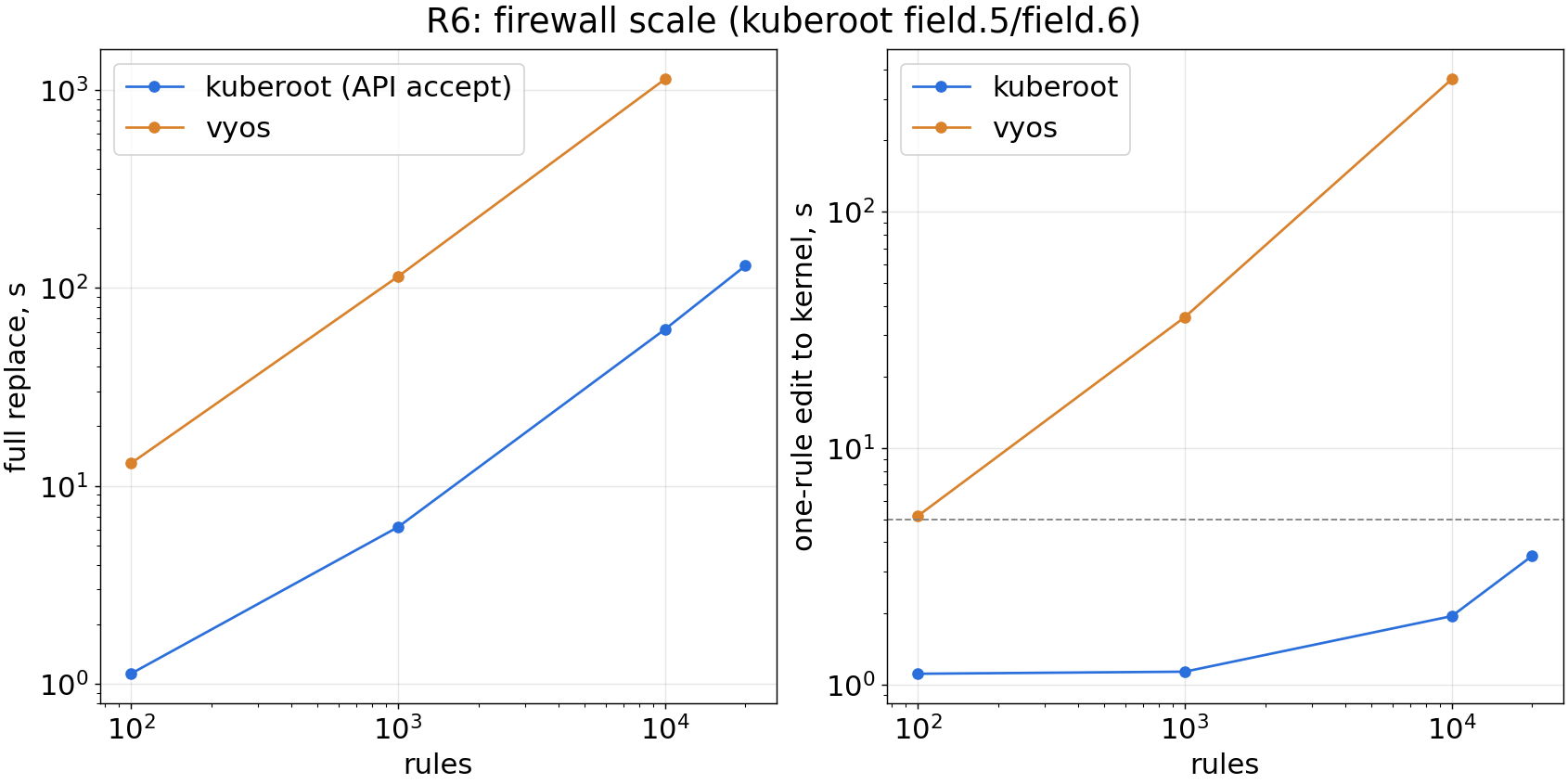
Replacing the whole rule set and editing one rule with 100 to 20,000 rules
This scenario found two bugs in kuberoot router, and we fixed both during the tests. First: on every reconcile pass the controller wrote the status of every resource, and with thousands of rules those status writes queued up ahead of the actual changes. With 10,000 rules, an edit to a single rule took 187 seconds to reach the kernel, and tens of minutes after a reboot. Second: at boot the kernel started forwarding traffic before the controller had loaded the rules, and in those seconds packets that the rules forbid got through the router, 22 and 45 of them in two runs.
After the fixes an edit to a single rule reaches the kernel in 1.1 seconds with 1,000 rules and in 1.9 seconds with 10,000. Of 12,966 probe packets sent to forbidden ports, including during boot, not one got through. VyOS applies the same edit in 35.6 and 363.6 seconds. OpenWrt handles a hundred rules in half a second, but at 1,000 rules, fw4 runs out of file descriptors, exits with code 0 and does not apply the new set. Debian holds the rules properly after boot, but at shutdown the nftables service flushes the ruleset before the interfaces go down, and in those seconds hundreds of forbidden packets get through.

10,000 rules: editing one rule in two seconds
One limitation remains. kubectl apply loads a set of 10,000 rule objects into the API in 62–85 seconds, and that load is not atomic: if it is interrupted, the API holds only part of the set until the apply is repeated. Anyone who changes rules in whole sets should keep this in mind.
A full BGP table in 2 GB of memory
We connected a router with 2 GB of memory to two providers, and each sent it the full internet table over BGP: 800,000 IPv4 routes and 200,000 IPv6 routes. kuberoot router, which uses BIRD internally, installed the whole table into the kernel in 62.9 seconds, and a spot check of a thousand routes passed without a single error. Debian with FRR could not cope with the same 2 GB: the OOM killer took out bgpd. With 4 GB both Debian and VyOS install the table faster, in about 31 seconds, but with 2 GB, kuberoot router was the only one of the three systems that handled the full table.

A full BGP table on 2 GB of memory
BGP policy and silent failures
kuberoot router enforces export policy and a max-prefix limit on routes from a neighbor just as the others do: when export policy stops permitting a prefix, the neighbor receives the withdrawal within a second, and a neighbor that exceeds its max-prefix limit has its session torn down within half a second. None of this existed before the tests began. The first version of BGPPeer could not filter routes, and a router that accepted more than it should from a customer would have re-advertised it to its upstream provider, a classic route leak. Exact-match prefix filters and a max-prefix limit were added to kuberoot router because of this scenario.

Export policy and a max-prefix limit
Silent failures are where kuberoot router trails its competitors. If a neighbor has stopped forwarding traffic but has not closed the session, the router only finds out when the BGP hold timer expires: in our test that took 10.25 seconds, with a 9-second hold time set by the upstream peer, and with BIRD’s default of 240 seconds it would take four minutes. VyOS and OpenWrt support BFD and detect such a failure in 1.3–1.4 seconds. After a link comes back, kuberoot router takes more than a minute to re-establish the session, because that is how long BIRD waits before reconnecting by default, while VyOS does it in 6.6 seconds. A restart of the router controller removes BGP-learned routes from the kernel routing table, and forwarding stops for 4.7 seconds. Timers, BFD and graceful restart cannot yet be configured in BGPPeer.

BGP session drops and a vanished neighbor
The management API under load
The router’s API server sustained 100 requests per second for a minute, 6,000 responses out of 6,000, with a 99th percentile of 4.9 milliseconds, and forwarding did not suffer in the meantime. kuberoot router refused to apply a port-forwarding rule aimed at the API port in a management zone, so an administrator cannot lose access that way.

A hundred requests per second to the API and forwarding at the same time
The scenario with a deleted zone found another bug. If an interface had no firewall zone and got its address from the kernel command line, then at boot, before the controller had loaded the rules, the Kubernetes API and the node API answered anyone on that interface for a second or two. Now the node loads the rules of the last confirmed configuration before any interface gets an address, and on the fixed build not one of 245 probe requests was answered in those seconds.

After the fix: not a single answer on an interface without a zone during boot
The disk
kuberoot router stores its configuration in SQLite, and in the first run it wrote to disk noticeably more than its competitors. Idle, the node wrote 231 MB per hour, compared with 102 MB for Debian and 6.4 for VyOS, and at the highest change rate, 5.75 changes per second, it added up to 233 GB a day, about 470 KB per change. For a router on cheap flash storage that is far too much, so we tracked down where every megabyte came from.
The biggest share came from the mount mode: the state partition was mounted with data=journal, so ext4 wrote every data block twice. Next came two coordination Lease objects that only matter when several API servers run side by side, yet they were renewed every ten seconds on a router with a single API server. Then came the confirmed configuration, which stored whole objects, metadata included. The rest came from logs: the API server kept logging errors while fetching the node API’s OpenAPI spec, and kube-controller-manager complained every few seconds that the node API did not support WatchList streaming. After all the fixes an idle node writes 6.6 MB per hour, level with VyOS and fifteen times less than Debian. A change costs 115 KB: two fsync’d writes to the datastore, one for the spec and one for the status. We kept those on purpose, because they guarantee that no confirmed change is lost in a power cut.
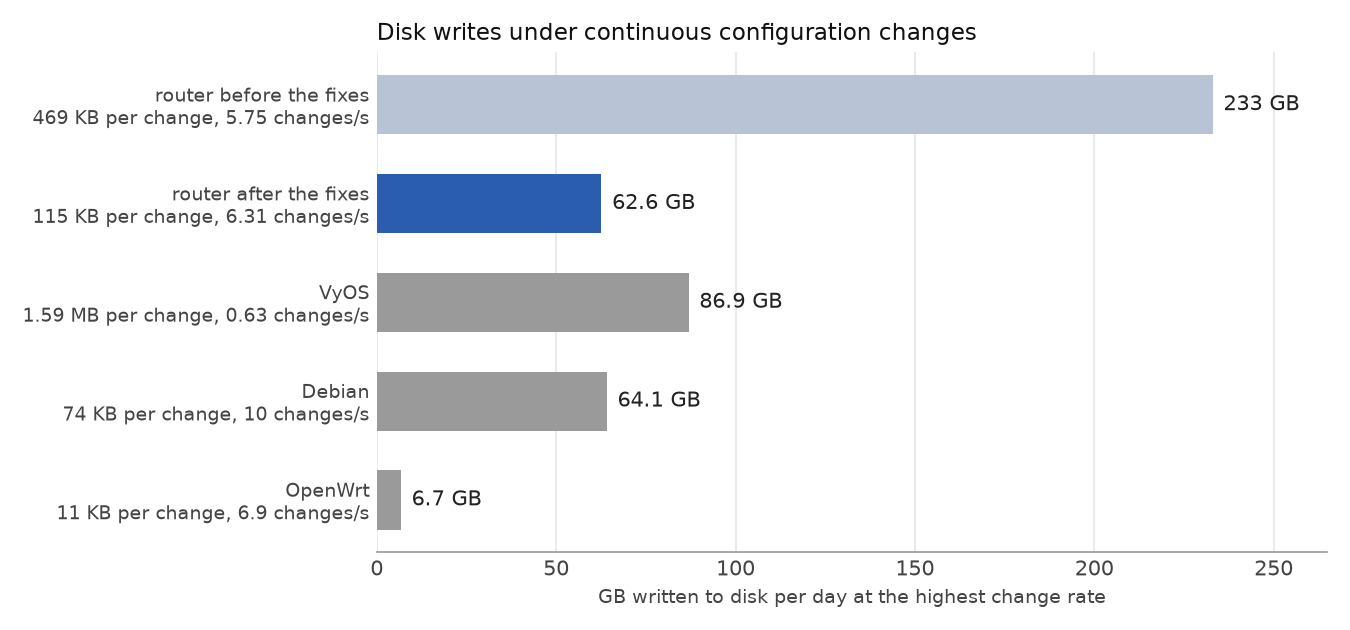
Disk writes per day at the highest change rate
In the first run, a full state partition was the worst case for kuberoot router: after a reboot the node did not come up at all, and no traffic went through it. Now kinit keeps a reserve on the partition, five percent of its space but no more than 64 MB, and when it boots with a full partition it releases the reserve so that the datastore and the API can start. With the reserve, the API came up in 6.6 seconds and accepted all 60 changes. We also tested the worst case, with no reserve at all: the API then does not come up, but forwarding works anyway, and the first reply through the router arrives 3.1 seconds after the VM starts. That is because kuberoot-router no longer waits for the API and applies the last confirmed configuration from disk as soon as it starts.

A full state partition with no reserve: the API does not come up, but traffic flows
For I/O errors, the rerun showed that the first fix did not go far enough. The node noticed the failure: the partition status in OSConfig turned to Failing within ten seconds, and service logs ended with an explicit error. But changes still hung for fifteen seconds and then timed out with no explanation, because the API server was alive and answering reads while writes got stuck in the datastore. Since Linux 6.10, ext4 stops accepting writes after an error while the mount table still lists the partition as read-write, so a check based on the mount table saw nothing. Now the node API serves a validating admission webhook that checks every change before it reaches the datastore: while the partition is ReadOnly or Failing, changes to router resources are rejected immediately, in 0.19 seconds, with the reason. Forwarding carries on all the while, and after a reboot onto a healthy disk all changes go through again.

A disk failure: the change is rejected with a reason, and traffic flows
OpenWrt did worse in the same tests: running out of space wiped its network configuration file, while the save command reported success.
What kuberoot router does not have
It lacks much of what VyOS and OpenWrt offer: VRRP and connection-state synchronization for a pair of routers, WireGuard and IPsec, PPPoE, DHCPv6 with prefix delegation, and router advertisements for IPv6. The Linux kernel supports all of these, but its resource schema does not, and the API server rejects such fields as unknown (kubectl validates fields strictly by default). So it is not yet a fit for a home router with PPPoE from the provider and a VPN to the office.
What we found and fixed
The tests produced thirteen fixes to kuberoot router, and we verified each one by rerunning the scenario that found it.
| Before | After |
|---|---|
| a version that did not forward was declared good during an upgrade | external forwarding probes during probation |
BGPPeer did not filter routes or limit the number of prefixes | exact-match prefix filters and a max-prefix limit |
| with 10,000 rules, an edit to one rule took 187 seconds to reach the kernel | 1.9 seconds |
| at boot, forwarding started before the rules were loaded | forwarding is enabled only after the rules are loaded |
| BIRD and dnsmasq kept running unsupervised after the controller crashed | they stop together with it |
| the API answered on an interface without a zone during the first seconds of boot | the rules of the confirmed configuration are loaded before the network comes up |
| addresses of a deleted Interface stayed on the interface | they are removed together with the resource |
| the node API audit did not record changes | it does |
| twenty clients that gave back their DHCP addresses got them again only after 19.9 seconds | after 0.076 seconds, with no refusals |
| of 100,000 NAT connections, only 58.9% were established, and the API took up to 10 seconds to answer with a full table | 100%, and the API answers in tens of milliseconds even with a full table |
| an idle node wrote 231 MB per hour to disk, and a change cost 469 KB | 6.6 MB per hour and 115 KB |
| with a full state partition the node did not come up or forward traffic | it comes up thanks to the reserve, and without a reserve it still forwards traffic |
| with disk errors, changes hung without explanation | they are rejected immediately, with the reason |
The competitors showed bugs of their own in the same tests, some of them more serious: the half-written VyOS image that became bootable, VyOS reporting “locked” with exit code 0, OpenWrt resetting to factory settings, sysupgrade -T letting a truncated image through, and fw4 silently not applying a thousand rules.
Where router fits
On the evidence of these tests, kuberoot router fits best where a site visit is expensive: branch offices, remote sites, edge routers in a provider’s rack. A change that cut off the administrator undoes itself within a minute, without a reboot. An upgrade that failed to boot, crashed or stopped forwarding rolls itself back. A power cut in the middle of an upgrade breaks nothing. And the whole configuration lives in the Kubernetes API, with RBAC, audit, protection against simultaneous edits and GitOps, so a fleet of such routers can be managed the same way as applications in a cluster.
The second area where kuberoot router outperforms the rest is a BGP network edge with a large firewall on modest hardware: a full table on two gigabytes of memory, and an edit to one rule in seconds with tens of thousands of rules.
It does not fit where you need a VPN, PPPoE, IPv6 with prefix delegation or a pair of routers with VRRP, or where a silent failure of a BGP neighbor has to be detected in one second rather than ten.
Where to get it and what to read
kuberoot is an open-source project under the Apache 2.0 license. The code, the release images and a description of every router resource are on GitHub:
- the repository: github.com/kuberoot-dev/kuberoot
- how to install a node and upgrade it: Installing and upgrading
- how the router distribution works and how to configure it: The router distribution
- release images: the releases page
- the test scenarios from this post, so you can repeat them yourself: test/field/router
Earlier posts in this series: